SideTrak Swivel Pro Touch LTTL134 13.3" Black

So compact it rides along in any laptop bag verified Nov 19
45/100 overall score
- Screen
- 13.3"
- Resolution
- 1920 x 1080
- Panel
- IPS
- Refresh
- 60 Hz
- Response time
- 12 ms
Compare prices at 1 store
Cheapest first. New, refurbished and bundled offers are kept apart, so you compare like with like.
| Store | Sold by | Colour and condition | Price | vs lowest | Last checked | Link |
|---|---|---|---|---|---|---|
| New1 offerSingle unit | ||||||
| Out of stock when last checked | ||||||
| Amazon | Not known | Not listed | No price | Out of stock | Nov 2 | Go to store |
 Source: PriceZen, checked Nov 2, 2026
A price counts as current when we checked it in the last 7 days. “Marketplace seller” means a third-party seller on that store, not the store itself.











Snapshot
The 30-Second Version
A portable triple-monitor rig that's a dream for spreadsheet warriors and a nightmare for gamers. Only buy it if you find it for under $500, or you're getting hosed.
Pros & Cons
Pros
- Turns any laptop into a triple-screen command center 99th
- Touchscreens are responsive and genuinely useful on the go 85th
- Solid 400 nits brightness cuts through glare 75th
- Single-cable USB-C/Thunderbolt setup is beautifully simple
Cons
- Abysmal for gaming, don't even think about it
- 1080p resolution on 13.3" is just okay, not sharp
- The 360° hinges feel like a potential long-term weak point
- Massive price spread, you can get seriously ripped off
The proof
Performance
We were genuinely surprised by how well the touch panels work. They're responsive and the 400 nits of brightness means you can actually use them by a window without squinting. The 60Hz refresh rate and 12ms response time are totally fine for documents and web browsing. Just don't try to game on them. With a performance score in the 3rd percentile, it's one of the worst we've seen for anything involving fast motion. Stick to Excel.
Specifications
Full Specifications
Display
| Size | 13.3" |
| Resolution | 1920x1080 (Full HD) |
| Panel Type | IPS |
| Aspect Ratio | 16:9 |
| Curved | No |
| Screen Finish | glossy |
Performance
| Refresh Rate | 60 Hz |
| Response Time | 12 |
Color & HDR
| Brightness | 400 nits |
| Color Gamut | 100% sRGB |
| Color Depth | 8-bit |
Connectivity
| USB-C | 2 |
| Thunderbolt | ✓ |
| Speakers | No |
Ergonomics
| Height Adjustable | No |
| Tilt | No |
| Swivel | Yes |
| Pivot | Yes |
Features
| Touchscreen | Yes |
| Weight | 0.7 kg / 1.5 lbs |
vs Competition
You can't really compare this to a desktop OLED like the ASUS ROG Strix XG27AQDMG or the Samsung Odyssey G6. Those are built for speed and image quality. The SideTrak's real competition is other portable monitors, like the Lenovo ThinkVision M14 or ASUS ZenScreen. Those are single-screen solutions, often with better panels, but they don't give you that triple-display, wrap-around-your-laptop feel. The SideTrak wins on sheer screen real estate, but loses on individual panel quality. If you're shopping the high end right now, the LG UltraGear 45GX950A-B, ASUS ROG Strix XG27UCDMG, MSI MPG 271QR QD-OLED X50, and Dell UltraSharp U4025QW are all in the conversation, but none of them solve the same problem. They're single, gorgeous panels. The SideTrak is a different animal entirely.
| Spec | SideTrak Swivel Pro Touch LTTL134 13.3" | LG UltraGear 45GX950A-B 45" | ASUS ROG Strix XG27UCDMG 27" | Dell UltraSharp U4025QW 39.7" | Alienware AW-Series AW3425DW 34" | MSI MAG 271QPX QD-OLED E2 27" |
|---|---|---|---|---|---|---|
| Screen Size | 13.3 | 45 | 27 | 39.7 | 34 | 27 |
| Resolution | 1920 x 1080 | 5120 x 2160 | 3840 x 2160 | 5120 x 2160 | 3440 x 1440 | 2560 x 1440 |
| Panel Type | IPS | OLED | QD-OLED | IPS | QD-OLED | QD-OLED |
| Refresh Rate | 60 | 330 | 240 | 120 | 240 | 240 |
| Response Time Ms | 12 | 0.03 | 0.03 | 5 | 0.03 | 0.03 |
| Adaptive Sync | - | FreeSync Premium Pro | FreeSync Premium Pro | Adaptive-Sync | FreeSync Premium Pro | FreeSync Premium Pro |
| Hdr | - | DisplayHDR True Black 400 | DisplayHDR True Black 400 | HDR600 | HDR400 | DisplayHDR True Black 400 |
| Compare | Compare | Compare | Compare | Compare |
| Product | Color | Portability | Display | Feature | Ergonomic | Performance | Connectivity | Social Proof |
|---|---|---|---|---|---|---|---|---|
| SideTrak Swivel Pro Touch LTTL134 13.3" | 75.4 | 99.3 | 21.4 | 55.3 | 59.9 | 2.8 | 85.1 | 22.7 |
| LG UltraGear 45GX950A-B 45" Compare | 99.4 | 76.5 | 99.7 | 96.3 | 90.8 | 99.4 | 96.9 | 91.9 |
| ASUS ROG Strix XG27UCDMG 27" Compare | 96.5 | 57.3 | 97.7 | 85 | 90.8 | 97.9 | 81 | 98.9 |
| Dell UltraSharp U4025QW 39.7" Compare | 97.9 | 76.5 | 98.6 | 96.3 | 90.8 | 56.1 | 99.3 | 96.8 |
| Alienware AW-Series AW3425DW 34" Compare | 98.9 | 73.9 | 84 | 96.3 | 90.8 | 97.9 | 95.4 | 96.8 |
| MSI MAG 271QPX QD-OLED E2 27" Compare | 99.2 | 57.3 | 73.4 | 85 | 90.8 | 97.9 | 81 | 98.9 |
Price
Value & Pricing
This is where it gets tricky. We've seen prices from $396 all the way up to an insane $2,278. At the low end, it's a solid deal for a portable dual-screen setup. At the high end, you're getting fleeced. Shop around aggressively. The best deal we spotted was around the $400 mark, and that's the only price where this makes sense.
Read more
Overview
The SideTrak Swivel Pro Touch Triple is a weird beast. It's not trying to be a gaming monitor or a color-critical reference display. It's a pure productivity hack, slapping two extra 13.3-inch touchscreens onto your laptop. If you're a road warrior who lives in spreadsheets, code editors, or Slack, this thing is a game-changer for your sanity. But if you're looking for a single, gorgeous screen, you're in the wrong aisle.
Common Questions
Q: Can I use this with my M1 MacBook?
Yes, but with a catch. It works over USB-C, but macOS can be finicky with multiple external displays on base M1 chips. You might need DisplayLink software to get all three screens running, which is a bit of a hack. M1 Pro/Max chips handle it natively.
Q: Does it drain my laptop battery fast?
Absolutely. You're powering two extra screens off your laptop's battery. Expect a significant hit. If you're away from an outlet for more than a couple of hours, you'll want a beefy power bank that supports USB-C PD passthrough.
Q: Is the 1080p resolution sharp enough?
It's fine, not great. At 13.3 inches, text is clear but you'll notice some pixelation if you lean in. It's a step down from a Retina display. Perfectly usable for work, but don't expect it to look as crisp as your main laptop screen.
Who Should Skip This
If you're looking for a single, stunning monitor for gaming or creative work, this isn't it. Go get a high-refresh-rate OLED like the MSI MPG 271QRX instead. This is a pure productivity tool, and a clunky one at that if you don't actually need three screens on the go.
Verdict
If you need maximum screen space in a coffee shop or on a plane, and you find a SideTrak Swivel Pro Touch Triple for under $500, buy it. It's a niche product that absolutely nails its niche. For everyone else, a single, higher-quality portable monitor is a smarter, cheaper, and less fiddly way to go.
Usage Scores
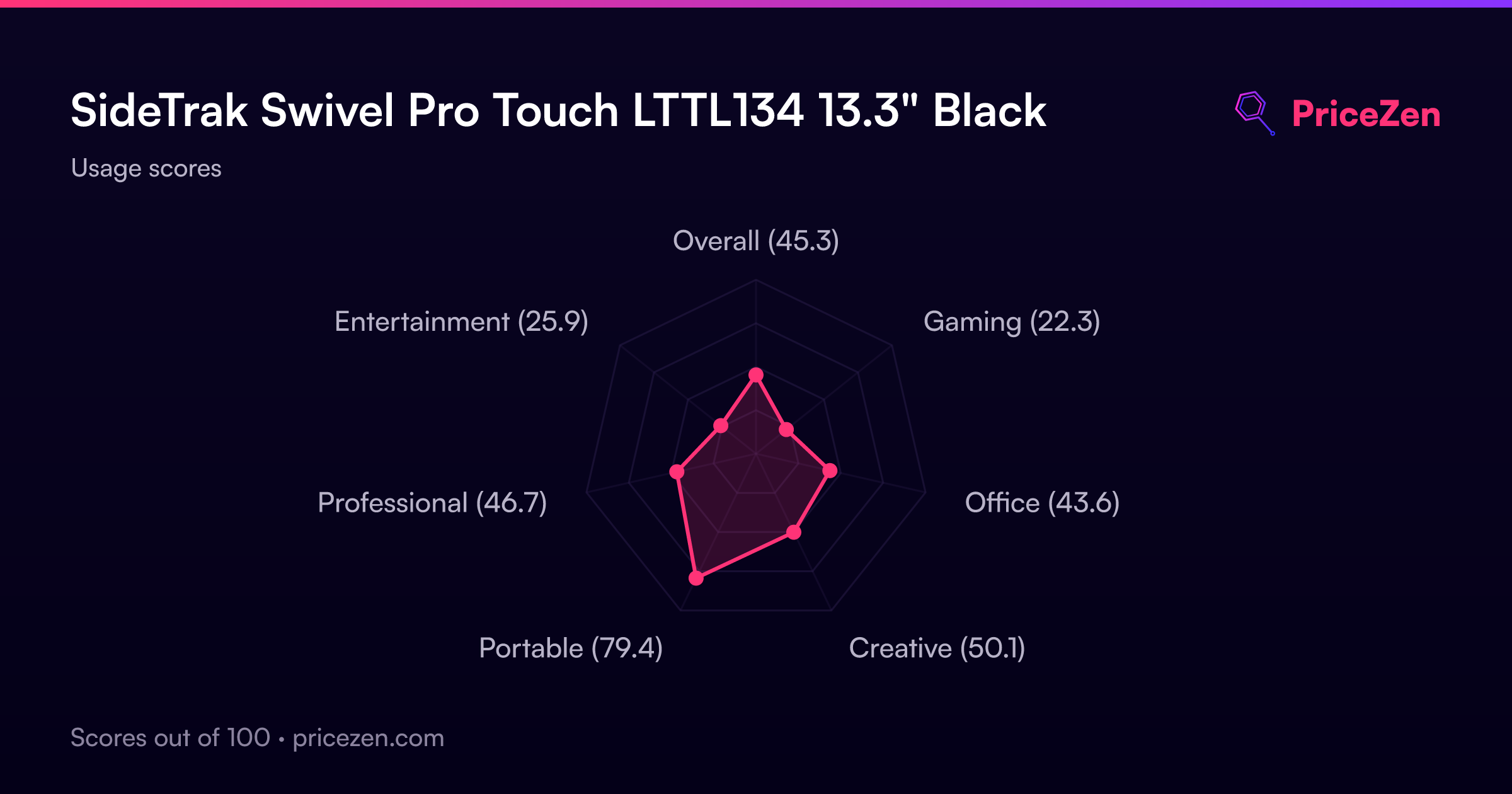
- Overall45.4
- Gaming22.3
- Office43.6
- Creative50.1
- Portable79.4
- Professional46.7
- Entertainment25.9