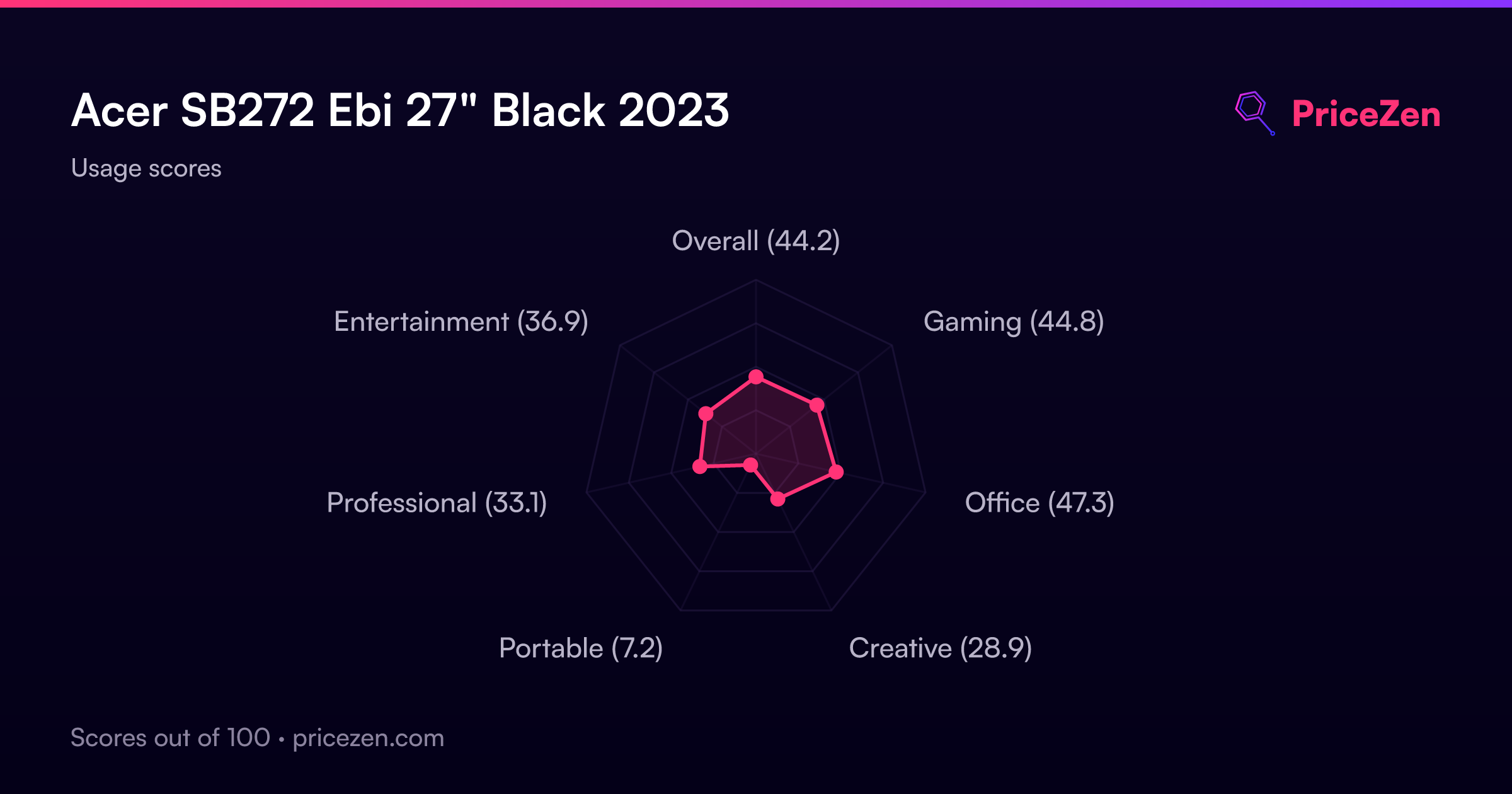
Acer SB272 Ebi 27" Black 2023
Combining a 100Hz refresh rate with a 1ms response time and AMD FreeSync, this 27-inch IPS panel delivers smoother motion than typical office displays. Its frameless, ultra-thin design and VESA compatibility allow for clean multi-monitor setups, though the 250-nit brightness and single HDMI port limit versatility. This monitor is best for home office users and students who want a fluid, space-saving display for productivity and light gaming on a budget.

No current retailer price











Snapshot
The 30-Second Version
The Acer SB272 Ebi gives you a 100Hz refresh rate and 1ms response time for around USD 168, which is a nice step up from the usual 60Hz budget monitor. But the 250-nit brightness and 17th percentile color performance mean it's strictly a basic office and casual gaming screen. With a 4.6-star rating from over 1,000 reviews, buyers seem happy, just don't expect any frills.
Pros & Cons
Pros
- 100Hz refresh rate beats the typical 60Hz budget monitor 92nd
- 1ms response time keeps fast motion relatively smooth 68th
- AMD FreeSync support helps prevent screen tearing
- Strong customer rating of 4.6 out of 5 from over 1,000 reviews
- IPS panel offers decent viewing angles for a budget display
Cons
- Only one HDMI port, connectivity ranks at the 22nd percentile
- 250-nit brightness is weak for bright rooms
- Color performance sits at the 17th percentile
- No height adjustment, just tilt
- 1080p on a 27-inch screen means lower pixel density
What owners think
The Word on the Street
How owner sentiment changed over time
ExclusiveBased on when customers actually wrote their reviews - so you can see whether early praise held up.
13 written reviews, Nov 2023 – Feb 2026: 13 happy
Across all 999 store ratings: 4.6★. Most owners rate without writing a review. The chart counts the 13 written reviews.
Each dot is one written review, in the month it was written. Happy = 4-5★, mixed = 3★, unhappy = 1-2★.
The proof
Performance
The 100Hz refresh rate is the star of the show here. Most budget 27-inch monitors still ship at 60Hz, so getting an extra 40 frames per second is a genuine upgrade for smoother scrolling and less motion blur in games. Paired with the 1ms response time, fast-moving scenes hold up better than you'd expect from a sub-$200 display. AMD FreeSync is also on board, which helps eliminate screen tearing when paired with a compatible graphics card. Our performance score lands at the 68th percentile, which is above average but not exactly thrilling.
Where things get less exciting is the display itself. The 250-nit brightness is fine for a dim office but will struggle in a sunlit room. Color performance sits at the 17th percentile, which means this panel is not going to impress anyone doing photo work or watching movies with rich, saturated scenes. The 1080p resolution on a 27-inch screen also means pixel density is on the lower side, so text won't be as crisp as it would be on a 1440p panel of the same size. For everyday office work and light gaming, it's fine. For anything more demanding, it falls behind.
Specifications
Full Specifications
Display
| Size | 27" |
| Resolution | 1920x1080 (Full HD) |
| Panel Type | IPS |
| Aspect Ratio | 16:9 |
| Curved | No |
| Screen Finish | glossy |
Performance
| Refresh Rate | 100 Hz |
| Response Time | 1 |
| Adaptive Sync | FreeSync |
Color & HDR
| Brightness | 250 nits |
Connectivity
| HDMI Ports | 1 |
| DisplayPort | 0 |
| USB-C | 0 |
| Speakers | No |
| Headphone Jack | No |
Ergonomics
| Height Adjustable | No |
| Tilt | Yes |
| Swivel | No |
| Pivot | No |
| VESA Mount | 75x75 |
Features
| Webcam | No |
| Touchscreen | No |
| PIP/PBP | No |
| Weight | 3.9 kg / 8.6 lbs |
vs Competition
Stacked against the competition, the SB272 Ebi is playing a different game entirely. The MSI MAG 271QPX QD-OLED E2 and ASUS ROG Strix XG27AQDMGR are OLED gaming monitors with dramatically better color, contrast, and response times, but they also cost several times more. The LG UltraGear 27G810A-B and Alienware AW2725D both offer higher resolutions and faster refresh rates, again at a much higher price. The BenQ MA270U targets productivity with better color accuracy and ergonomics. What the Acer does is undercut all of them on price while offering a 100Hz refresh rate that none of the budget office monitors in its class can match. It's not a fair fight on specs, but if your budget is tight and you want a little gaming smoothness, the Acer is the only one of these you can actually afford.
| Spec | Acer SB272 Ebi 27" | LG UltraGear 45GX950A-B 45" | ASUS ROG Strix XG27UCDMG 27" | Dell UltraSharp U4025QW 39.7" | Alienware AW-Series AW3425DW 34" | MSI MAG 271QPX QD-OLED E2 27" |
|---|---|---|---|---|---|---|
| Screen Size | 27 | 45 | 27 | 39.70000076293945 | 34 | 27 |
| Resolution | 1920 x 1080 | 5120 x 2160 | 3840 x 2160 | 5120 x 2160 | 3440 x 1440 | 2560 x 1440 |
| Panel Type | IPS | OLED | OLED | IPS | QD-OLED | QD-OLED |
| Refresh Rate | 100 | 330 | 240 | 120 | 240 | 240 |
| Response Time Ms | 1 | 0.029999999329447746 | 0.029999999329447746 | 5 | 0.029999999329447746 | 0.029999999329447746 |
| Adaptive Sync | FreeSync | FreeSync Premium Pro | FreeSync Premium Pro | Adaptive-Sync | FreeSync Premium Pro | FreeSync Premium Pro |
| Hdr | - | DisplayHDR True Black 400 | DisplayHDR True Black 400 | HDR600 | HDR400 | DisplayHDR True Black 400 |
| Compare | Compare | Compare | Compare | Compare |
| Product | Color | Portability | Display | Feature | Ergonomic | Performance | Connectivity | Social Proof |
|---|---|---|---|---|---|---|---|---|
| Acer SB272 Ebi 27" | 15.5 | 12.7 | 50.7 | 21.3 | 47.3 | 67.8 | 20.7 | 92 |
| LG UltraGear 45GX950A-B 45" Compare | 99.4 | 76.6 | 99.7 | 96.3 | 90.8 | 99.4 | 96.9 | 92 |
| ASUS ROG Strix XG27UCDMG 27" Compare | 96.5 | 57.5 | 97.7 | 85.1 | 90.8 | 97.9 | 81.1 | 98.9 |
| Dell UltraSharp U4025QW 39.7" Compare | 97.9 | 76.6 | 98.6 | 96.3 | 90.8 | 56.1 | 99.3 | 96.8 |
| Alienware AW-Series AW3425DW 34" Compare | 98.9 | 74 | 84.1 | 96.3 | 90.8 | 97.9 | 95.4 | 96.8 |
| MSI MAG 271QPX QD-OLED E2 27" Compare | 99.2 | 57.5 | 73.5 | 85.1 | 90.8 | 97.9 | 81.1 | 98.9 |
Price
Value & Pricing
At USD 168 in the US, the SB272 Ebi is priced like a budget monitor and mostly delivers like one. The 100Hz refresh rate and 1ms response time are the main reasons to pick this over a cheaper 60Hz office panel, and for that small premium, it's a reasonable trade. But the value story gets murkier in other markets. In Canada, prices swing from CAD 194 to CAD 285 across two listings, which is a CAD 91 spread for the exact same monitor. If you're shopping in Canada, the lower end of that range is the only sensible option. Paying CAD 285 puts you dangerously close to better-equipped displays with higher brightness and more connectivity. The EUR 432 price in Spain is frankly absurd for what this monitor offers, and we'd steer clear at that number.
Read more
Overview
The Acer SB272 Ebi is a 27-inch 1080p IPS panel that tries to split the difference between a budget office display and a casual gaming screen. The headline numbers are a 100Hz refresh rate and a 1ms response time, which sound great on paper for a monitor in this price range. But the rest of the spec sheet tells a more modest story: 250 nits of brightness, a single HDMI port, and a total score of 44 out of 100 in our database. That puts it solidly in the middle of the pack overall, with performance landing at the 68th percentile while connectivity sits way down at the 22nd percentile.
What you're really getting here is a no-frills 1080p panel with a slightly faster refresh rate than the typical 60Hz office monitor. The social proof is strong, a 4.6 out of 5 rating from over 1,000 reviews, which suggests buyers know exactly what they're signing up for. And that's the thing: this monitor doesn't pretend to be something it's not. It's a budget-friendly screen that adds a little gaming spice to an otherwise basic recipe.
Common Questions
Q: Is the Acer SB272 Ebi good for gaming?
For casual gaming, yes. The 100Hz refresh rate and 1ms response time are a real step up from a standard 60Hz office monitor, and AMD FreeSync helps prevent screen tearing. But the 250-nit brightness and 17th percentile color performance mean it won't deliver a vibrant or immersive experience in darker or more colorful games. Serious gamers should look at higher refresh rate panels with better color.
Q: Does this monitor have built-in speakers?
No, the SB272 Ebi does not have speakers. Several owners mention that their computer initially tried to route audio to the monitor, which caused confusion until they manually switched back to their own speakers or headphones. Plan on using separate audio output.
Q: Can I mount this monitor on a wall or monitor arm?
Yes, it supports VESA 75x75 mounting, so you can attach it to a wall mount or monitor arm. The included stand only offers tilt adjustment, so if you need height or swivel adjustments, a VESA mount is the way to go.
Who Should Skip This
Skip this monitor if you care about color accuracy, brightness, or connectivity. The 17th percentile color performance and 250-nit brightness make it a poor fit for photo editing, video work, or any room with significant natural light. The single HDMI port at the 22nd percentile for connectivity is a real limitation if you want to hook up multiple devices. And if you're a serious gamer chasing high frame rates, the 100Hz refresh rate is nice but nowhere near the 144Hz or 240Hz panels available for not much more money. This is a budget office monitor with a light gaming twist, not a gaming monitor that happens to be cheap.
Verdict
The Acer SB272 Ebi is a budget monitor with one genuinely useful trick: a 100Hz refresh rate at a price that won't make your wallet cry. If you're coming from a 60Hz office panel and want smoother scrolling and less motion blur in casual games, this is a cheap and cheerful upgrade. The 4.6-star rating from over 1,000 buyers backs that up. But the weak brightness, poor color performance, and single HDMI port mean this is not a monitor for serious gaming, creative work, or bright rooms. It's a solid budget pick with clear limitations, and as long as you know what you're getting, it's hard to be disappointed.
Usage Scores
- Overall44.2
- Gaming44.9
- Office47.5
- Creative29
- Portable7.2
- Professional33.1
- Entertainment36.6