LG UltraGear 32GS95UE-B 31.5" Black 2024
The Dual Mode feature lets you switch between 4K at 240Hz for visual fidelity and FHD at 480Hz for competitive speed, all on a 32-inch OLED panel with 0.03ms response time. It covers 98.5% DCI-P3 color gamut with DisplayHDR True Black 400 and integrates Pixel Sound audio directly into the display, reducing desk clutter. This monitor is best for gamers who play both immersive single-player titles and fast-paced esports and want a single display for both.

No current retailer price


Snapshot
The 30-Second Version
The LG UltraGear 32GS95UE-B is a 31.46-inch 4K OLED that hits 240Hz, then flips to 1080p at 480Hz with a hotkey, and our ranking puts its performance and display at the 98th percentile. Picture quality, deep blacks and the built-in Pixel Sound speakers are the standout strengths owners keep mentioning. The catches: 275 nits caps HDR punch, a few reliability reports exist, and USD 1,390 at Best Buy is the low end of what we're tracking. Great buy for hybrid gamers who'll use both modes, ideally on sale.
Pros & Cons
Pros
- Dual Mode gives you 4K at 240Hz or Full HD at 480Hz via hotkey, a genuinely rare combo 98th
- 0.03ms response time and G-SYNC Compatible plus FreeSync Premium Pro cover both GPU camps 98th
- OLED contrast at 1.5M:1 with 98.5% DCI-P3 and 10-bit color, top-tier display scores in our ranking 92nd
- Pixel Sound speakers surprise owners with how good they are for built-in audio 91st
- Full ergonomic stand (height, tilt, swivel, pivot) plus VESA 100x100 mounting
Cons
- USD 1,390 at the cheapest store, and price is the most common complaint from owners
- 275 nits typical brightness limits HDR impact, a recurring gripe in reviews
- A small number of owners report reliability problems, including a unit dying within months
- No USB-C with 90W power delivery, so it won't single-cable charge a laptop
- Matte coating divides opinion, some buyers wanted a glossy finish
What owners think
The Word on the Street
How owner sentiment changed over time
ExclusiveBased on when customers actually wrote their reviews - so you can see whether early praise held up.
14 written reviews, Jul 2024 – Apr 2026: 10 happy, 4 unhappy
Across all 605 store ratings: 4.6★. Most owners rate without writing a review. The chart counts the 14 written reviews.
Each dot is one written review, in the month it was written. Happy = 4-5★, mixed = 3★, unhappy = 1-2★.
The proof
Performance
Let's translate the big numbers. 240Hz at 4K means the panel can show a new frame every four-ish milliseconds, and the 0.03ms pixel transition is fast enough that motion clarity basically stops being the bottleneck. Ghosting and smearing, the things that make fast camera pans look mushy on slower panels, aren't really a factor here. Flip to the 480Hz Full HD mode and you're chasing the kind of frame cadence competitive shooter players normally buy a dedicated esports panel for. Owners with high-end rigs report this is exactly where it shines, though you'll need a GPU that can actually feed hundreds of frames to see the benefit. Buying 480Hz and then running at 90fps is an expensive way to feel sad.
Color and contrast are the other half of the story. OLED's per-pixel lighting plus that 1.5M:1 contrast ratio means dark scenes have actual detail instead of grey fog, and 98.5% DCI-P3 with 10-bit output puts color performance well above average for the category. The trade-off is brightness: 275 nits typical, even with LG's Micro Lens Array+ tech doing the heavy lifting. That's fine in a normal or dim room and it's why True Black 400 is the relevant certification rather than a big peak-brightness number. But several owners specifically call out HDR feeling limited, and they're right to. If your desk sits next to a sunny window, or you want HDR highlights that punch you in the face, this panel isn't built for that job. The matte coating helps with reflections, which owners appreciate, though a few would've preferred glossy clarity.
Specifications
Full Specifications
Display
| Size | 31.46" |
| Resolution | 3840x2160 (4K UHD) |
| Panel Type | OLED |
| Aspect Ratio | 16:9 |
| Curved | No |
| Screen Finish | glossy |
Performance
| Refresh Rate | 240 Hz |
| Response Time | 0.03 |
| Adaptive Sync | FreeSync Premium Pro |
Color & HDR
| Brightness | 275 nits |
| Color Gamut | DCI-P3 98.5% (CIE1976) |
| Color Depth | 10-bit |
| HDR | HDR10 |
| HDR Support | HDR10 |
Connectivity
| HDMI Ports | 2 |
| DisplayPort | 1 |
| Thunderbolt | 0 |
| Speakers | Yes |
| Headphone Jack | Yes |
Ergonomics
| Height Adjustable | Yes |
| Tilt | Yes |
| Swivel | Yes |
| Pivot | Yes |
| VESA Mount | 100x100 |
Features
| Webcam | No |
| Touchscreen | No |
| Power | 55 |
| Weight | 9.0 kg / 19.8 lbs |
vs Competition
The competitive set here is strong, and most of it goes a different direction. The ASUS ROG Strix XG27UCDMG, MSI MAG 271QPX QD-OLED E2 and Samsung Odyssey G60SD are all 27-inch panels, while the LG gives you 31.46 inches of screen. If you want more image real estate for immersive games and desktop work, that size difference is the LG's clearest structural advantage, and its display and performance metrics sit at the very top of our category ranking. The counterargument is desk space and pixel density: a smaller panel at high resolution looks sharper up close, and the LG's compact score is only middle of the pack at 8981g and this footprint.
Then there are the two outliers. The Alienware AW3425DW at 34 inches and Dell UltraSharp U4025QW at 39.7 inches are ultrawide shapes, a fundamentally different proposition. If your games and workflow benefit from horizontal width more than raw refresh rate, cross-shop those first, because the LG's 16:9 frame and 480Hz party trick won't matter to you. Where the LG wins is versatility of purpose: our gaming score of 86.9/100 and office score of 86.1/100 are remarkably close, meaning it doesn't fall apart when you tab out to a spreadsheet. Against the 27-inch crowd, pick the LG for size and dual-mode flexibility. Against the ultrawides, pick it for speed and traditional aspect ratio. Just know that none of these rivals escape the OLED brightness ceiling conversation, and the LG's owner sentiment trails its spec sheet more than we'd like.
| Spec | LG UltraGear 32GS95UE-B 31.5" | ASUS ROG Strix XG27UCDMG 27" | Dell UltraSharp U4025QW 39.7" | MSI MAG 271QPX QD-OLED E2 27" | Alienware AW-Series AW3425DW 34" | Samsung Odyssey G60SD 27" |
|---|---|---|---|---|---|---|
| Screen Size | 31.459999084472656 | 27 | 39.70000076293945 | 27 | 34 | 27 |
| Resolution | 3840 x 2160 | 3840 x 2160 | 5120 x 2160 | 2560 x 1440 | 3440 x 1440 | 2560 x 1440 |
| Panel Type | OLED | OLED | IPS | QD-OLED | QD-OLED | OLED |
| Refresh Rate | 240 | 240 | 120 | 240 | 240 | 360 |
| Response Time Ms | 0.029999999329447746 | 0.029999999329447746 | 5 | 0.029999999329447746 | 0.029999999329447746 | 0.029999999329447746 |
| Adaptive Sync | FreeSync Premium Pro | FreeSync Premium Pro | Adaptive-Sync | FreeSync Premium Pro | FreeSync Premium Pro | FreeSync Premium Pro |
| Hdr | HDR10 | DisplayHDR True Black 400 | DisplayHDR 600 | DisplayHDR True Black 400 | DisplayHDR 400 True Black | HDR10+ |
| Compare | Compare | Compare | Compare | Compare |
| Product | Color | Portability | Display | Feature | User Sentiment | Performance | Connectivity | Social Proof |
|---|---|---|---|---|---|---|---|---|
| LG UltraGear 32GS95UE-B 31.5" | 83.3 | 43.5 | 97.9 | 66.8 | 29.3 | 97.9 | 91.1 | 92.1 |
| ASUS ROG Strix XG27UCDMG 27" Compare | 96.1 | 57.5 | 97.9 | 83.7 | 99.2 | 97.9 | 81.3 | 98.9 |
| Dell UltraSharp U4025QW 39.7" Compare | 98.2 | 76.5 | 98.7 | 95.7 | 85.7 | 56.1 | 99.3 | 96.9 |
| MSI MAG 271QPX QD-OLED E2 27" Compare | 99.1 | 57.5 | 77.3 | 83.7 | 95.7 | 97.9 | 81.3 | 98.9 |
| Alienware AW-Series AW3425DW 34" Compare | 99 | 73.9 | 85.7 | 89.7 | 95.7 | 97.9 | 95.4 | 96.9 |
| Samsung Odyssey G60SD 27" Compare | 90.3 | 39.6 | 77.3 | 66.8 | 95.7 | 99.5 | 87.6 | 92.1 |
Price
Value & Pricing
We track this one across stores, and right now Best Buy has it at USD 1,390 with Amazon at USD 1,439. That's a USD 49 spread, so there's no clever arbitrage to chase, just buy from whichever store you trust on returns. In Canada we're seeing CAD 1,730 to CAD 1,750, in Japan JPY 398,356, and in Mexico MXN 46,893. Those are separate markets, not conversions of each other, so shop your local listings.
Is it worth it? Honestly, it depends on whether you'll use both modes. If you're the hybrid player who wants cinematic 4K and competitive refresh rates from one panel, you're consolidating two purchases into one, and the math gets friendlier. If you only ever play at 4K, you're paying a premium for a 480Hz mode you'll never touch, and owners repeatedly say this thing makes far more sense on sale. Our advice: watch the price through our community extension and pounce when it dips rather than paying full sticker.
Read more
Overview
There's a specific kind of gamer this monitor was built for: the one who spends Friday night getting lost in a story-driven game at 4K, then Saturday morning grinding ranked shooters and wishing they had a faster panel. The LG UltraGear 32GS95UE-B tries to be both monitors at once. It's a 31.46-inch OLED running 3840 x 2160 at 240Hz, and with a hotkey press it drops to Full HD at 480Hz. That dual-mode trick is the headline, and it's genuinely unusual rather than marketing garnish.
The rest of the spec sheet backs it up. A 0.03ms grey-to-grey response time, NVIDIA G-SYNC Compatible validation alongside AMD FreeSync Premium Pro, 98.5% DCI-P3 coverage with 10-bit color, and VESA DisplayHDR True Black 400 certification with a 1.5M:1 contrast ratio. Our scoring model puts its performance and display metrics at the 98th percentile against everything else in this category, which is about as high as our numbers go. Connectivity and ergonomics both land in leading territory too, thanks to two HDMI inputs, a DisplayPort, Thunderbolt, and a stand that does height, tilt, swivel and pivot.
Here's the wrinkle, and we're not going to bury it. The spec-based scores are elite, but owner sentiment sits well below the middle of the pack in our data, at 72/100 across 17 pieces of evidence. The star rating looks great (4.6/5 from 605 reviews), yet the written feedback carries real complaints about price, HDR brightness and a couple of reliability reports. So this is a monitor where the numbers and the lived experience don't perfectly agree, and that gap is worth understanding before you spend USD 1,390.
Common Questions
Q: How does the switch between 4K 240Hz and 1080p 480Hz actually work?
It's a hotkey press, not a menu dive, which is the whole point of LG's Dual Mode design. You run 3840 x 2160 at up to 240Hz for detailed games, then flip to Full HD at up to 480Hz when you want maximum frame cadence for shooters or racing. Owners confirm the swap is quick, though you'll want a GPU capable of pushing very high frame rates to make the fast mode worthwhile.
Q: Is the HDR any good on this thing?
It's certified VESA DisplayHDR True Black 400, which is about perfect blacks and shadow detail rather than searing highlights, backed by that 1.5M:1 contrast ratio. Typical brightness is 275 nits even with Micro Lens Array+ technology, and multiple owners specifically flag HDR as underwhelming. If you want bright, punchy HDR in a sunlit room, temper expectations or look elsewhere.
Q: Can I mount it on an arm, and does the stand adjust properly?
Yes on both counts. The included stand handles height, tilt, swivel and pivot, which lands its ergonomics among the leaders in our category data, and there's standard VESA 100x100 mounting if you'd rather use an arm. At 8981g it's not a lightweight, so check your arm's weight rating before committing.
Q: Will it work with both NVIDIA and AMD graphics cards?
It covers both camps: officially validated as G-SYNC Compatible by NVIDIA and carrying AMD FreeSync Premium Pro, which guarantees at least 120Hz at Full HD minimum with low-latency behavior. Combined with the 0.03ms response time, tearing and stutter should be a non-issue on either brand. You also get two HDMI inputs, a DisplayPort and Thunderbolt for wiring up multiple machines.
Who Should Skip This
Skip this if you're purely a 4K single-player person, because you'd be paying a premium for a 480Hz mode that never gets used, and there are cheaper ways to get a beautiful OLED picture. Also skip it if your desk lives in a bright, sun-facing room: 275 nits typical brightness and the recurring owner complaints about HDR mean this panel wants a controlled lighting environment. And if you were hoping to dock a laptop over one cable with 90W charging, the missing USB-C power delivery is a dealbreaker, so look at productivity-focused displays like the Dell UltraSharp U4025QW instead.
One more group: the risk-averse buyer who keeps monitors for many years without a warranty safety net. The reliability reports in owner feedback are few, but at USD 1,390 they deserve weight, and our sentiment data puts owner satisfaction below the category midpoint despite elite specs. If that combination makes you nervous, buy from a retailer with a strong return policy or wait until the price drops enough that the gamble feels smaller.
Verdict
For the player who genuinely splits time between gorgeous single-player games and sweaty competitive matches, this is one of the most interesting monitors you can buy. You get near-best-in-class performance and display scores, a 0.03ms panel, both adaptive sync standards, and a hotkey that swaps personalities. Owners in that exact use case are effusive, and the 4.6/5 rating from 605 reviews reflects a lot of happy people. Add the surprisingly capable Pixel Sound speakers and the fully adjustable stand, and day-to-day life with it sounds pleasant.
For everyone else, we'd pump the brakes. At USD 1,390 this is a serious purchase, and the below-average owner sentiment in our data isn't nothing: brightness complaints are consistent, and the reliability reports, while few, are the kind of thing you want to know about before dropping this much money. Buy it if you'll use both modes and keep your room reasonably dim. Wait for a discount if you're on the fence. And keep your receipt either way.
Usage Scores
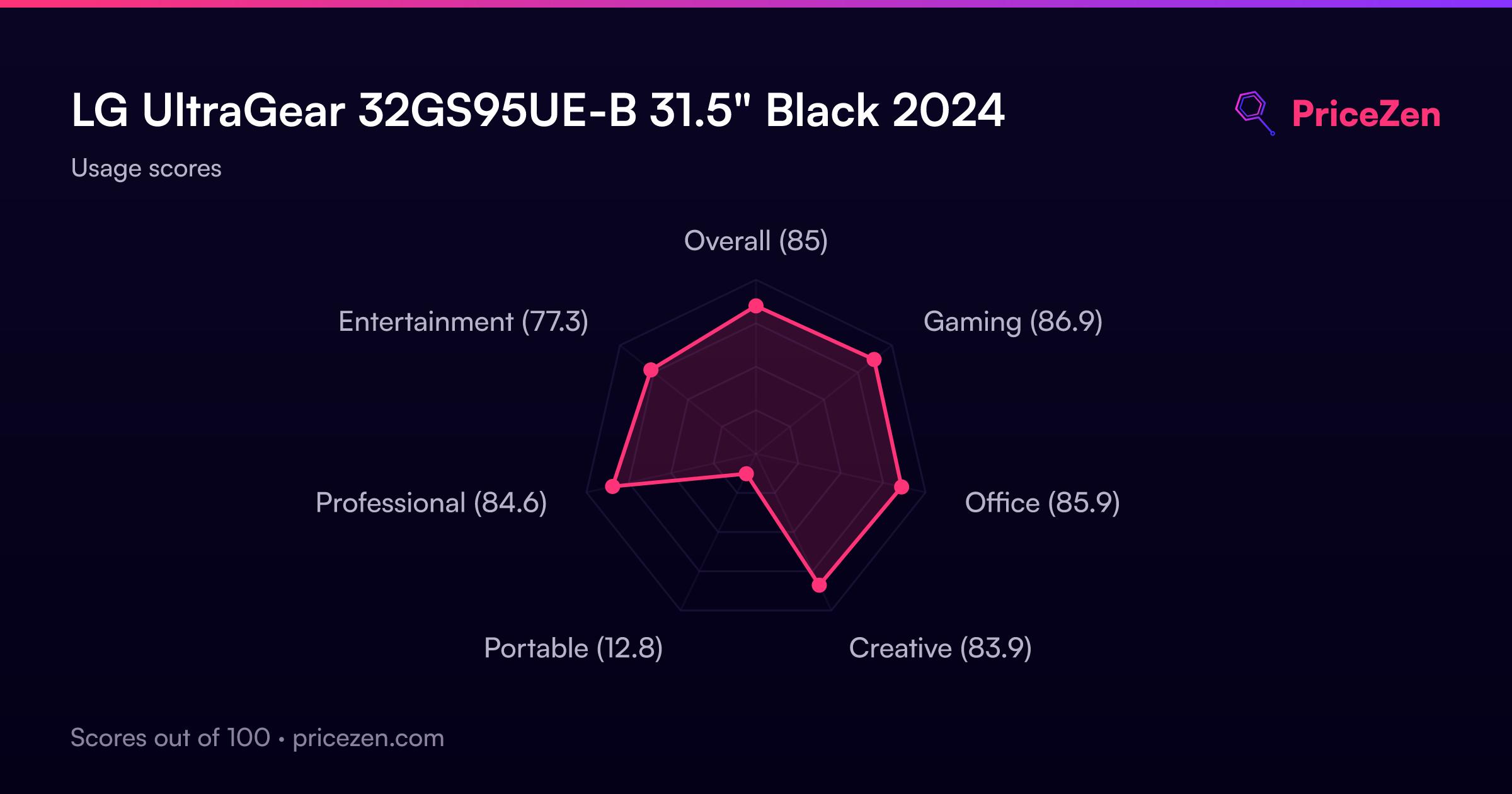
- Overall85
- Gaming86.9
- Office85.9
- Creative83.9
- Portable12.8
- Professional84.6
- Entertainment77.3