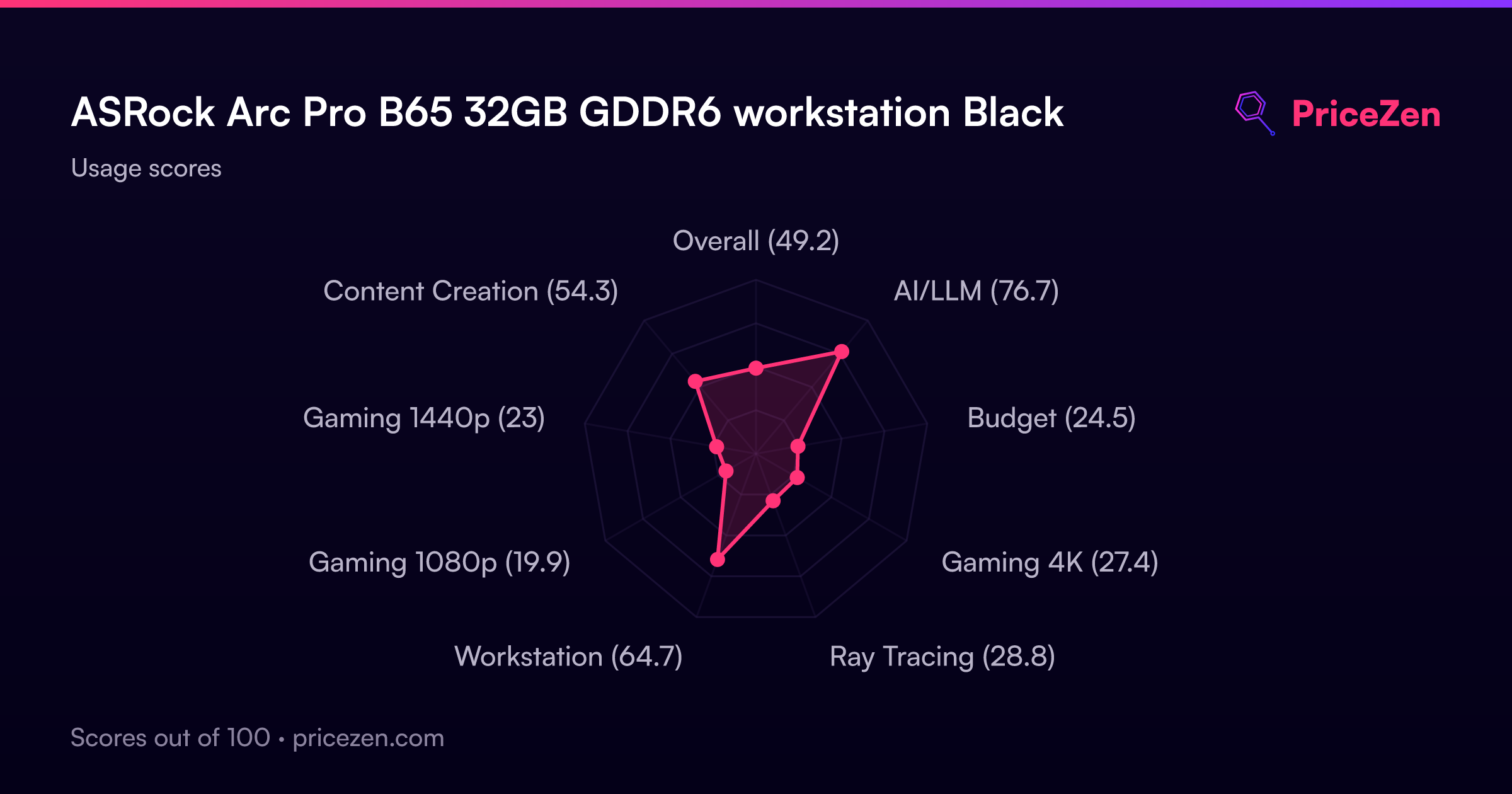
ASRock Arc Pro B65 32GB GDDR6 workstation Black

Workstation GPU built for AI workloads verified Nov 27
49/100 overall score 5.0 average from 1 owner ratings
- GPU
- Arc Pro B65
- VRAM
- 32GB GDDR6
- Boost clock
- 2375 MHz
- TDP
- 200 W
- Memory bus
- 192 bit
- Ray tracing
- Yes
- Class
- workstation
Compare prices at 1 store
Cheapest first. New, refurbished and bundled offers are kept apart, so you compare like with like.
| Store | Sold by | Colour and condition | Price | vs lowest | Last checked | Link |
|---|---|---|---|---|---|---|
| New1 offerSingle unit | ||||||
| Out of stock when last checked | ||||||
| Amazon | Not known | Not listed | No price | Out of stock | 5 days ago | Go to store |
 Source: PriceZen, checked Nov 23, 2026
A price counts as current when we checked it in the last 7 days. “Marketplace seller” means a third-party seller on that store, not the store itself.











Snapshot
The 30-Second Version
The ASRock Arc Pro B65 Creator packs 32GB of ECC GDDR6 with 608 GB/s bandwidth, making it a top-tier option for local AI and LLM work at the 96th percentile in our database. It's priced around $1,450 to $1,500 USD, which is reasonable for the memory capacity but expensive given its weak compute and raster performance. Four DisplayPort 2.1 outputs and a blower-style cooler make it great for multi-monitor and multi-GPU workstations. Buy it for AI inference and memory-hungry workloads, skip it for gaming or traditional rendering.
Pros & Cons
Pros
- 32GB GDDR6 with 608 GB/s bandwidth is top-tier for local AI and LLM work 96th
- Four DisplayPort 2.1 outputs support up to four 8K displays 96th
- ECC memory support for data integrity in long-running workloads 87th
- Blower-style cooling with vapor chamber works well in multi-GPU setups 85th
- PCIe 5.0 x16 interface provides plenty of bandwidth for large data transfers
Cons
- Raster performance at the 2nd percentile makes it poor for gaming
- Compute performance at the 9th percentile is weak for traditional GPU compute
- Efficiency at the 2nd percentile means 200W TDP delivers relatively little performance
- Ray tracing at the 12th percentile is barely worth mentioning
- Thermals at the 27th percentile are mediocre even with the blower design
The proof
Performance
Let's talk about what this card does well first. The 32GB of GDDR6 at 608 GB/s is genuinely impressive for local AI inference and LLM work. Our AI score puts it at the 96th percentile, which means it's among the best options in our database for that specific workload. The 160 XMX engines are built for matrix math, and Intel's Arc Pro drivers have matured enough that you can actually rely on them for stable workstation tasks on both Windows and Linux. ECC memory support is a nice touch for long-running simulations where a flipped bit can ruin your week.
But the compute and raster scores tell a different story. Compute lands at the 9th percentile and raster at the 2nd percentile. That means for traditional GPU compute workloads and standard graphics rendering, this card falls behind most of what we've tested. The 200W TDP doesn't help either. Efficiency sits at the 2nd percentile, so you're getting relatively little performance per watt compared to modern alternatives. The single fan and blower design keeps thermals at the 27th percentile, which is mediocre. It'll stay cool enough in a well-ventilated workstation, but it's not going to win any thermal awards.
Specifications
Full Specifications
Chipset
| GPU Chipset | Arc Pro B65 |
| Brand | Intel |
| Architecture | Xe2-HPG |
| Class | workstation |
Memory
| VRAM | 32 GB |
| Memory Type | GDDR6 |
| Memory Bus | 192 |
| Bandwidth | 608 |
| ECC | Yes |
Compute
| Tensor Cores | 160 |
| RT Cores | 20 |
| Boost Clock | 2375 |
Power & Cooling
| TDP | 200 |
| Recommended PSU | 550 |
| Power Connectors | 1 x 16-pin |
| Cooler | Single Fan |
| Fans | 1 |
Connectivity
| Interface | PCIe 5.0 x16 |
| DisplayPort | 4 |
| HDMI | 0 |
| Max Displays | 4 |
| Max Resolution | 7680 x 4320 |
Physical
| Length | 271 |
| Slot Width | 2 |
| Form Factor | Full Height |
| Weight | 1.5 kg / 3.2 lbs |
Features
| Ray Tracing | Yes |
| AV1 Encode | Yes |
| VR Ready | Yes |
| DirectX | 12 |
| RGB | No |
vs Competition
The most obvious comparison is against NVIDIA's workstation and high-end consumer cards. The ASUS TUF RTX 5090 with 32GB is in a completely different performance class, but it also costs significantly more. If you need raw compute and raster performance along with that 32GB of VRAM, the 5090 is the better choice, assuming your budget allows. The Gigabyte AERO RTX 5070 Ti with 16GB is closer in price but half the VRAM. For AI workloads that need more than 16GB, the Arc Pro B65 actually has an advantage despite its weaker compute scores.
The MSI Ventus RTX 5070 Ti and ZOTAC RTX 5080 are also worth considering. They'll absolutely crush the Arc Pro B65 in gaming and traditional rendering, but they can't touch the 32GB of memory. If you're doing local LLM inference with larger models, that memory capacity matters more than raw compute. The Sapphire NITRO+ is an AMD option that splits the difference on some workloads, but again, VRAM capacity is the differentiator here. The Arc Pro B65 is a specialist card. It wins on memory capacity and AI acceleration per dollar, but loses on nearly everything else.
| Spec | ASRock Arc Pro B65 | ASUS GeForce RTX 5090 TUF Gaming | Gigabyte GeForce RTX 5070 Ti Eagle Ice | MSI GeForce RTX 5070 Ti Ventus 3X OC | ZOTAC GeForce RTX 5080 APOCALYPSE | PNY GeForce RTX 5080 ARGB OC |
|---|---|---|---|---|---|---|
| Chipset | Arc Pro B65 | GeForce RTX 5090 | GeForce RTX 5070 Ti | GeForce RTX 5070 Ti | GeForce RTX 5080 | GeForce RTX 5080 |
| Vram | 32GB GDDR6 | 32GB GDDR7 | 16GB GDDR7 | 16GB GDDR7 | 16GB GDDR7 | 16GB GDDR7 |
| Boost Clock Mhz | 2375 | 2407 | 2542 | 2482 | 2730 | 2620 |
| Tdp W | 200 | 575 | 300 | 300 | 360 | 360 |
| Memory Bus Bits | 192 | 512 | 256 | 256 | 256 | 256 |
| Ray Tracing | Yes | Yes | Yes | Yes | Yes | Yes |
| GPU Class | workstation | consumer | consumer | consumer | consumer | consumer |
| Compare | Compare | Compare | Compare | Compare |
| Product | AI | Rt | Vram | Raster | Compute | Feature | Thermal | Efficiency | Connectivity | Social Proof | Affordability |
|---|---|---|---|---|---|---|---|---|---|---|---|
| ASRock Arc Pro B65 | 96.1 | 13 | 96.1 | 2.2 | 56.1 | 84.6 | 24.7 | 2.2 | 87.2 | 32.8 | 23.3 |
| ASUS GeForce RTX 5090 TUF Gaming Compare | 97.2 | 90.5 | 97.8 | 98.8 | 97.7 | 95.7 | 71.8 | 23.1 | 99.3 | 98.7 | 2.2 |
| Gigabyte GeForce RTX 5070 Ti Eagle Ice Compare | 78.9 | 88.6 | 86 | 88.9 | 87.9 | 95.7 | 91.8 | 71.6 | 94.2 | 93.4 | 23 |
| MSI GeForce RTX 5070 Ti Ventus 3X OC Compare | 78.9 | 92.4 | 86 | 88.9 | 87.9 | 95.7 | 91.8 | 71.6 | 94.2 | 83.9 | 21.1 |
| ZOTAC GeForce RTX 5080 APOCALYPSE Compare | 85.5 | 97.7 | 89.1 | 94.4 | 93.3 | 95.7 | 91.8 | 56.6 | 94.2 | 98.7 | 23.3 |
| PNY GeForce RTX 5080 ARGB OC Compare | 85.5 | 97.7 | 89.1 | 94.4 | 93.3 | 95.7 | 91.8 | 56.6 | 94.2 | 75 | 15.9 |
Price
Value & Pricing
Pricing on this card is a bit of a puzzle. We're seeing it listed around $1,450 to $1,500 USD in the US, and about $2,085 CAD in Canada. For a card with 32GB of VRAM and strong AI inference performance, that's actually not unreasonable when you look at what NVIDIA charges for similar memory capacity. The RTX 5090 with 32GB runs significantly more, and even the RTX 5070 Ti with 16GB sits in a similar price bracket depending on the vendor.
But here's the thing. You're paying for memory capacity and AI acceleration, not overall performance. If your workload doesn't specifically need 32GB of VRAM or Intel's XMX engines, you can get much better raster and compute performance for the same money elsewhere. The affordability percentile sits at 23rd, which means it's on the expensive side relative to what it delivers across the board. For the right buyer, the price makes sense. For everyone else, it's a tough sell.
Read more
Overview
The ASRock Arc Pro B65 Creator is not trying to be a gaming card, and that's honestly refreshing. This is a workstation part aimed at people who need a pile of VRAM for local AI work, rendering, or driving a wall of monitors. With 32GB of GDDR6 on a 192-bit bus pushing 608 GB/s, it sits in our database at the 96th percentile for memory capacity. That's the headline here. Not raw speed, not efficiency, just a big bucket of memory that lets you run models locally without renting cloud GPUs.
ASRock built this around Intel's Xe2-HPG architecture with 20 Xe cores and 160 XMX engines. Intel claims 197 TOPS of INT8 compute, which is the kind of number that matters for AI inference and some creative workloads. It also has 20 ray tracing units, but let's be real, ray tracing is not why you buy this card. The RT performance lands at the 12th percentile in our rankings, so if you're eyeing Cyberpunk with path tracing, keep walking.
The card itself is a 2-slot, 271mm blower-style design with a vapor chamber and Honeywell PTM7950 thermal material. That blower setup is a deliberate choice for multi-GPU workstations where you want heat exhausted out the back instead of recirculated into the case. It's a niche product with a specific audience, and for that audience, the 32GB of ECC memory and four DisplayPort 2.1 outputs are the real selling points.
Common Questions
Q: Can this card run modern games at 1080p?
Not well. The raster performance sits at the 2nd percentile in our database, which means it's among the weakest cards we've tested for traditional gaming. The 20 ray tracing units also land at the 12th percentile for RT performance. This is a workstation card built for AI and productivity, not gaming. If you want to game, look at the RTX 5070 Ti or 5080 instead.
Q: Is 32GB of VRAM enough for local LLM inference?
For many models, yes. 32GB lets you run 13B to 30B parameter models with reasonable quantization, and the 608 GB/s bandwidth helps with token generation speed. The 197 TOPS of INT8 compute from the 160 XMX engines is well-suited for inference workloads. Larger models like 70B will still require aggressive quantization or offloading, but this card handles a lot more than typical 16GB consumer cards.
Q: Will this card work in a standard ATX case?
The card measures 271mm long, 112mm wide, and 39mm tall, so it should fit in most mid-tower and full-tower cases. It uses a 12V-2x6 power connector and includes a dual 8-pin adapter cable. You'll need a 550W or better power supply. The blower-style cooler exhausts heat out the back, which is ideal for cases with limited airflow or multi-GPU setups.
Q: Does the Arc Pro B65 support ECC memory?
Yes, the 32GB of GDDR6 includes ECC support. This matters for long-running simulations, financial modeling, or any workload where data integrity is critical. A flipped bit in a multi-day render or training run can cause subtle errors, and ECC helps catch those. It's a feature you don't get on most consumer cards.
Who Should Skip This
Gamers should absolutely skip this card. The raster performance is at the 2nd percentile in our database, which means it's one of the worst options we've seen for traditional gaming. Even at 1080p, you'll be disappointed. The RTX 5070 Ti or 5080 will deliver dramatically better frame rates for similar or less money. Creative professionals doing 3D rendering in Blender, Maya, or Cinema 4D should also look elsewhere. Those applications lean heavily on CUDA and OptiX, and NVIDIA's ecosystem is simply more mature. A used RTX 4090 or a new RTX 5070 Ti will serve you better.
If you're doing traditional GPU compute work like scientific simulations or video encoding that doesn't specifically leverage Intel's XMX engines, this card's compute score at the 9th percentile is a red flag. The 200W TDP with efficiency at the 2nd percentile means you're burning power without getting much back. Look at NVIDIA's workstation cards or even AMD's Radeon Pro line if you need compute performance. The Arc Pro B65 is for AI inference and memory-hungry workloads, and that's about it.
Verdict
If you're building a workstation specifically for local AI inference, LLM deployment, or running large models without cloud dependencies, the Arc Pro B65 Creator makes a compelling case. The 32GB of ECC GDDR6 at 608 GB/s is the kind of spec that lets you load models that would choke a 16GB card. The four DisplayPort 2.1 outputs are also great for multi-monitor productivity setups, and the blower design means you can stack a few of these in a chassis without cooking everything inside.
For everyone else, this card is a hard pass. Gamers should look at the RTX 5070 Ti or 5080. Creative professionals doing 3D rendering or video work will get more mileage from NVIDIA's CUDA ecosystem. Even some AI researchers might prefer a used RTX 3090 or 4090 if they need a balance of compute and memory. The Arc Pro B65 is a niche tool, and it's excellent within that niche. Outside of it, the weaknesses are hard to ignore.
Usage Scores
- Overall49.2
- AI/LLM76.7
- Budget24.5
- Gaming 4K27.4
- Ray Tracing28.8
- Workstation64.7
- Gaming 1080p19.9
- Gaming 1440p23
- Content Creation54.3