Lenovo ThinkStation P3 Tower i7k, Core i7-14700K, 64GB, 1TB SSD, RTX A4000
The Intel i7-14700K 20-core processor paired with the NVIDIA RTX A4000 16GB GPU delivers workstation-grade compute for demanding professional tasks. The bundle includes a 49-inch ViewFinity S95UC curved monitor with 5120 x 1440 resolution and 120 Hz refresh rate, plus a wireless MK650 keyboard and mouse, expanding your workspace without extra setup. This setup suits business and home-office users who need multi-tasking power and a wide visual field for data-heavy workflows, though its 15.88 kg tower is not meant for compact spaces.

No current retailer price


Snapshot
The 30-Second Version
Strong CPU and 64GB of RAM, both in the 92nd percentile, paired with a pro-grade RTX A4000 and a 49-inch ultrawide in one box. Worth buying if you want the whole desk at once, but only near USD 5,219, because listings climb to USD 7,299 for the same thing.
Pros & Cons
Pros
- 20-core i7-14700K and 64GB of RAM are both near the top of our rankings. 92nd
- RTX A4000 with 16GB of GDDR6 is proper pro-grade graphics, not a gaming card. 92nd
- The 49-inch 5120x1440 120Hz curved monitor is included, not an upsell. 75th
- Windows 11 Pro plus a wireless keyboard, mouse and wrist pad in the same box. 70th
Cons
- Port selection lags behind most desktops we track.
- 1TB of storage is only middle of the pack for a workstation at this price.
- Wi-Fi 5 feels old next to the rest of the spec sheet.
- At 15.88kg it's a mid-tower that owns your desk, and pricing varies by thousands.
The proof
Performance
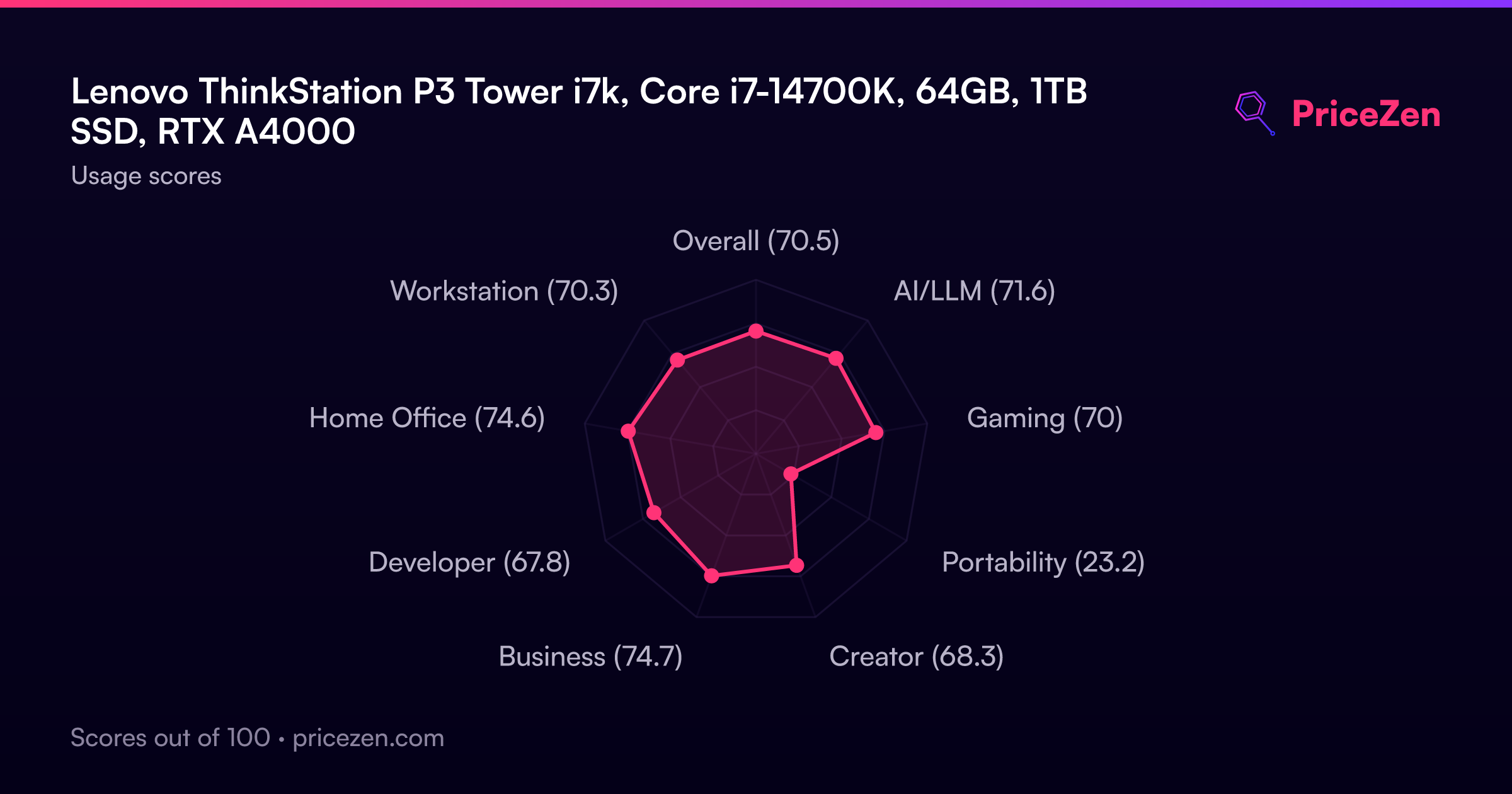
The i7-14700K and 64GB of RAM both land in the 92nd percentile in our rankings, so heavy multitasking, big spreadsheets, VMs and compile jobs are exactly what this build is for. The RTX A4000's 16GB of VRAM is the reason to pick this over a gaming desktop: it's a pro card built for CAD, rendering and AI-accelerated work, and it scores well above average for graphics in our data, though it isn't the fastest GPU we track. Our AI/LLM suitability score sits at 71.6, which tracks with that 16GB buffer being useful but not enormous. Storage is the meh part: 1TB is only about average for this category, and if you're editing video off that 49-inch screen you'll fill it fast. Ports rank in the 24th percentile, a real weak spot for a machine people will want to plug a lot into. And Wi-Fi 5 is dated when everything else here is current.
Specifications
Full Specifications
Processor
| CPU | Intel Core i7 14700K |
| Cores | 20 |
| Frequency | 3.4 GHz |
Graphics
| GPU | NVIDIA RTX A4000 |
| Type | Discrete |
| VRAM | 16 GB |
| VRAM Type | GDDR6 |
Memory & Storage
| RAM | 64 GB |
| Storage | 1 TB |
| Storage Type | SSD |
Build
| Form Factor | mid-tower |
| Weight | 15.9 kg / 35.0 lbs |
Connectivity
| USB Ports | 0 |
| HDMI | ✓ |
| DisplayPort | ✓ |
| Wi-Fi | Wi-Fi 5 |
| Bluetooth | Bluetooth 5.0 |
| Ethernet | Gigabit Ethernet |
System
| OS | Windows 11 Pro |
vs Competition
Against the Apple Mac Studio M5 Max, this is the pick if you need Windows 11 Pro and NVIDIA CUDA-style pro graphics, since the A4000's 16GB is aimed squarely at that work. The HP OMEN GT16-0364, ASUS ROG GM700 and MSI Aegis ZS2 A9NVP-1407US are gaming towers, so cross-shop those if raw frame rates matter more than certified pro drivers and a bundled 49-inch display. The Dell Desktop ECT1250 is the one to look at if you want a simpler office machine and don't need 64GB or a discrete pro GPU. Where this Lenovo wins is the combination: 92nd percentile CPU and RAM together with a workstation card and a complete desk setup. Where it loses is ports, storage headroom and that price spread.
| Spec | Lenovo ThinkStation P3 Tower i7k | Apple Mac Studio M5 Max | HP OMEN GT16-0364 | Dell Desktop ECT1250 | ASUS ROG GM700 | MSI Aegis ZS2 A9NVP-1407US |
|---|---|---|---|---|---|---|
| CPU | Intel Core i7 14700K | Apple M5 Max | AMD Ryzen 7 8700F | Intel Core Ultra 7 265 | AMD Ryzen 7 9800X3D | AMD Ryzen 9 9900X |
| RAM (GB) | 64 | 48 | 32 | 32 | 32 | 32 |
| Storage (GB) | 1024 | 1024 | 1024 | 2048 | 2048 | 2048 |
| GPU | NVIDIA RTX A4000 | Apple (40-Core) | NVIDIA GeForce RTX 5070 | Intel UHD Graphics | NVIDIA GeForce RTX 5070 Ti | NVIDIA GeForce RTX 5070 |
| Form Factor | mid-tower | mini | mid-tower | sff | mid-tower | mid-tower |
| Psu W | - | 480 | 850 | 180 | 850 | 750 |
| OS | Windows 11 Pro | macOS | Windows 11 Home | Windows 11 Home | Windows 11 Home | Windows 11 Home |
| Compare | Compare | Compare | Compare | Compare |
| Product | CPU | GPU | RAM | Ports | Storage | Reliability |
|---|---|---|---|---|---|---|
| Lenovo ThinkStation P3 Tower i7k | 91.6 | 74.5 | 92 | 23.7 | 53.3 | 70.3 |
| Apple Mac Studio M5 Max Compare | 95.7 | 84.9 | 95 | 89.1 | 68.6 | 99.3 |
| HP OMEN GT16-0364 Compare | 69.3 | 90.6 | 87 | 97.9 | 53.3 | 70.3 |
| Dell Desktop ECT1250 Compare | 88.1 | 60 | 81.6 | 75 | 82.5 | 70.3 |
| ASUS ROG GM700 Compare | 80.3 | 94.6 | 81.6 | 96.1 | 90 | 37.8 |
| MSI Aegis ZS2 A9NVP-1407US Compare | 92.3 | 90.6 | 87 | 90.4 | 82.5 | 37.8 |
Price
Value & Pricing
Here's the problem: listings run from USD 5,219 to USD 7,299. That's a USD 2,080 spread for the same bundle, which is more than some entire computers cost. We track prices over time and this one is all over the map, so shopping around isn't optional here, it's the whole game. At the low end you're getting a top-tier CPU, leading memory capacity, a pro GPU and a huge high-refresh ultrawide in one purchase, which is defensible. At USD 7,299 you're paying a premium for convenience. Our business and home office scores both sit around 74, solid rather than spectacular, so the value case leans heavily on that monitor being something you actually wanted.
Read more
Overview
This is a workstation bundle, not just a tower. You get the ThinkStation P3 with an i7-14700K (20 cores, 3.4GHz base, 5.6GHz turbo), 64GB of RAM, a 1TB SSD and an RTX A4000 with 16GB of GDDR6, plus a 49-inch ViewFinity S95UC curved monitor at 5120x1440 and 120Hz, an MK650 wireless keyboard and mouse, and a gel wrist pad. Windows 11 Pro comes preloaded.
The pitch is simple: one box, whole desk sorted. The CPU and memory are genuinely strong here, sitting near the top of our category data. The catch is that this thing weighs 15.88kg, the port selection ranks poorly against other desktops, and the price swings wildly depending on where you look.
Common Questions
Q: Which graphics card does this bundle use?
An NVIDIA RTX A4000 with 16GB of GDDR6, a single-slot professional card rather than a gaming GPU. It ranks well above average for graphics in our category data.
Q: How much memory does it come with, and can I add more?
It ships with 64GB, which is one of the best memory configurations we track for desktops. The listed maximum for this configuration is also 64GB, so plan on that being your ceiling.
Q: Is the 49-inch monitor actually included?
Yes, the ViewFinity S95UC with 5120x1440 resolution, a 1000R curve and 120Hz refresh comes in the bundle alongside the MK650 keyboard and mouse and a gel wrist pad.
Who Should Skip This
If you're a gamer, skip it. The RTX A4000 is a pro card and the gaming towers in this category are better aimed at you. If you already have a monitor you love, you're paying for a 49-inch panel you don't need. And if you want a small, quiet box tucked under a desk, this 15.88kg mid-tower scoring 23.2 on compactness is the opposite of that. Anyone who plugs in a pile of peripherals should also look elsewhere, given how far behind the port selection ranks.
Verdict
Buy this if you do CAD, 3D, engineering or local AI tinkering on Windows and you were going to buy a big ultrawide anyway. The 20-core chip and 64GB give you real headroom, and the A4000's 16GB is the right kind of GPU for professional apps. Just buy it at the low end of the range, not the high end. If you already own a good monitor, the bundle math gets a lot less friendly.
Usage Scores
- Overall70.5
- AI/LLM71.6
- Gaming70
- Portability23.2
- Creator68.3
- Business74.7
- Developer67.8
- Home Office74.6
- Workstation70.3