ASUS ProArt Display PA278QGV 27" Black 2025

Accurate color for photo edits verified Nov 29
72/100 overall score 4.2 average from 770 owner ratings
£73.40 (24%) under the usual price, and the lowest in 90 days.
Price over the last 90 days: low £231.21 on Nov 11, high £304.61. Usual price £304.61. Today £231.21.
- Screen
- 27"
- Resolution
- 2560 x 1440
- Panel
- IPS
- Refresh
- 120 Hz
- Response time
- 5 ms
- Adaptive sync
- Adaptive-Sync
- HDR
- HDR10
Compare prices at 1 store
Cheapest first. New, refurbished and bundled offers are kept apart, so you compare like with like.
| Store | Sold by | Colour and condition | Price | vs lowest | Last checked | Link |
|---|---|---|---|---|---|---|
| New1 offerSingle unit | ||||||
| Amazon | Not known | Not listed | £231.21 | Lowest price | Yesterday | Go to store |
 Source: PriceZen, checked Nov 28, 2026
A price counts as current when we checked it in the last 7 days. “Marketplace seller” means a third-party seller on that store, not the store itself.
Price history
£231.21 is £73.40 under the usual store price, and the lowest in 90 days.
Checked that dayNot checked that day, still on offer
Source: PriceZen, checked Nov 28, 2026











Snapshot
The 30-Second Version
The ASUS ProArt PA278QV Gen2 is a 27-inch 1440p IPS monitor that pairs factory-calibrated color accuracy with a smooth 120Hz refresh rate. Color performance is a standout, landing in the 85th percentile in our database. Real-world pricing around $250 makes it a killer value for creatives who also want fluid motion. Skip it if you need real HDR impact or a dedicated high-speed gaming panel.
Pros & Cons
Pros
- Factory-calibrated color accuracy with Delta E < 2, ready for professional work out of the box 93rd
- 120Hz refresh rate on a color-critical IPS panel is a rare and welcome combo 91st
- 95% DCI-P3 and 100% sRGB coverage puts it in the 85th percentile for color performance 85th
- Versatile ergonomic stand with height, tilt, and swivel adjustments 67th
- Built-in USB hub and dual monitor kit option simplifies a clean desk setup
Cons
- 350 nits peak brightness is underwhelming for HDR content or bright rooms
- 5ms response time leads to visible motion blur in fast-paced games
- Integrated speakers are weak and tinny, typical for built-in monitor audio
- HDR10 support is on paper only, the edge-lit backlight can't deliver real HDR impact
- Connectivity is just average, with only one HDMI and one DisplayPort input
What owners think
The Word on the Street
- A recurring theme is that the color accuracy out of the box is excellent, with multiple owners confirming it matches their calibration tools closely and saves them time on setup.
- Many buyers appreciate the 120Hz refresh rate on a professional monitor, noting that it makes everyday desktop use and casual gaming feel much smoother than expected.
- Several users mention the built-in speakers are disappointing and only useful for system sounds, recommending external speakers or headphones for any real audio work.
- A common complaint is that the HDR implementation is lackluster, with the limited brightness and edge-lit backlight failing to produce any meaningful HDR experience.
How owner sentiment changed over time
ExclusiveBased on when customers actually wrote their reviews - so you can see whether early praise held up.
9 written reviews, Mar 2022 – Jan 2026: 4 happy, 2 mixed, 2 unhappy, 1 without stars
Across all 770 store ratings: 4.2★. Most owners rate without writing a review. The chart counts the 9 written reviews.
Each dot is one written review, in the month it was written. Happy = 4-5★, mixed = 3★, unhappy = 1-2★.
The proof
Performance
Out of the box, the color accuracy is the main event. ASUS claims a Delta E less than 2, and in practice, that means you can trust what you're seeing without needing to burn cash on a calibrator immediately. The 95% DCI-P3 and 100% sRGB coverage means your work translates well to web and print. In our database, the color performance sits in the 85th percentile, which puts it among the best on the market for a non-OLED professional display. The 10-bit color support (1.07 billion colors) keeps gradients smooth, so you won't see banding in a blue sky when you're pushing pixels in Photoshop.
The 120Hz refresh rate is the wildcard here. For a professional monitor, that's a leading spec. Scrolling through timelines in Premiere or just moving windows around feels noticeably smoother than a standard 60Hz panel. The 5ms GtG response time is solid, not spectacular. You'll see a bit of motion blur in fast-paced games compared to a dedicated 1ms gaming monitor, but it's completely usable. The Adaptive-Sync keeps things tear-free whether you're on an AMD or NVIDIA card. Just don't expect this to replace a 240Hz esports panel. The 350 nits brightness is about average for this class, fine for indoor use but it won't fight off a sunny window.
Specifications
Full Specifications
Display
| Size | 27" |
| Resolution | 2560x1440 (QHD) |
| Panel Type | IPS |
| Aspect Ratio | 16:9 |
| Curved | No |
| Screen Finish | matte |
Performance
| Refresh Rate | 120 Hz |
| Response Time | 5 |
| Adaptive Sync | Adaptive-Sync |
Color & HDR
| Brightness | 350 nits |
| Color Gamut | 100% sRGB, 95% DCI-P3 |
| Color Depth | 10-bit |
| HDR | HDR10 |
| HDR Support | HDR10 |
Connectivity
| HDMI Ports | 1 |
| DisplayPort | 1 |
| USB-C | 0 |
| Speakers | Yes |
| Headphone Jack | Yes |
Ergonomics
| Height Adjustable | Yes |
| Tilt | Yes |
| Swivel | Yes |
| Pivot | Yes |
| VESA Mount | 100x100 |
Features
| Webcam | No |
| Touchscreen | No |
| PIP/PBP | Yes |
| Power | 17 |
| Weight | 6.4 kg / 14.1 lbs |
vs Competition
Stacked against the LG UltraGear 45GX950A-B, the ASUS takes a different path. The LG is a massive 45-inch ultrawide built for immersion and gaming first, and while its color coverage is solid, it won't match the ProArt's factory-calibrated accuracy out of the box. If you're a hybrid user who leans 70% work and 30% play, the ASUS makes more sense. The ASUS ROG Strix XG27UCDMG is another interesting alternative, a 27-inch 4K QD-OLED that will absolutely destroy the PA278QV Gen2 in contrast and HDR, but you'll pay more and take on burn-in risks for static desktop work. For all-day spreadsheets or UI design with fixed elements, the ProArt is the more practical, worry-free choice.
The MSI MAG 271QPX QD-OLED E2 is a 1440p QD-OLED that competes directly on resolution but wins decisively on contrast, HDR, and response time. If your workflow is mostly video or photo editing where deep blacks matter, the MSI is tempting. But if you need a monitor that can sit on a desk for eight hours a day with static toolbars and menus without you thinking about pixel wear, the IPS panel on the ASUS is the safer long-term bet. The Dell UltraSharp U4025QW is a completely different beast, a 40-inch 5K2K ultrawide with a built-in Thunderbolt hub and a much higher price tag. It's aimed at productivity users who want maximum screen real estate and one-cable docking, not someone looking for a color-accurate dual-screen setup at a reasonable price. If your workflow involves all-day timelines and tool palettes, the dual kit from B&H gives you more usable canvas for less money than a single Dell.
| Spec | ASUS ProArt Display PA278QGV 27" | MSI MAG 271QPX QD-OLED E2 27" | Samsung Odyssey G60SD 27" | LG UltraGear 27G810A-B 27" | BenQ MA Series MA270U 27" | Dell S2725QC 27" |
|---|---|---|---|---|---|---|
| Screen Size | 27 | 27 | 27 | 27 | 27 | 27 |
| Resolution | 2560 x 1440 | 2560 x 1440 | 2560 x 1440 | 3840 x 2160 | 3840 x 2160 | 3840 x 2160 |
| Panel Type | IPS | QD-OLED | OLED | IPS | IPS | IPS |
| Refresh Rate | 120 | 240 | 360 | 180 | 60 | 120 |
| Response Time Ms | 5 | 0.03 | 0.03 | 1 | 5 | 8 |
| Adaptive Sync | Adaptive-Sync | FreeSync Premium Pro | FreeSync Premium Pro | FreeSync Premium | - | FreeSync Premium |
| Hdr | HDR10 | DisplayHDR True Black 400 | HDR10+ | HDR400 | HDR10 | HDR |
| Compare | Compare | Compare | Compare | Compare |
| Product | Color | Portability | Display | Feature | Performance | Connectivity | Social Proof |
|---|---|---|---|---|---|---|---|
| ASUS ProArt Display PA278QGV 27" | 92.6 | 54.1 | 66.9 | 85 | 56.1 | 42.9 | 62.6 |
| MSI MAG 271QPX QD-OLED E2 27" Compare | 99.2 | 57.3 | 73.3 | 85 | 97.9 | 81 | 98.9 |
| Samsung Odyssey G60SD 27" Compare | 90.6 | 39.3 | 73.3 | 70.1 | 99.5 | 87.4 | 92.2 |
| LG UltraGear 27G810A-B 27" Compare | 93.7 | 67.9 | 87 | 70.1 | 81.7 | 98.2 | 62.6 |
| BenQ MA Series MA270U 27" Compare | 92.2 | 83.9 | 87 | 70.1 | 22.3 | 97.8 | 84.3 |
| Dell S2725QC 27" Compare | 71.7 | 76.5 | 87 | 70.1 | 44.2 | 87.4 | 92.2 |
Price
Value & Pricing
Pricing on this kit is a bit of a rollercoaster depending on where you look. We're seeing a spread from $250 all the way up to $58,885 across vendors, which is clearly some kind of data error on the high end, but it highlights why you need to shop carefully. The real-world price for a single unit hovers around that lower end, and for a factory-calibrated 1440p 120Hz panel with this color coverage, that's a very strong deal. You're getting professional-grade color accuracy without paying the AdobeRGB tax that some competitors slap on.
When you compare it to something like a Dell UltraSharp with similar color credentials but locked at 60Hz, the ASUS gives you that extra smoothness for about the same money. The dual kit from B&H makes even more sense if you're building out a workstation from scratch. Two of these side-by-side give you a massive canvas for timelines and tool palettes, and the thin bezels keep the gap between them minimal. For a freelancer or small studio, this is one of the better price-to-performance ratios we've seen in the professional space.
Read more
Overview
ASUS has been quietly killing it with the ProArt line for years, and the PA278QV Gen2 is basically the monitor equivalent of a reliable sedan that suddenly got a sport mode. This is a 27-inch, 1440p IPS panel aimed squarely at creative pros who also wouldn't mind a little buttery smoothness when they're off the clock. We're talking factory-calibrated color accuracy with a Delta E under 2, 95% DCI-P3 coverage, and a surprise 120Hz refresh rate that you don't usually see on a 'work first' display. The dual kit B&H is pushing just means you get two of these in one box, which is a clever way to say 'your desk is about to get serious.'
Who's this for? If you're editing photos, designing layouts, or doing any color-critical work where a 4.5 out of 5 star average from other buyers backs up the spec sheet, this is a strong contender. But the 120Hz panel and Adaptive-Sync also mean you can fire up a game after hours without wanting to throw the monitor out the window. It's not a gaming monitor first, and the 5ms response time will remind you of that, but it's a far cry from the 60Hz locked panels that used to dominate this space. The built-in USB hub and speakers are nice touches for decluttering, even if the speakers are about what you'd expect from a monitor.
Here's the thing about the 'Gen2' name: it's not just marketing. The jump to a 120Hz refresh rate on a color-accurate panel at this price point is genuinely interesting. Our database puts the feature set in the 87th percentile overall, which means you're getting a lot of boxes ticked. The color performance is a standout, landing in the 85th percentile. It's not the brightest panel at 350 nits, and HDR10 on an edge-lit IPS is more of a checkbox than a revelation, but for SDR work in a controlled lighting environment, this thing is a joy.
Common Questions
Q: Is this monitor good for gaming?
It's decent for casual gaming but not a dedicated gaming monitor. The 120Hz refresh rate and Adaptive-Sync support keep things smooth and tear-free, which is a big step up from 60Hz office displays. However, the 5ms response time means you'll see some motion blur in fast-paced shooters, and the 350 nits brightness won't make HDR games pop. If you play single-player titles or slower-paced games, it's perfectly enjoyable. For competitive esports, look for a 1ms 240Hz panel instead.
Q: Can I daisy-chain these monitors via DisplayPort?
No, the PA278QV Gen2 does not support DisplayPort daisy-chaining (MST). It has a single DisplayPort 1.4 input and a single HDMI 2.1 input. If you want to run a dual monitor setup like the B&H kit, you'll need two separate video outputs from your computer or a docking station that supports dual displays. The built-in USB hub is for peripherals, not video signal passthrough.
Q: Does the factory calibration cover AdobeRGB?
The factory calibration targets a Delta E under 2 and covers 95% DCI-P3 and 100% sRGB, which are the more relevant color spaces for most modern creative work. ASUS doesn't advertise full AdobeRGB coverage on this model. If your workflow specifically requires AdobeRGB for print work, you might want to look at a higher-end ProArt model or a dedicated wide-gamut display. For web, video, and most photography, the DCI-P3 and sRGB coverage here is excellent.
Q: How is the stand and ergonomics?
The stand is one of the better ones in this price range. You get full height adjustment, tilt, and swivel, which puts it in the 73rd percentile for ergonomics in our database. It's sturdy and doesn't wobble much when you're typing. The VESA 100x100 mount is there if you want to put it on an arm, but the included stand is good enough that you might not feel the need to upgrade immediately.
Who Should Skip This
If your primary use case is HDR content creation or consumption, this monitor is not for you. The 350 nits peak brightness and edge-lit backlight can't deliver the contrast and highlight detail that real HDR work demands. You'd be better off saving up for a mini-LED or OLED panel that can actually hit DisplayHDR 600 or higher. Similarly, if you're a competitive gamer who needs the lowest possible input lag and fastest response times, the 5ms GtG panel here will feel sluggish compared to a 240Hz or 360Hz TN or fast IPS gaming monitor. Look at the LG UltraGear or Alienware lines for that kind of speed.
Also, if you need extensive connectivity with multiple input sources, the single HDMI and single DisplayPort might feel limiting. There's no USB-C with power delivery, so laptop users who want a one-cable docking solution should look elsewhere. The portable score of 11.2 out of 100 in our database tells you everything you need to know: this is a desktop monitor through and through, not something you'll be moving between locations.
Verdict
For the pure creative professional who needs a reliable, color-accurate canvas for photo editing, graphic design, or video work, the PA278QV Gen2 is an easy recommendation. The factory calibration means you can unbox it and get to work, and the 120Hz panel makes everything from cursor movement to timeline scrubbing feel more responsive. It's not the flashiest monitor, but it's the kind of tool that just gets out of your way and lets you do your job.
If you're a gamer who occasionally dabbles in creative work, this is still a solid pick, but you should know what you're trading. The 5ms response time and 350 nits brightness mean it won't deliver the same punch in games as a dedicated gaming display. But if you value color accuracy over pure speed, and you want one monitor that does both without costing a fortune, this is a sweet spot. The dual kit especially makes sense for anyone building a productivity powerhouse on a reasonable budget.
Usage Scores
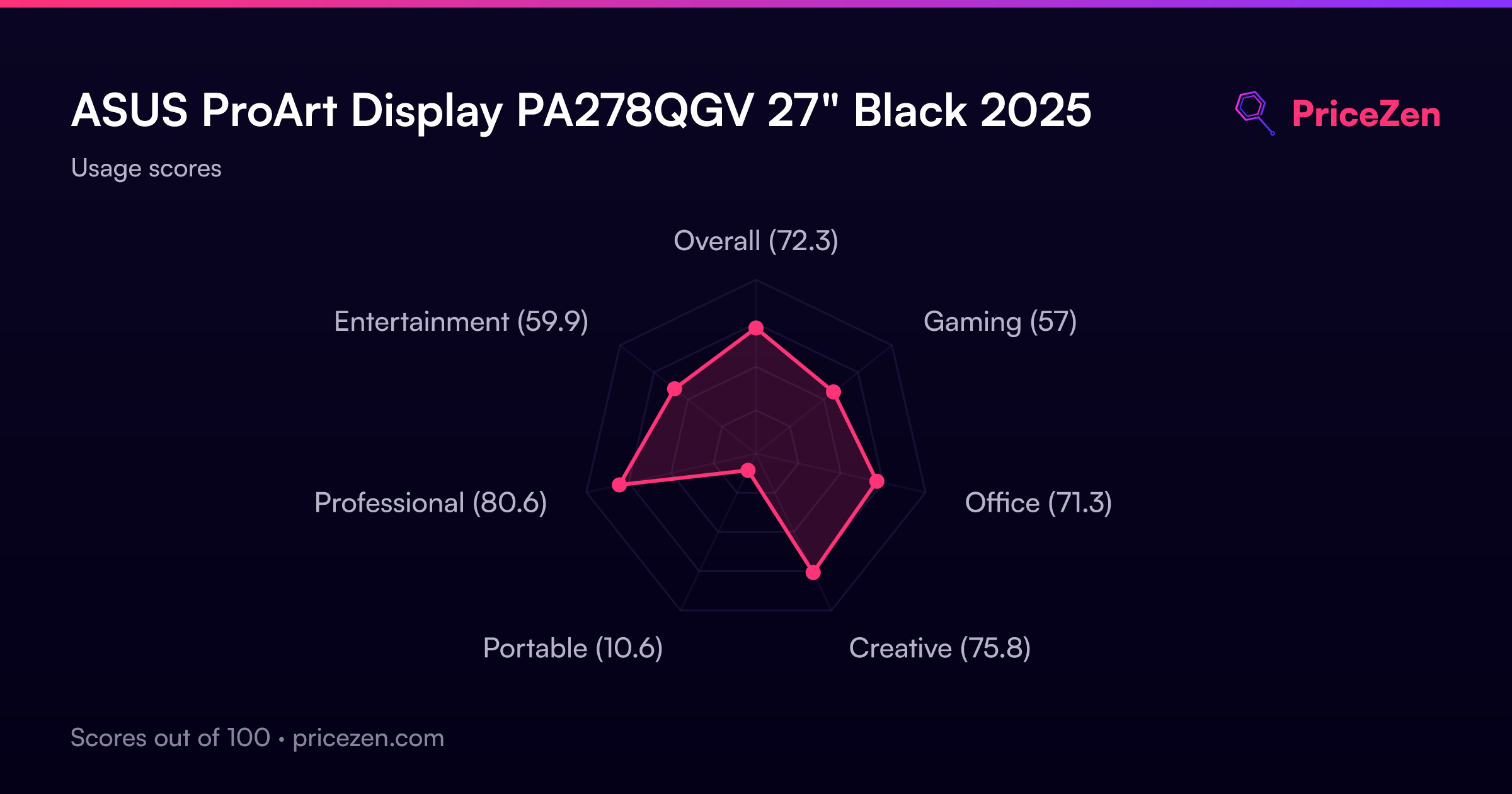
- Overall72.3
- Gaming57
- Office71.3
- Creative75.8
- Portable10.6
- Professional80.6
- Entertainment59.9