Lenovo ThinkPad 16" T1g Gen 8 2024, Core Ultra 7 265H, 32GB, 1TB SSD, RTX 5070, Black
A 16-inch 3200x2000 tandem OLED touchscreen with 600 nits and 100% DCI-P3 coverage delivers exceptional color accuracy, paired with an RTX 5070 GPU for demanding visual work. The Intel Core Ultra 7 265H processor with vPro and a 90Wh battery balances enterprise security with all-day portability at 1.84kg. This mobile workstation is best for color-critical creators who need GPU-accelerated rendering and a high-resolution touchscreen on the go.

No current retailer price


Snapshot
The 30-Second Version
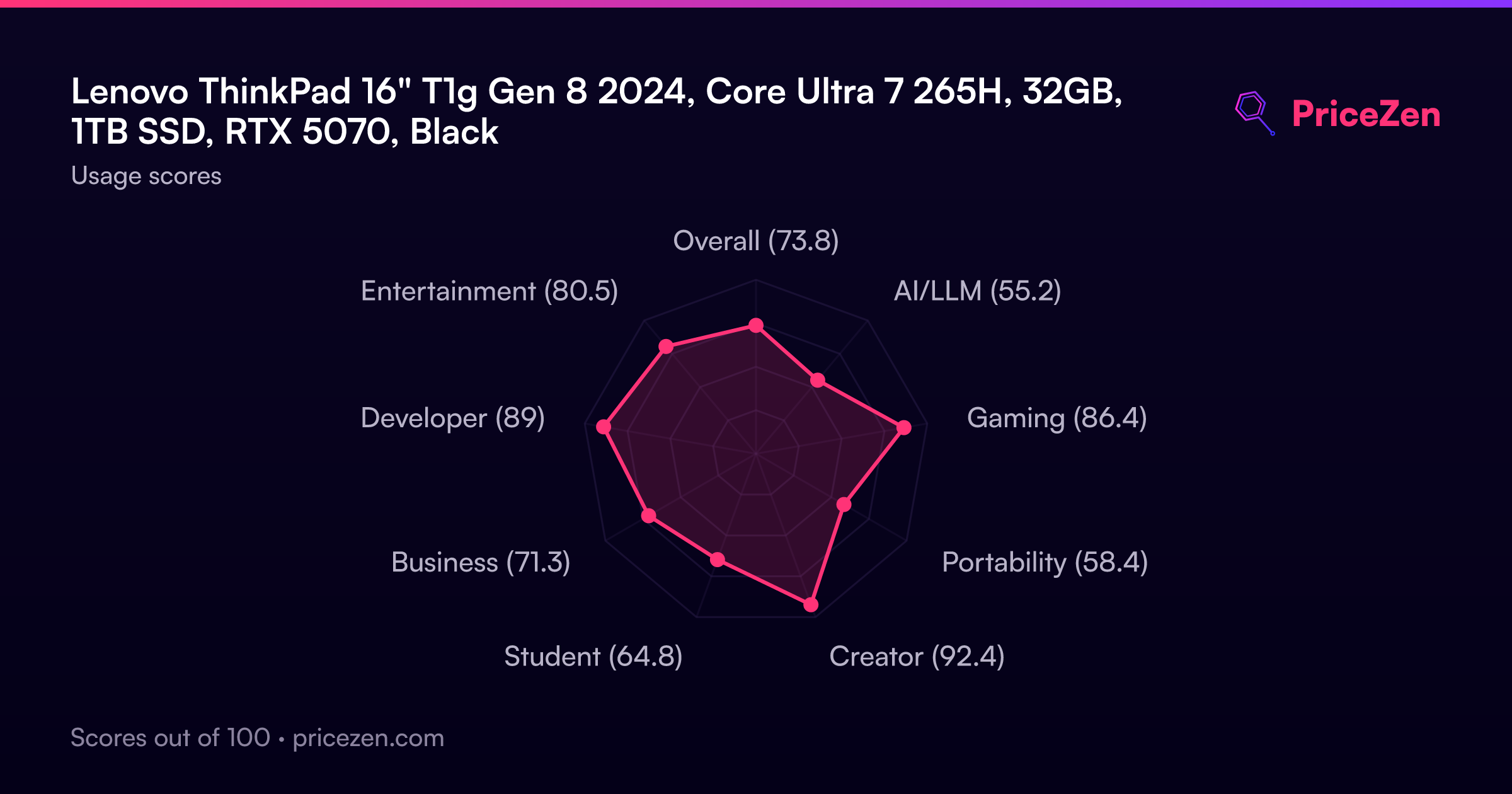
A top-ranked screen: 16 inches, 3840x2400, 800 nits, 100% DCI-P3. Add a GPU that ranks near the top and best-in-class ports, and creator work scores 92.4/100. The bill is the problem, with affordability in the 3rd percentile and a 60Hz panel.
Pros & Cons
Pros
- Best-in-class display: 16-inch 3840x2400 IPS, 800 nits, 100% DCI-P3, top of our screen rankings 99th
- Port selection is among the best available: Thunderbolt 5 and 4, 3x USB-C, USB-A, HDMI 2.1, Ethernet, SD reader 96th
- RTX 5070 with 8GB GDDR7 ranks near the top for graphics in this category 94th
- 32GB LPDDR5X plus a 16-core Core Ultra 7 265H score 92.4/100 for creators and 89.1 for developers 90th
- 90Wh battery and Wi-Fi 7 in a 1.84kg body
Cons
- Affordability sits in the 3rd percentile, one of the priciest options we track
- 60Hz refresh rate on a machine that scores 86.4/100 for gaming
- AI LLM score of 55.2/100 is only about average, with 8GB VRAM the ceiling
- Compactness ranks 25th percentile, so the 16-inch footprint falls behind smaller rivals
- Only 20 owner reviews so far, a thin base for the 4.5/5 rating
The proof
Performance
The GPU is the standout: one of the best graphics setups we track in this class, from an RTX 5070 carrying 8GB of GDDR7. Pair that with the 16-core Core Ultra 7 265H, which ranks near the top, and 32GB of LPDDR5X, also near the top, and you've got a machine that our model scores 92.4 for creator work and 89.1 for development. Storage is the modest part of the spec sheet: 1TB of NVMe lands in the upper tier, strong but not exceptional, and reliability sits well above average.
Two numbers temper the enthusiasm. The panel is 60Hz. Gorgeous, bright, colour-accurate, and 60Hz, which is why gaming scores 86.4 rather than something sillier. And AI LLM work is the weak spot at 55.2/100, barely middle of the pack, which tracks with 8GB of VRAM and an NPU rated at up to 13 TOPS. This is a rendering-and-compiling laptop, not a local-model box.
Specifications
Full Specifications
Processor
| CPU | Intel Core Ultra 7 265H |
| Cores | 16 |
| Frequency | 2.2 GHz |
| L3 Cache | 24 MB |
Graphics
| GPU | NVIDIA GeForce RTX 5070 |
| Type | Discrete |
| VRAM | 8 GB |
| VRAM Type | GDDR7 |
Memory & Storage
| RAM | 32 GB |
| RAM Generation | LPDDR5X |
| Storage | 1 TB |
| Storage Type | NVMe SSD |
Display
| Size | 16" |
| Resolution | 3840x2400 (4K UHD) |
| Panel | IPS |
| Refresh Rate | 60 Hz |
| Brightness | 800 nits |
| Color Gamut | 100% DCI-P3 |
Connectivity
| USB-C Ports | 3 |
| USB Ports | 1 |
| Thunderbolt | Thunderbolt 5 |
| HDMI | HDMI 2.1 |
| Wi-Fi | Wi-Fi 7 |
| Bluetooth | Bluetooth 5.4 |
| Ethernet | No Onboard Ethernet |
Physical
| Weight | 1.8 kg / 4.1 lbs |
| Battery | 90 Wh |
| OS | Windows 11 Pro |
vs Competition
Against the Apple MacBook Pro 14.2" M4 Max, the ASUS ROG Zephyrus 14" GA403WW-G14.R95080, the HP OMEN Transcend 14-fb1023dx, the Samsung Galaxy Book5 Pro 14" and the Dell Premium 14.5", the T1g's argument is its own numbers: top-ranked screen, near-top ports, and a GPU that ranks near the top. Every one of those rivals is a 14-inch or 14.5-inch machine, and the Lenovo's 16-inch 3840x2400 panel at 800 nits is where it pulls away for colour work. But compactness ranks just 25th percentile here, so if desk space and bag weight drive your decision, cross-shop the Zephyrus 14 and the OMEN Transcend 14. If you want wired Ethernet, HDMI 2.1 and an SD reader without dongles, the ThinkPad's port ranking makes the case on its own.
| Spec | Lenovo ThinkPad 16" T1g Gen 8 | Apple MacBook Pro 14.2" M4 Pro | ASUS ROG Zephyrus 14" GA403WW-G14.R95080 | HP OMEN Transcend | Samsung Galaxy Book5 Pro 14" NP944XHA-KG3US | Dell Premium 14.5" LDA14250-7667SLV-PUS |
|---|---|---|---|---|---|---|
| CPU | Intel Core Ultra 7 265H | Apple M4 Pro | AMD Ryzen AI 9 HX 370 | Intel Core Ultra 9 285H | Intel Core Ultra 7 258V | Intel Core Ultra 7 255H |
| RAM (GB) | 32 | 48 | 32 | 32 | 32 | 32 |
| Storage (GB) | 1024 | 4096 | 2048 | 1024 | 1024 | 1024 |
| Screen | 16" 3840x2400 | 14.2" 3024x1964 | 14" 2880x1800 | 14" 2880x1800 | 14" 2880x1800 | 14.5" 3200x2000 |
| GPU | NVIDIA GeForce RTX 5070 | Apple (16-Core) | NVIDIA GeForce RTX 5080 | NVIDIA GeForce RTX 5070 | Intel Arc Graphics 140V | Intel Arc Graphics |
| OS | Windows 11 Pro | macOS | Windows 11 Home | Windows 11 Home | Windows 11 Pro | Windows 11 Home |
| Weight (kg) | 1.8 | 1.6 | 1.6 | 1.6 | 1.2 | 1.7 |
| Battery (Wh) | 90 | 72 | - | 71 | 63 | 62 |
| Compare | Compare | Compare | Compare | Compare |
| Product | CPU | GPU | RAM | Ports | Screen | Portability | Storage | Reliability | Affordability |
|---|---|---|---|---|---|---|---|---|---|
| Lenovo ThinkPad 16" T1g Gen 8 | 89.4 | 93.5 | 89.7 | 96.4 | 98.6 | 25.1 | 79.3 | 81.9 | 2.7 |
| Apple MacBook Pro 14.2" M4 Pro Compare | 92.4 | 78.9 | 90.6 | 73.9 | 99.1 | 68.9 | 98.4 | 98.2 | 4.6 |
| ASUS ROG Zephyrus 14" GA403WW-G14.R95080 Compare | 91.2 | 98.3 | 90.8 | 89.5 | 96 | 73.6 | 89.7 | 60.6 | 6.1 |
| HP OMEN Transcend Compare | 90.1 | 93.5 | 89.7 | 89.5 | 96 | 72.2 | 65.4 | 33.7 | 9 |
| Samsung Galaxy Book5 Pro 14" NP944XHA-KG3US Compare | 65.8 | 69.7 | 79.5 | 83.5 | 90.4 | 89.4 | 79.3 | 81.9 | 21.3 |
| Dell Premium 14.5" LDA14250-7667SLV-PUS Compare | 87 | 69.7 | 89 | 66.7 | 96.8 | 61.3 | 65.4 | 33.7 | 14.8 |
Price
Value & Pricing
USD 4,289 at B&H Photo is the lowest US listing we're tracking, against a top end of USD 4,699, so shopping around saves you real money before you even spec anything. In Canada the spread is wider: CAD 6,725 to CAD 7,440, a CAD 715 gap between listings for the same machine. We track these prices over time, partly through our community browser extension, and this one lives in the 3rd percentile for affordability. What you're buying is a top-ranked screen, near-top ports and GPU, 32GB of RAM and Windows 11 Pro with vPro manageability. If those line items aren't on your must-have list, the price is hard to justify.
Read more
Overview
Top of the charts for screen. That's the headline number on the Lenovo ThinkPad T1g Gen 8, and it's not close: a 16-inch 3840x2400 IPS panel pushing 800 nits with 100% DCI-P3 coverage sits at the very top of our display rankings. Ports land right behind it, among the best we track, thanks to Thunderbolt 5 and 4, three USB-C, a USB-A, HDMI 2.1, Ethernet, an SD card reader and Wi-Fi 7. Underneath that sits an Intel Core Ultra 7 265H with 16 cores at 2.2GHz, an RTX 5070 with 8GB of GDDR7, 32GB of LPDDR5X and a 1TB NVMe SSD, all in a 1.84kg chassis with a 90Wh battery.
Our scoring model likes this thing a lot for real work: 92.4/100 for creators, 89.1 for developers, 86.4 for gaming. The catch is money. Affordability ranks in the 3rd percentile, which is a polite way of saying it's one of the most expensive machines in its category. Listings run USD 4,289 to USD 4,699 in the US and CAD 6,725 to CAD 7,440 in Canada. Owners are broadly happy at 4.5/5 across 20 reviews, but that's a small sample, so treat it as a signal rather than gospel.
Common Questions
Q: Can it handle gaming, or is it strictly a work machine?
Our model gives it 86.4/100 for gaming, and the RTX 5070 with 8GB GDDR7 ranks near the top for graphics, so the silicon is capable. The limiter is the 60Hz panel. You get a stunning 3840x2400 image at 800 nits, but not a high-refresh one.
Q: Is 32GB of RAM and 1TB of storage enough for creative work?
For most workflows, yes. The 32GB of LPDDR5X ranks near the top and the 1TB NVMe SSD is strong, both well above average. Combined with the 16-core Core Ultra 7 265H, that's why creator work scores 92.4/100 and development 89.1.
Q: Could I run local AI models on it?
Not comfortably. AI LLM is its weakest area at 55.2/100, roughly middle of the pack. The RTX 5070 has 8GB of VRAM and the Intel AI Boost NPU is rated at up to 13 TOPS, which suits light acceleration rather than large local models.
Who Should Skip This
If you're watching your budget, walk away now: 3rd percentile for affordability means this is among the most expensive machines in its category, and CAD 7,440 at the top of the Canadian range stings. Competitive gamers should skip it too, because 60Hz caps what that near-top GPU can show you. Anyone building a local LLM rig will hit the wall fast at 55.2/100 with 8GB of VRAM. And if you want something genuinely pocketable, the 25th percentile compactness ranking says the 16-inch chassis isn't it.
Verdict
Buy it if your work is visual and your I/O needs are messy. A top-ranked display, near-top ports, a GPU that ranks near the top, and creator/developer scores of 92.4 and 89.1 make this one of the strongest work laptops in our data, and 4.5/5 from 20 owners backs that up. Skip it if you're price-sensitive (3rd percentile affordability), chasing high-refresh gaming (60Hz), or planning to run local models (55.2/100). At USD 4,289 from B&H Photo it's a specialist tool, and a good one, but it's not a general-purpose bargain.
Usage Scores
- Overall73.8
- AI/LLM55.2
- Gaming86.4
- Portability58.4
- Creator92.5
- Student62.7
- Business71.3
- Developer89
- Entertainment80.5