Gigabyte GeForce RTX 5060 Ti AERO 16GB GDDR7 Silver

Fast GDDR7 memory on board verified Nov 28
68/100 overall score
- GPU
- GeForce RTX 5060 Ti
- VRAM
- 16GB GDDR7
- Boost clock
- 2647 MHz
- TDP
- 180 W
- Memory bus
- 128 bit
- Ray tracing
- Yes
- Class
- consumer
Snapshot
The 30-Second Version
The Gigabyte RTX 5060 Ti AERO pairs 16GB of GDDR7 at 448 GB/s with best-in-class display outputs and a frugal 180W TDP, but its PassMark G3D score of 22099 keeps raster performance mid-pack. At CAD 1,800 from Newegg, affordability ranks just 32nd percentile, so you're paying a premium for memory, efficiency and a slim 2-slot white cooler rather than frames. Great for compact 1080p builds and VRAM-hungry creators. Skip it if raw gaming or workstation throughput is the goal.
Pros & Cons
Pros
- 16GB GDDR7 at 448 GB/s, VRAM ranks 83rd percentile 94th
- Connectivity near top of class: 3x DP 2.1b + HDMI 2.1b (94th percentile) 86th
- Only 180W TDP, single 8-pin, 650W PSU recommended 83rd
- 2-slot, 281mm triple-fan design fits tighter cases 72nd
- AV1 encode plus VR Ready, useful for creators and streamers
Cons
- CAD 1,800 at Newegg, affordability ranks just 32nd percentile
- Raster performance is mid-pack (56), PassMark G3D 22099
- Ray tracing sits about average at 53, not a strength
- 128-bit bus limits bandwidth despite the 16GB pool
- Workstation score of 59.4/100 is its weakest category
The proof
Performance
Let's start with the number that matters most for buyers: 22099 in the PassMark G3D benchmark. That lands the raster score around the middle of the pack in our data, 56th percentile, and ray tracing sits close behind at 53. Translation: this is a competent 1080p card, not a 1440p monster and definitely not a 4K option. Compute lands at 55, with 23.7 FP32 TFLOPS and the same 23.7 FP16 figure. AI workloads score better at 69 thanks to those 144 Tensor cores, which is why local model tinkering is more plausible here than raw shader math would suggest. But the workstation score of 59.4/100 is the weakest area in our model, and that tracks with the narrow 128-bit bus. Wide memory capacity doesn't fix bandwidth-limited professional workloads.
Where this card genuinely shines is everything around the silicon. Connectivity ranks at the 94th percentile, one of the best on the market, driven by 3x DisplayPort 2.1b plus 1x HDMI 2.1b. That's four modern outputs with real bandwidth behind them, so multi-monitor setups and high-refresh panels aren't a compromise. Efficiency ranks 86, a standout, and the reason is simple: 180W TDP with a single 8-pin connector and a 650W PSU recommendation. You're not rewiring your build or buying a new power supply. Thermals sit at 72, solid rather than exceptional, which makes sense for a triple-fan cooler squeezed into 2 slots at 281mm. The trade-off to name plainly: you're paying a premium for memory capacity, display outputs and low power draw, while raw frame rates stay mid-tier. If your bottleneck is GPU horsepower rather than VRAM, this card won't rescue you.
Specifications
Full Specifications
Chipset
| GPU Chipset | GeForce RTX 5060 Ti |
| Brand | NVIDIA |
| Architecture | Blackwell |
| Class | consumer |
| Process | 5 |
Memory
| VRAM | 16 GB |
| Memory Type | GDDR7 |
| Memory Bus | 128 |
| Bandwidth | 448 |
Compute
| CUDA Cores | 4608 |
| Tensor Cores | 144 |
| RT Cores | 36 |
| Base Clock | 2647 |
| Boost Clock | 2647 |
| FP16 TFLOPS | 23.7 |
| FP32 TFLOPS | 23.7 |
Performance
| PassMark G3D | 22099 |
| GPU Compute | 11371 |
Power & Cooling
| TDP | 180 |
| Recommended PSU | 650 |
| Power Connectors | 8-Pin |
| Cooler | Triple Fan |
| Fans | 3 |
Connectivity
| Interface | PCI Express 5.0 x8 |
| DisplayPort | 3 |
| HDMI | 1 |
| Max Displays | 4 |
| Max Resolution | 7680 x 4320 |
Physical
| Length | 281 |
| Slot Width | 2 |
| Form Factor | ATX |
Features
| Ray Tracing | Yes |
| AV1 Encode | Yes |
| VR Ready | Yes |
| DirectX | 12 Ultimate |
vs Competition
The competitor set in our data is brutal company: ASUS GeForce RTX 5080 PRIME EVO OC, MSI GeForce RTX 5070 Ti Ventus 3X OC, ZOTAC GeForce RTX 5080 APOCALYPSE, Sapphire Radeon RX 7900 XTX NITRO+ and PNY GeForce RTX 5080 ARGB OC. These are all cards positioned above the 5060 Ti tier, and our rankings reflect that gap. With raster at 56 and ray tracing at 53, this Gigabyte isn't trading punches with them on frame rates. If your priority is maximum frames per dollar and your case and PSU can handle a bigger card, cross-shop the MSI GeForce RTX 5070 Ti Ventus 3X OC first, then the ASUS GeForce RTX 5080 PRIME EVO OC and PNY GeForce RTX 5080 ARGB OC. The ZOTAC GeForce RTX 5080 APOCALYPSE belongs on that same shortlist.
Where the AERO claws back ground is everything that isn't shading pixels. Its 94th-percentile connectivity, 86th-percentile efficiency and 180W draw with a single 8-pin make it the easy fit in compact or power-constrained builds where those larger competitors become a headache. The Sapphire Radeon RX 7900 XTX NITRO+ is worth a look if you're brand-agnostic and chasing raw throughput, but this card's AV1 encode and 16GB GDDR7 pool are the specific reasons to stay. And the 2-slot, 281mm footprint is a genuine advantage nobody's spec sheet can argue with. So: pick this for fit, memory and outputs. Pick the others for speed.
| Spec | Gigabyte GeForce RTX 5060 Ti AERO | ASUS GeForce RTX 5090 TUF Gaming | MSI GeForce RTX 5070 Ti Ventus 3X OC | ZOTAC GeForce RTX 5080 APOCALYPSE | PNY GeForce RTX 5080 ARGB OC | Sapphire Radeon RX 7900 XTX NITRO+ |
|---|---|---|---|---|---|---|
| Chipset | GeForce RTX 5060 Ti | GeForce RTX 5090 | GeForce RTX 5070 Ti | GeForce RTX 5080 | GeForce RTX 5080 | Radeon RX 7900 XTX |
| Vram | 16GB GDDR7 | 32GB GDDR7 | 16GB GDDR7 | 16GB GDDR7 | 16GB GDDR7 | 24GB GDDR6 |
| Boost Clock Mhz | 2647 | 2407 | 2482 | 2730 | 2620 | 2680 |
| Tdp W | 180 | 575 | 300 | 360 | 360 | 339 |
| Memory Bus Bits | 128 | 512 | 256 | 256 | 256 | 384 |
| Ray Tracing | Yes | Yes | Yes | Yes | Yes | Yes |
| GPU Class | consumer | consumer | consumer | consumer | consumer | consumer |
| Compare | Compare | Compare | Compare | Compare |
| Product | AI | Rt | Vram | Raster | Compute | Feature | Thermal | Efficiency | Connectivity | Affordability |
|---|---|---|---|---|---|---|---|---|---|---|
| Gigabyte GeForce RTX 5060 Ti AERO | 69.2 | 53.2 | 82.9 | 55.3 | 55.1 | 62.4 | 71.8 | 85.6 | 94.2 | 31.9 |
| ASUS GeForce RTX 5090 TUF Gaming Compare | 97.2 | 90.5 | 97.8 | 98.8 | 97.7 | 95.7 | 71.8 | 23.1 | 99.3 | 2.2 |
| MSI GeForce RTX 5070 Ti Ventus 3X OC Compare | 78.9 | 92.4 | 86 | 88.9 | 87.9 | 95.7 | 91.8 | 71.6 | 94.2 | 21 |
| ZOTAC GeForce RTX 5080 APOCALYPSE Compare | 85.5 | 97.7 | 89.1 | 94.4 | 93.3 | 95.7 | 91.8 | 56.6 | 94.2 | 23 |
| PNY GeForce RTX 5080 ARGB OC Compare | 85.5 | 97.7 | 89.1 | 94.4 | 93.3 | 95.7 | 91.8 | 56.6 | 94.2 | 15.8 |
| Sapphire Radeon RX 7900 XTX NITRO+ Compare | 95.3 | 96.4 | 92.1 | 83.4 | 95.6 | 95.7 | 91.8 | 51.3 | 98.8 | 13.7 |
Price
Value & Pricing
Here's the uncomfortable part. CAD 1,800 at Newegg is the only price in our data, and our affordability ranking puts this card at the 32nd percentile, meaning most of the field offers better bang per dollar. For a product whose strongest use-case score is 69.7/100 for 1080p gaming, that's a hard sell on pure value. You're not buying frames here, you're buying 16GB of GDDR7, best-in-class display outputs and a 180W power envelope. Those are real things, but they're niche things.
We'd argue the value case only closes if you specifically need what this card is good at. White-build aesthetics, a small case that can't take a thick cooler, a modest PSU you don't want to replace, or creator work that eats VRAM and benefits from AV1 encode. If none of those describe you, the same money spent on raw performance elsewhere in the category will feel better every time you launch a game. We track prices over time, and with a single listing in our data there's no cross-store arbitrage to hunt right now.
Read more
Overview
The Gigabyte GeForce RTX 5060 Ti AERO GV-N506TAERO-16GD is a Blackwell-based card built on a 5nm process, and the headline here is memory: 16GB of GDDR7 pushing 448 GB/s across a 128-bit bus. That's an unusual pairing. Lots of VRAM, narrow pipe, but GDDR7 speed does a lot of the heavy lifting to keep that bus from choking. Add 4608 CUDA cores boosting to 2647MHz, 144 Tensor cores and 36 RT cores, and you get a card that scores 22099 in PassMark G3D. Our scoring model puts it at 69.7/100 for 1080p gaming, 69.6/100 for budget builds and 69.3/100 for content creation.
Who's this for? Honestly, two groups. First, people building or upgrading a 1080p rig who want headroom for texture-heavy games and don't want to revisit VRAM limits in a couple of years. Second, creators who care about AV1 encode and enough memory to hold bigger timelines and projects. The AERO branding means white shroud, triple fan, 281mm long and only 2 slots thick, so it slides into a lot of cases that would gag on a thicker card. If you've got a white build going, this is one of the few cards that won't ruin your color scheme.
The interesting tension is price versus positioning. We track its price through our own system and community browser extension, and right now the only listing we have is Newegg at CAD 1,800. Our affordability ranking sits at the 32nd percentile, which is a polite way of saying this thing costs more than its performance tier suggests it should. Nobody can pay us to soften that. So the rest of this review is basically about whether the 16GB, the efficiency and the connectivity justify the sticker.
Common Questions
Q: Is 16GB of VRAM overkill for 1080p gaming?
For today's 1080p titles, mostly yes, and our 69.7/100 gaming score reflects a card that's capable rather than dominant at that resolution. But VRAM ranks at the 83rd percentile here, and that headroom is the point: texture-heavy games and higher settings won't hit a memory wall. Just remember the 128-bit bus means capacity and bandwidth aren't the same thing, so 16GB doesn't turn this into a 1440p card.
Q: Will it fit my case and power supply?
This is one of its strongest practical arguments. It's 281mm long and only 2 slots thick with a triple-fan cooler, so it fits far more cases than thicker flagship designs. Power is 180W TDP with a single 8-pin connector and a 650W PSU recommendation, which lands efficiency at the 86th percentile in our rankings. Measure your clearance, but most mid-towers will be fine.
Q: Can I use it for video editing, streaming or AI work?
Content creation scores 69.3/100 in our model, helped by AV1 encode and the 16GB GDDR7 pool for larger projects. AI ranks better than raw compute at 69 versus 55, thanks to 144 Tensor cores, so light local experimentation is reasonable. Heavy professional workstation loads are the weak spot at 59.4/100, largely because of the 128-bit memory bus.
Q: Is CAD 1,800 a fair price for this card?
Bluntly, no, not on performance alone. Our affordability ranking sits at the 32nd percentile, and raster at 56 with a PassMark G3D score of 22099 puts it mid-field while the price sits above that tier. The premium buys 16GB GDDR7, 94th-percentile connectivity and a 180W slim design. If those specifics matter to your build, it's defensible. Otherwise, shop the faster cards in this category.
Who Should Skip This
Skip this if you're a frame-rate chaser. Anyone targeting high-refresh 1440p, cranking ray tracing, or doing GPU-heavy professional work will bump into the ceiling fast: raster at 56, ray tracing at 53, and a workstation score of 59.4/100 that's the lowest in our whole scoring breakdown. The 128-bit bus is the culprit, and no amount of GDDR7 speed fully hides it in bandwidth-bound workloads. At CAD 1,800, you can point that money at the MSI GeForce RTX 5070 Ti Ventus 3X OC, the ASUS GeForce RTX 5080 PRIME EVO OC or the Sapphire Radeon RX 7900 XTX NITRO+ and get meaningfully more muscle.
Also skip it if you don't care about the things it's actually good at. If your case is huge, your PSU is overbuilt, your build is black, and you don't need 16GB or AV1 encode, then you're paying extra for advantages you'll never use. That's the worst kind of purchase. Buy this card because its specific strengths solve your specific problem, not because the spec sheet looks tidy.
Verdict
If you're building a 1080p gaming rig with a compact case, a 650W PSU already in place, and you want VRAM headroom that won't age badly, this card makes sense. The 69.7/100 gaming score and 69.6/100 budget score say it's capable without being exciting, and the 180W TDP means your electricity bill and your cable management both stay calm. Creators get a similar story: 69.3/100 for content creation, AV1 encode, and 16GB to work with. Owners give it 4.2/5 across 16 reviews, which suggests the people who bought it for these reasons are broadly happy.
If you're chasing high-refresh 1440p, heavy ray tracing or professional workstation throughput, look elsewhere. Ray tracing at 53 and a workstation score of 59.4/100 tell you exactly where the ceiling is, and CAD 1,800 buys you more raw performance in other parts of this category. Our honest read: this is a good card sold at an awkward price. Buy it for what it uniquely does well, not for what you hope it might do.
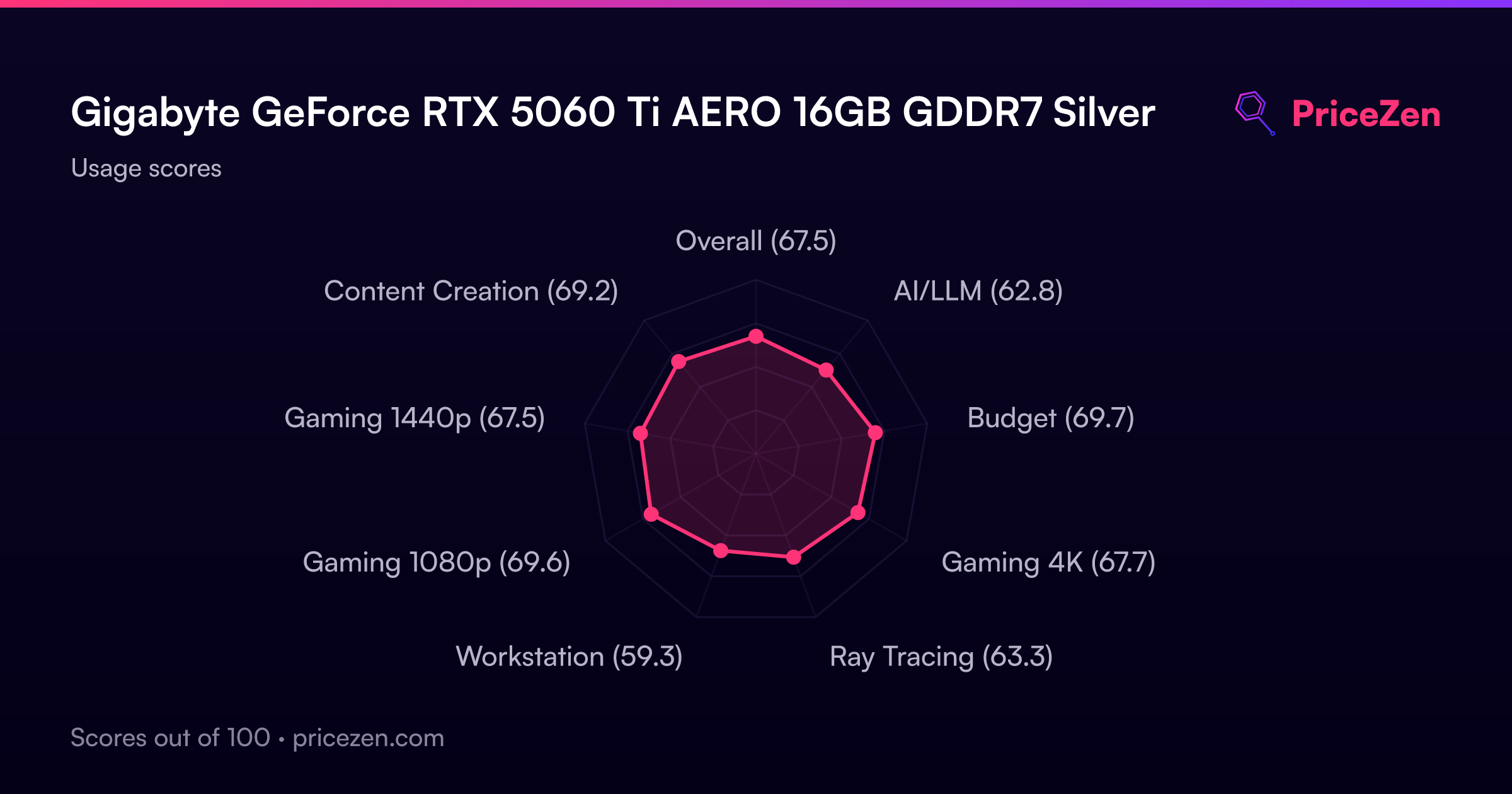
Usage Scores
- Overall67.5
- AI/LLM62.8
- Budget69.7
- Gaming 4K67.7
- Ray Tracing63.3
- Workstation59.3
- Gaming 1080p69.6
- Gaming 1440p67.5
- Content Creation69.2