Gigabyte GeForce RTX 5090 AORUS 32GB GDDR7 Black
The 32GB GDDR7 512-bit memory and 2730MHz boost clock deliver top-tier ray tracing and AI performance, with a 575W TDP requiring a 1000W PSU. Its triple-fan double flow through design keeps thermals controlled in a 3.25-slot, 330mm frame, while DisplayPort 2.1b supports 8K output. Best for enthusiasts running 4K ray-traced games or local LLM workloads who prioritize raw power over budget.

No current retailer price


Snapshot
The 30-Second Version
The Gigabyte GeForce RTX 5090 AORUS GV-N5090AORUS IF-32GD is a flagship graphics card with 32GB of GDDR7, top-ranked ray tracing and AI performance, and a PassMark G3D score of 38,958. At USD 5,700 it's built for creators and local AI work, not value gamers. It also demands a 1000W PSU and a case that fits 330mm and 3.25 slots.
Pros & Cons
Pros
- Top-of-the-charts ray tracing and compute scores 100th
- 32GB GDDR7 on a 512-bit bus, huge headroom for AI and rendering 100th
- PCIe 5.0 x16 with three DP 2.1b ports and HDMI 2.1b 99th
- AV1 encode and DLSS 4.5 support 98th
- Drives up to 7680 x 4320 output
Cons
- Brutally expensive, near the bottom for affordability
- 575W TDP and a 1000W PSU requirement
- Efficiency lags behind most of the category
- 330mm and 3.25 slots won't fit smaller cases
- Only four owner ratings so far, and one is furious about connector heat
What owners think
The Word on the Street
How owner sentiment changed over time
ExclusiveBased on when customers actually wrote their reviews - so you can see whether early praise held up.
1 written review, Jun 2026: 1 unhappy
Across all 4 store ratings: 4.0★. Most owners rate without writing a review. The chart counts the 1 written review.
Each dot is one written review, in the month it was written. Happy = 4-5★, mixed = 3★, unhappy = 1-2★.
The proof
Performance
The PassMark G3D benchmark score is 38,958, which lands it in the 99th percentile for raster performance and ties for the absolute best right now in compute and ray tracing. In practice that means 4K with heavy ray tracing isn't a compromise exercise, and the 32GB of GDDR7 running at 28Gbps over a 512-bit interface gives you headroom that most cards simply don't have. For local LLM work, big timelines, heavy 3D scenes or 8K output, VRAM is usually the wall you hit first, and this card pushes that wall way out. Owners doing AI and rendering work are the ones who'll actually feel the difference.
The catch is heat and power. 575W TDP with a 1000W PSU recommendation and a single 16-pin connector is a serious ask, and the triple-fan double flow through cooler only earns a middle-of-the-pack thermal ranking in our data despite the marketing pitch. Efficiency is a genuine weak spot, sitting near the bottom of the category. And physically? 330mm long and 3.25 slots thick, listed as full height quad slot. Measure your case before you click buy, then measure again.
Specifications
Full Specifications
Chipset
| GPU Chipset | GeForce RTX 5090 |
| Brand | NVIDIA |
| Architecture | Blackwell |
| Class | consumer |
Memory
| VRAM | 32 GB |
| Memory Type | GDDR7 |
| Memory Bus | 512 |
Compute
| CUDA Cores | 21760 |
| Tensor Cores | 680 |
| RT Cores | 170 |
| Base Clock | 2017 |
| Boost Clock | 2730 |
Performance
| PassMark G3D | 38958 |
| GPU Compute | 24458 |
Power & Cooling
| TDP | 575 |
| Recommended PSU | 1000 |
| Power Connectors | 1 x 16-pin |
| Cooler | Triple Fan |
| Fans | 2 |
Connectivity
| Interface | PCIe 5.0 x16 |
| DisplayPort | 3 |
| HDMI | 1 |
| Max Displays | 4 |
| Max Resolution | 7680 x 4320 |
Physical
| Length | 330 |
| Slot Width | 3.25 |
| Form Factor | Full Height |
Features
| Ray Tracing | Yes |
| Upscaling | DLSS 4.5 |
| AV1 Encode | Yes |
| VR Ready | Yes |
| DirectX | 12 |
| RGB | Yes |
vs Competition
Against the ASUS GeForce RTX 5090 TUF Gaming, you're looking at the same chipset tier, so the decision comes down to price, cooler design and whether the 330mm, 3.25-slot AORUS fits your build. Cross-shop those two closely and buy whichever is cheaper on the day, because our rankings put this AORUS at the ceiling for ray tracing, compute and VRAM already.
If you're deciding between this and the ZOTAC GeForce RTX 5080 AMP Extreme Infinity, MSI GeForce RTX 5080 Gaming Trio or PNY GeForce RTX 5080 ARGB OC, ask yourself one question: do you need 32GB? For pure gaming, probably not, and the 5080 options are the sane pick. For local LLMs, heavy 3D or 8K video work, the VRAM and compute lead here is the whole point. The Sapphire Radeon RX 7900 XTX NITRO+ is the value-minded alternative in this group, but this AORUS leads the entire category on ray tracing and AI scores, so if those are your workloads, it's a different conversation.
| Spec | Gigabyte GeForce RTX 5090 AORUS | ASUS GeForce RTX 5090 TUF Gaming | MSI GeForce RTX 5070 Ti Ventus 3X OC | ZOTAC GeForce RTX 5080 APOCALYPSE | Sapphire Radeon RX 7900 XTX NITRO+ | PNY GeForce RTX 5080 ARGB OC |
|---|---|---|---|---|---|---|
| Chipset | GeForce RTX 5090 | GeForce RTX 5090 | GeForce RTX 5070 Ti | GeForce RTX 5080 | Radeon RX 7900 XTX | GeForce RTX 5080 |
| Vram | 32GB GDDR7 | 32GB GDDR7 | 16GB GDDR7 | 16GB GDDR7 | 24GB GDDR6 | 16GB GDDR7 |
| Boost Clock Mhz | 2730 | 2407 | 2482 | 2730 | 2680 | 2620 |
| Tdp W | 575 | 575 | 300 | 360 | 339 | 360 |
| Memory Bus Bits | 512 | 512 | 256 | 256 | 384 | 256 |
| Ray Tracing | Yes | Yes | Yes | Yes | Yes | Yes |
| GPU Class | consumer | consumer | consumer | consumer | consumer | consumer |
| Compare | Compare | Compare | Compare | Compare |
| Product | AI | Rt | Vram | Raster | Compute | Thermal | Efficiency | Connectivity | Social Proof | Affordability |
|---|---|---|---|---|---|---|---|---|---|---|
| Gigabyte GeForce RTX 5090 AORUS | 98.4 | 99.7 | 97.8 | 98.8 | 99.7 | 59.8 | 23.5 | 94.2 | 8.5 | 2.9 |
| ASUS GeForce RTX 5090 TUF Gaming Compare | 97.2 | 90.5 | 97.8 | 98.8 | 97.7 | 72.1 | 23.5 | 99.3 | 98.7 | 2.1 |
| MSI GeForce RTX 5070 Ti Ventus 3X OC Compare | 79.1 | 92.4 | 86 | 89 | 88 | 91.9 | 71.7 | 94.2 | 83.8 | 22.4 |
| ZOTAC GeForce RTX 5080 APOCALYPSE Compare | 85.4 | 97.6 | 89.1 | 94.5 | 93.4 | 91.9 | 56.8 | 94.2 | 98.7 | 22.6 |
| Sapphire Radeon RX 7900 XTX NITRO+ Compare | 95.2 | 96.4 | 92 | 83.4 | 95.7 | 91.9 | 51.6 | 98.8 | 69.1 | 13.5 |
| PNY GeForce RTX 5080 ARGB OC Compare | 85.4 | 97.6 | 89.1 | 94.5 | 93.4 | 91.9 | 56.8 | 94.2 | 74.8 | 15.6 |
Price
Value & Pricing
Let's not pretend: USD 5,700 at Micro Center is a lot of money for a graphics card, and in Canada the listings we track run from CAD 10,000 to CAD 11,931, a spread of CAD 1,931 between just two sellers. That gap alone is worth shopping around for. We track prices over time, partly through our community browser extension, and this card ranks in the 2nd percentile for affordability, so there's no version of this where it's a bargain. The value argument only works if the 32GB of VRAM and the top-tier compute score directly earn you money or save you hours. If you're mostly gaming, an RTX 5080 card like the MSI GeForce RTX 5080 Gaming Trio or the PNY GeForce RTX 5080 ARGB OC gets you a modern Blackwell feature set without setting your savings on fire.
Read more
Overview
The Gigabyte GeForce RTX 5090 AORUS GV-N5090AORUS IF-32GD is a flagship Blackwell graphics card with 32GB of GDDR7 on a 512-bit bus, and it sits at the very top of the price ladder: USD 5,700 in the US listing we track, CAD 10,000 to CAD 11,931 across the Canadian ones. This isn't a card you buy because your old one feels slow. It's a card you buy because you're rendering, training models locally, or chasing maxed-out ray tracing at 4K and beyond.
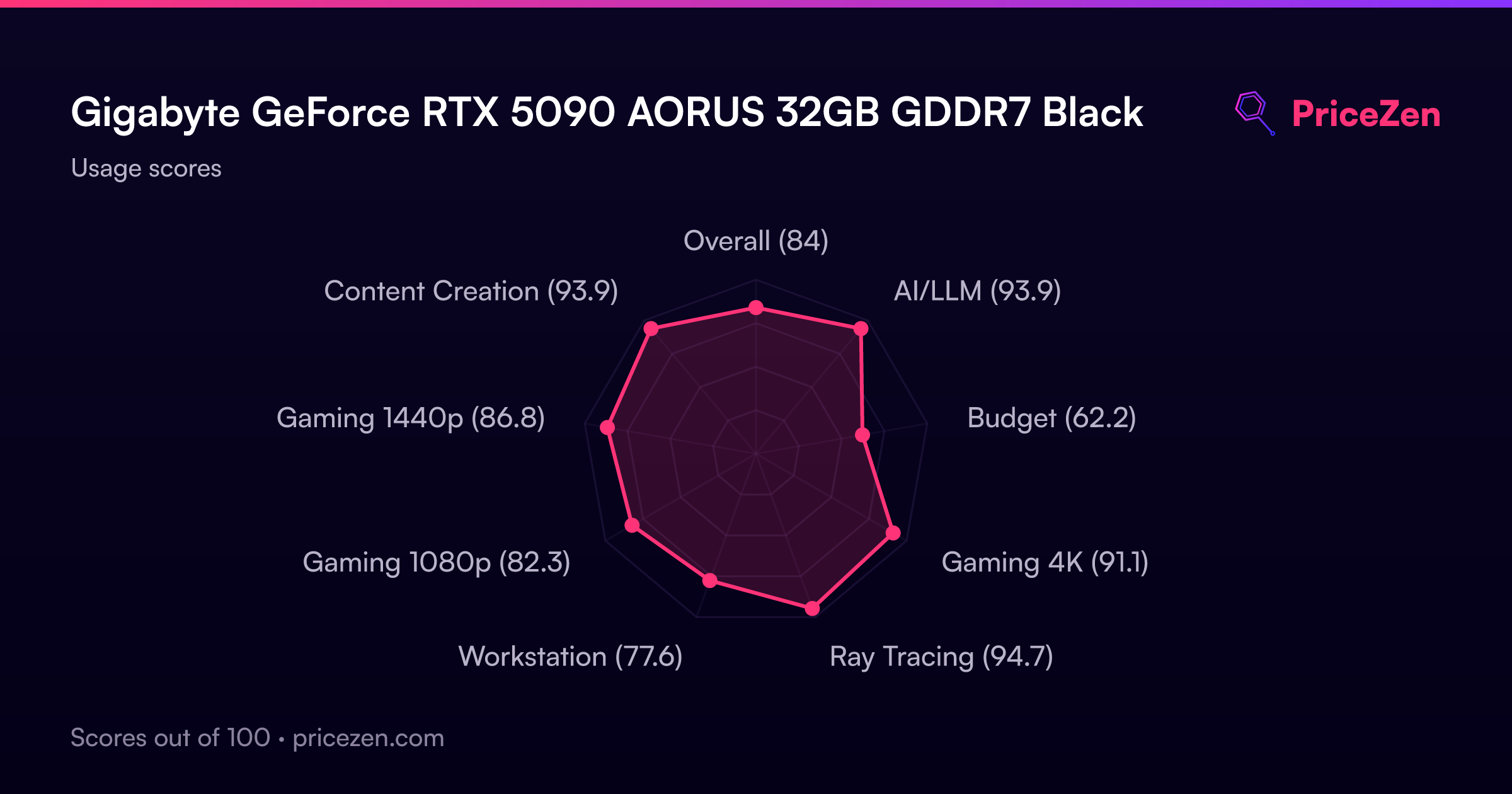
On paper it's a monster. 21,760 CUDA cores, 680 Tensor cores, 170 RT cores, a 2730MHz boost clock, PCIe 5.0 x16, three DisplayPort 2.1b outputs plus HDMI 2.1b, AV1 encode, DLSS 4.5 and support for up to 7680 x 4320. Our scoring model, built from specs and external benchmarks and compared against every other GPU in our database, puts it at the top of the charts for ray tracing (94.7/100), AI and LLM work (93.9/100) and content creation (93.9/100). Its weakest score by far is budget, at 61.1/100, which is a polite way of saying your wallet will notice.
We collect specs, prices, ratings and owner reviews from multiple stores with our own automated system, and nobody can pay us to say anything nice about a product. So here's the honest version: this thing is absurdly fast, absurdly expensive, and physically enormous.
Common Questions
Q: Is the Gigabyte RTX 5090 AORUS good for gaming?
It's overkill for most gaming, but it's at the top of our rankings for ray tracing and raster performance with a 38,958 PassMark G3D score. If you want maxed 4K ray tracing or 8K output, nothing in our data beats it.
Q: How much VRAM does the RTX 5090 AORUS Infinity have?
32GB of GDDR7 on a 512-bit bus running at 28Gbps, which puts it among the best on the market for memory capacity. That's the main reason to pick it for local AI and LLM work.
Q: What power supply do I need for the RTX 5090 AORUS?
Gigabyte recommends a 1000W PSU for this 575W card, and it uses a single 16-pin connector. Make sure the cable is fully seated and your case has room for a 330mm, 3.25-slot card.
Q: Will the RTX 5090 AORUS Infinity fit in my case?
Only if you've got space for a 330mm long, 3.25-slot thick full-height card, which effectively means four expansion slots. Small form factor and many mid-tower builds are out.
Who Should Skip This
Skip this if you're a 1440p gamer, if your case is compact, or if your PSU is under 1000W and you'd rather not replace it. Also skip it if you were hoping for quiet, low-power efficiency, because this card ranks near the bottom of the category there. For mainstream gaming look at the MSI GeForce RTX 5080 Gaming Trio, ZOTAC GeForce RTX 5080 AMP Extreme Infinity or PNY GeForce RTX 5080 ARGB OC, and if you want strong value without the Nvidia tax, the Sapphire Radeon RX 7900 XTX NITRO+ is the sensible cross-shop.
Verdict
Should you buy it? If you're a creator, 3D artist or someone running models locally and you've already got a case that swallows 330mm and a power supply that laughs at 575W, yes. It's one of the fastest things you can put in a PCIe slot right now, and the 32GB buffer is the reason to pay for it.
If you're a gamer with a normal budget and a normal case, no. Buy a 5080-class card and put the difference toward a monitor or, honestly, rent. And go in with eyes open about the 16-pin connector: one owner review is scathing about heat risk, and while four reviews is a tiny sample, the 575W draw is real. Seat that cable properly.
Usage Scores
- Overall84
- AI/LLM93.9
- Budget62.2
- Gaming 4K91.1
- Ray Tracing94.7
- Workstation77.6
- Gaming 1080p82.3
- Gaming 1440p86.8
- Content Creation93.9