HP OmniDesk M03-0000t, Core Ultra 7 265, 32GB, 2TB SSD, RTX 5060, Dark Wood
Combining a 20-core Intel Core Ultra 7 265 with 32GB DDR5 RAM and GeForce RTX 5060 graphics, this desktop handles demanding multitasking and 1080p gaming with ease. The 2TB NVMe SSD provides ample fast storage, while the 400W 80 Plus Platinum PSU and distinctive dark wood finish add efficiency and a unique aesthetic. It’s best for developers and general workstation users who need strong CPU performance and modern connectivity in a pre-built system.

No current retailer price
Snapshot
The 30-Second Version
Strong 20-core CPU and a 2TB NVMe drive that ranks near the top of our storage data, wrapped in a compact wood-finish case. The 8GB RTX 5060 drags local AI performance down to 49.6. At $1,739 it's a good buy for work and casual gaming, a bad one for running models locally.
Pros & Cons
Pros
- 20-core Core Ultra 7 265 is one of the stronger CPUs in this category. 90th
- 2TB NVMe SSD lands near the top of our storage rankings. 88th
- Ten USB ports plus Ethernet, Wi-Fi 6 and Bluetooth 5.4. 79th
- Compact dark wood case with an efficient 400W Platinum PSU. 79th
Cons
- 8GB of VRAM makes local AI work a real letdown at 49.6.
- 400W power supply limits future GPU upgrades.
- 32GB of RAM is only middle of the pack for desktops right now.
- $1,739 with no display included.
The proof
Performance
The CPU is the star here. That 20-core Ultra 7 265 sits at the 88th percentile against every desktop we track, so compiling, multitasking and heavy browser-plus-IDE days are comfortably handled. Storage is even better at the 90th percentile thanks to the 2TB PCIe NVMe drive. The RTX 5060 is well above average for this category but not a standout, and its 8GB of VRAM is exactly why the AI score sags to 49.6. RAM at 32GB is solid rather than leading. Ports are a genuine plus: two USB-C, eight USB-A, Ethernet, Wi-Fi 6 and Bluetooth 5.4. The 400W 80 Plus Platinum PSU is efficient, but it doesn't leave much room for a bigger GPU later.
Specifications
Full Specifications
Processor
| CPU | Intel Core Ultra 7 265 |
| Cores | 20 |
| Frequency | 2.4 GHz |
| L3 Cache | 30 MB |
Graphics
| GPU | NVIDIA GeForce RTX 5060 |
| Type | Discrete |
| VRAM | 8 GB |
| VRAM Type | GDDR7 |
Memory & Storage
| RAM | 32 GB |
| RAM Generation | DDR5 |
| Storage | 2 TB |
| Storage Type | NVMe SSD |
Build
| Form Factor | desktop |
| PSU | 400 |
Connectivity
| USB-C Ports | 2 |
| USB Ports | 8 |
| Wi-Fi | Wi-Fi 6 |
| Bluetooth | Bluetooth 5.4 |
| Ethernet | Gigabit Ethernet |
System
| OS | Windows 11 Home |
vs Competition
Cross-shop the Lenovo Legion Tower 5a Gen 10 and the MSI Aegis ZS2 A9NVP-1407US if gaming or GPU headroom is your priority, since this HP's RTX 5060 and 400W PSU are the parts holding it back. The ASUS ROG GM700 is worth a look for the same reason. If you'd rather have a small quiet box for creative and office work, the Apple Mac Studio M5 Max is the obvious alternative, though you'd be leaving Windows behind. The Dell Desktop ECT1250 is the plain-tower option to weigh against this one. Where the HP wins is its 88th-percentile CPU, top-tier storage and ten USB ports in a case you won't mind seeing on your desk.
| Spec | HP OmniDesk M03-0000t | Apple Mac Studio M5 Max | Lenovo T Series Towers Legion Tower 5a Gen 10 | Dell Desktop ECT1250 | ASUS ROG GM700 | MSI Aegis ZS2 A9NVP-1407US |
|---|---|---|---|---|---|---|
| CPU | Intel Core Ultra 7 265 | Apple M5 Max | AMD Ryzen 7 7800X3D | Intel Core Ultra 7 265 | AMD Ryzen 7 9800X3D | AMD Ryzen 9 9900X |
| RAM (GB) | 32 | 48 | 32 | 32 | 32 | 32 |
| Storage (GB) | 2048 | 1024 | 4096 | 2048 | 2048 | 2048 |
| GPU | NVIDIA GeForce RTX 5060 | Apple (40-Core) | NVIDIA GeForce RTX 5070 Ti | Intel UHD Graphics | NVIDIA GeForce RTX 5070 Ti | NVIDIA GeForce RTX 5070 |
| Form Factor | desktop | mini | mid-tower | sff | mid-tower | mid-tower |
| Psu W | 400 | 480 | 850 | 180 | 850 | 750 |
| OS | Windows 11 Home | macOS | Windows 11 Home | Windows 11 Home | Windows 11 Home | Windows 11 Home |
| Compare | Compare | Compare | Compare | Compare |
| Product | CPU | GPU | RAM | Ports | Storage | Reliability |
|---|---|---|---|---|---|---|
| HP OmniDesk M03-0000t | 88.1 | 79.4 | 72.2 | 79.1 | 90 | 70.3 |
| Apple Mac Studio M5 Max Compare | 95.7 | 84.9 | 95 | 89.1 | 68.6 | 99.3 |
| Lenovo T Series Towers Legion Tower 5a Gen 10 Compare | 73.2 | 94.6 | 78 | 88.6 | 98.1 | 70.3 |
| Dell Desktop ECT1250 Compare | 88.1 | 60 | 81.6 | 75 | 82.5 | 70.3 |
| ASUS ROG GM700 Compare | 80.4 | 94.6 | 81.6 | 96.1 | 90 | 37.8 |
| MSI Aegis ZS2 A9NVP-1407US Compare | 92.4 | 90.7 | 87 | 90.4 | 82.5 | 37.8 |
Price
Value & Pricing
At $1,739 from Newegg, you're paying for the CPU and the storage, and both deliver. The 20-core chip and 2TB drive are the parts that justify the ticket. The graphics card is the compromise: it's fine for mainstream gaming and GPU-accelerated apps, but 8GB of VRAM at this price stings if AI is on your list. For a home office or dev machine that also games after hours, the money makes sense. For anything VRAM-hungry, it doesn't.
Read more
Overview
The HP OmniDesk M03-0000t is a compact tower that looks like furniture and runs like a workstation. You get a 20-core Intel Core Ultra 7 265, an RTX 5060 with 8GB of VRAM, 32GB of DDR5 and a 2TB NVMe SSD, all wrapped in a dark wood finish at 13.27 x 6.10 x 12.40 inches and 11.78 lb. No monitor in the box.
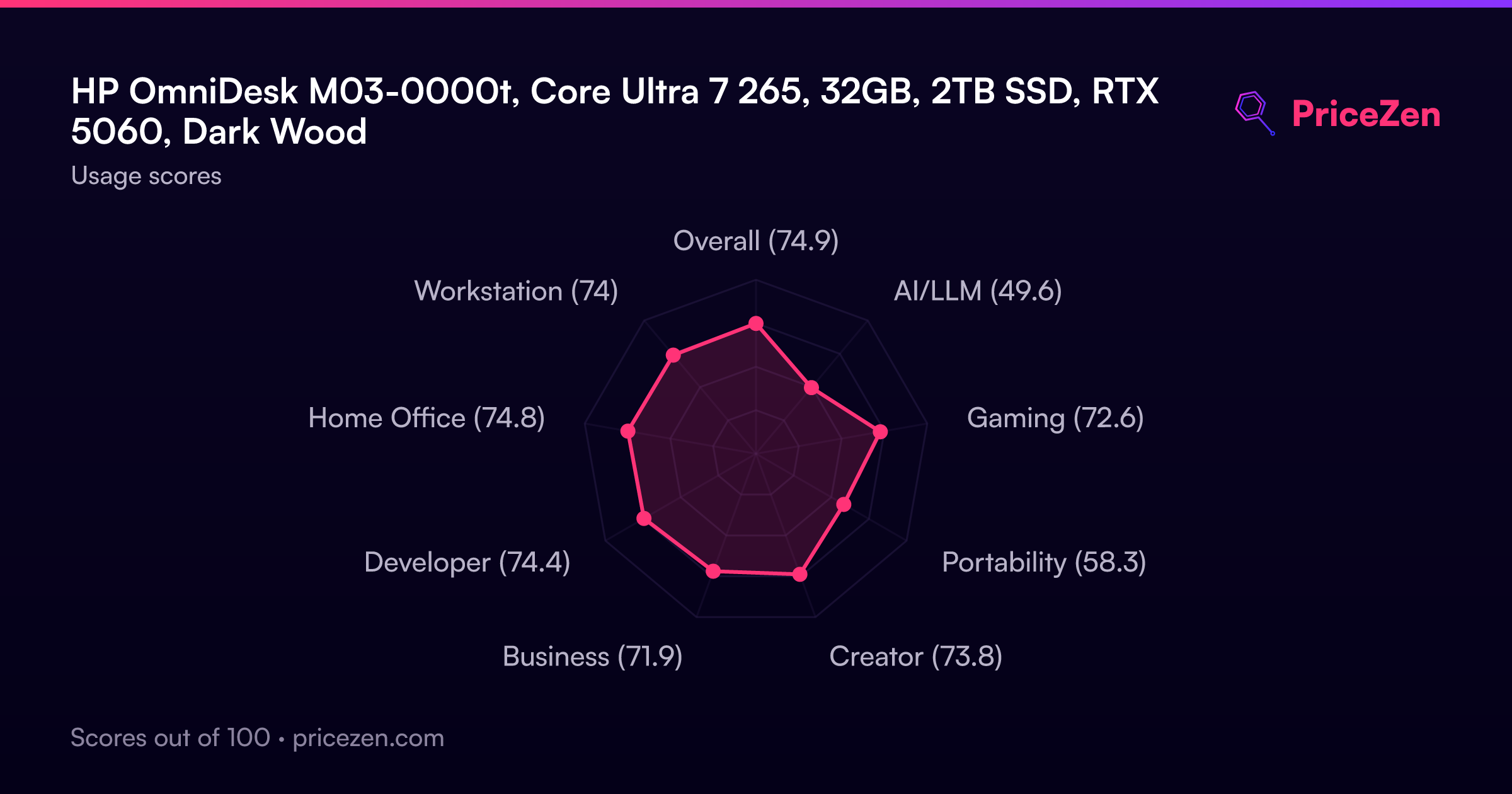
Our scoring model puts it at 75.6 overall, with home office at 74.8 and developer use at 74.4. The weak spot is local AI work, which lands at 49.6. So: a strong everyday and coding machine, not an LLM box.
Common Questions
Q: Can I upgrade the graphics card later?
Not easily. The 400W 80 Plus Platinum supply is efficient but leaves little headroom for a hungrier GPU, so plan around the RTX 5060 you're buying.
Q: Is 32GB of RAM enough for development work?
For most coding, containers and VM work, yes, and it pairs well with the 20-core Ultra 7 265. It's only about average among desktops we track, so heavy multi-VM setups may want more.
Q: Does it come with a monitor?
No, the display isn't included. Budget for a monitor separately on top of the $1,739 price.
Who Should Skip This
If you want to run local LLMs or big image models, skip it. 8GB of VRAM and a 49.6 AI score mean you'll hit the wall fast. Same story if you're planning a GPU upgrade down the road, because that 400W PSU boxes you in. And if you want a machine that's mainly a gaming rig, the tower-style competitors are a better use of $1,739.
Verdict
Buy this if you want one Windows desktop that handles a full workday of code, spreadsheets and forty tabs, then plays games in the evening without looking like a gaming rig. Developers and home office buyers get the most out of it, which matches its 74.4 and 74.8 scores. Just go in knowing the GPU is the ceiling, not the selling point.
Usage Scores
- Overall74.9
- AI/LLM49.5
- Gaming72.6
- Portability58.3
- Creator73.8
- Business71.9
- Developer74.4
- Home Office74.8
- Workstation74