HP OmniStudio 27-cw0054 2026, Ryzen AI 7 445, 16GB, 1TB SSD, Jet Black
The AMD Ryzen AI 7 445 processor with a dedicated NPU enables Copilot+ AI features on a 27-inch FHD IPS touchscreen, making local AI tasks a core differentiator. The system offers strong connectivity with Wi-Fi 7 and a generous port selection including Thunderbolt and five USB-A ports, housed in a design with an adjustable stand. This all-in-one is best for home office users and students who want a streamlined, AI-capable desktop for everyday productivity and media consumption.

No current retailer price
Snapshot
The 30-Second Version
The HP OmniStudio 27-cw0054 is a 27-inch touchscreen all-in-one desktop with an AMD Ryzen AI 7 445, 16GB RAM, and 1TB SSD. It's great for everyday home and office tasks with an excellent port selection and Wi-Fi 7. Just don't expect gaming performance, and shop around since prices swing from USD 748 to USD 1,000.
Pros & Cons
Pros
- Excellent port selection with Thunderbolt, USB-C, and 5 USB-A 99th
- Touchscreen is responsive and great for casual use 86th
- Wi-Fi 7 and Bluetooth 6.0 future-proof connectivity 70th
- Compact all-in-one design saves desk space
- Copilot+ AI features are genuinely useful for some tasks
Cons
- FHD resolution on a 27-inch screen looks soft up close
- Integrated graphics can't handle serious gaming
- 90W power supply limits upgrade potential
- CPU performance is mid-pack for the price
- No height adjustment, only tilt
What owners think
How owner sentiment changed over time
ExclusiveBased on when customers actually wrote their reviews - so you can see whether early praise held up.
19 written reviews, May – Jun 2026: 17 happy, 2 mixed
Across all 260 store ratings: 4.8★. Most owners rate without writing a review. The chart counts the 19 written reviews.
Each dot is one written review, in the month it was written. Happy = 4-5★, mixed = 3★, unhappy = 1-2★.
The proof
Performance
The Ryzen AI 7 445 is a 6-core, 2.0GHz chip that lands in the middle of the pack for CPUs in our database. It's not going to blow anyone away in heavy multi-threaded workloads, but for web browsing, office apps, video calls, and the occasional photo edit, it's plenty. The 16GB of DDR5 RAM is about average for this class, and the 1TB SSD gives you decent room without being exceptional.
The Radeon 840M integrated graphics are fine for casual games and media playback, but don't expect to run modern AAA titles at anything beyond low settings. The 27-inch FHD touchscreen is sharp enough for daily use, though at this size, 1080p means you'll notice pixels if you sit close. The 178-degree viewing angles are nice for sharing the screen, and the touch response is smooth. The adjustable stand tilts from -6 to 16 degrees, which is a small range but better than a fixed mount.
Specifications
Full Specifications
Processor
| CPU | AMD Ryzen AI 7 445 |
| Cores | 6 |
| Frequency | 2.0 GHz |
| L3 Cache | 4 MB |
Graphics
| GPU | AMD Radeon 840M |
| Type | Integrated |
Memory & Storage
| RAM | 16 GB |
| RAM Generation | DDR5 |
| Storage | 1 TB |
| Storage Type | SSD |
Build
| Form Factor | aio |
| PSU | 90 |
| Weight | 6.1 kg / 13.5 lbs |
Connectivity
| USB-C Ports | 2 |
| USB Ports | 5 |
| Thunderbolt | 0 |
| HDMI | 1 x HDMI 2.0 |
| DisplayPort | 0 |
| Wi-Fi | Wi-Fi 7 |
| Bluetooth | Bluetooth 6.0 |
| Ethernet | Gigabit Ethernet |
System
| OS | Windows 11 Home |
vs Competition
Compared to the Lenovo Legion 90YA003GUS, the HP OmniStudio 27 is a completely different animal. The Legion is built around gaming performance, while the HP is a tidy all-in-one for everyday tasks. If you want to game, the Legion is the obvious pick. But if you want a family computer that doesn't sprawl across your desk, the HP is the better fit.
The Apple Mac Studio M3 Ultra sits in another league entirely for performance, and it doesn't include a display, so you're buying a screen separately. The ASUS ROG NUC RNUC15JNK9X489AU takes the opposite approach to size: it's a tiny box you pair with your own monitor, which keeps the desk clear but gives up the built-in touchscreen. The MSI Aegis Z2 C7NVP-1449US is a traditional tower aimed at gamers, and it will outrun the HP in raw benchmarks. Our ranking puts the HP well behind these machines on performance, and that's expected. What it offers instead is a 27-inch touchscreen, Thunderbolt, five USB-A ports and Wi-Fi 7 in one unit you plug in once.
| Spec | HP OmniStudio 27-cw0054 | Apple Mac Studio M5 Max | Lenovo T Series Towers Legion Tower 5a Gen 10 | Dell Desktop ECT1250 | ASUS ROG GM700 | MSI Aegis ZS2 A9NVP-1407US |
|---|---|---|---|---|---|---|
| CPU | AMD Ryzen AI 7 445 | Apple M5 Max | AMD Ryzen 7 7800X3D | Intel Core Ultra 7 265 | AMD Ryzen 7 9800X3D | AMD Ryzen 9 9900X |
| RAM (GB) | 16 | 48 | 32 | 32 | 32 | 32 |
| Storage (GB) | 1024 | 1024 | 4096 | 2048 | 2048 | 2048 |
| GPU | AMD Radeon 840M | Apple (40-Core) | NVIDIA GeForce RTX 5070 Ti | Intel UHD Graphics | NVIDIA GeForce RTX 5070 Ti | NVIDIA GeForce RTX 5070 |
| Form Factor | aio | mini | mid-tower | sff | mid-tower | mid-tower |
| Psu W | 90 | 480 | 850 | 180 | 850 | 750 |
| OS | Windows 11 Home | macOS | Windows 11 Home | Windows 11 Home | Windows 11 Home | Windows 11 Home |
| Compare | Compare | Compare | Compare | Compare |
| Product | CPU | GPU | RAM | Ports | Storage | Reliability | Social Proof |
|---|---|---|---|---|---|---|---|
| HP OmniStudio 27-cw0054 | 47.9 | 54.6 | 53.8 | 85.7 | 53.3 | 70.3 | 99.3 |
| Apple Mac Studio M5 Max Compare | 95.7 | 84.9 | 95 | 89.1 | 68.6 | 99.3 | 71.1 |
| Lenovo T Series Towers Legion Tower 5a Gen 10 Compare | 73.2 | 94.6 | 78 | 88.6 | 98.1 | 70.3 | 99.9 |
| Dell Desktop ECT1250 Compare | 88.1 | 60 | 81.6 | 75 | 82.5 | 70.3 | 98.2 |
| ASUS ROG GM700 Compare | 80.4 | 94.6 | 81.6 | 96.1 | 90 | 37.8 | 99.3 |
| MSI Aegis ZS2 A9NVP-1407US Compare | 92.4 | 90.7 | 87 | 90.4 | 82.5 | 37.8 | 99.3 |
Price
Value & Pricing
Pricing on the HP OmniStudio 27 has come down, and that changes the math in its favor. We're tracking USD 748 to USD 1,000 across five US listings, which is still a wide spread but a much friendlier one than before. At the low end, this is a genuinely good deal for a touchscreen AIO with this port selection and Copilot+ support. At USD 1,000 you're paying a premium for the form factor rather than the hardware inside. If you're shopping, aim for the bottom of that range and don't pay a cent more than you have to. For context, you can get a more powerful traditional desktop and a separate monitor for similar money, but you'd lose the clean AIO shape and the touchscreen.
Read more
Overview
The HP OmniStudio 27-cw0054 is an all-in-one desktop that tries to be the family computer for the AI era. It sits in that mid-range AIO bracket where you're paying for the clean look, the touchscreen, and the Copilot+ branding more than raw horsepower. The AMD Ryzen AI 7 445 chip is interesting, it's a 6-core part built around efficiency and on-device AI tasks, paired with 16GB of DDR5 and a 1TB SSD. That's a sensible combo for everyday work, streaming, and light creative stuff.
What you're really getting here is a 27-inch FHD touchscreen wrapped in a tidy package with a surprising amount of ports. HP loaded this thing up with Thunderbolt, DisplayPort, two USB-C, five USB-A, HDMI, Ethernet, and Wi-Fi 7. That port selection is genuinely one of the best we've seen in this category, which matters if you hate dongles as much as we do.
Is the HP OmniStudio 27 good for everyday home use? For most people, yes. It's not a gaming rig and it's not a workstation, but it handles the basics without breaking a sweat. The 90W power supply tells you a lot about the design philosophy here: efficiency over raw performance.
Common Questions
Q: Is the HP OmniStudio 27 good for gaming?
Not really. The integrated AMD Radeon 840M graphics can handle casual games and older titles, but modern AAA games will struggle even at low settings. If gaming is a priority, look at a desktop with a discrete GPU like the MSI Aegis Z2 C7NVP-1449US.
Q: Does the HP OmniStudio 27 have a touchscreen?
Yes, it has a 27-inch Full HD IPS touchscreen with 178-degree viewing angles. Owners report the touch response is smooth and works well for casual use, though the 1080p resolution looks a bit soft at this screen size.
Q: Can I upgrade the RAM or storage on the HP OmniStudio 27?
The 16GB of DDR5 RAM and 1TB SSD are decent out of the box, but all-in-one PCs like this are typically harder to upgrade than traditional towers. The 90W power supply also suggests limited headroom for upgrades.
Q: Is the HP OmniStudio 27 worth the price?
It depends on the price you find. Near USD 748, it's a solid deal for a touchscreen AIO with this port selection, and the recent price drop helps its case. At USD 1,000, you're paying extra for the form factor and would be better off with a more powerful traditional desktop.
Who Should Skip This
Skip the HP OmniStudio 27 if you're a gamer, a video editor, or anyone who needs real graphics performance. The integrated Radeon 840M just can't keep up with discrete GPUs, and the 90W power supply means there's no room to add one later. If you need more CPU muscle for rendering or heavy multitasking, a traditional desktop like the Lenovo Legion 90YA003GUS or MSI Aegis Z2 C7NVP-1449US will serve you better. And if you're picky about display quality, the 1080p resolution on a 27-inch panel might bother you, a 1440p or 4K monitor paired with a tower would look noticeably sharper.
Verdict
Should you buy the HP OmniStudio 27-cw0054? If you want a clean, capable all-in-one for everyday home or office use, and you can find it near the USD 748 mark, yes. The price drop makes it an easier recommendation than it was. The port selection is genuinely great, the touchscreen is a nice bonus, and the Copilot+ features add some future-proofing. It's a good family computer.
But if you're a gamer, a video editor, or anyone who needs real GPU power, this isn't your machine. The integrated Radeon 840M is fine for casual use but nothing more. And at USD 1,000 you're overpaying for the form factor. Know what you're getting: a well-connected, efficient all-in-one, not a performance powerhouse.
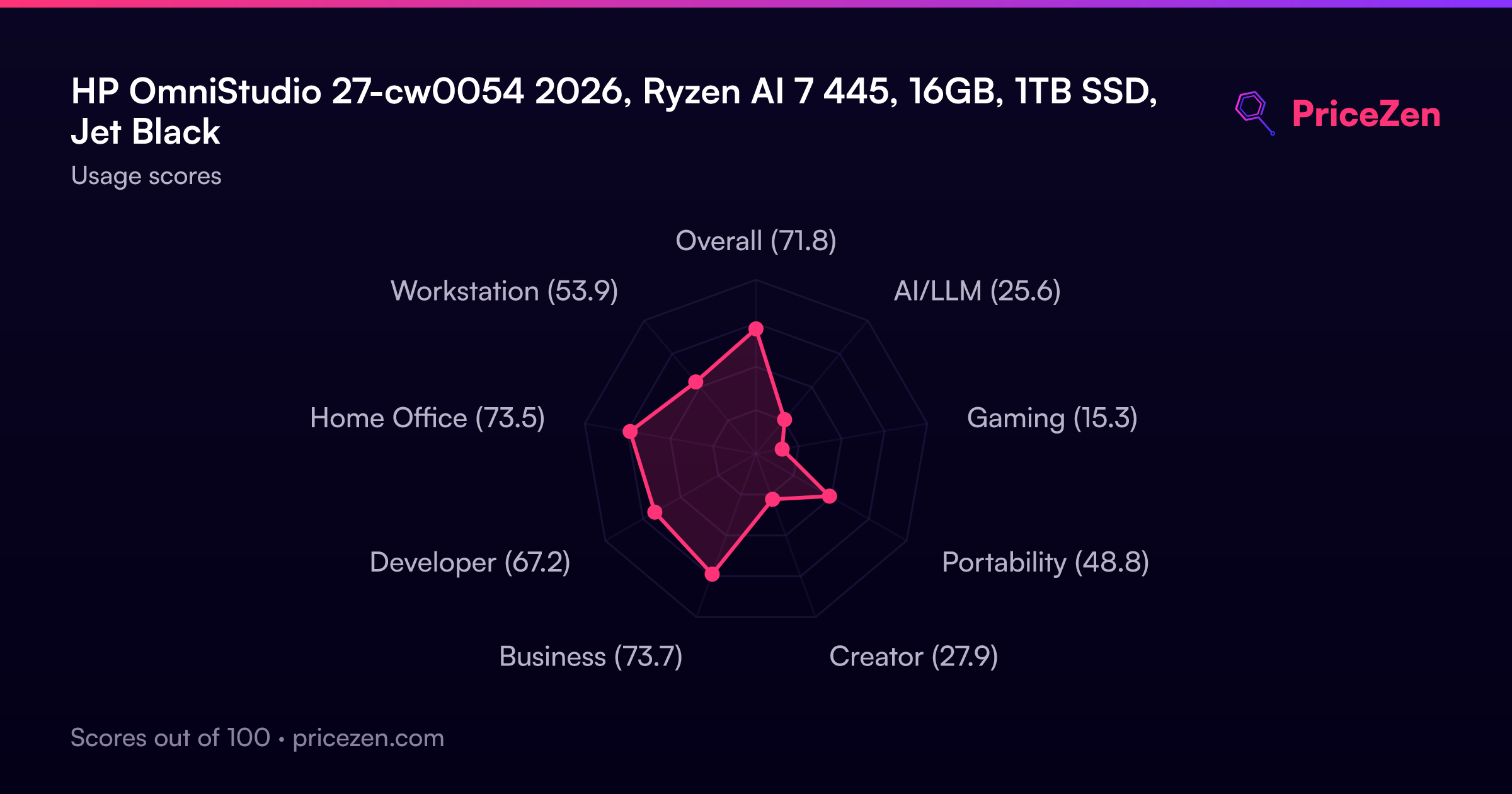
Usage Scores
- Overall71.8
- AI/LLM25.6
- Gaming15.3
- Portability48.8
- Creator27.9
- Business73.7
- Developer67.2
- Home Office73.5
- Workstation53.9