OWC 32GB (4x8GB) DDR3L-1866 CL13 SODIMM (OWC1867DDR3S32S)
The 32GB DDR3 SODIMM kit runs at 1866 MT/s with CL11 timing and 1.35V voltage, delivering 14.9GB/s bandwidth in a 204-pin form factor for late 2015 iMac 27-inch Retina 5K models. Its low-noise 8-layer PCB and lifetime OWC warranty with advanced replacement program add reliability beyond standard specs. Best for owners of the iMac17,1 (3.2GHz i5, 3.3GHz i5, or 4.0GHz i7) needing a straightforward memory upgrade for heavier multitasking or photo editing.

No current retailer price


Snapshot
The 30-Second Version
OWC's 32GB DDR3L kit is a targeted upgrade for Late 2015 27-inch iMacs, maxing out the RAM at 1866 MT/s with CL13 latency. The capacity jump from 8GB to 32GB is the real win here, not raw speed. Pricing ranges from USD 148 to USD 399 across just two US listings, so shop carefully. If you're still using that iMac, this is a solid buy at the low end. Everyone else should look elsewhere.
Pros & Cons
Pros
- 32GB capacity is a massive upgrade over the stock 8GB in 2015 iMacs 71st
- 1.35V low-voltage DDR3L runs cooler and uses less power than standard DDR3
- Specifically qualified for iMac17,1 models, reducing compatibility guesswork
- CL13 latency is about average for DDR3L, no penalty there
- OWC has a long track record with Mac memory upgrades
Cons
- 1866 MT/s speed is in the 19th percentile, slow by modern standards
- Only useful for a narrow range of older Macs and laptops
- Server performance score of 23.8 makes this a poor fit for homelab use
- Price spread of USD 148 to USD 399 across just two listings is wild
- No customer reviews available, so real-world reliability data is thin
The proof
Performance
Let's be honest about the numbers. 1866 MT/s puts this kit in the 19th percentile for speed across all memory we track. That sounds bad until you remember this is DDR3 from 2015, not DDR5 from 2024. For the iMacs it's designed for, 1866MHz is actually the correct spec, and running faster memory wouldn't help because the memory controller won't take advantage of it. The CL13 latency lands right at the 49th percentile, which is about average for DDR3L at this speed.
In real-world terms, the performance story here isn't about raw bandwidth. It's about capacity. Going from 8GB to 32GB means macOS stops compressing memory and writing swap files constantly. Apps launch faster after the first load, browser tabs stay resident, and photo or video editing becomes far less stuttery. The 71st percentile capacity ranking reflects that 32GB is still a solid amount of RAM for a machine of this vintage, even if it's nowhere near the 64GB or 128GB kits we see in modern workstations.
Specifications
Full Specifications
Memory
| Type | DDR3L |
| Form Factor | SODIMM |
| Total Capacity | 32768 |
| Modules | 4 |
| Per Module | 8192 |
| Pins | 204 |
Performance
| Speed | 1866 |
| CAS Latency | 13 |
| Voltage | 1.35 |
Class
| ECC | No |
| Registered | No |
Features
| RGB | No |
| Heat Spreader | No |
vs Competition
Comparing this OWC kit to the Corsair Vengeance CMK32GX5M2B6400Z36 or Patriot Viper Venom PVV532G640C32K is almost unfair. Those are DDR5 desktop kits running at 6400 MT/s, more than three times the speed of this DDR3L set. But they're also completely incompatible with a 2015 iMac. If you're building a modern PC, those kits are the obvious choice. If you're upgrading an old Mac, they're useless to you.
The more relevant comparison is against other DDR3L SO-DIMM options from Crucial or used pulls from Micron and Samsung. Crucial's CT16G3S186DM modules are listed as compatible part numbers right in OWC's own product description, which tells you the underlying chips are likely similar. The difference is OWC's Mac-specific qualification and warranty support. Generic DDR3L sticks might work fine, but if they don't, you're stuck troubleshooting memory errors on a machine Apple stopped supporting years ago. That peace of mind has real value, assuming you can find this kit at the lower end of its price range.
| Spec | OWC 32GB DDR3L SODIMM | Kingston FURY Beast | Corsair Vengeance | G.Skill Trident Z5 RGB | Team Group T-CREATE EXPERT | ADATA Lancer Blade RGB |
|---|---|---|---|---|---|---|
| Capacity | 32GB | 32GB | 32GB | 32GB | 32GB | 32GB |
| Kit | 4 x 8GB | 2 x 16GB | 2 x 16GB | 2 x 16GB | 2 x 16GB | 2 x 16GB |
| Memory Type | DDR3L | DDR5 | DDR5 | DDR5 | DDR5 | DDR5 |
| Speed Mts | 1866 | 6000 | 6400 | 7600 | 6400 | 6000 |
| Cas Latency | CL13 | CL30 | CL36 | CL36 | CL32 | CL30 |
| Form Factor | SODIMM | UDIMM | UDIMM | UDIMM | UDIMM | UDIMM |
| Ecc | false | false | false | false | false | false |
| Compare | Compare | Compare | Compare | Compare |
| Product | Speed | Feature | Latency | Affordability |
|---|---|---|---|---|
| OWC 32GB DDR3L SODIMM | 19 | 44.9 | 49 | 56.4 |
| Kingston FURY Beast Compare | 87.6 | 89.5 | 87.6 | 22.8 |
| Corsair Vengeance Compare | 94.8 | 74.7 | 78 | 29.1 |
| G.Skill Trident Z5 RGB Compare | 98.8 | 89.5 | 95.5 | 6.7 |
| Team Group T-CREATE EXPERT Compare | 94.8 | 74.7 | 87.6 | 24.4 |
| ADATA Lancer Blade RGB Compare | 87.6 | 89.5 | 87.6 | 15.9 |
Price
Value & Pricing
Pricing on this kit is all over the place. We found two US listings ranging from USD 148 to USD 399, which is a USD 251 spread for what should be the same product. That's not a typo. The lower end of that range is reasonable for 32GB of DDR3L in 2025, especially with OWC's compatibility testing baked in. The higher end is frankly absurd, you could buy a used 2015 iMac for not much more than that.
If you're shopping for this, the Best Buy listing at the lower end is the one to watch. At USD 148, it's a solid value for breathing new life into an old Mac. At USD 399, you'd be better off putting that money toward a used M1 Mac mini and leaving the 2015 iMac behind entirely. The 54th percentile affordability ranking confirms this is middle-of-the-pack pricing for its category, but the spread between vendors means your actual experience depends entirely on which listing you find.
Price history
Read more
Overview
OWC's 32GB DDR3L kit is a niche product in 2025, and that's exactly the point. This is a 4x8GB set of 1866MHz SO-DIMMs running at CL13 and 1.35V, built specifically for older Macs, most notably the Late 2015 27-inch iMac with Retina 5K display. If you've got one of those machines still chugging along, this is one of the few straightforward ways to max out its memory without hunting down sketchy used sticks on eBay.
Who is this for? Someone holding onto a 2015 iMac because it still does the job for photo editing, music production, or general office work. Apple shipped those machines with 8GB standard, and 32GB is the practical ceiling for most configurations. The jump from 8GB to 32GB is transformative if you're running modern browsers, Adobe apps, or virtual machines. It's not a performance upgrade in the traditional sense, it's a capacity upgrade that stops your Mac from swapping to a slow hard drive or SSD.
What makes it interesting is the low-voltage DDR3L spec. At 1.35V, it runs cooler and draws less power than standard 1.5V DDR3, which matters in an iMac's tight thermal envelope. OWC has been in the Mac upgrade game for decades, and they've qualified these modules specifically for the iMac17,1 model ID. That compatibility assurance is the real selling point here, because DDR3 SO-DIMMs can be finicky with older Mac memory controllers.
Common Questions
Q: Will this work in my 2015 iMac?
It's specifically qualified for the Late 2015 27-inch iMac with Retina 5K, model ID iMac17,1. That covers the 3.2GHz i5, 3.3GHz i5, and 4.0GHz i7 configurations. If you have a different iMac model or year, check your model ID first, because DDR3L SO-DIMM compatibility varies significantly across Apple's lineup.
Q: Is 1866MHz fast enough for modern tasks?
For the machines this kit is designed for, yes. The 2015 iMac's memory controller runs DDR3L at 1866MHz natively, so faster memory wouldn't provide any benefit. The real performance gain comes from the 32GB capacity, which prevents macOS from swapping to disk when you're running memory-hungry apps like Photoshop, Chrome with dozens of tabs, or virtual machines.
Q: Why is the price so different between listings?
We found two US listings ranging from USD 148 to USD 399, a USD 251 spread. This likely reflects different sellers, stock levels, and the fact that DDR3L is now a legacy product with limited supply. The lower-priced listing is the one to target. At the higher price, this kit makes no financial sense compared to putting that money toward a newer Mac.
Q: Can I use this in a PC laptop or server?
It's a standard 204-pin DDR3L SO-DIMM, so it will physically fit in many PC laptops from the same era that support 1866MHz DDR3L. However, the server score of 23.8 in our database reflects that this is not a good choice for server workloads, which typically demand ECC memory and higher reliability ratings. For laptops, check your specific model's memory compatibility list before buying.
Who Should Skip This
If you don't own a Late 2015 27-inch iMac or a compatible PC laptop from the same era, skip this entirely. It's not for modern desktops, not for gaming rigs, and definitely not for servers. The 23.8 server score is one of the weakest we've seen, and the 19th percentile speed ranking means it would bottleneck any modern system.
If you're on the fence about upgrading an old iMac versus replacing it, consider this: at the USD 399 end of the price range, you're spending a significant chunk of what a used M1 Mac mini costs. That M1 will run circles around a 2015 iMac in every way, even with 32GB of RAM. The OWC kit only makes sense if you're committed to keeping that specific iMac alive and you can find it at the lower end of the price spread.
Verdict
If you have a Late 2015 27-inch iMac with Retina 5K and you're still using it daily, this OWC 32GB kit is one of the best upgrades you can make. The jump from 8GB to 32GB will make the machine feel dramatically more responsive, and the low-voltage spec means you won't be adding extra heat to an already warm all-in-one. Just make sure you're paying closer to USD 148 than USD 399.
For anyone else, this kit is a hard pass. It's not for modern PCs, not for servers, and not for most laptops. The 50/100 laptop score and 41.4/100 workstation score reflect that this is a specialized product for a specific generation of Mac hardware. If you're not running an iMac17,1 or a compatible PC laptop from the same era, you're looking at the wrong memory entirely.
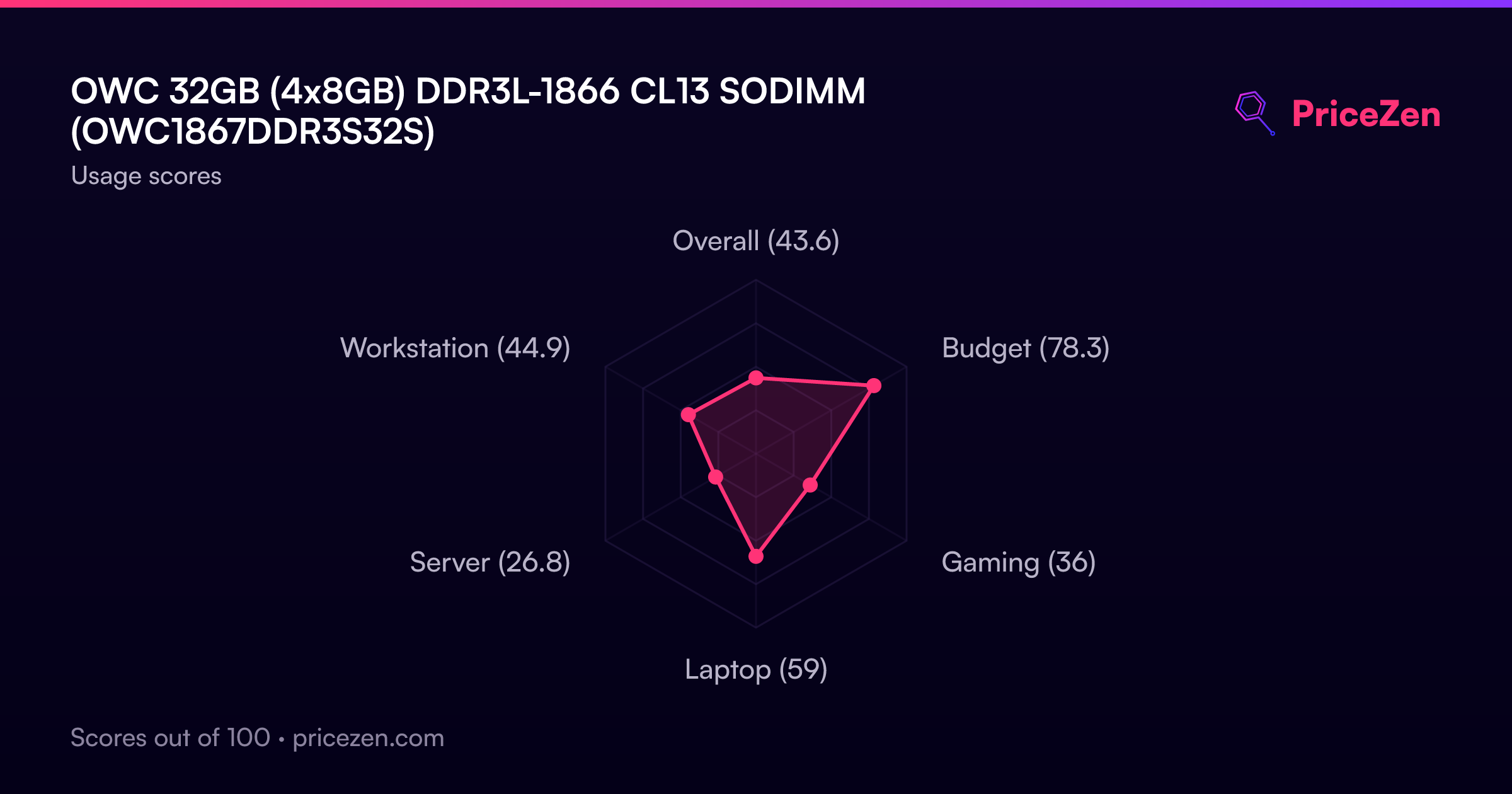
Usage Scores
- Overall43.6
- Budget78.3
- Gaming36
- Laptop59
- Server26.8
- Workstation44.9