ViewSonic VX3418C-2K 34" Black
The 34-inch VA panel with 3440x1440 resolution and 1500R curvature delivers an immersive ultrawide view, paired with a 180Hz refresh rate and 1ms MPRT response for smooth, blur-free gaming. AMD FreeSync Premium eliminates tearing and stuttering, while ViewMode presets optimize the display for gaming, editing, or movies, and dual HDMI and DisplayPort inputs offer flexible connectivity. This monitor suits gamers who want a large curved screen with high refresh rates and adaptive sync, though its 250 nits brightness and 51W power draw are modest.












Snapshot
The 30-Second Version
The ViewSonic VX3418C is a 34-inch curved ultrawide gaming monitor that delivers 180Hz, FreeSync Premium, and a 3440 x 1440 resolution at a budget-friendly price. The VA panel is dim at 250 nits and smears in dark scenes, but for the money, it's one of the cheapest ways to get an immersive ultrawide experience. If you prioritize screen size and refresh rate over HDR and color accuracy, it's worth a look.
Pros & Cons
Pros
- 34-inch ultrawide with 1500R curve is genuinely immersive 96th
- 180Hz refresh rate and 1ms MPRT keep motion smooth 91st
- FreeSync Premium eliminates tearing and stutter 82nd
- 3440 x 1440 resolution is sharp for the size 76th
- Aggressive pricing for a screen this large
Cons
- 250 nits brightness is dim, especially for HDR
- VA panel smears in dark, fast-moving scenes
- Ergonomics are limited, no height adjust on the stand
- Built-in speakers are weak
- Color accuracy is middle of the pack
What owners think
How owner sentiment changed over time
ExclusiveBased on when customers actually wrote their reviews - so you can see whether early praise held up.
19 written reviews, Dec 2024 – Jan 2026: 19 happy
Across all 2,412 store ratings: 4.4★. Most owners rate without writing a review. The chart counts the 19 written reviews.
Each dot is one written review, in the month it was written. Happy = 4-5★, mixed = 3★, unhappy = 1-2★.
The proof
Performance
The headline numbers are solid: 180Hz refresh rate, 1ms MPRT, and FreeSync Premium. In our database, the feature set lands in the 90th percentile for this category, which means you're getting a lot of gaming-focused tech for the money. The 3440 x 1440 resolution pushes about 5 million pixels, so you'll need a decent GPU to hit those high frame rates. An RTX 3060 Ti or RX 6700 XT is the realistic floor for 1440p ultrawide gaming at high settings.
But the performance score of 67th percentile tells the real story. The VA panel's response time is fine for most people, but fast motion in dark scenes can show ghosting. The 250 nits peak brightness is below average, which hurts HDR performance despite the HDR10 badge. In practice, HDR on this monitor is more of a checkbox than a feature. For SDR gaming and desktop use, it's perfectly usable, just not a standout.
Specifications
Full Specifications
Display
| Size | 34" |
| Resolution | 3440x1440 |
| Panel Type | VA |
| Aspect Ratio | 21:9 |
| Curved | Yes |
| Curvature | 1500 |
| Screen Finish | matte |
Performance
| Refresh Rate | 180 Hz |
| Response Time | 1 |
| Adaptive Sync | FreeSync Premium |
Color & HDR
| Brightness | 250 nits |
| Color Gamut | 0.72 |
| Color Depth | 8-bit |
| HDR | HDR10 |
| HDR Support | HDR10 |
Connectivity
| HDMI Ports | 2 |
| DisplayPort | 2 |
| USB-C | 0 |
| Thunderbolt | No |
| Speakers | Yes |
| Headphone Jack | Yes |
Ergonomics
| Height Adjustable | Yes |
| Tilt | Yes |
| Swivel | Yes |
| Pivot | No |
| VESA Mount | 100x100 |
Features
| Webcam | No |
| Touchscreen | No |
| PIP/PBP | No |
| Power | 51 |
| Weight | 12.1 kg / 26.7 lbs |
vs Competition
Compared to the MSI MAG 271QPX QD-OLED E2, the ViewSonic gives you more screen real estate and a lower price, but the MSI's OLED panel destroys it in contrast, response time, and HDR brightness. The ASUS ROG Strix XG27AQDMG is similarly in another league for image quality, though it's a 27-inch 16:9 panel, so you lose the ultrawide immersion. The LG UltraGear 27G810A-B is a closer competitor in spirit, with strong gaming performance, but again it's a smaller flat panel.
The BenQ MA270U targets productivity more than gaming, with better color accuracy but a lower refresh rate. The Dell Alienware AW2523HF is a 25-inch esports monitor with a 360Hz refresh rate, so it's faster but tiny by comparison. If you want the biggest screen for the least money, the ViewSonic wins. If you want the best image quality, any of the OLED options will embarrass it.
| Spec | ViewSonic VX3418C-2K 34" | ASUS ROG Strix XG27UCDMG 27" | MSI MAG 271QPX QD-OLED E2 27" | Alienware AW-Series AW3425DW 34" | Samsung Odyssey G60SD 27" | LG UltraGear 32GX850A-B 32" |
|---|---|---|---|---|---|---|
| Screen Size | 34 | 27 | 27 | 34 | 27 | 32 |
| Resolution | 3440 x 1440 | 3840 x 2160 | 2560 x 1440 | 3440 x 1440 | 2560 x 1440 | 3840 x 2160 |
| Panel Type | VA | OLED | QD-OLED | QD-OLED | OLED | OLED |
| Refresh Rate | 180 | 240 | 240 | 240 | 360 | 165 |
| Response Time Ms | 1 | 0.029999999329447746 | 0.029999999329447746 | 0.029999999329447746 | 0.029999999329447746 | 0.029999999329447746 |
| Adaptive Sync | FreeSync Premium | FreeSync Premium Pro | FreeSync Premium Pro | FreeSync Premium Pro | FreeSync Premium Pro | FreeSync Premium Pro |
| Hdr | HDR10 | DisplayHDR True Black 400 | DisplayHDR True Black 400 | HDR400 | HDR10+ | DisplayHDR True Black 400 |
| Compare | Compare | Compare | Compare | Compare |
| Product | Color | Portability | Display | Feature | User Sentiment | Ergonomic | Performance | Connectivity | Social Proof |
|---|---|---|---|---|---|---|---|---|---|
| ViewSonic VX3418C-2K 34" | 42.1 | 43.5 | 76.2 | 90.8 | 48.1 | 73.5 | 81.8 | 96 | 74.9 |
| ASUS ROG Strix XG27UCDMG 27" Compare | 96.5 | 57.5 | 97.7 | 85.1 | 99.2 | 90.8 | 97.9 | 81.2 | 98.9 |
| MSI MAG 271QPX QD-OLED E2 27" Compare | 99.2 | 57.5 | 73.6 | 85.1 | 95.7 | 90.8 | 97.9 | 81.2 | 98.9 |
| Alienware AW-Series AW3425DW 34" Compare | 98.9 | 74 | 84.1 | 90.8 | 95.7 | 90.8 | 97.9 | 95.4 | 96.8 |
| Samsung Odyssey G60SD 27" Compare | 90.8 | 39.5 | 73.6 | 70.2 | 95.7 | 90.8 | 99.5 | 87.6 | 92 |
| LG UltraGear 32GX850A-B 32" Compare | 79.5 | 49.5 | 99 | 70.2 | 76.5 | 90.8 | 96.2 | 98.2 | 74.9 |
Price
Value & Pricing
At around $250 to $300 in most markets, the ViewSonic VX3418C undercuts a lot of 34-inch ultrawides. The MSI MAG 271QPX QD-OLED E2 and ASUS ROG Strix XG27AQDMG are better monitors, but they cost two to three times as much. If you want the ultrawide experience on a budget, this is one of the cheapest ways to get it. Just know that you're trading brightness, color accuracy, and HDR quality for that price. For pure gaming on a budget, it's a fair deal. For color-critical work or bright-room HDR, you'll want to spend more.
Amazon 1 offer From €267
Price history
Read more
Overview
The ViewSonic VX3418C is a 34-inch ultrawide gaming monitor that tries to bring the curved, immersive experience down to a budget-friendly price. You're getting a 3440 x 1440 VA panel with a 1500R curve, 180Hz refresh rate, and FreeSync Premium. In most markets it sits in the $250 to $300 range, which is aggressive for a screen this size. It's aimed squarely at gamers who want that wrap-around feel without dropping OLED money.
So is the ViewSonic VX3418C good for gaming? For fast-paced shooters and racing games, the 180Hz refresh rate and 1ms MPRT response time do a lot of heavy lifting. The 21:9 aspect ratio gives you extra horizontal field of view, which is a genuine advantage in competitive titles. But the VA panel means you'll see some smearing in dark scenes, and the 250 nits brightness is on the dim side for HDR content.
For productivity and everyday use, the ultrawide format is fantastic for side-by-side windows. The three-sided borderless design keeps things looking clean. Just don't expect much from the built-in speakers, and the stand's ergonomics are pretty limited, so a VESA mount might be in your future.
Common Questions
Q: Is the ViewSonic VX3418C good for gaming?
Yes, for most gamers. The 180Hz refresh rate and 1ms MPRT response time keep motion smooth, and FreeSync Premium eliminates screen tearing. The VA panel can smear in dark scenes, so it's better for bright, fast-paced games than dark atmospheric ones.
Q: Does the ViewSonic VX3418C support HDR?
It has an HDR10 badge, but the 250 nits peak brightness is too low for real HDR impact. You'll get a slight improvement in color range, but don't expect the bright highlights you'd see on an OLED or a brighter IPS panel.
Q: Can I mount the ViewSonic VX3418C on a monitor arm?
Yes, it has a standard VESA 100x100 mount. Given the limited ergonomics of the included stand, a monitor arm is a good upgrade if you want height adjustment or a cleaner desk setup.
Q: What GPU do I need for the ViewSonic VX3418C?
For 3440 x 1440 at high refresh rates, you'll want at least an RTX 3060 Ti or RX 6700 XT. To consistently hit 180Hz in demanding games, something like an RTX 4070 or RX 7800 XT is more realistic.
Who Should Skip This
Skip the ViewSonic VX3418C if you care about HDR, color accuracy, or play a lot of dark, moody games. The 250 nits brightness and VA panel's black smearing will frustrate you. Creative professionals who need accurate color should look at the BenQ MA270U or an IPS ultrawide instead. If you're a competitive esports player who wants the absolute fastest response times, the Dell Alienware AW2523HF's 360Hz panel is a better fit, though you'll lose the ultrawide format. And if you have the budget, any OLED option like the MSI MAG 271QPX QD-OLED E2 will deliver dramatically better image quality.
Verdict
Should you buy the ViewSonic VX3418C? If you want a 34-inch curved ultrawide for gaming and you're on a strict budget, yes. The 180Hz refresh rate and FreeSync Premium deliver smooth gameplay, and the 21:9 format is a genuine upgrade for immersion and productivity. The price is the main selling point here.
But if you care about HDR, color accuracy, or play a lot of dark, atmospheric games, the VA panel's limitations will bug you. The 250 nits brightness is a real weakness, and the smearing in dark scenes is noticeable if you're sensitive to it. For the money, it's a solid entry into ultrawide gaming, just don't expect it to punch above its weight class.
Usage Scores
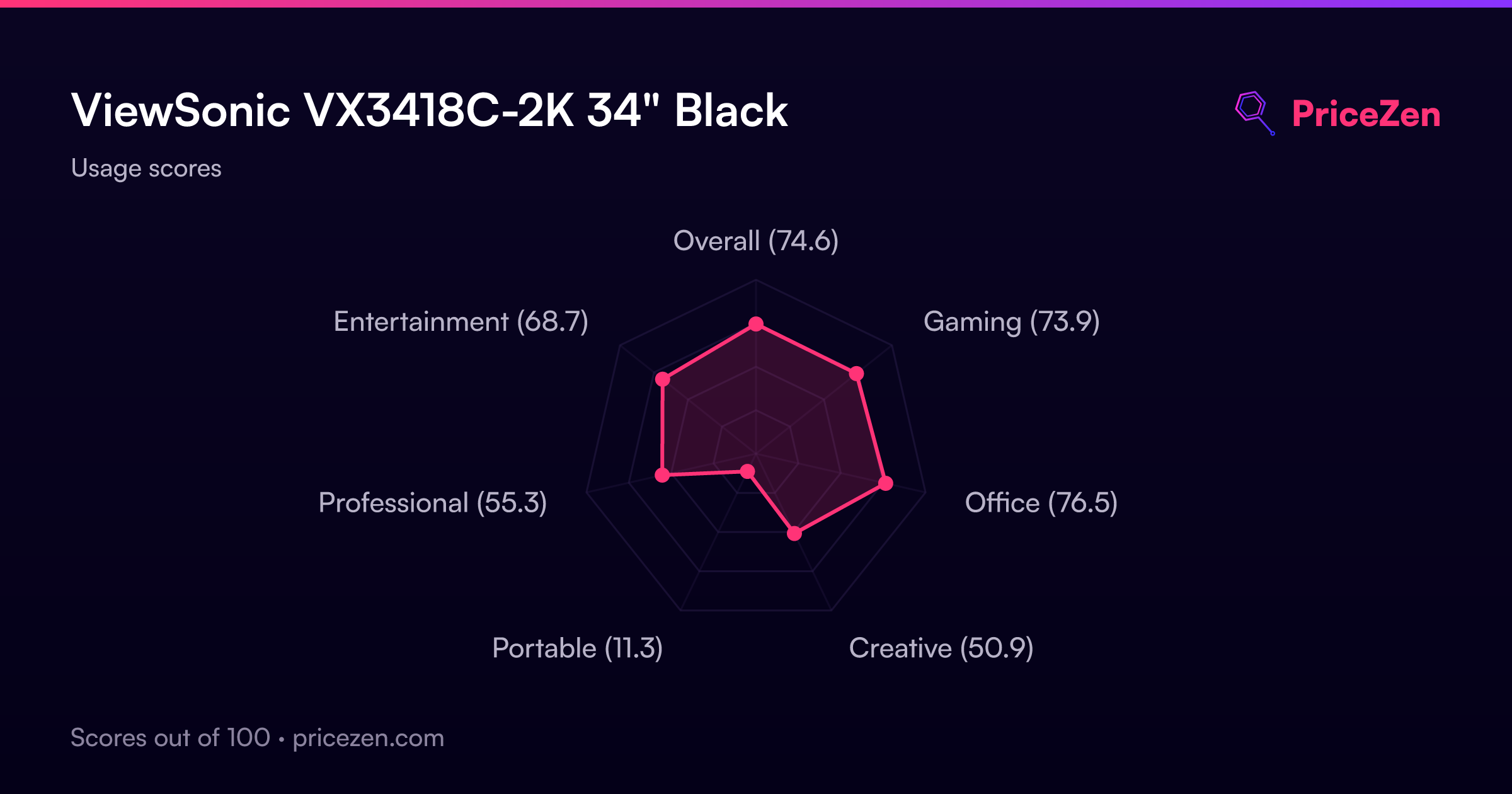
- Overall74.4
- Gaming74
- Office76.6
- Creative51
- Portable11.3
- Professional55.3
- Entertainment68.7