ASUS TUF Gaming VG27AQ3A 27" Black 2023
The 180Hz refresh rate and 1ms response time on a 27-inch QHD IPS panel deliver fluid motion clarity for fast-paced gaming. Its 130% sRGB coverage provides decent color vibrancy for an entry-level display, though the 250-nit brightness limits HDR impact. This monitor is best for competitive gamers on a budget who prioritize high refresh rates over peak luminance or color-critical accuracy.












Snapshot
The 30-Second Version
The ASUS TUF Gaming VG27AQ3A is a 27-inch 1440p IPS monitor with a 180Hz refresh rate and 1ms response time that punches well above its price. ELMB Sync is the standout feature, letting you run motion blur reduction and variable refresh rate simultaneously. US pricing has dropped and now runs from $139 to $270, so the value case is stronger than ever, though it still pays to compare listings. For budget-conscious gamers, this is one of the best values in the 1440p high-refresh space right now.
Pros & Cons
Pros
- 180Hz refresh rate at a budget-friendly price 84th
- ELMB Sync lets you run motion blur reduction and VRR together 82nd
- FreeSync Premium and G-Sync compatible out of the box 76th
- 130% sRGB coverage with good color after calibration 70th
- VESA mount compatible if you want a better stand
Cons
- Stand only tilts and swivels, no height adjustment
- 250 nits brightness is underwhelming for HDR content
- Screen flicker reported on some units
- Built-in speakers are weak, as expected
- Default color settings need manual tuning
What owners think
The Word on the Street
How owner sentiment changed over time
ExclusiveBased on when customers actually wrote their reviews - so you can see whether early praise held up.
Happy owners: 91% lately, 93% in 2024 – 2025
Too few reviews to call that a change.
Across all 2,826 store ratings: 4.5★. Most owners rate without writing a review. The chart counts the 25 written reviews with stars and their own date.
8 written reviews without stars are left out of the trend.
Show the numbers
| Period | Reviews | Happy | Mixed | Unhappy | Happy share |
|---|---|---|---|---|---|
| 2024 – 2025 | 14 | 13 | 0 | 1 | 93% |
| Jan – Oct 2026 | 11 | 10 | 1 | 0 | 91% |
- Jan – Mar 20265 of 6 happy · 1 without stars
Buyers in this period generally liked the monitor's picture quality and value, but one reported screen flicker issues and another noted the stand lacks vertical adjustment.
- Good picture quality, bright colors, and value for the price.
- Screen flicker problems reported by one buyer.
- Stand lacks vertical adjustment; one buyer plans aftermarket stand.
- Built-in speakers are a plus but could be stronger.
- Jul – Sep 20251 of 1 happy · 4 without stars
Buyers in this period praised the monitor's 1440p resolution, refresh rate, and build quality, calling it an upgrade and great value. One user bought three for wide-screen gaming.
- 1440p resolution and refresh rate praised as outstanding, with vivid details.
- Build quality and value for price highlighted as exceptional.
- Multiple units purchased for wide-screen gaming, indicating satisfaction.
- Upgrade over previous ASUS monitors, with no quality compromise.
Each column joins calendar quarters until it holds at least 10 reviews with stars and their own date. Happy = 4-5★, mixed = 3★, unhappy = 1-2★. Period summaries are in English.
The proof
Performance
The headline numbers are solid. 180Hz refresh rate puts this in the top tier of gaming monitors in our database, landing around the 84th percentile for overall performance. That's a real step up from the 144Hz panels that dominated this price range a couple years ago. The 1ms GTG response time is marketing-speak, but in practice the Fast IPS panel keeps motion blur to a minimum. Combined with ELMB Sync, you're getting motion clarity that punches above what the price tag suggests.
Color performance is more of a mixed bag. The 130% sRGB coverage sounds impressive, but our data puts color at the 57th percentile, which is about average for this class. The 250 nits brightness is fine for a dim room but won't wow you in a sunlit office. HDR10 support is there, but without meaningful peak brightness or local dimming, it's more of a checkbox than a feature. Users report the default color settings need some tweaking, and a few mention whites looking slightly greyish out of the box. Spend ten minutes calibrating and you'll be in better shape.
Specifications
Full Specifications
Display
| Size | 27" |
| Resolution | 2560x1440 (QHD) |
| Panel Type | IPS |
| Aspect Ratio | 16:9 |
| Curved | No |
| Screen Finish | matte |
Performance
| Refresh Rate | 180 Hz |
| Response Time | 1 |
| Adaptive Sync | FreeSync Premium |
Color & HDR
| Brightness | 250 nits |
| Color Gamut | 130% sRGB |
| Color Depth | 8-bit |
| HDR | HDR10 |
| HDR Support | HDR10 |
Connectivity
| HDMI Ports | 2 |
| DisplayPort | 1 |
| USB-C | 0 |
| Speakers | Yes |
| Headphone Jack | Yes |
Ergonomics
| Height Adjustable | No |
| Tilt | Yes |
| Swivel | Yes |
| Pivot | No |
| VESA Mount | 100x100 |
Features
| Webcam | No |
| Touchscreen | No |
| PIP/PBP | No |
| Power | 35 |
| Weight | 4.6 kg / 10.1 lbs |
vs Competition
The LG UltraGear 27G810A-B is probably the closest competitor, and it trades blows depending on what you value. LG's UltraGear line tends to have better out-of-box color calibration and slightly better build quality, but you'll typically pay more for it. The MSI MPG 274URDFW E16M is another option if you want more gaming-focused features, though it's aimed at a slightly different segment. The HP OMEN 27qs G2 and Acer Nitro XV272U W2bmiiprx are both solid alternatives in the same 1440p high-refresh space, with the Acer often competing directly on price.
Where the ASUS stands out is the ELMB Sync feature and the aggressive pricing when you find a good deal. The Dell S2725QC is more of an office monitor with gaming aspirations, so if productivity matters more than frame rates, that's worth a look. But for pure gaming value, the VG27AQ3A holds its own against anything in this price bracket.
| Spec | ASUS TUF Gaming VG27AQ3A 27" | Alienware AW-Series AW3425DW 34" | MSI MAG 271QPX QD-OLED E2 27" | Samsung Odyssey G60SD 27" | LG UltraGear 32GX850A-B 32" | Dell S2725QC 27" |
|---|---|---|---|---|---|---|
| Screen Size | 27 | 34 | 27 | 27 | 32 | 27 |
| Resolution | 2560 x 1440 | 3440 x 1440 | 2560 x 1440 | 2560 x 1440 | 3840 x 2160 | 3840 x 2160 |
| Panel Type | IPS | QD-OLED | QD-OLED | OLED | OLED | IPS |
| Refresh Rate | 180 | 240 | 240 | 360 | 165 | 120 |
| Response Time Ms | 1 | 0.029999999329447746 | 0.029999999329447746 | 0.029999999329447746 | 0.029999999329447746 | 8 |
| Adaptive Sync | FreeSync Premium | FreeSync Premium Pro | FreeSync Premium Pro | FreeSync Premium Pro | FreeSync Premium Pro | FreeSync Premium |
| Hdr | HDR10 | HDR400 | DisplayHDR True Black 400 | HDR10+ | DisplayHDR True Black 400 | HDR |
| Compare | Compare | Compare | Compare | Compare |
| Product | Color | Portability | Display | Feature | User Sentiment | Ergonomic | Performance | Connectivity | Social Proof |
|---|---|---|---|---|---|---|---|---|---|
| ASUS TUF Gaming VG27AQ3A 27" | 50.2 | 43.4 | 67.1 | 70.2 | 76.4 | 62.1 | 81.8 | 62.3 | 84 |
| Alienware AW-Series AW3425DW 34" Compare | 98.9 | 74 | 84.1 | 96.3 | 95.7 | 90.8 | 97.9 | 95.4 | 96.8 |
| MSI MAG 271QPX QD-OLED E2 27" Compare | 99.2 | 57.5 | 73.5 | 85.1 | 95.7 | 90.8 | 97.9 | 81.2 | 98.9 |
| Samsung Odyssey G60SD 27" Compare | 90.8 | 39.5 | 73.5 | 70.2 | 95.7 | 90.8 | 99.5 | 87.6 | 92 |
| LG UltraGear 32GX850A-B 32" Compare | 79.5 | 49.5 | 99 | 70.2 | 76.4 | 90.8 | 96.2 | 98.2 | 74.8 |
| Dell S2725QC 27" Compare | 71.9 | 76.6 | 87.1 | 70.2 | 95.7 | 90.8 | 44.2 | 87.6 | 96.8 |
Price
Value & Pricing
Here's where things get interesting. The US pricing on this monitor has come down, and it now runs from $139 to $270 across seven listings. That's a $131 spread, which is still worth shopping around for, but nothing like the wild swings we were tracking before. The ceiling dropping matters more than the floor here: even the most expensive listing sits in genuinely affordable territory now, so the risk of overpaying has shrunk considerably. Near the low end, this is one of the best value propositions in gaming monitors right now. The CAD market is tighter, ranging from $230 to $349 across four listings, so Canadian buyers have less variance to navigate but should still compare stores before pulling the trigger.
For context, the user sentiment score sits at 85 out of 100, and the social proof is at the 95th percentile. People genuinely like this monitor, and the recurring theme across reviews is value for money. When you factor in the 4.6 out of 5 rating from nearly 1,400 reviews, it's clear this panel delivers where it counts for most buyers. We track its price over time, partly through our community browser extension, and the current range makes the value case easier to argue than it was a few months back.
Amazon 1 offer From €236
Price history
Read more
Overview
The ASUS TUF Gaming VG27AQ3A is one of those monitors that makes you wonder why you'd spend more. You get a 27-inch 1440p IPS panel running at 180Hz with a 1ms response time, and it's priced to move. This is the sweet spot for PC gamers who want sharp visuals without needing a graphics card that costs more than a used car. The TUF line has always been ASUS's value-focused gaming brand, and this panel carries that torch well.
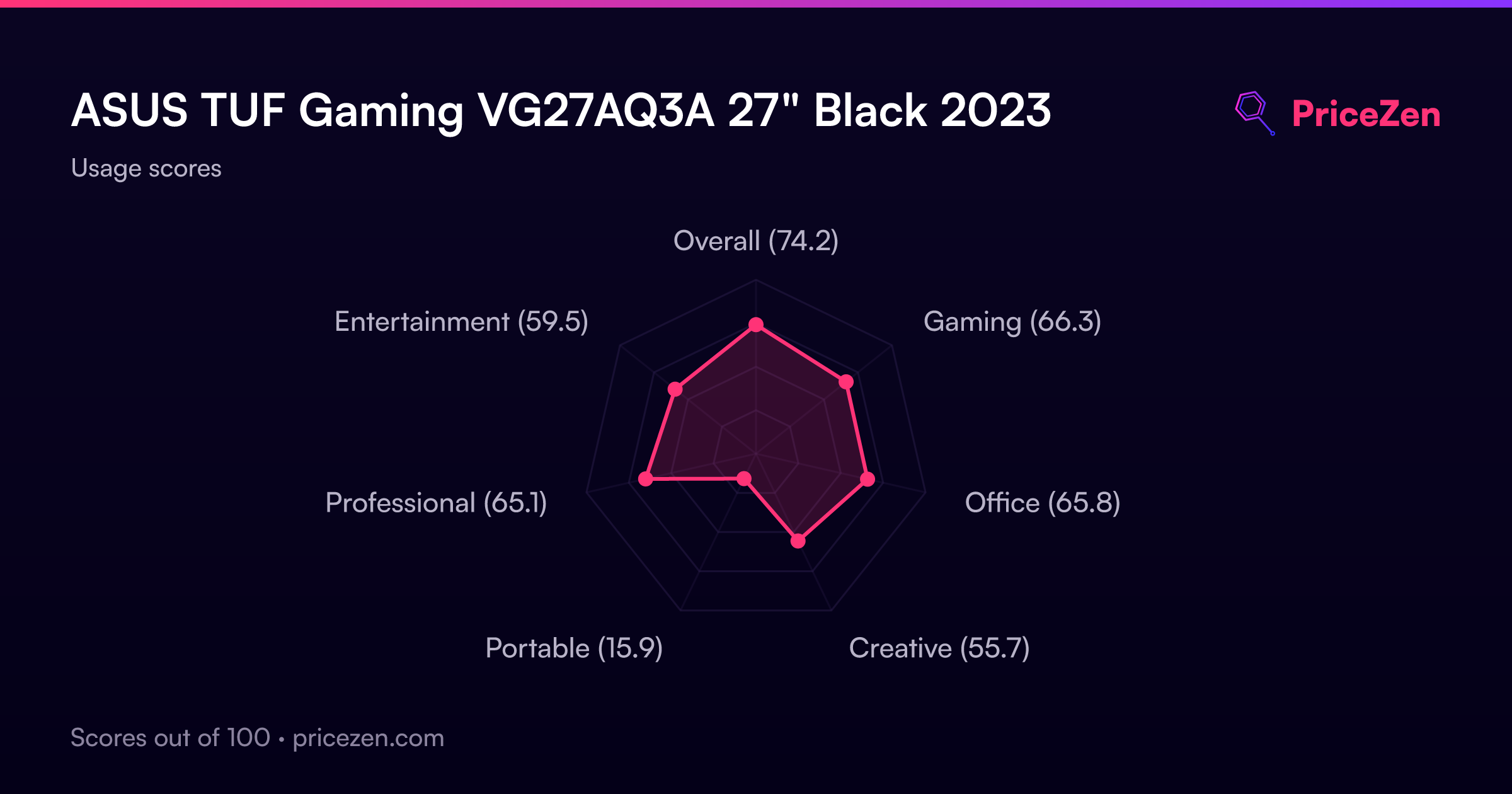
Who's this for? Budget-conscious gamers stepping up from 1080p, competitive players who want high refresh rates without sacrificing resolution, and anyone who wants FreeSync Premium and G-Sync compatibility without paying a premium for the badge. It's also a decent pick for mixed use, though the office score in our database sits at 71.6 out of 100, so it's not exactly a productivity powerhouse.
The interesting bit here is the ELMB Sync tech. Most monitors make you choose between motion blur reduction and variable refresh rate. This one lets you run both at the same time. That's a feature you usually find on pricier panels, and it's genuinely useful for fast-paced shooters where ghosting can cost you a kill.
Common Questions
Q: Can I adjust the height of this monitor?
No, the included stand only supports tilt from +20° to -5° and swivel from +20° to -20°. There's no height adjustment, which is a common complaint. If you need height flexibility, the monitor is VESA 100x100 compatible, so a monitor arm or aftermarket stand is an easy fix.
Q: Does this monitor work with both AMD and NVIDIA graphics cards?
Yes. It supports FreeSync Premium for AMD cards and is G-Sync compatible for NVIDIA cards. AdaptiveSync is enabled by default, so variable refresh rate should work out of the box with either GPU brand. This is a big selling point since you're not locked into one ecosystem.
Q: How much power does this monitor draw?
The rated power consumption is 35W, which is reasonable for a 27-inch 1440p panel running at 180Hz. It's not the most efficient monitor in our database, but it won't noticeably impact your electricity bill either.
Q: What comes in the box?
You get a DisplayPort cable, an L-shaped screwdriver for assembly, the power cord and adapter, a quick start guide, and a warranty card. Notably, there's no HDMI cable included, so if you plan to use HDMI you'll need to supply your own.
Who Should Skip This
If you need a monitor for serious color-critical work like photo editing or design, look elsewhere. The 57th percentile color ranking and 250 nits brightness won't cut it for professional workflows. You'd be better served by something like the Dell S2725QC or a dedicated color-accurate panel. The portable score of 17.5 out of 100 also tells you this isn't a travel monitor, but that's true of most 27-inch displays.
If you're sensitive to screen flicker or have had bad luck with panel lottery issues like dead pixels, you might want to consider the LG UltraGear 27G810A-B instead. The flicker reports aren't universal, but they're frequent enough to be a consideration. And if you absolutely need height adjustment without buying extra hardware, the stand here will frustrate you. Budget for a VESA arm or pick a monitor with a more complete stand.
Verdict
If you're a competitive gamer on a budget, this is an easy recommendation, and the recent price drop only strengthens it. The 180Hz refresh rate, ELMB Sync, and adaptive sync support give you the core features that matter for fast-paced games, and the 1440p resolution keeps things sharp without demanding a flagship GPU. Pair it with a mid-range card and you'll have a great experience without blowing the whole build budget on the display.
For mixed use, it's a bit more complicated. The office score of 71.6 out of 100 reflects the lack of height adjustment and the average color performance. If you're splitting time between spreadsheets and shooters, you might want to budget for a VESA mount arm to fix the ergonomics. But if gaming is the priority and everything else is secondary, this monitor delivers a lot for the money, and at the current pricing there's less reason to hesitate.
Usage Scores
- Overall74.2
- Gaming66.3
- Office65.8
- Creative55.7
- Portable15.9
- Professional65.1
- Entertainment59.5