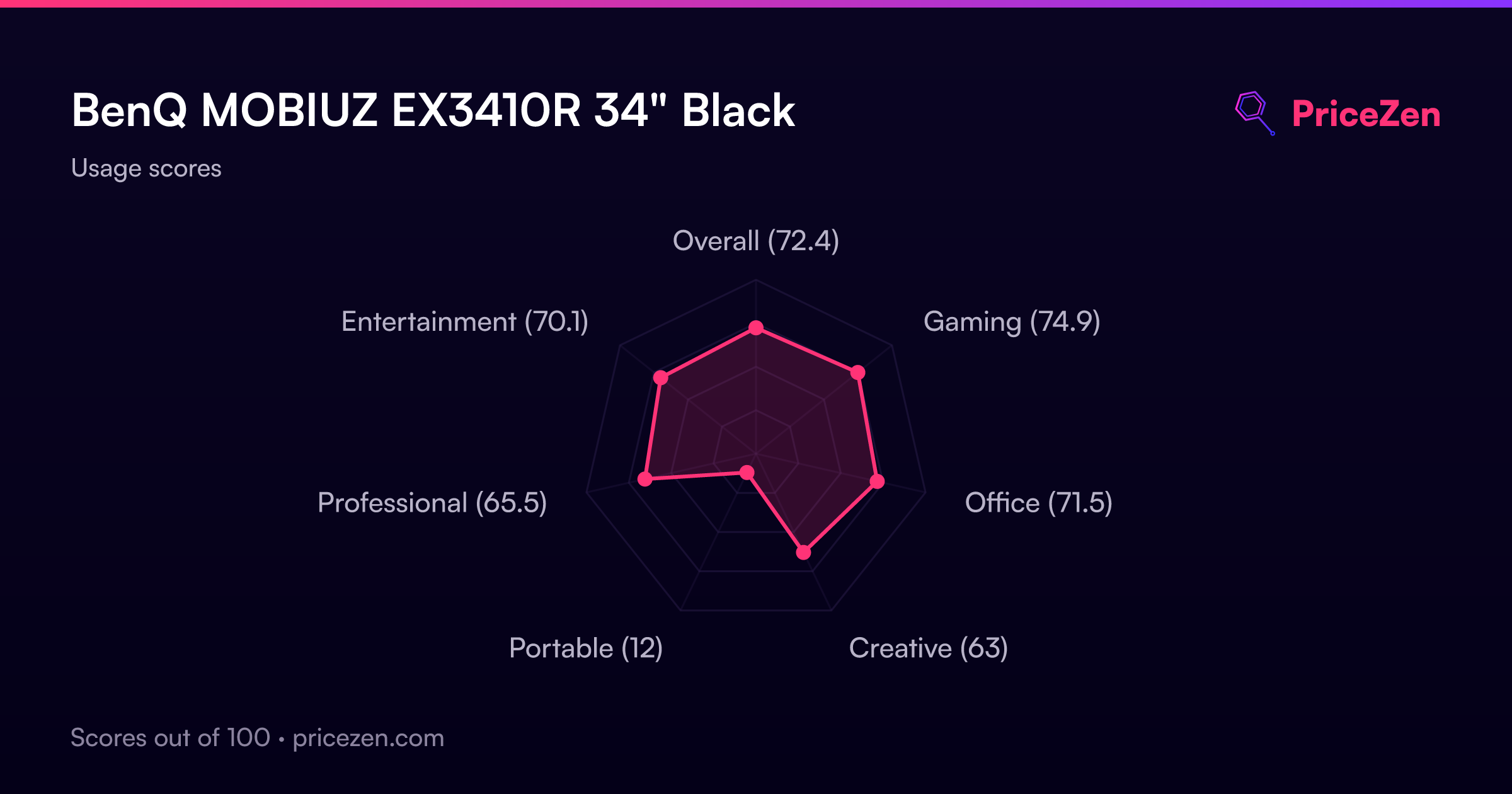
BenQ MOBIUZ EX3410R 34" Black
The 34-inch curved VA panel delivers 2560x1440 resolution at 144Hz with a 1ms response time and AMD FreeSync support. It covers 90% DCI-P3 color gamut with HDR and includes built-in speakers, reducing the need for external audio. This refurbished monitor suits gamers seeking an immersive ultrawide experience with smooth adaptive sync for fast-paced titles.

No current retailer price
Where we saw it before. Check the store for today's price.











Snapshot
The 30-Second Version
A 34-inch ultrawide with a 1500R curve, 144Hz refresh rate, and surprisingly good built-in speakers. The treVolo audio setup with a dedicated woofer is genuinely better than most monitor speakers. HDRi adjusts picture settings based on room lighting, which helps contrast and color pop. It's a strong buy if you want immersion and convenience without OLED pricing, but esports players should look elsewhere.
Pros & Cons
Pros
- 34-inch ultrawide 3440x1440 at 144Hz is a great mix of immersion and smoothness 91st
- HDRi adjusts contrast and color based on ambient lighting, which actually makes HDR content more watchable 91st
- Built-in treVolo speakers with a dedicated woofer sound better than 95 percent of monitor audio 78th
- Height, tilt, and swivel adjustments included, so you can dial in a comfortable setup 76th
- VA panel delivers strong contrast and deep blacks for cinematic games
Cons
- 1ms MPRT is achieved via backlight strobing, not native pixel response
- 90 percent DCI-P3 coverage is good but not great for HDR content creation
- 350 nits peak brightness means HDR won't punch like a true HDR600 or HDR1000 display
- Portability score of 9.8 out of 100, this thing is a desk anchor and that's fine, just don't plan to move it
- 75th percentile performance means it's not the fastest panel for competitive esports
The proof
Performance
The 144Hz refresh rate paired with FreeSync Premium means smooth frame pacing from 48Hz all the way up. That's the sweet spot for mid-range GPUs, you won't need a flagship card to push high frame rates at 3440x1440 on less demanding titles, and FreeSync Premium guarantees low framerate compensation when things dip. The 1ms MPRT rating is achieved through backlight strobing rather than native pixel response, so you may notice some flicker if you're sensitive to that in bright scenes.
Compared to everything else in our database, the EX3410R sits at the 75th percentile for performance. That puts it well above average, though not in the same league as today's fastest OLEDs or 240Hz IPS panels. For the vast majority of gamers, 144Hz at ultrawide resolution is plenty. You'll notice the difference if you're coming from 60Hz or 100Hz, but competitive esports players chasing every millisecond would be better served by a smaller 240Hz+ monitor. The VA panel gives you deep blacks and strong contrast for cinematic games, but fast motion can show some smearing in dark scenes. It's a fair trade for the immersion factor.
Specifications
Full Specifications
Display
| Size | 34" |
| Resolution | 3440x1440 |
| Panel Type | VA |
| Aspect Ratio | 21:9 |
| Curved | Yes |
| Curvature | 1000 |
| Screen Finish | matte |
Performance
| Refresh Rate | 144 Hz |
| Response Time | 1 |
| Adaptive Sync | FreeSync |
Color & HDR
| Brightness | 350 nits |
| Color Gamut | 90% DCI-P3 |
| Color Depth | 8-bit |
| HDR | HDR400 |
| HDR Support | HDR |
Connectivity
| HDMI Ports | 2 |
| DisplayPort | 1 |
| USB-C | 0 |
| Thunderbolt | N/A |
| Speakers | Yes |
| Headphone Jack | Yes |
Ergonomics
| Height Adjustable | Yes |
| Tilt | Yes |
| Swivel | Yes |
| Pivot | No |
| VESA Mount | 100x100 |
Features
| Power | 30 |
| Weight | 6.9 kg / 15.3 lbs |
vs Competition
Stacked against the MSI MAG 271QPX QD-OLED E2 or the Samsung Odyssey G60SD, the EX3410R loses on pure panel technology. OLED response times are in a different league, and HDR content looks dramatically better on those displays with true per-pixel dimming. The trade-off is price and size. Those competitors are 27-inch 16:9 panels, so you give up the ultrawide aspect ratio that makes this BenQ feel cinematic. If you play mostly fast-paced shooters and want the absolute best motion clarity, an OLED is the right call. If you want a big curved screen for racing, RPGs, and mixed media, the BenQ holds its own.
The LG UltraGear 45GX950A-B is the closest in spirit, but it's a larger 45-inch panel and comes with a much higher price tag. The ASUS ROG Strix XG27UCDMG and Gigabyte MO27U2 are both 27-inch 4K OLEDs aimed at different buyers entirely. They're sharper and faster, but smaller and flat. None of these competitors include speakers as good as the treVolo setup in the EX3410R. If audio matters to you and you don't want external speakers, BenQ is the only one that takes built-in sound seriously.
| Spec | BenQ MOBIUZ EX3410R 34" | ASUS ROG Strix XG27UCDMG 27" | LG UltraGear 45GX950A-B 45" | Dell UltraSharp U4025QW 39.7" | Alienware AW-Series AW3425DW 34" | MSI MAG 271QPX QD-OLED E2 27" |
|---|---|---|---|---|---|---|
| Screen Size | 34 | 27 | 45 | 39.7 | 34 | 27 |
| Resolution | 3440 x 1440 | 3840 x 2160 | 5120 x 2160 | 5120 x 2160 | 3440 x 1440 | 2560 x 1440 |
| Panel Type | VA | QD-OLED | OLED | IPS | QD-OLED | QD-OLED |
| Refresh Rate | 144 | 240 | 330 | 120 | 240 | 240 |
| Response Time Ms | 1 | 0.03 | 0.03 | 5 | 0.03 | 0.03 |
| Adaptive Sync | FreeSync | FreeSync Premium Pro | FreeSync Premium Pro | Adaptive-Sync | FreeSync Premium Pro | FreeSync Premium Pro |
| Hdr | HDR400 | DisplayHDR True Black 400 | DisplayHDR True Black 400 | HDR600 | HDR400 | DisplayHDR True Black 400 |
| Compare | Compare | Compare | Compare | Compare |
| Product | Color | Portability | Display | Feature | Ergonomic | Performance | Connectivity |
|---|---|---|---|---|---|---|---|
| BenQ MOBIUZ EX3410R 34" | 78.3 | 54.3 | 76 | 90.8 | 73.4 | 72.6 | 91 |
| ASUS ROG Strix XG27UCDMG 27" Compare | 96.5 | 57.4 | 97.7 | 85 | 90.8 | 97.9 | 81.1 |
| LG UltraGear 45GX950A-B 45" Compare | 99.4 | 76.5 | 99.7 | 96.3 | 90.8 | 99.4 | 96.9 |
| Dell UltraSharp U4025QW 39.7" Compare | 97.9 | 76.5 | 98.6 | 96.3 | 90.8 | 56.1 | 99.3 |
| Alienware AW-Series AW3425DW 34" Compare | 98.9 | 73.9 | 84.1 | 96.3 | 90.8 | 97.9 | 95.4 |
| MSI MAG 271QPX QD-OLED E2 27" Compare | 99.2 | 57.4 | 73.4 | 85 | 90.8 | 97.9 | 81.1 |
Price
Value & Pricing
Pricing varies a lot by region, and the main listing we track right now sits between CAD 350 and CAD 700. That's a wide spread for one monitor, so it pays to check where the price lands before you commit. We track its price over time, partly through our community browser extension, and that range is worth watching rather than buying at the first number you see. Mexican buyers still see MXN 7,149 on their local listing. Those are different currencies, so don't try to line the amounts up against each other in your head. Within each market, this positions as a mid-tier ultrawide rather than a premium one.
For a 34-inch curved VA panel at 144Hz with decent speakers and HDRi, the asking price is fair, and at the lower end of that Canadian range it's a genuinely strong deal. You're not paying OLED money, but you get a lot of the immersion. The competitors in our database include models from MSI, Samsung, LG, ASUS, and Gigabyte, and several of them will beat this monitor on contrast, response time, and HDR brightness. They also tend to cost more. If your budget caps out around this range, the EX3410R gives you the ultrawide experience without the premium panel tax. The built-in audio also saves you from buying speakers, which is a real cost offset if you don't already own a set.
We started tracking prices for this product on Jul 18, 2026. The chart appears once we have more data.
Read more
Overview
The BenQ MOBIUZ EX3410R is a 34-inch ultrawide that goes all-in on immersion. You get a 3440x1440 VA panel with a 1500R curve, 144Hz refresh rate, and a claimed 1ms MPRT response time. It's aimed at gamers who want that wrap-around feel without selling a kidney for an OLED. The curve is aggressive enough to pull you into racing games and RPGs, but not so extreme that spreadsheets become a funhouse mirror.
BenQ pushed two things hard with this monitor: HDRi and treVolo audio. HDRi is their smart HDR tech that adjusts contrast and color based on ambient light in the room. The treVolo speakers are a pair of 2.5W drivers plus a 5W woofer, which is genuinely more than most monitors bother with. Most gaming monitors treat speakers as an afterthought, so this is a nice change if you don't want desk clutter from external speakers.
In our database, this monitor lands in the 92nd percentile for features and 81st for both display quality and color. It's a strong all-rounder for gaming and entertainment, with office work scoring decently too. Portability is its weakest area at 9.8/100, but nobody buys a 34-inch ultrawide to throw in a backpack. If you want a big curved screen with solid gaming chops and audio that doesn't suck, this one earns a look.
Common Questions
Q: Does the EX3410R work well with PS5 and Xbox Series X?
BenQ markets this monitor as console-compatible, and it works with both PS5 and Xbox Series X. You'll get 1440p at 120Hz via HDMI on either console, which is the max those systems output for that resolution. The HDRi feature works on console input as well. Just don't expect 4K support, since the panel is 3440x1440 and consoles output 16:9 signals, so you'll have black bars on the sides in console mode.
Q: Is the 1ms response time real?
The 1ms figure is MPRT, which uses backlight strobing to reduce perceived motion blur rather than measuring native pixel transition time. In practice, the VA panel is fast enough for 144Hz gaming without major ghosting, but it won't match a true 1ms OLED or fast IPS panel in pixel response. If you're sensitive to backlight flicker, you may prefer to run it without the strobing mode.
Q: How does HDRi differ from standard HDR?
HDRi is BenQ's proprietary enhancement that uses a sensor to measure ambient light in your room and adjusts contrast, color, and brightness accordingly. It's designed to make HDR content look better in bright rooms where standard HDR can look washed out. The monitor's 350 nits peak brightness and 90 percent DCI-P3 coverage are modest by HDR standards, so HDRi does a lot of the work to make content pop. It's convenient, but not a replacement for HDR600 or HDR1000 panels.
Q: Can I use this monitor for work and productivity?
Yes, it scores 71.1 out of 100 for office use in our database. The 3440x1440 resolution gives you plenty of horizontal space for side-by-side windows, and the height, tilt, and swivel adjustments help with ergonomics. The VA panel's text rendering isn't quite as crisp as a good IPS equivalent at this size, but it's perfectly usable for spreadsheets, documents, and coding. The 1500R curve is mild enough that it won't distort straight lines in a distracting way.
Who Should Skip This
Competitive esports players should skip this one. The 144Hz refresh rate and VA panel response times aren't enough for players who main games like Valorant, CS2, or Apex at a high level. You'll want a 240Hz or 360Hz monitor with a fast IPS or OLED panel instead. The difference in motion clarity between this and a 27-inch 240Hz monitor is noticeable in fast flicks and tracking scenarios.
Also skip if you need a portable or space-efficient setup. The portability score of 9.8 out of 100 is not a typo, this is a 10kg monitor with a wide curved footprint. If you have a small desk or move your setup often, look at a 27-inch flat panel. And if HDR is a top priority for you, the 350 nits brightness and 90 percent DCI-P3 coverage won't deliver the punch of an OLED or HDR1000 display. Those shoppers should consider the QD-OLED options from MSI, Samsung, or Gigabyte in our database instead.
Verdict
For a gaming-first ultrawide, the EX3410R is an easy recommendation if you're coming from a 16:9 monitor and want more immersion without breaking the bank. The curve, size, and aspect ratio do most of the heavy lifting. Games like Forza, Cyberpunk, and Red Dead feel completely different on a 34-inch curved panel compared to a flat 27-inch display. The 144Hz refresh rate keeps things smooth, and FreeSync Premium handles frame dips without tearing.
If you're a competitive player who only cares about ranked matches in Valorant, CS2, or Overwatch, skip this. A 240Hz or 360Hz 27-inch monitor will serve you better. The same goes for anyone doing serious color-critical work, 90 percent DCI-P3 and 350 nits aren't enough for professional HDR editing. But for the mix of gaming, movies, and general use that most people actually do, this monitor is a solid pick with audio that genuinely impresses.
Usage Scores
- Overall72.4
- Gaming74.9
- Office71.5
- Creative63
- Portable12
- Professional65.5
- Entertainment70.1