LG UltraGear 27GS75Q-B 27" Black 2025
A 27-inch QHD IPS panel overclockable to 200Hz with a 1ms response time delivers fluid motion clarity for competitive play. Its 99% sRGB coverage and HDR10 support provide accurate, lifelike visuals, while G-Sync and FreeSync compatibility eliminate tearing. This monitor is best for esports gamers and PC enthusiasts who prioritize high refresh rate precision and color fidelity in a single display.

No current retailer price


Snapshot
The 30-Second Version
The LG UltraGear 27GS75Q-B is a 27-inch QHD IPS gaming monitor with a 200Hz overclocked refresh rate and 1ms response time. It supports both G-Sync and FreeSync, has a fully adjustable stand, and covers 99% sRGB. Listings start at USD 175, and at prices under USD 300 it's one of the best gaming monitor deals around.
Pros & Cons
Pros
- 200Hz overclocked refresh rate is excellent for fast-paced gaming 88th
- G-Sync Compatible and FreeSync cover both GPU camps 85th
- Fully adjustable stand with height, tilt, swivel, and pivot 83rd
- 99% sRGB coverage makes colors pop in games and content 79th
- Three-side borderless design looks clean on any desk
- Owners rate it highly, and our sentiment score sits at 85 out of 100
Cons
- 300 nits brightness is mediocre for HDR content
- HDR10 support is basic and won't impress
- No built-in speakers
- Portable score is one of the worst we've seen, but it's a desktop monitor so who cares
- Price varies wildly between vendors, with some listings asking far more than it's worth
What owners think
How owner sentiment changed over time
ExclusiveBased on when customers actually wrote their reviews - so you can see whether early praise held up.
11 written reviews, Jan 2025 – May 2026: 3 happy, 8 without stars
Across all 173 store ratings: 4.4★. Most owners rate without writing a review. The chart counts the 11 written reviews.
Each dot is one written review, in the month it was written. Happy = 4-5★, mixed = 3★, unhappy = 1-2★.
The proof
Performance
Let's talk numbers. The 27GS75Q-B runs at 180Hz natively and can overclock to 200Hz. That's a big deal for competitive shooters and fast-paced games. The 1ms GtG response time keeps motion blur to a minimum, and combined with G-Sync Compatible and FreeSync support, you're getting smooth, tear-free gameplay whether you're running an RTX 4080 or a Radeon RX 7800 XT. In our database, this monitor's performance sits in the 87th percentile, which puts it among the better options on the market right now. Not the absolute best, but a standout for the price.
Input lag is handled by LG's Dynamic Action Sync, which reduces the delay between your mouse click and what shows on screen. Black Stabilizer helps you spot enemies hiding in dark corners, which is one of those features you don't think about until it saves your K/D ratio. The IPS panel means colors stay accurate even when you're viewing from an angle, and the 300 nits brightness is fine for most rooms, though HDR10 support is more of a checkbox than a transformative experience. Don't expect eye-searing highlights here.
Specifications
Full Specifications
Display
| Size | 27" |
| Resolution | 2560x1440 (QHD) |
| Panel Type | IPS |
| Aspect Ratio | 16:9 |
| Curved | No |
| Screen Finish | matte |
Performance
| Refresh Rate | 200 Hz |
| Response Time | 1 |
| Adaptive Sync | G-Sync Compatible |
Color & HDR
| Brightness | 400 nits |
| Color Gamut | 99% sRGB |
| HDR | HDR10 |
| HDR Support | HDR |
Connectivity
| HDMI Ports | 2 |
| DisplayPort | 1 |
| USB-C | 0 |
| Thunderbolt | 0 |
| Speakers | No |
| Headphone Jack | Yes |
Ergonomics
| Height Adjustable | Yes |
| Tilt | Yes |
| Swivel | No |
| Pivot | Yes |
| VESA Mount | 100x100 |
Features
| Webcam | No |
| Touchscreen | No |
| PIP/PBP | No |
| Power | 29 |
| Weight | 6.0 kg / 13.2 lbs |
vs Competition
Our ranking compares every monitor against the others in its category, and the current top five around the 27GS75Q-B are a mixed bag. The ASUS ROG Strix XG27ACDNG is another 27-inch gaming panel, so if you're weighing the two, the LG's case rests on its 200Hz overclock, 1ms GtG response time and a stand that adjusts every which way, at a price that starts at USD 175. The BenQ MA Series MA270U is also 27 inches, but it's aimed at desk work rather than shooters, and the LG's high refresh rate and dual adaptive sync are what separate them. The Dell Alienware AW2523HF is a smaller 24.5-inch esports display, so the choice there is really about size and sharpness: the LG gives you 2560 x 1440 across 27 inches instead of a tighter, smaller screen. The Samsung ViewFinity LS34C650UANXGO goes the other direction at 34 inches, which is a lot of horizontal space for spreadsheets and timelines, while the LG stays in the shape most games and GPUs are happiest with.
If you're deciding between the LG 27GS75Q-B and a budget 1080p monitor, the jump to 1440p is worth it. Text is sharper, games look better, and the extra screen real estate helps with productivity. The 200Hz refresh rate means you're not sacrificing speed for resolution. For most people, this is the right balance.
| Spec | LG UltraGear 27GS75Q-B 27" | ASUS ROG Strix XG27UCDMG 27" | Dell UltraSharp U4025QW 39.7" | MSI MAG 271QPX QD-OLED E2 27" | Alienware AW-Series AW3425DW 34" | Samsung Odyssey G60SD 27" |
|---|---|---|---|---|---|---|
| Screen Size | 27 | 27 | 39.70000076293945 | 27 | 34 | 27 |
| Resolution | 2560 x 1440 | 3840 x 2160 | 5120 x 2160 | 2560 x 1440 | 3440 x 1440 | 2560 x 1440 |
| Panel Type | IPS | OLED | IPS | QD-OLED | QD-OLED | OLED |
| Refresh Rate | 200 | 240 | 120 | 240 | 240 | 360 |
| Response Time Ms | 1 | 0.029999999329447746 | 5 | 0.029999999329447746 | 0.029999999329447746 | 0.029999999329447746 |
| Adaptive Sync | G-Sync Compatible | FreeSync Premium Pro | Adaptive-Sync | FreeSync Premium Pro | FreeSync Premium Pro | FreeSync Premium Pro |
| Hdr | HDR10 | DisplayHDR True Black 400 | DisplayHDR 600 | DisplayHDR True Black 400 | DisplayHDR 400 True Black | HDR10+ |
| Compare | Compare | Compare | Compare | Compare |
| Product | Color | Portability | Display | Feature | User Sentiment | Ergonomic | Performance | Connectivity | Social Proof |
|---|---|---|---|---|---|---|---|---|---|
| LG UltraGear 27GS75Q-B 27" | 82.9 | 49.5 | 70.4 | 66.8 | 76.5 | 78.8 | 84.8 | 87.6 | 74.9 |
| ASUS ROG Strix XG27UCDMG 27" Compare | 96.1 | 57.5 | 97.9 | 83.7 | 99.2 | 90.8 | 97.9 | 81.3 | 98.9 |
| Dell UltraSharp U4025QW 39.7" Compare | 98.2 | 76.5 | 98.7 | 95.7 | 85.7 | 90.8 | 56.1 | 99.3 | 96.9 |
| MSI MAG 271QPX QD-OLED E2 27" Compare | 99.1 | 57.5 | 77.3 | 83.7 | 95.7 | 90.8 | 97.9 | 81.3 | 98.9 |
| Alienware AW-Series AW3425DW 34" Compare | 99 | 73.9 | 85.7 | 89.7 | 95.7 | 90.8 | 97.9 | 95.4 | 96.9 |
| Samsung Odyssey G60SD 27" Compare | 90.3 | 39.6 | 77.3 | 66.8 | 95.7 | 90.8 | 99.5 | 87.6 | 92.1 |
Price
Value & Pricing
Here's where things get interesting. We track this monitor's price over time, partly through our community browser extension, and US listings currently stretch from USD 175 all the way to USD 885. That's not a normal spread, that's a warning sign about the sellers at the top end. At USD 175, this monitor is an absolute steal. Anywhere near the upper listings, you're paying multiples of what the panel is worth. The key is finding the right vendor, and prices move constantly. If you can snag it under USD 250, you're getting a 200Hz QHD IPS panel with full ergonomics for less than many 144Hz competitors. That's hard to beat. Just don't overpay, and treat anything above USD 300 as a listing to walk away from.
Read more
Overview
The LG UltraGear 27GS75Q-B is a 27-inch QHD IPS gaming monitor that sits in that sweet spot between budget and premium. You get a 2560 x 1440 resolution, a 180Hz native refresh rate that overclocks to 200Hz, and a 1ms GtG response time. It's the kind of panel that makes you wonder why you put up with 1080p for so long. LG positions this as a do-it-all gaming display, and honestly, the spec sheet backs that up. G-Sync Compatible, FreeSync, HDR10, 99% sRGB, and a fully adjustable stand. We track its price across stores, and right now US listings run from USD 175 at the low end to USD 885 at the high end, which tells you more about the sellers than about the monitor.
People searching for a 1440p gaming monitor under $300 will keep bumping into this one. And for good reason. The 27GS75Q-B checks the boxes that matter most: high refresh rate, low response time, and adaptive sync that works with both NVIDIA and AMD GPUs. It's not trying to be a 4K OLED killer. It's trying to be the monitor you actually buy when you want great performance without selling a kidney.
We've seen a lot of monitors come through our database, and this one lands in a comfortable spot. It's not the flashiest, but it's competent where it counts. The three-side borderless design keeps things clean on a desk, and the stand gives you height, tilt, swivel, and pivot adjustments. That's more than you get from a lot of monitors in this price range.
Common Questions
Q: Is the LG 27GS75Q-B good for gaming?
Yes, the 27GS75Q-B is excellent for gaming thanks to its 200Hz overclocked refresh rate, 1ms GtG response time, and support for both NVIDIA G-Sync and AMD FreeSync. It handles fast-paced shooters and competitive titles with minimal motion blur and screen tearing.
Q: Does the LG 27GS75Q-B have built-in speakers?
No, the LG 27GS75Q-B does not have built-in speakers. You'll need external speakers or a headset connected through the headphone jack.
Q: What is the difference between the LG 27GS75Q-B and the LG 27GS75Q?
The 27GS75Q-B is the same monitor as the 27GS75Q, with the B indicating the black color variant. Specs are identical, including the 180Hz native refresh rate that overclocks to 200Hz.
Q: Can the LG 27GS75Q-B be wall mounted?
Yes, the LG 27GS75Q-B supports VESA 100x100 mounting, so you can attach it to a monitor arm or wall mount if you prefer not to use the included stand.
Who Should Skip This
Skip the LG 27GS75Q-B if you need a monitor for color-critical work like photo editing or video production. The 99% sRGB coverage is fine for gaming and general use, but it's not factory calibrated for professional workflows. If you want true HDR with deep blacks and high peak brightness, an OLED panel like the ASUS ROG Strix XG27ACDNG is the direction to look instead. If your desk work involves huge timelines or endless spreadsheet columns, the 34-inch Samsung ViewFinity LS34C650UANXGO gives you far more width. And if you're on a tight budget and only play esports titles at 1080p, a cheaper 144Hz monitor might serve you just as well. This monitor is for people who want the 1440p high-refresh sweet spot without breaking the bank.
Verdict
Should you buy the LG UltraGear 27GS75Q-B? If you're looking for a 1440p gaming monitor that doesn't cost a fortune, yes. The 200Hz refresh rate, 1ms response time, and dual adaptive sync support make it a fantastic choice for both competitive and casual gamers. The fully adjustable stand is a nice bonus that many budget monitors skip. Owners back that up too, with our sentiment score at 85 out of 100. The main caveat is price. Shop around and don't pay more than USD 300 for it, because some listings ask several times that. At USD 300 or below, it's one of the best values in QHD gaming right now.
If you're a content creator who needs perfect color accuracy or someone who wants true HDR, this isn't the monitor for you. But for gaming, it's hard to find a better combination of speed, resolution, and features at this price point.
Usage Scores
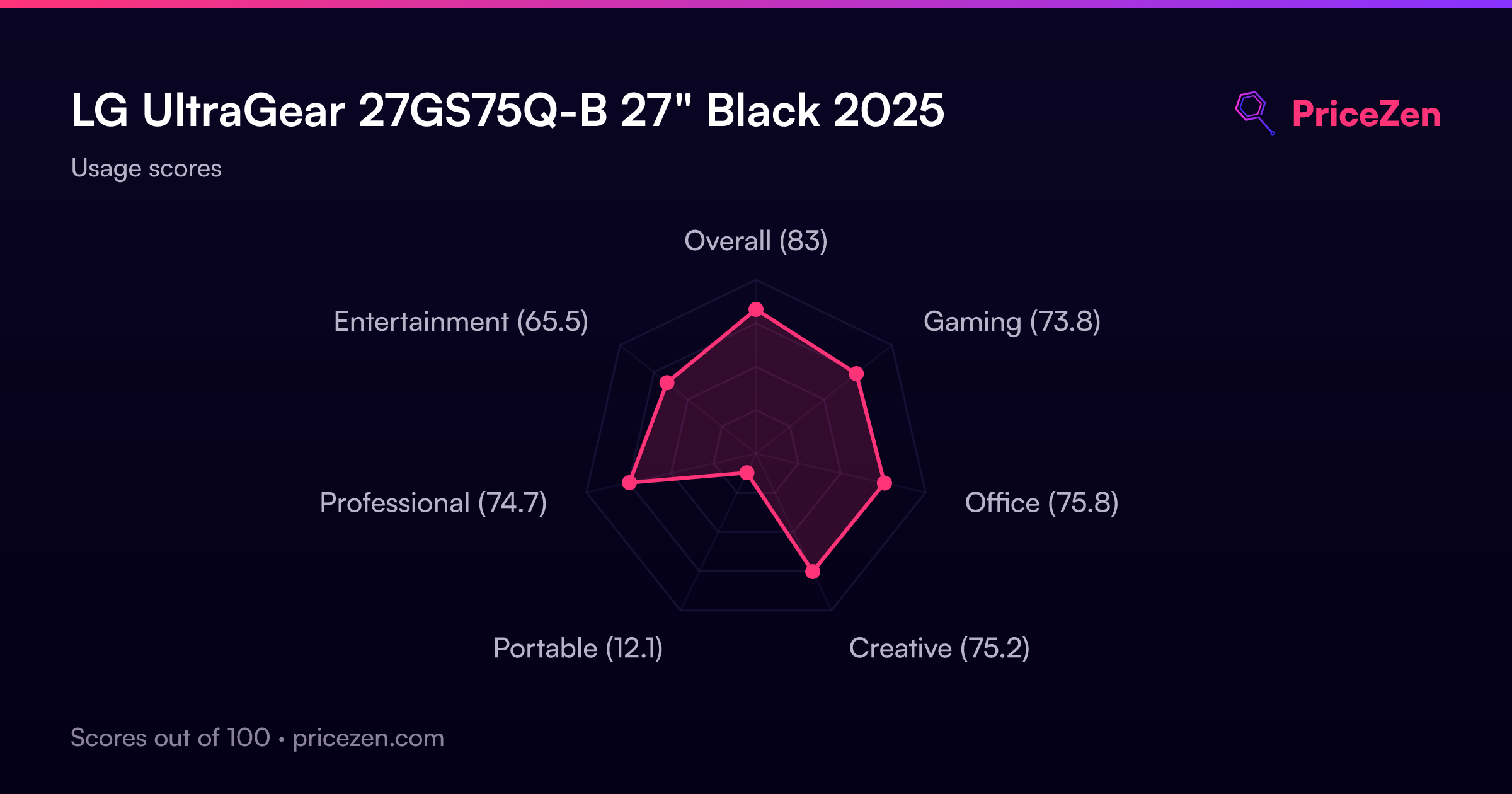
- Overall83
- Gaming73.8
- Office75.8
- Creative75.2
- Portable12.1
- Professional74.7
- Entertainment65.5