HP OmniBook 3 2025, Snapdragon X X1-26-100, 8GB, 256GB SSD, Silver
The 8-core Snapdragon X X1-26-100 processor with 45 NPU TOPS powers AI tasks and delivers up to 41 hours and 45 minutes of battery life. The 14-inch 2K OLED display with 300 nits and 1920x1200 resolution offers rich colors, while the 2.00kg build and 4 USB-A ports keep it practical. Best for students and compact-laptop buyers who need all-day productivity, document summarization, and email drafting without gaming performance.

No current retailer price
Snapshot
The 30-Second Version
An OLED screen and a 60Wh battery for USD 500, wrapped around 8GB of RAM you can never upgrade. Gorgeous, cheap, and permanently limited.
Pros & Cons
Pros
- OLED at USD 500 is absurd value, and our screen ranking backs it up 84th
- 60Wh battery plus an efficient ARM chip means real all-day unplugged use 76th
- Four USB-A ports and HDMI, so your old peripherals still work 74th
- Wi-Fi 6E and a backlit keyboard, both rare at this price 66th
Cons
- 8GB of soldered RAM, no upgrade path, ever
- 256GB SSD fills up faster than you think
- Adreno graphics are close to dead last in our rankings
- 2.00kg is heavy for a 14-inch machine
What owners think
The Word on the Street
The proof
Performance
The surprise is how lopsided the spec sheet is. That 60Wh battery paired with an ARM chip is the efficiency play, and HP claims up to 41 hours 45 minutes with fast charge hitting 50% in roughly 45 minutes. Treat the headline number as marketing math, but the underlying combination is sound. Meanwhile the memory runs at 8448 MT/s, which is quick RAM attached to a very small amount of RAM: 8GB sits in the bottom quartile of our rankings, and 256GB of storage is barely better. The CPU lands mid-pack, which is honestly fine for the price. Graphics are the disaster: 7th percentile, one of the weakest we've tracked. Our gaming score is 9.6/100. Don't.
Specifications
Full Specifications
Processor
| CPU | Snapdragon® X X1-26-100 |
| Cores | 8 |
| Frequency | 3.0 GHz |
Graphics
| GPU | Qualcomm Adreno |
| Type | Integrated |
Memory & Storage
| RAM | 8 GB |
| RAM Generation | LPDDR5X |
| Storage | 256 GB |
| Storage Type | NVMe SSD |
Display
| Size | 14" |
| Resolution | 1920x1200 (Full HD) |
| Panel | OLED |
| Brightness | 300 nits |
Connectivity
| USB Ports | 4 |
| HDMI | 1x HDMI |
| Wi-Fi | Wi-Fi 6E |
| Bluetooth | ✓ |
Physical
| Weight | 2.0 kg / 4.4 lbs |
| Battery | 60 Wh |
| OS | Windows 11 Home |
vs Competition
Cross-shop the ASUS Vivobook S 14" S5406SA-DH76 first if you want a similar-size Windows machine and can stretch the budget, because 8GB of non-upgradeable memory is the single biggest reason people outgrow this HP. The Apple MacBook Air 13.6" M4 is the answer if you're not tied to Windows and want a machine that'll still feel quick in four years. And the Lenovo ThinkPad X9-14 Gen 1 is worth a look if you type all day and care about build. Skip the MSI Creator 14" A13V and Alienware Aurora 16" entirely unless you need graphics muscle, since this HP's 7th-percentile GPU means it isn't competing in that conversation at all.
| Spec | HP OmniBook 3 | Apple MacBook Pro 14.2" M4 Pro | ASUS ROG Zephyrus 14" GA403WW-G14.R95080 | Lenovo Legion Pro 7i Gen 10 16" | Samsung Galaxy Book5 Pro 14" NP944XHA-KG3US | Dell Premium 14.5" LDA14250-7667SLV-PUS |
|---|---|---|---|---|---|---|
| CPU | Snapdragon® X X1-26-100 | Apple M4 Pro | AMD Ryzen AI 9 HX 370 | Intel Core Ultra 9 275HX | Intel Core Ultra 7 258V | Intel Core Ultra 7 255H |
| RAM (GB) | 8 | 48 | 32 | 32 | 32 | 32 |
| Storage (GB) | 256 | 4096 | 2048 | 1024 | 1024 | 1024 |
| Screen | 14" 1920x1200 | 14.2" 3024x1964 | 14" 2880x1800 | 16" 2560x1600 | 14" 2880x1800 | 14.5" 3200x2000 |
| GPU | Qualcomm Adreno | Apple (16-Core) | NVIDIA GeForce RTX 5080 | NVIDIA GeForce RTX 5070 Ti | Intel Arc Graphics 140V | Intel Arc Graphics |
| OS | Windows 11 Home | macOS | Windows 11 Home | Windows 11 Home | Windows 11 Pro | Windows 11 Home |
| Weight (kg) | 2 | 1.6 | 1.6 | 2.7 | 1.2 | 1.7 |
| Battery (Wh) | 60 | 72 | - | 99 | 63 | 62 |
| Compare | Compare | Compare | Compare | Compare |
| Product | CPU | GPU | RAM | Ports | Screen | Portability | Storage | Reliability | Social Proof | Affordability |
|---|---|---|---|---|---|---|---|---|---|---|
| HP OmniBook 3 | 52.3 | 6.6 | 24.9 | 46.5 | 75.6 | 66.1 | 24 | 33.7 | 73.8 | 84.3 |
| Apple MacBook Pro 14.2" M4 Pro Compare | 92.4 | 78.9 | 90.6 | 73.9 | 99.1 | 68.9 | 98.4 | 98.2 | 99.7 | 4.6 |
| ASUS ROG Zephyrus 14" GA403WW-G14.R95080 Compare | 91.2 | 98.3 | 90.8 | 89.5 | 96 | 73.6 | 89.7 | 60.6 | 95.6 | 6.1 |
| Lenovo Legion Pro 7i Gen 10 16" Compare | 97.2 | 96.7 | 89 | 97.3 | 95 | 9.5 | 79.3 | 81.9 | 99.7 | 5.9 |
| Samsung Galaxy Book5 Pro 14" NP944XHA-KG3US Compare | 65.8 | 69.7 | 79.5 | 83.5 | 90.4 | 89.4 | 79.3 | 81.9 | 95.6 | 21.3 |
| Dell Premium 14.5" LDA14250-7667SLV-PUS Compare | 87 | 69.7 | 89 | 66.7 | 96.8 | 61.3 | 65.4 | 33.7 | 95.6 | 14.8 |
Price
Value & Pricing
Worth it, with conditions. At USD 500 from Staples you're getting an OLED display and a big battery for less than most plastic-screened budget machines cost. Our affordability ranking puts it in the top quarter. Just go in accepting that 8GB and 256GB are permanent. If that's a dealbreaker, save up rather than buy this and regret it.
Read more
Overview
A $500 OLED laptop is a genuinely weird thing to find, and that's the whole story here. HP put a 14" 1920x1200 OLED panel in a machine that Staples currently lists at USD 500, and our screen ranking puts it well above average for the category. Everything else about this OmniBook 3 is a compromise you accept to get that panel at that price.
And the compromises are real. 8GB of soldered LPDDR5X, a 256GB SSD, and integrated Adreno graphics that land near the bottom of our GPU rankings. The Snapdragon X X1-26-100 is an 8-core chip running at 3.0GHz with a Hexagon NPU rated up to 45 TOPS, so Copilot+ features work fine, but this is a browsing-and-documents machine, not a creative workstation. Buy it knowing exactly that and you'll be happy. Buy it hoping it grows into something more and you won't.
Common Questions
Q: Can I add more RAM later?
No. The 8GB of LPDDR5X is onboard, soldered to the board. What you buy is what you keep, so decide now whether 8GB is enough for you.
Q: Will it run my games?
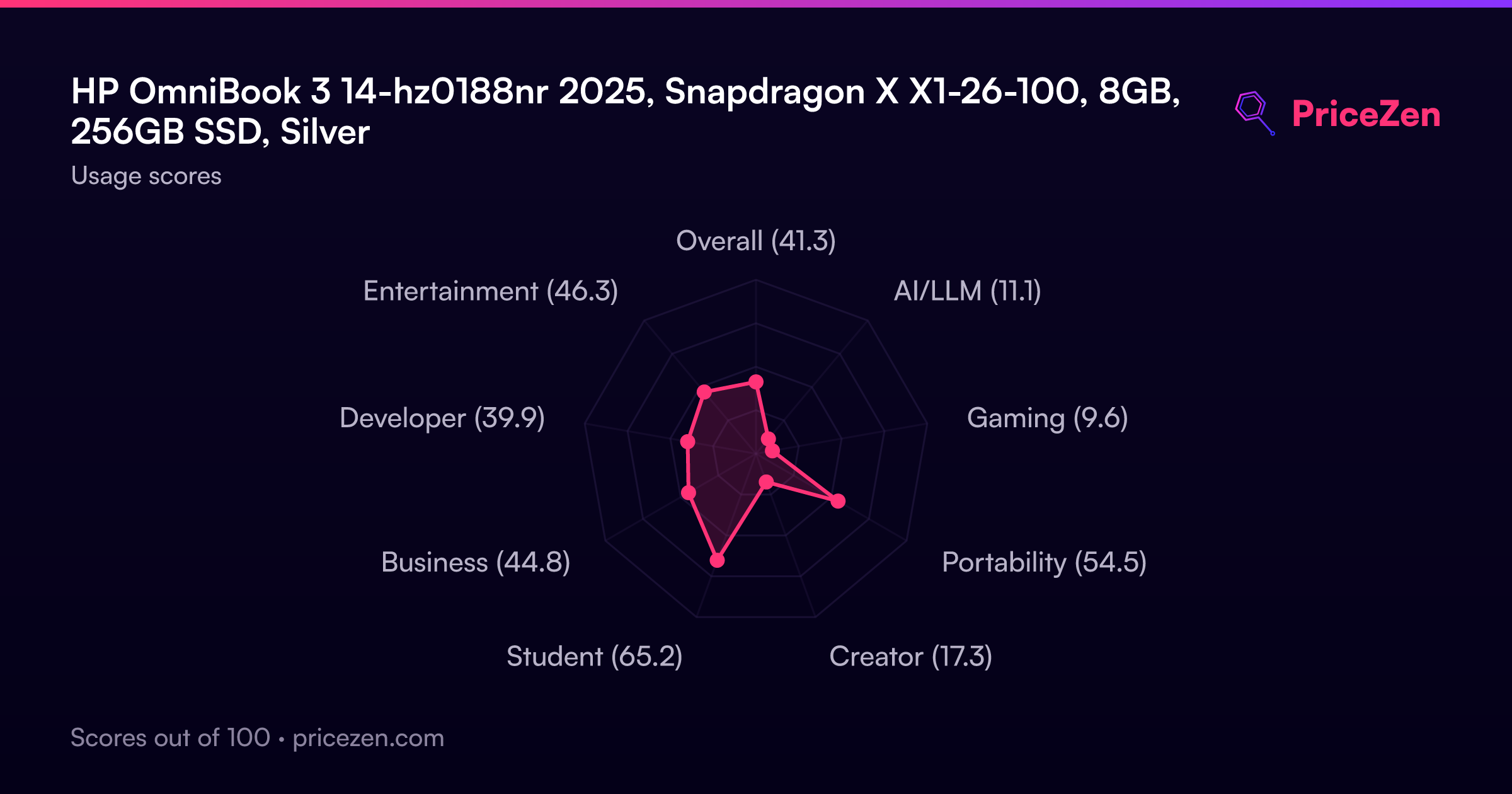
Not meaningfully. Integrated Adreno graphics rank in the 7th percentile in our data and our gaming score is 9.6/100. Cloud gaming or very old titles, that's your ceiling.
Q: Is the ARM chip a problem for normal apps?
For browsers, Office, streaming and video calls, no. The 8-core Snapdragon X handles that comfortably and the NPU supports Copilot+ features. Specialized x86 software is where you'd want to check compatibility first.
Who Should Skip This
If you need a machine for photo editing, gaming, or heavy multitasking, this isn't it. 8GB of soldered RAM and a 7th-percentile GPU are hard walls, not soft limits. Go look at the ASUS Vivobook S 14" S5406SA-DH76 or the MacBook Air 13.6" M4 instead, and spend the extra money once rather than replacing this in eighteen months.
Verdict
Buy it if you're a student or a light-use writer who wants a great screen and long battery life for USD 500. Our student score of 62.1/100 is the highest of its use-case ratings, and that tracks: documents, lectures, streaming, done. Skip it if you edit video, game, or keep 40 browser tabs open, because 8GB of soldered RAM will make you miserable and there's no fixing it later. As a cheap second machine or a first laptop for school, it's a smart buy. As your only computer for the next five years, it's a gamble.
Usage Scores
- Overall41.3
- AI/LLM11.1
- Gaming9.6
- Portability54.5
- Creator17.3
- Student65.2
- Business44.8
- Developer39.9
- Entertainment46.3