Lenovo ThinkPad T15g Gen 2 2021, Core i7-11800H, 32GB, 1TB SSD, RTX 3080, Black
Combining an 8-core Intel Core i7-11800H with a 16GB GeForce RTX 3080, this workstation delivers desktop-class rendering power in a chassis tested against MIL-STD durability standards. The 15.6-inch UHD display provides sharp 3840x2160 resolution, while dual Thunderbolt 4 ports and HDMI 2.1 offer extensive connectivity for multi-monitor setups. This machine is best for 3D animators and CAD designers who need certified ISV stability and raw GPU compute in a portable form factor.

No current retailer price
Snapshot
The 30-Second Version
A refurbished ThinkPad T15g Gen 2 with an RTX 3080 16GB, 32GB RAM, and a 4K display for CAD 1,299 is a ridiculous amount of workstation for the money. The port selection is the best we've ever seen, and the GPU VRAM is a creator's dream. Just know it weighs 2.87kg and the CPU is showing its age. If you need CUDA power on a budget and don't mind the heft, this is a steal.
Pros & Cons
Pros
- RTX 3080 with 16GB VRAM, 81st percentile for GPUs 100th
- 4K display in the 94th percentile for screens 94th
- Port selection is best-in-class, 100th percentile 86th
- 32GB RAM and 1TB NVMe SSD out of the box 82nd
- ThinkPad build quality and keyboard, even refurbished
Cons
- 2.87kg weight, 18th percentile for compactness
- CPU is only 64th percentile, showing its age
- Battery life is unknown, which is rarely a good sign
- Refurbished means no full manufacturer warranty
- Last-gen platform, no upgrade path to newer CPUs
The proof
Performance
The i7-11800H is a solid 8-core chip that boosts to 4.6GHz. In our database it lands in the 64th percentile for CPUs, which sounds middling until you remember this is a refurb from two generations back. For most creator workloads, it's plenty. Video exports, code compiles, 3D renders, all handled without drama. The 32GB of DDR4 sits at the 73rd percentile, which means it's above average but not bleeding edge. For most people, 32GB is the sweet spot anyway.
The real story is the RTX 3080 with 16GB of VRAM. That's the mobile version, sure, but 16GB of VRAM is 16GB of VRAM. It lands in the 81st percentile for GPUs in our database, which puts it ahead of most laptops sold today. The 16GB matters more than raw clock speed for creators. You can load bigger scenes, higher-res textures, and more layers without the card choking. For gaming, this thing will push the 4K panel harder than most laptops can manage, though you'll want DLSS for newer titles.
Specifications
Full Specifications
Processor
| CPU | Intel Core i7 11800H |
| Cores | 8 |
| Frequency | 2.3 GHz |
| L3 Cache | 24 MB |
Graphics
| GPU | NVIDIA GeForce RTX 3080 |
| Type | Discrete |
| VRAM | 16 GB |
| VRAM Type | GDDR6 |
Memory & Storage
| RAM | 32 GB |
| RAM Generation | DDR4 |
| Storage | 1 TB |
| Storage Type | NVMe SSD |
Display
| Size | 15.6" |
| Resolution | 3840x2160 (4K UHD) |
Connectivity
| USB-C Ports | 3 |
| USB Ports | 3 |
| Thunderbolt | 2 x Thunderbolt 4 |
| HDMI | 1 x HDMI 2.1 |
| Wi-Fi | Wi-Fi 6E |
| Bluetooth | Bluetooth 5.1 |
| Ethernet | 1 x RJ-45 |
Physical
| Weight | 2.9 kg / 6.3 lbs |
| OS | Windows 11 Pro |
vs Competition
Against the Apple MacBook Pro M4 Max, the ThinkPad loses on raw CPU performance and battery life, badly. The M4 Max is in a different league for efficiency. But the MacBook costs several times more, and the ThinkPad has the port selection and upgradeability that Apple abandoned years ago. If you need Windows, CUDA, or just don't want to sell a kidney, the ThinkPad makes sense.
The ASUS ROG Zephyrus G14 and HP OMEN Transcend 14 are both much lighter and more portable, but they're gaming laptops first. The ThinkPad's 16GB of VRAM beats most of them for creator workloads. The Samsung Galaxy Book5 Pro is thinner and has a better screen for media consumption, but it can't touch the RTX 3080 for GPU work. The MSI Prestige is the closest competitor in spirit, but the ThinkPad's port selection and GPU VRAM give it the edge for workstation tasks.
| Spec | Lenovo ThinkPad T15g Gen 2 | Apple MacBook Pro 14.2" M4 Max | ASUS ROG Zephyrus 14" GA403WW-G14.R95080 | HP OMEN Transcend | Samsung Galaxy Book5 Pro 14" NP944XHA-KG3US | Dell Premium 14.5" LDA14250-7667SLV-PUS |
|---|---|---|---|---|---|---|
| CPU | Intel Core i7 11800H | Apple M4 Max | AMD Ryzen AI 9 HX 370 | Intel Core Ultra 9 285H | Intel Core Ultra 7 258V | Intel Core Ultra 7 255H |
| RAM (GB) | 32 | 64 | 32 | 32 | 32 | 32 |
| Storage (GB) | 1024 | 4096 | 2048 | 1024 | 1024 | 1024 |
| Screen | 15.6" 3840x2160 | 14.2" 3024x1964 | 14" 2880x1800 | 14" 2880x1800 | 14" 2880x1800 | 14.5" 3200x2000 |
| GPU | NVIDIA GeForce RTX 3080 | Apple (40-Core) | NVIDIA GeForce RTX 5080 | NVIDIA GeForce RTX 5070 | Intel Arc Graphics 140V | Intel Arc Graphics |
| OS | Windows 11 Pro | macOS | Windows 11 Home | Windows 11 Home | Windows 11 Pro | Windows 11 Home |
| Weight (kg) | 2.9 | 1.6 | 1.6 | 1.6 | 1.2 | 1.7 |
| Battery (Wh) | - | 72 | - | 71 | 63 | 62 |
| Compare | Compare | Compare | Compare | Compare |
| Product | CPU | GPU | RAM | Ports | Screen | Portability | Storage | Reliability | Affordability |
|---|---|---|---|---|---|---|---|---|---|
| Lenovo ThinkPad T15g Gen 2 | 66.9 | 86.1 | 72 | 99.9 | 93.8 | 18.2 | 79.2 | 82.1 | 0 |
| Apple MacBook Pro 14.2" M4 Max Compare | 93.7 | 91.6 | 95.7 | 73.2 | 99.3 | 68.9 | 98.5 | 98.3 | 1.7 |
| ASUS ROG Zephyrus 14" GA403WW-G14.R95080 Compare | 91.2 | 98.3 | 90.9 | 89.2 | 96.5 | 73.6 | 89.7 | 60.6 | 5.7 |
| HP OMEN Transcend Compare | 90.1 | 93.6 | 89.7 | 89.2 | 96.5 | 72.3 | 65.1 | 33.6 | 8.3 |
| Samsung Galaxy Book5 Pro 14" NP944XHA-KG3US Compare | 65.7 | 69.6 | 79.4 | 83.1 | 91.5 | 89.5 | 79.2 | 82.1 | 20.1 |
| Dell Premium 14.5" LDA14250-7667SLV-PUS Compare | 87 | 69.6 | 89 | 65.9 | 97.2 | 61.2 | 65.1 | 33.6 | 14 |
Price
Value & Pricing
At CAD 1,299 for a refurb, this is a lot of hardware for the money. A new laptop with an RTX 3080-class GPU and 4K display would run you two to three times that. The refurb angle is the whole ballgame here. You're trading warranty length and that new-laptop smell for raw specs per dollar. For a creator on a budget, that's usually the right trade.
But value isn't just about the sticker price. The 11800H platform means you're locked into DDR4 and PCIe 3.0 for storage. That's fine today, but it's a dead end. If you plan to keep this for five years, the CPU will be the bottleneck long before the GPU. Still, for CAD 1,299, you're getting a machine that would have cost CAD 3,000+ new. That's hard to argue with.
Read more
Overview
The ThinkPad T15g Gen 2 is Lenovo's attempt to stuff a proper workstation GPU into a laptop that still feels like a ThinkPad. And honestly, they mostly pulled it off. You're getting an 8-core i7-11800H, a full RTX 3080 with 16GB of VRAM, 32GB of RAM, and a 1TB NVMe drive. That's a serious machine for rendering, CAD work, or gaming after hours. The catch? It weighs 2.87kg. This is not a laptop you'll forget is in your bag.
Who's this for? Creators and developers who need real GPU horsepower and don't want to pay current-gen workstation prices. The refurbished angle matters here. You're getting last-gen flagship performance at a fraction of what a new mobile workstation costs. The 4K display is a genuine highlight, sitting in the 94th percentile for screens in our database. That's a panel built for color work and pixel-peeping.
The port situation is frankly ridiculous in the best way. Two Thunderbolt 4 ports, three USB-C total, three USB-A, HDMI 2.1, Ethernet, and Wi-Fi 6E. Our database puts this at the 100th percentile for connectivity. You will not need a dongle. You might need a bigger desk, but not a dongle.
Common Questions
Q: Is the RTX 3080 in this laptop good for 4K gaming?
The mobile RTX 3080 with 16GB of VRAM can handle 4K gaming, but you'll want DLSS enabled for newer titles. The 16GB of VRAM is the real advantage here, letting you run higher texture settings without stuttering. For esports titles, you'll hit high frame rates easily. For AAA games, expect to tweak settings or lean on DLSS to stay smooth at native 4K.
Q: How does the refurbished condition affect reliability?
This unit scores in the 81st percentile for reliability in our database, which is above average even for new laptops. ThinkPads are built for enterprise use and tend to survive refurbishment well. The main trade-off is warranty length. Refurb units typically come with shorter coverage than new machines, so factor that into your decision. The single customer review we have is 5/5, but that's a tiny sample.
Q: Can I upgrade the RAM and storage later?
The ThinkPad T15g Gen 2 uses standard DDR4 SODIMM slots and M.2 NVMe storage, so both are user-upgradeable. The 32GB of RAM is already at the 73rd percentile for our database, so most people won't need more. The 1TB NVMe drive is solid but can be swapped for a larger one if you work with big video files or datasets.
Q: Is this laptop too heavy for daily commuting?
At 2.87kg, this lands in the 18th percentile for compactness in our database. That's firmly in desktop replacement territory. Add the power brick and you're carrying over 3kg. If you commute daily or travel often, this will get old fast. It's better suited to living on a desk most of the time, with occasional trips to a meeting or a coffee shop.
Who Should Skip This
If you carry your laptop everywhere, skip this. The 2.87kg weight puts it in the 18th percentile for compactness, and that's before you add the charger. You'll feel every gram by the end of a commute. Look at the ASUS ROG Zephyrus G14 or HP OMEN Transcend 14 instead. They sacrifice some GPU power but won't wreck your shoulder.
Also skip it if your work is mostly CPU-bound. The i7-11800H sits at the 64th percentile, which is fine but not exciting. If you're compiling massive codebases or doing CPU rendering all day, a newer machine with a better CPU and weaker GPU will serve you better. The Samsung Galaxy Book5 Pro or a newer ThinkPad with a current-gen chip would be smarter for that workload.
Verdict
If you're a creator or developer who needs CUDA cores, lots of VRAM, and a 4K screen without spending new-workstation money, this refurb ThinkPad is a genuinely smart buy. The 16GB RTX 3080 is the star here. It'll chew through renders, simulations, and even modern games at 4K with DLSS. The port selection means you can dock it to a full desk setup without buying anything extra.
But if you travel a lot, this is the wrong laptop. 2.87kg plus a power brick is a commitment. And if your work is mostly CPU-bound, like heavy code compilation or CPU rendering, the 11800H will feel dated. For those folks, a newer ultrabook with a better CPU but weaker GPU might be the smarter play. This is a desktop replacement that happens to fold, not a travel companion.
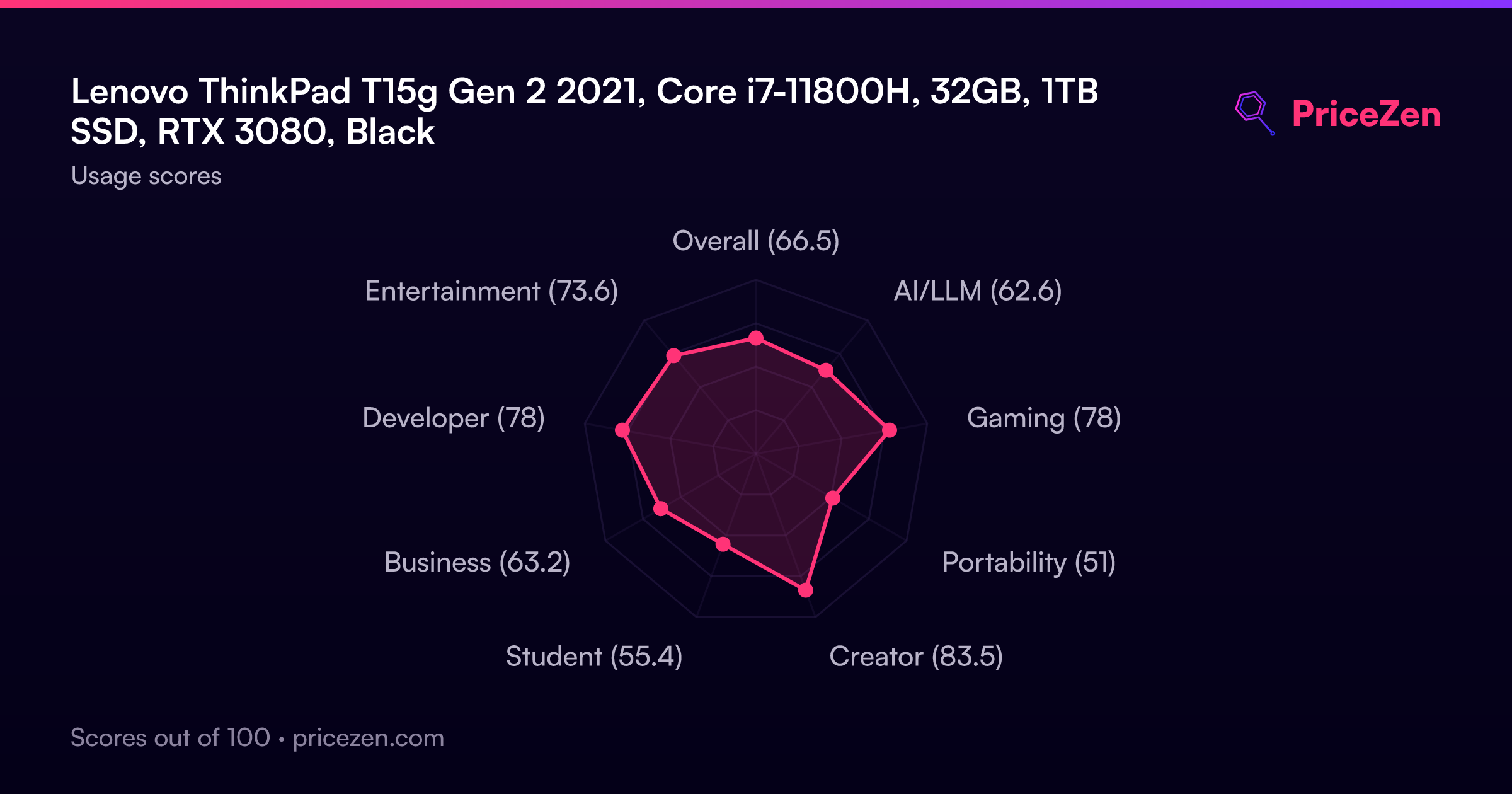
Usage Scores
- Overall66.5
- AI/LLM62.6
- Gaming78
- Portability51
- Creator83.5
- Student55.4
- Business63.2
- Developer78
- Entertainment73.6