Gigabyte GeForce RTX 5060 Ti Gaming 8GB GDDR7 Black

Fast GDDR7 memory on board verified Nov 29
58/100 overall score
- GPU
- GeForce RTX 5060 Ti
- VRAM
- 8GB GDDR7
- Boost clock
- 2647 MHz
- TDP
- 180 W
- Memory bus
- 128 bit
- Ray tracing
- Yes
- Class
- consumer
Snapshot
The 30-Second Version
The Gigabyte RTX 5060 Ti Gaming 8GB is an efficient, compact 1080p card with standout connectivity and a modest 180W power draw. Its top-14% efficiency ranking is the headline strength, but 8GB VRAM and a CAD 1,400 price tag hold it back from being a clear value pick. Best suited for small-form-factor builds where power and space matter more than raw horsepower.
Pros & Cons
Pros
- Strong efficiency at top 14%, great performance-per-watt for a 180W card 86th
- Modern connectivity with 3x DP 2.1b and 1x HDMI 2.1b, well above average at 81st percentile 81st
- Compact 281mm length fits most mid-tower cases without clearance issues 72nd
- GDDR7 memory delivers 448 GB/s bandwidth despite the 128-bit bus
- PCIe 5.0 x8 interface keeps it compatible with current-gen platforms
Cons
- 8GB VRAM is a real limitation for 1440p and future titles, ranking only 46th percentile
- AI and LLM workloads are a weak spot at 34.6/100, don't buy this for machine learning
- Affordability scores just 42nd percentile, CAD 1,400 isn't cheap for a 5060 Ti 8GB
- 128-bit memory bus will bottleneck at higher resolutions even with GDDR7 speed
- Feature set ranks below average at 43rd percentile compared to the broader GPU market
What owners think
The Word on the Street
- Owners tend to appreciate the compact size and low power consumption, with multiple buyers noting it fits easily into smaller cases and runs quietly thanks to the triple-fan design.
- A recurring theme is that 1080p gaming performance meets expectations, but several owners express concern about the 8GB VRAM feeling limiting in newer titles with high-resolution textures.
- A common complaint centers on the price-to-performance ratio, with some buyers feeling that CAD 1,400 is steep for a card that struggles beyond 1080p and has limited VRAM headroom.
The proof
Performance
The PassMark G3D benchmark score of 22099 places this card in a solid middle-of-the-pack position for rasterization (55th percentile) and compute (55th percentile). In practical terms, that translates to smooth 1080p gaming in most titles at high settings. The 23.7 TFLOPS of FP32 compute is respectable for this class, and the 448 GB/s memory bandwidth from GDDR7 helps offset the narrow 128-bit bus. You'll get playable frame rates in demanding games at 1080p, but pushing to 1440p with maxed settings will start exposing the VRAM ceiling.
Ray tracing performance sits at the 53rd percentile, basically average for the GPU category as a whole. The 36 RT cores can handle ray-traced effects, but don't expect to crank every RT setting to ultra without leaning on upscaling. Where this card genuinely shines is efficiency: at 180W TDP with that top-14% efficiency ranking, it delivers more frames per watt than most competitors. The thermal score of 72nd percentile suggests the triple-fan solution does a decent job keeping things cool under load, though it's not class-leading.
Specifications
Full Specifications
Chipset
| GPU Chipset | GeForce RTX 5060 Ti |
| Brand | NVIDIA |
| Architecture | Blackwell |
| Class | consumer |
| Process | 5 |
Memory
| VRAM | 8 GB |
| Memory Type | GDDR7 |
| Memory Bus | 128 |
| Bandwidth | 448 |
Compute
| CUDA Cores | 4608 |
| Tensor Cores | 144 |
| RT Cores | 36 |
| Base Clock | 2647 |
| Boost Clock | 2647 |
| FP16 TFLOPS | 23.7 |
| FP32 TFLOPS | 23.7 |
Performance
| PassMark G3D | 22099 |
| GPU Compute | 11371 |
Power & Cooling
| TDP | 180 |
| Recommended PSU | 650 |
| Power Connectors | 8-Pin |
| Cooler | Triple Fan |
| Fans | 3 |
Connectivity
| Interface | PCI Express 5.0 x8 |
| DisplayPort | 3 |
| HDMI | 1 |
| Max Displays | 4 |
| Max Resolution | 7680 x 4320 |
Physical
| Length | 281 |
| Slot Width | 2 |
| Form Factor | ATX |
Features
| Ray Tracing | Yes |
| VR Ready | Yes |
| DirectX | 12 Ultimate |
vs Competition
Stack this up against the ASUS GeForce RTX 5080 PRIME EVO OC or the ZOTAC GeForce RTX 5080 APOCALYPSE and you're looking at a completely different performance tier. Those 5080-class cards will demolish this 5060 Ti in rasterization, ray tracing, and VRAM capacity. But they'll also draw significantly more power and cost substantially more. The Gigabyte 5060 Ti's advantage is its 180W TDP and compact form factor. If your PSU is modest or your case is tight, the 5080 cards simply aren't drop-in alternatives.
The MSI GeForce RTX 5070 Ti Ventus 3X OC is the more natural cross-shop. It sits one tier up and would offer noticeably better headroom for 1440p gaming and heavier workloads. The Sapphire Radeon RX 7900 XTX NITRO+ is another competitor worth considering if you prioritize VRAM capacity and raw rasterization over ray tracing and efficiency. Against all of these, the Gigabyte 5060 Ti wins on power draw and physical size but gives ground everywhere else. Our total score of 57.1/100 reflects a card that's competent but not exceptional when measured against the full GPU market including higher-tier options.
| Spec | Gigabyte GeForce RTX 5060 Ti Gaming | ASUS GeForce RTX 5080 PRIME EVO OC | MSI GeForce RTX 5070 Ti Ventus 3X OC | ZOTAC GeForce RTX 5080 APOCALYPSE | PNY GeForce RTX 5080 ARGB OC | Sapphire Radeon RX 7900 XTX NITRO+ |
|---|---|---|---|---|---|---|
| Chipset | GeForce RTX 5060 Ti | GeForce RTX 5080 | GeForce RTX 5070 Ti | GeForce RTX 5080 | GeForce RTX 5080 | Radeon RX 7900 XTX |
| Vram | 8GB GDDR7 | 16GB GDDR7 | 16GB GDDR7 | 16GB GDDR7 | 16GB GDDR7 | 24GB GDDR6 |
| Boost Clock Mhz | 2647 | 2685 | 2482 | 2730 | 2620 | 2680 |
| Tdp W | 180 | 360 | 300 | 360 | 360 | 339 |
| Memory Bus Bits | 128 | 256 | 256 | 256 | 256 | 384 |
| Ray Tracing | Yes | Yes | Yes | Yes | Yes | Yes |
| GPU Class | consumer | consumer | consumer | consumer | consumer | consumer |
| Compare | Compare | Compare | Compare | Compare |
| Product | AI | Rt | Vram | Raster | Compute | Feature | Thermal | Efficiency | Connectivity | Affordability |
|---|---|---|---|---|---|---|---|---|---|---|
| Gigabyte GeForce RTX 5060 Ti Gaming | 44.4 | 53.2 | 46.1 | 55.2 | 55.1 | 43.1 | 71.8 | 85.6 | 81.3 | 42.4 |
| ASUS GeForce RTX 5080 PRIME EVO OC Compare | 85.5 | 97.7 | 89.1 | 94.5 | 93.3 | 88.4 | 91.8 | 56.6 | 94.2 | 19.4 |
| MSI GeForce RTX 5070 Ti Ventus 3X OC Compare | 78.9 | 92.4 | 85.9 | 88.9 | 87.8 | 95.7 | 91.8 | 71.6 | 94.2 | 21.2 |
| ZOTAC GeForce RTX 5080 APOCALYPSE Compare | 85.5 | 97.7 | 89.1 | 94.5 | 93.3 | 95.7 | 91.8 | 56.6 | 94.2 | 23.7 |
| PNY GeForce RTX 5080 ARGB OC Compare | 85.5 | 97.7 | 89.1 | 94.5 | 93.3 | 95.7 | 91.8 | 56.6 | 94.2 | 16.1 |
| Sapphire Radeon RX 7900 XTX NITRO+ Compare | 95.3 | 96.4 | 92 | 83.4 | 95.6 | 95.7 | 91.8 | 51.3 | 98.8 | 13.6 |
Price
Value & Pricing
At CAD 1,400 from Newegg (the only listing we're currently tracking), this card's affordability ranks at the 42nd percentile. That's below the midpoint, meaning you're paying a bit of a premium relative to what the broader GPU market offers at similar performance levels. The budget score of 71.1/100 tells a slightly friendlier story when you factor in the efficiency and modern feature set, but it's hard to call this a bargain.
The value proposition hinges on what you prioritize. If you want a low-power, compact card with excellent display outputs and don't plan to push beyond 1080p, the price is defensible. But if raw performance per dollar is your main metric, the 55th-percentile rasterization ranking at this price point means there are likely better deals elsewhere in the market. We'd keep an eye on price tracking here because a drop of even CAD 100-150 would shift the value equation significantly.
Read more
Overview
The Gigabyte GeForce RTX 5060 Ti Gaming GV-N506TGAMING-8GD is a Blackwell-based card built on a 5nm process, packing 4608 CUDA cores with a boost clock of 2647 MHz. It sits squarely in the mid-range GPU space, targeting gamers who want solid 1080p performance without spending flagship money. The triple-fan cooler and compact 281mm length make it a practical fit for most mid-tower cases, and the 180W TDP means you won't need to overhaul your power supply.
This card is aimed at budget-conscious builders who still want access to ray tracing and modern display outputs. With three DisplayPort 2.1b ports and one HDMI 2.1b, connectivity is genuinely strong for this tier. The PCIe 5.0 x8 interface keeps it current with newer motherboards, though the x8 lane width (rather than x16) is worth noting if you're pairing it with an older PCIe 3.0 board where bandwidth gets halved.
What makes this particular Gigabyte variant interesting is the balance it strikes between efficiency and raw output. Our ranking puts its efficiency in the top 14% of GPUs, meaning it punches well above its weight in performance-per-watt compared to the broader GPU market. But that efficiency comes with trade-offs: 8GB of VRAM on a 128-bit bus is the main constraint, and it shows up clearly in our scoring where VRAM lands at about average (46th percentile).
Common Questions
Q: Is 8GB of VRAM enough for gaming in 2026?
For 1080p gaming at high settings, 8GB is still workable in most current titles. But our VRAM ranking puts this card at only the 46th percentile, and games with heavy texture packs or ray tracing can push past that limit. If you're planning to keep this card for several years or want to game at 1440p, 8GB is going to feel increasingly tight.
Q: Will this card work in my older PCIe 3.0 motherboard?
Yes, PCIe is backward compatible so it'll physically work. But since this card uses a PCIe 5.0 x8 interface, running it on PCIe 3.0 effectively halves the available bandwidth compared to PCIe 4.0 x8. For most 1080p gaming scenarios the impact is small, but it's something to be aware of if you're not upgrading your platform.
Q: How does the 180W TDP affect my PSU choice?
Gigabyte recommends a 650W PSU, which is generous headroom for a 180W card. In practice, if your system isn't packed with power-hungry components, a quality 550W unit would likely suffice. The single 8-pin connector keeps cabling simple and avoids the need for adapter dongles.
Q: Can I use this for AI or machine learning workloads?
We'd steer you away from this card for AI work. Our scoring puts its AI/LLM capability at just 34.6/100, and the 8GB VRAM is a hard ceiling for loading larger models. The 144 Tensor cores are present but the memory constraint makes this impractical for anything beyond toy experiments.
Who Should Skip This
Skip this card if you're targeting 1440p or 4K gaming, doing any serious AI or machine learning work, or if maximum performance per dollar is your top priority. The 8GB VRAM and 128-bit bus are genuine bottlenecks at higher resolutions, and the 42nd-percentile affordability ranking means you're not getting a steal. The MSI GeForce RTX 5070 Ti Ventus 3X OC would give you more breathing room for resolution-heavy gaming, while the Sapphire Radeon RX 7900 XTX NITRO+ offers substantially more VRAM if creative or compute workloads are on your agenda.
Also skip it if you already have a capable GPU from the previous generation that handles your target resolution fine. The generational uplift here is modest in rasterization (55th percentile), and spending CAD 1,400 for a sidegrade in raw gaming performance doesn't make financial sense unless you specifically need the efficiency gains or the newer display outputs.
Verdict
If you're building a compact, power-efficient 1080p gaming rig and you want modern display outputs without breaking the bank on a PSU upgrade, this card makes sense. The 180W TDP, triple-fan cooling, and 281mm length are a genuinely practical combination. It'll handle current games at 1080p well, and the efficiency ranking means your electricity bill stays reasonable.
But if you're planning to game at 1440p, do any AI or creative work that eats VRAM, or you simply want the best bang for your buck regardless of power constraints, look elsewhere. The 8GB VRAM ceiling is going to feel tight sooner rather than later, and the CAD 1,400 price doesn't scream value. The MSI 5070 Ti Ventus 3X OC or stepping up to a 5080-class card would serve those use cases better, assuming your budget and case can accommodate them.
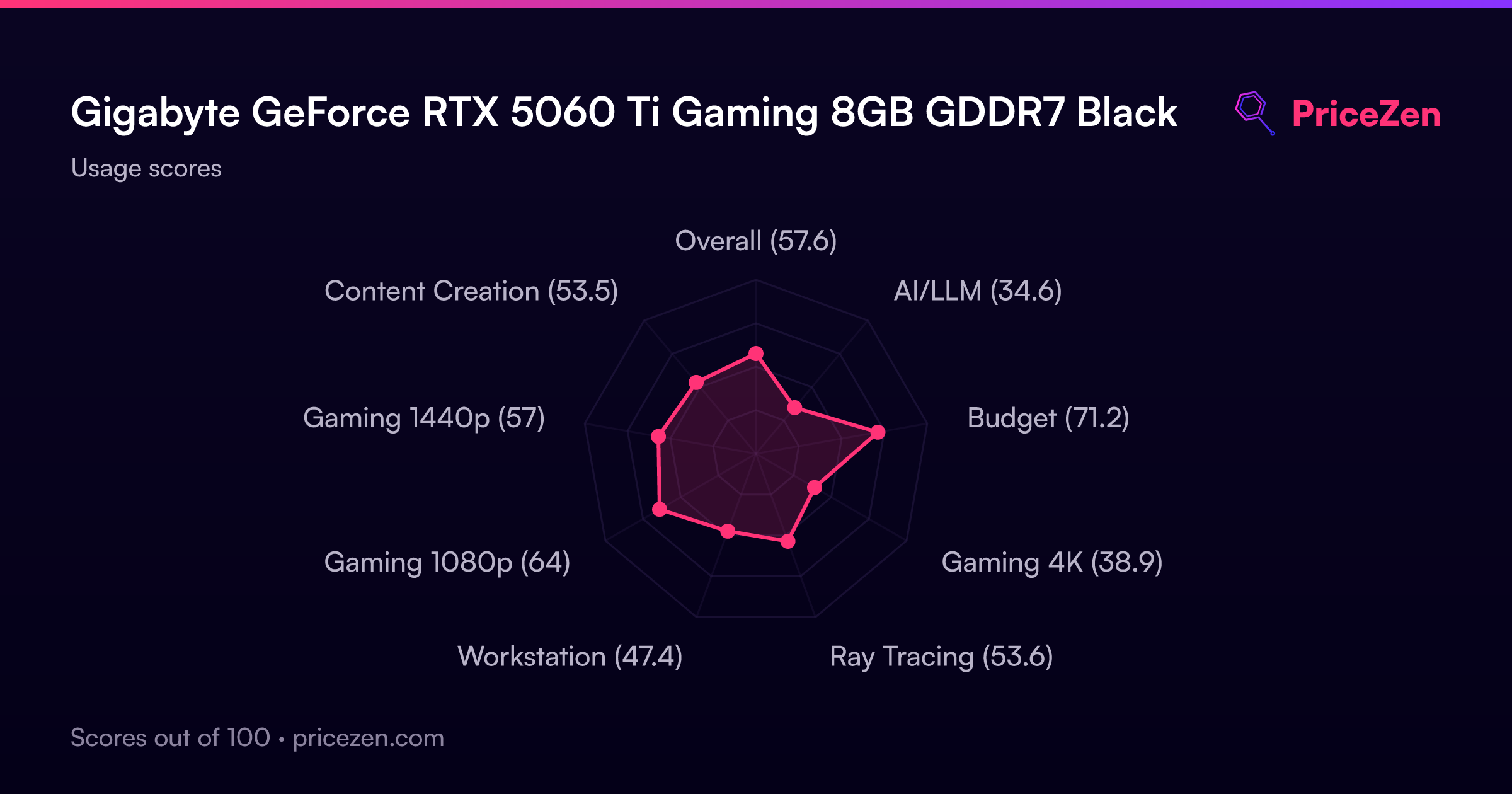
Usage Scores
- Overall57.6
- AI/LLM34.6
- Budget71.2
- Gaming 4K38.9
- Ray Tracing53.5
- Workstation47.4
- Gaming 1080p63.9
- Gaming 1440p56.9
- Content Creation53.4