HP Z2 G1i, Core Ultra 5 235, 32GB, 1TB SSD, Quadro RTX A1000, Black

An 8 GB graphics card for gaming verified Nov 28
72/100 overall score
- CPU
- Intel Core Ultra 5 235
- RAM
- 32 GB
- Storage
- 1 TB
- GPU
- NVIDIA Quadro RTX A1000
- Form factor
- mid-tower
- Psu
- 700 W
- OS
- Windows 11 Pro
Compare prices at 1 store
Cheapest first. New, refurbished and bundled offers are kept apart, so you compare like with like.
| Store | Sold by | Colour and condition | Price | vs lowest | Last checked | Link |
|---|---|---|---|---|---|---|
| New1 offerSingle unit | ||||||
| Out of stock when last checked | ||||||
| Amazon | Not known | Not listed | No price | Out of stock | Not known | Go to store |
 Source: PriceZen
A price counts as current when we checked it in the last 7 days. “Marketplace seller” means a third-party seller on that store, not the store itself.











Snapshot
The 30-Second Version
The HP Z2 G1i is a solid workstation tower with a strong 14-core CPU, fast 32GB of DDR5, and excellent port selection. The RTX A1000 GPU is mid-pack, so heavy GPU rendering will feel slow. Worth it if you need certified reliability and expandability, but you're paying workstation prices for it.
Pros & Cons
Pros
- Excellent port selection with 9 USB-A, 2 USB-C, and 4 Mini DisplayPort outputs 92nd
- 32GB of fast DDR5 RAM, upgradeable to 256GB 82nd
- 14-core Intel CPU handles multi-threaded pro apps well 76th
- Workstation-class build with certified NVIDIA drivers 70th
Cons
- RTX A1000 is mid-pack for GPU performance
- Not compact at all, this is a big heavy tower
- 1TB storage fills up fast for pro workloads
- No price listed, but workstation hardware is rarely cheap
The proof
Performance
The Core Ultra 5 235 lands in the 78th percentile for CPUs in our database, which means it's well above average but not the absolute top of the charts. For most professional workloads, that's plenty. The 32GB of DDR5 at 5600 MHz is a standout, ranking in the 83rd percentile, and you can push it to 256GB later if your projects get massive. The RTX A1000 is a solid mid-pack performer at the 64th percentile. It's not going to crush heavy GPU rendering like a high-end RTX 4090, but it's certified for pro apps and handles CAD, simulation, and moderate rendering fine. The 1TB NVMe SSD is about average for this class, sitting at the 65th percentile. Fast enough, but you might want a second drive for big project files.
Specifications
Full Specifications
Processor
| CPU | Intel Core Ultra 5 235 |
| Cores | 14 |
| Frequency | 3.4 GHz |
| L3 Cache | 24 MB |
Graphics
| GPU | NVIDIA Quadro RTX A1000 |
| Type | Discrete |
| VRAM | 8 GB |
Memory & Storage
| RAM | 32 GB |
| RAM Generation | DDR5 |
| Storage | 1 TB |
| Storage Type | NVMe SSD |
Build
| Form Factor | mid-tower |
| PSU | 700 |
| Weight | 8.6 kg / 19.0 lbs |
Connectivity
| USB-C Ports | 2 |
| USB Ports | 9 |
| HDMI | 4x Mini DisplayPort 1.4a Output |
| DisplayPort | 4x Mini DisplayPort 1.4a Output |
| Bluetooth | No |
| Ethernet | Gigabit Ethernet |
System
| OS | Windows 11 Pro |
vs Competition
Stacked against the competition, the Z2 G1i is a sensible but not flashy choice. The Apple Mac Studio M4 Max will absolutely demolish it in GPU-heavy tasks and runs quieter, but you're locked into macOS and Apple's upgrade path. The Lenovo Legion 90Y6003JUS is more of a gaming-leaning machine with stronger consumer GPU options, but it lacks the workstation certification and pro driver support. The Dell Tower ECT1250 is the closest direct rival, and honestly they trade blows depending on config. The MSI MEG Vision X AI is a different beast entirely, aimed at AI workloads with a much higher ceiling and price tag. The CLX SET is a boutique build that'll give you more raw performance per dollar but without the enterprise support story.
| Spec | HP Z2 G1i | Apple Mac Studio M5 Max | Lenovo T Series Towers Legion Tower 5a Gen 10 | Dell Desktop ECT1250 | ASUS ROG GM700 | MSI Aegis ZS2 A9NVP-1407US |
|---|---|---|---|---|---|---|
| CPU | Intel Core Ultra 5 235 | Apple M5 Max | AMD Ryzen 7 7800X3D | Intel Core Ultra 7 265 | AMD Ryzen 7 9800X3D | AMD Ryzen 9 9900X |
| RAM (GB) | 32 | 48 | 32 | 32 | 32 | 32 |
| Storage (GB) | 1024 | 1024 | 4096 | 2048 | 2048 | 2048 |
| GPU | NVIDIA Quadro RTX A1000 | Apple (40-Core) | NVIDIA GeForce RTX 5070 Ti | Intel UHD Graphics | NVIDIA GeForce RTX 5070 Ti | NVIDIA GeForce RTX 5070 |
| Form Factor | mid-tower | mini | mid-tower | sff | mid-tower | mid-tower |
| Psu W | 700 | 480 | 850 | 180 | 850 | 750 |
| OS | Windows 11 Pro | macOS | Windows 11 Home | Windows 11 Home | Windows 11 Home | Windows 11 Home |
| Compare | Compare | Compare | Compare | Compare |
| Product | CPU | GPU | RAM | Ports | Storage | Reliability |
|---|---|---|---|---|---|---|
| HP Z2 G1i | 76.3 | 68.8 | 81.6 | 92.1 | 68.6 | 70.2 |
| Apple Mac Studio M5 Max Compare | 95.7 | 84.9 | 95 | 89.1 | 68.6 | 99.3 |
| Lenovo T Series Towers Legion Tower 5a Gen 10 Compare | 73.1 | 94.6 | 78 | 88.5 | 98.1 | 70.2 |
| Dell Desktop ECT1250 Compare | 88 | 60 | 81.6 | 75 | 82.5 | 70.2 |
| ASUS ROG GM700 Compare | 80.3 | 94.6 | 81.6 | 96.1 | 90 | 37.7 |
| MSI Aegis ZS2 A9NVP-1407US Compare | 92.3 | 90.7 | 87 | 90.4 | 82.5 | 37.7 |
Price
Value & Pricing
We don't have a confirmed price for this exact config, which makes value tricky to judge. The USD listing we saw was around $3,446, and that's real workstation money. For that kind of cash, you're paying for reliability, certified drivers, and HP's enterprise support more than raw performance. If you're a solo freelancer, you could build something faster for less. But if your company needs a stable, warrantied machine that won't randomly blue-screen during a client deadline, that's what this buys you.
Read more
Overview
The HP Z2 G1i is a proper workstation tower, not some slimmed-down office box. It's built around Intel's Core Ultra 5 235, a 14-core chip that handles multi-threaded modeling and rendering without breaking a sweat. HP paired it with 32GB of fast DDR5 and an NVIDIA RTX A1000 with 8GB of VRAM, so it's aimed squarely at engineers, architects, and content pros who need certified drivers and reliable performance more than flashy RGB.
This thing is heavy at 8.6kg and it's not trying to be compact. That's fine. It's a tower that sits under a desk and works. The port selection is genuinely excellent, with a ton of USB-A, a couple of USB-C, and four Mini DisplayPort outputs for multi-monitor setups. Just know you're paying workstation money for workstation reliability.
Common Questions
Q: Can I upgrade the RAM and storage later?
Yes. The 32GB of DDR5 can be expanded up to 256GB, and the 1TB M.2 SSD can be supplemented with additional drives. The tower form factor makes upgrades straightforward.
Q: Is the RTX A1000 good enough for 3D rendering?
It's adequate for moderate rendering workloads and certified for pro apps like SolidWorks and AutoCAD. If you're doing heavy GPU rendering daily, you'll want a higher-end Quadro or RTX card.
Q: How many monitors can this support?
The four Mini DisplayPort 1.4a outputs plus additional DisplayPort connectivity mean you can run at least four monitors easily. Multi-monitor productivity setups are a strong suit here.
Who Should Skip This
Skip this if you're a gamer or a solo creator who needs maximum GPU horsepower per dollar. The RTX A1000 will leave you wanting more in Blender, Unreal Engine, or any heavy rendering pipeline. Also skip it if you need something compact, this tower is big and heavy at 8.6kg. And if you're on a tight budget, you can build a faster machine yourself for less, just without the enterprise warranty and certified drivers.
Verdict
Buy this if you need a dependable workstation for CAD, simulation, or professional content work and you value stability over maximum frame rates. It's a solid performer with great expandability and a port selection that'll handle just about any peripheral setup you throw at it. The RTX A1000 is the weak link if you're doing heavy GPU rendering, but for most engineering and design workflows it's perfectly adequate. This is a workhorse, not a racehorse.
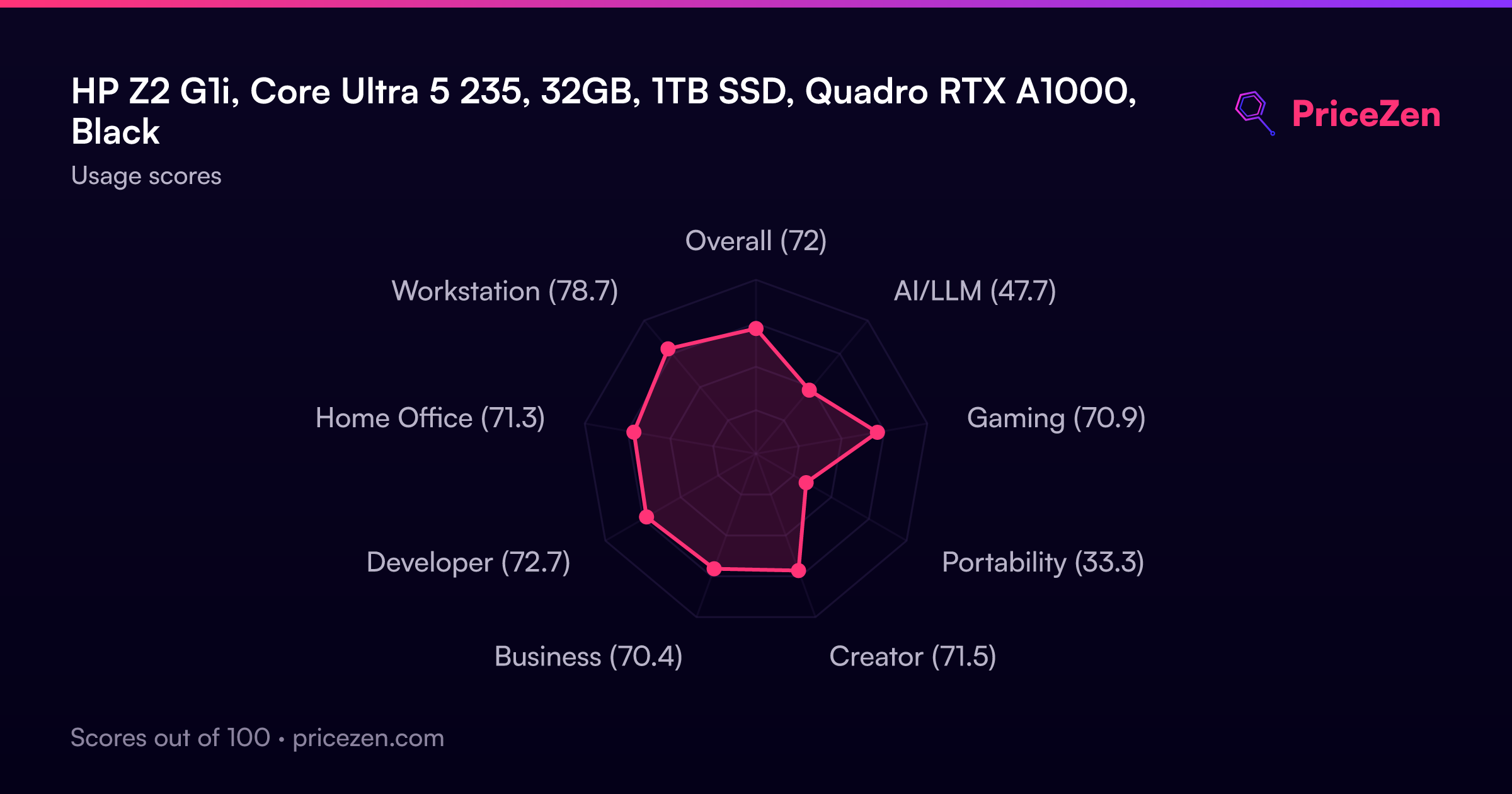
Usage Scores
- Overall72
- AI/LLM47.7
- Gaming70.9
- Portability33.3
- Creator71.5
- Business70.4
- Developer72.7
- Home Office71.3
- Workstation78.7