OWC ThunderBay 4 8TB Portable Thunderbolt 3
The 8TB Thunderbolt 3 enclosure delivers 1527 MB/s read speeds, making it a high-capacity storage solution for large media files. Its portable design scores 65.6/100, offering a balance of capacity and mobility for on-the-go workflows. Best for video editors or photographers who need massive, fast external storage without relying on a laptop's internal drive.

No current retailer price
Where we saw it before. Check the store for today's price.









Snapshot
The 30-Second Version
The OWC ThunderBay 4 packs a category-topping 8TB into a Thunderbolt 3 enclosure, but our model scores it just 35.2/100 overall. Its 1527 MB/s read is fine for big files, while random access ranks near the bottom and affordability also near the bottom at USD 1,400. Buy it only if massive single-drive capacity is your actual problem. Everyone else should cross-shop the faster names on our competitor list.
Pros & Cons
Pros
- 8TB capacity ranks near the very top of the category 97th
- 1527 MB/s read benchmark is plenty for large sequential file transfers
- Thunderbolt 3 connection keeps big-copy workflows smooth
- Portability score of 65.6/100 is decent for a drive this size
- Single-vendor OWC listing means a straightforward buying path
Cons
- Random access performance sits near the bottom, a real weak spot
- Affordability ranks near the bottom at USD 1,400
- Feature set ranks in the 15th against the category
- Endurance ranking of 15th makes it a poor scratch-disk pick
- Laptop suitability scores just 15.5/100, our lowest sub-score for it
The proof
Performance
The headline benchmark result is 1527 MB/s read. For sequential work, that's genuinely useful. Copying big video files, pulling large project folders onto your machine, streaming high-bitrate media off the drive: those tasks care about sustained throughput, and 1527 MB/s handles them without drama. But context matters, and in our rankings that speed only lands mid-pack. Middle of the pack. Plenty of smaller external SSDs we track move sequential data faster, so you're paying for space here, not for a speed record.
The number that should give you pause is random access, sitting near the bottom. That's one of the weakest results we've seen in this category. Random performance is what you feel when an app opens thousands of tiny files, when a database chews through scattered reads, or when a photo catalog indexes itself. Big-file transfers will feel fine. Small-file-heavy work will feel sluggish, and no amount of Thunderbolt 3 bandwidth fixes that. Endurance ranking at the 15th is the other quiet warning: if you're rewriting the whole drive constantly, this isn't built to be your scratch disk.
Specifications
Full Specifications
Drive
| Capacity | 8000 |
| Form Factor | External |
| Interface | Thunderbolt 3 |
| Protocol | SATA |
| External | Yes |
Performance
| Sequential Read (MB/s) | 1527 |
vs Competition
The competitor names in our data are an interesting bunch: Western Digital WD_BLACK SN8100, Samsung 9100 PRO, Kingston FURY Renegade, Crucial T700 and SanDisk WD_BLACK. These are the drives our system stacks against the ThunderBay 4, and the comparison is lopsided in a very specific way. On raw speed rankings, the OWC lands mid-pack, and on random access it's near the bottom. If your work is app loading, gaming, or anything small-file intensive, cross-shop the WD_BLACK SN8100 and the Samsung 9100 PRO first, because the ThunderBay's own numbers say it gives ground badly there.
Where the OWC wins is the one column nobody else in this matchup can touch: capacity near the top. If you've been juggling multiple smaller drives and hating it, consolidating into 8TB over Thunderbolt 3 has real quality-of-life value that benchmarks don't capture. The Kingston FURY Renegade and Crucial T700 are worth a look if speed-per-dollar is your priority, since our affordability ranking says the OWC is one of the worst values in the group. Buy the ThunderBay for the space, buy almost anything else on this list for the speed.
| Spec | OWC ThunderBay 4 | Samsung 9100 PRO | Kingston FURY Renegade | Western Digital WD_BLACK SN850X | SanDisk WD_BLACK | Corsair MP700 PRO |
|---|---|---|---|---|---|---|
| Capacity | 8TB | 8TB | 4TB | 8TB | 8TB | 4TB |
| Form Factor | External | M.2 2280 | M.2 2280 | M.2 2280 | M.2 2280 | M.2 2280 |
| Interface | Thunderbolt 3 | PCIe 5.0 x4 | PCIe 4.0 x4 | PCIe 4.0 x4 | PCIe 5.0 x4 | PCIe 5.0 x4 |
| Seq Read | 1,527 MB/s | 14,800 MB/s | 7,300 MB/s | 7,200 MB/s | 14,900 MB/s | 12,400 MB/s |
| Nand Type | - | TLC | TLC | TLC | TLC | TLC |
| Dram Cache | - | Yes | Yes | Yes | Yes | Yes |
| Endurance | - | 4800 TBW | 4000 TBW | 4800 TBW | 4800 TBW | 3000 TBW |
| Compare | Compare | Compare | Compare | Compare |
| Product | Speed | Random | Feature | Capacity | Endurance | Affordability |
|---|---|---|---|---|---|---|
| OWC ThunderBay 4 | 45.9 | 23.9 | 15.6 | 97.1 | 16.1 | 3.7 |
| Samsung 9100 PRO Compare | 99.2 | 99.8 | 99.8 | 97.1 | 86 | 2 |
| Kingston FURY Renegade Compare | 93.6 | 94.7 | 94.3 | 91.7 | 94.2 | 12.2 |
| Western Digital WD_BLACK SN850X Compare | 88.3 | 96.7 | 94.3 | 97.1 | 88.2 | 4.6 |
| SanDisk WD_BLACK Compare | 99.1 | 99.4 | 97.7 | 97.1 | 80.7 | 3.7 |
| Corsair MP700 PRO Compare | 96.8 | 81.7 | 91.3 | 91.7 | 91 | 8.5 |
Price
Value & Pricing
Let's not dance around it: USD 1,400 on Amazon is a lot of money, and our affordability ranking puts this drive near the bottom of the category. That's near the bottom of the category. The budget score of 37.7 out of 100 is the second-highest number our model gives it after portability, and even that's below the midpoint. You're paying a serious premium per unit of speed. What you're buying is the 8TB, full stop.
We track its price across stores, and right now the US listing sits at USD 1,400 on Amazon while Canadian buyers see CAD 1,450. Those are different currencies and different markets, so don't try to math your way to a bargain between them. If the capacity is genuinely non-negotiable for your workflow, the price is the toll. If it isn't, our data says you can get faster drives for less.
We started tracking prices for this product on Nov 25, 2026. The chart appears once we have more data.
Read more
Overview
The OWC ThunderBay 4 OWCTB3SRT08.0S is an 8TB external Thunderbolt 3 drive, and that capacity figure is the whole reason to look at it. In our data it sits near the very top for storage size against everything else we track in this category, which puts it right at the top of the charts. Most external SSDs we compare are nowhere near that roomy, so if you're hoarding footage, sample libraries or a decade of photo archives on one desk-connected box, this is one of the few options that even plays in that conversation.
Here's the thing though: our scoring model ranks it 35.2 out of 100 overall, and that number isn't a typo. Capacity is doing almost all the heavy lifting. Speed lands mid-pack, features and endurance both sit down at the 15th, random access performance is near the bottom, and affordability is also near the bottom. This is a specialist product with one enormous strength and a lot of ordinary-to-weak everything else.
So who's it for? Someone who needs a big, always-plugged-in pile of fast-ish storage next to a desktop and cares more about how much fits than how quickly small files move. Our portability score for it is 65.6 out of 100, which is respectable but not class-leading, and the laptop suitability score is a rough 15.5. That gap tells you exactly what this thing is: a desk anchor, not a travel companion.
Common Questions
Q: Is 1527 MB/s fast enough for video editing?
For pulling large sequential files like high-bitrate footage, that benchmark read speed is workable, and the 8TB lets you keep whole projects on one drive. But it ranks only mid-pack for speed in our data, and random access sits near the bottom, so timeline scrubbing through many small assets or cache-heavy work won't feel snappy. Treat it as a big media library rather than an active scratch disk.
Q: Why does it score so low overall if the capacity is huge?
Our scoring model weighs the whole picture, not just one spec. Capacity ranks near the top, but speed is mid-pack, features and endurance sit at the 15th, random performance near the bottom, and affordability near the bottom. One elite stat can't carry five weak ones, which is how you end up at 35.2 out of 100.
Q: Can I use it as my main drive with a laptop?
We'd steer you away from that. Its laptop suitability score is 15.5 out of 100, the weakest sub-score our model gives it, and the near-bottom random performance means OS-style and app-style workloads would feel slow. It's designed to be a big secondary archive on a desk, not the drive your computer lives on.
Q: Is USD 1,400 a fair price for this?
By our numbers, no, unless you specifically need 8TB in one external box. Affordability ranks near the bottom against the category, and the budget score is 37.7 out of 100. You're paying a premium for capacity that almost nothing else in our comparison set matches, so the price only makes sense if that capacity is the point.
Who Should Skip This
Skip this if your work is small-file heavy: developers building projects, anyone running apps or catalogs off an external drive, or gamers eyeing it as a library drive. The near-bottom random access ranking means those workloads will drag, and the 15th endurance score makes it a bad choice for constant rewrite duty like scratch disks or render caches. The WD_BLACK SN8100, Samsung 9100 PRO and Crucial T700 from our comparison set are the names to investigate instead.
Also skip it if you're a laptop-first user or watching your budget. A 15.5 laptop score and a near-bottom affordability ranking are about as clear as our data gets. At USD 1,400, you should only sign that check when 8TB of consolidated space solves a problem you actually have every day.
Verdict
If you're a video editor, photographer or audio person who needs one huge archive drive parked next to a desktop, and your daily work is moving big files rather than millions of small ones, the ThunderBay 4 makes a defensible case. The 8TB is best-in-class, 1527 MB/s read is enough for sequential work, and the consolidation alone might justify the USD 1,400 to you. Just go in knowing the endurance and feature rankings are weak, so treat it as storage, not as a drive you hammer with constant rewrites.
For nearly everyone else, we'd point you elsewhere. The 35.2 overall score, the near-bottom random performance and the near-bottom affordability add up to a product that only makes sense in one narrow lane. Laptop users especially should walk away, given that 15.5 laptop score. Our honest take: this is a great warehouse and a mediocre daily driver, and the price tag doesn't care which one you needed.
Usage Scores
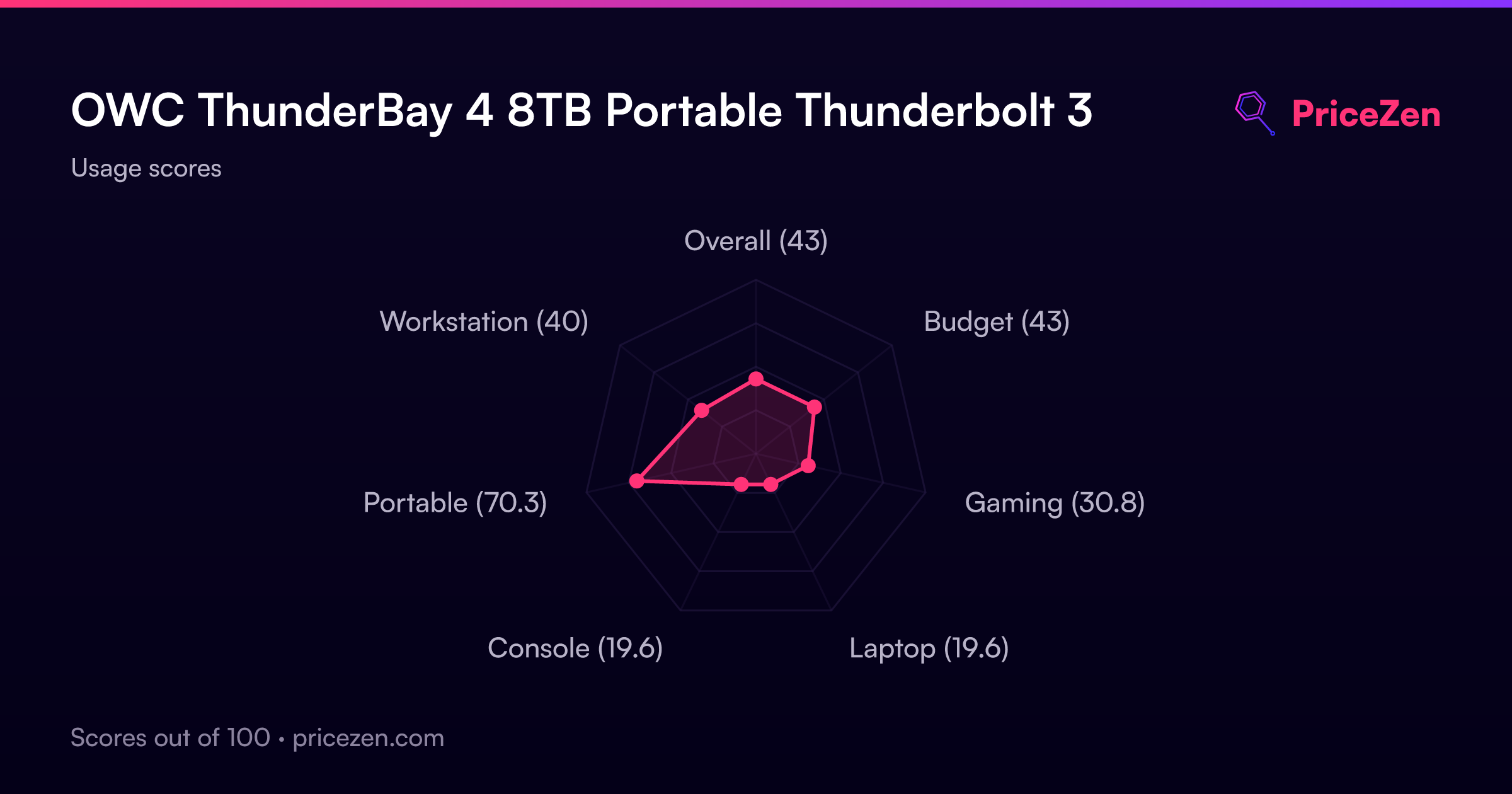
- Overall43
- Budget43
- Gaming30.8
- Laptop19.6
- Console19.6
- Portable70.3
- Workstation40