Team Group T-Force Vulcan 16GB DDR5-6000 CL30 Black

DDR5-6000 at CL30, quick and tight verified Nov 28
59/100 overall score
- Capacity
- 16GB
- Kit
- 1 x 16GB
- Memory
- DDR5
- Speed
- 6000 MT/s
- CAS latency
- CL30
- Form factor
- UDIMM
Snapshot
The 30-Second Version
Team Group's T-Force Vulcan delivers DDR5 6000 at CL30 with 1.35V and a 32.7mm low-profile spreader, landing near the top for both speed and latency. The problem is the format and the price: one 16GB stick means single-channel, and CAD 355 at Newegg puts affordability below the category midpoint. Buy it if tight timings and cooler clearance are your priorities and you plan on a second stick. Otherwise there are better-shaped deals.
Pros & Cons
Pros
- CL30 at 6000 MT/s puts latency near the top of the category, genuinely quick 88th
- Speed also ranks near the top, among the best in the category 88th
- Both Intel XMP 3.0 and AMD EXPO profiles, so setup is one BIOS toggle
- 32.7mm low-profile heat spreader clears big air coolers
- Only 1.35V for these timings, a modest voltage ask
Cons
- Single 16GB stick means single-channel bandwidth out of the box
- CAD 355 for one module is steep, affordability ranks below average
- Capacity is middling, 16GB total, around the middle of the pack
- No RGB or extras, feature score of 62 is merely solid
- Server suitability is a weak 22.2/100, unbuffered consumer RAM only
The proof
Performance
Let's talk about what 6000 MT/s and CL30 actually mean together, because the two numbers only make sense as a pair. Speed tells you how much data the module can push per second; CAS latency tells you how long you wait before the first bit shows up. Plenty of DDR5 runs at 6000 with looser timings, and those kits feel slower in the moments that matter, like frame-time consistency in CPU-bound games. This one lands in the 88th percentile for both speed and latency in our model, which puts it among the better-performing desktop memory you can buy right now. The 30-36-36-76 subtimings are tight rather than merely acceptable, and 1.35V means you're getting that without cooking the modules.
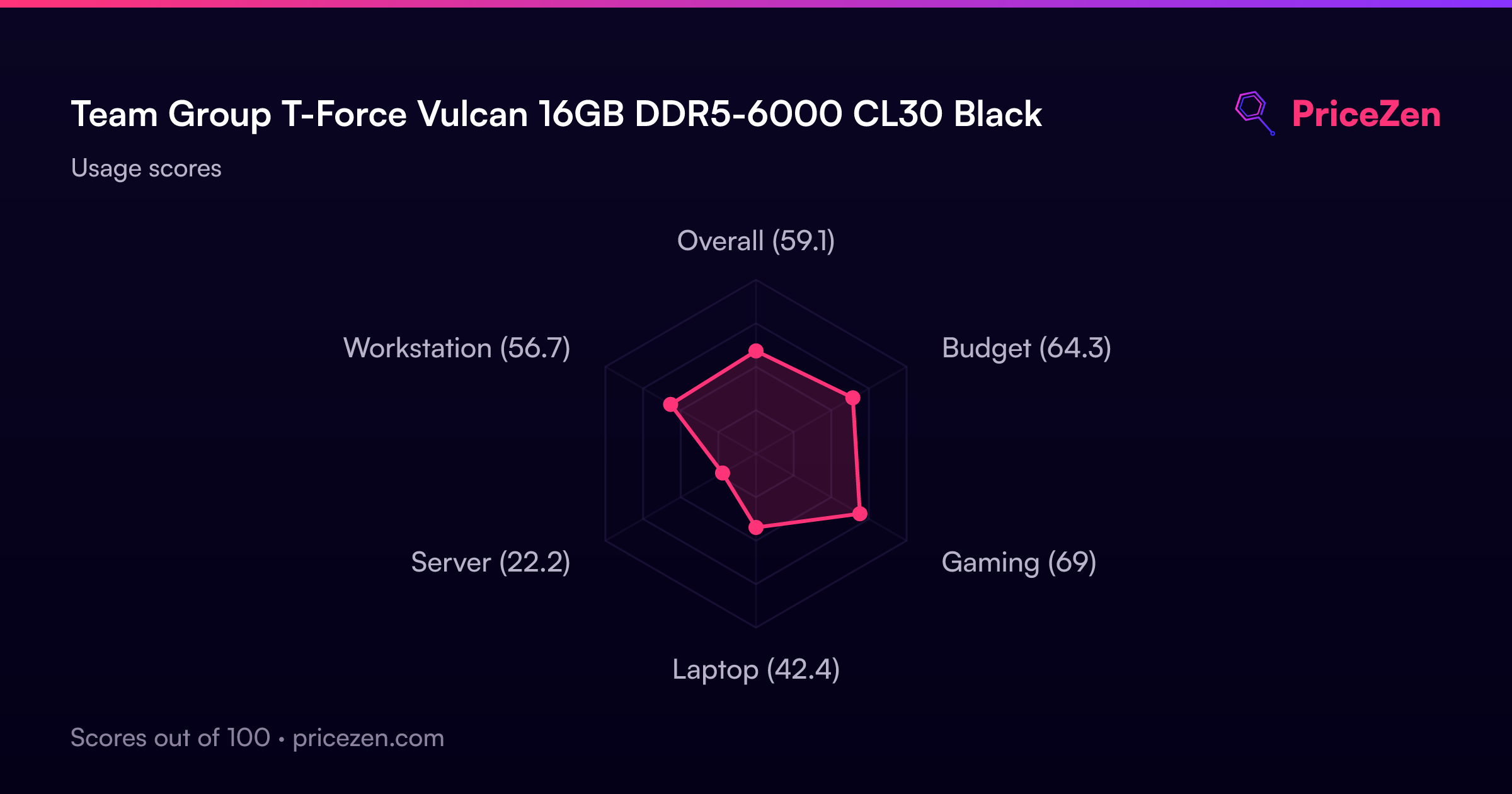
The catch is configuration, not silicon. This is a single 16GB stick, and one DIMM means single-channel operation. You can have the tightest timings on the shelf and still leave real bandwidth on the table because there's only one lane feeding the controller. Our scoring reflects that split personality: 69/100 for gaming and 64.4/100 for budget, but a total of 59.1/100 once everything gets weighed together. Capacity ranks around the middle of the pack at the 45th percentile, and features sit at 62, solid but unremarkable since you're getting a heat spreader and profile support and not much else. Server workloads are where it falls apart entirely at 22.2/100, which is expected for unbuffered consumer memory. If you're planning to add a matching stick later, treat that as part of the purchase plan, not an optional extra.
Specifications
Full Specifications
Memory
| Type | DDR5 |
| Form Factor | UDIMM |
| Total Capacity | 16384 |
| Modules | 1 |
| Per Module | 16384 |
| Pins | 288 |
Performance
| Speed | 6000 |
| CAS Latency | 30 |
| Timings | 30-36-36-76 |
| Voltage | 1.35 |
Class
| ECC | No |
| Registered | No |
| OC Profile | Intel XMP 3.0, AMD EXPO |
Features
| RGB | No |
| Heat Spreader | Yes |
vs Competition
The names it's up against are G.Skill Trident Z5 Royal Neo RGB, Kingston Fury Renegade, Corsair Vengeance, Crucial Pro Overclocking and XPG Lancer Blade RGB. Against the flashier options like the Trident Z5 Royal Neo RGB and the Lancer Blade RGB, the Vulcan's argument is physical rather than visual: at 32.7mm it's short enough to disappear under a tower cooler, and its speed and latency rankings are near the top, meaning you're not trading performance for that restraint. If you want lighting, this isn't your product and no amount of tight timings will change that.
Where it gives ground is breadth. Corsair Vengeance and Crucial Pro Overclocking are the kinds of lines builders cross-shop when they want a straightforward kit decision, and the Vulcan's single-module format makes that comparison awkward, because a lone 16GB stick isn't really competing with a matched pair on equal terms. Kingston Fury Renegade is the one to look at if you're chasing outright performance headroom. Our total score of 59.1/100 versus a gaming score of 69 tells the story: this is a specialist pick that scores well on the thing it's good at and loses points everywhere else. Cross-shop it if latency and clearance are your priorities. Skip past it if you want a complete memory solution in one box.
| Spec | Team Group T-Force Vulcan | Kingston FURY Beast | G.Skill Trident Z5 Royal | Corsair VENGEANCE RGB | Crucial Pro Overclocking | XPG Lancer Blade RGB |
|---|---|---|---|---|---|---|
| Capacity | 16GB | 64GB | 64GB | 64GB | 32GB | 32GB |
| Kit | 1 x 16GB | 2 x 32GB | 2 x 32GB | 2 x 32GB | 2 x 16GB | 2 x 16GB |
| Memory Type | DDR5 | DDR5 | DDR5 | DDR5 | DDR5 | DDR5 |
| Speed Mts | 6000 | 6400 | 6000 | 6400 | 6400 | 6000 |
| Cas Latency | CL30 | CL32 | CL26 | CL32 | CL32 | CL30 |
| Form Factor | UDIMM | UDIMM | UDIMM | UDIMM | UDIMM | UDIMM |
| Ecc | No | No | No | No | No | No |
| Compare | Compare | Compare | Compare | Compare |
| Product | Speed | Feature | Latency | Capacity | Affordability |
|---|---|---|---|---|---|
| Team Group T-Force Vulcan | 87.6 | 61.4 | 87.6 | 44.8 | 43.2 |
| Kingston FURY Beast Compare | 94.8 | 89.5 | 87.6 | 89.5 | 7.7 |
| G.Skill Trident Z5 Royal Compare | 87.6 | 89.5 | 99 | 89.5 | 3.9 |
| Corsair VENGEANCE RGB Compare | 94.8 | 89.5 | 87.6 | 89.5 | 6.7 |
| Crucial Pro Overclocking Compare | 94.8 | 74.8 | 87.6 | 70.5 | 26.8 |
| XPG Lancer Blade RGB Compare | 87.6 | 89.5 | 87.6 | 70.5 | 16.5 |
Price
Value & Pricing
Here's the honest math problem. We track CAD 355 at Newegg, and that's the only listing in our data for this module, so there's no cross-store shopping to be done here. For a single 16GB stick, that's a premium ask, and our affordability ranking of 43 puts it slightly below the middle of the category. You're paying for tight timings and a low-profile design, not for capacity.
The way to make this pencil out is to think in pairs. If your plan is two of these for a proper dual-channel 32GB setup, the per-stick cost stings but the resulting spec is legitimately strong. If you just need 16GB of working memory and don't care whether CAS is 30 or something looser, you're spending money on a number you'll barely feel. Our budget score of 64.4/100 says it's not a bad buy, just not a bargain.
Read more
Overview
The T-Force Vulcan FLBD516G6000HC3001 is Team Group's no-nonsense take on DDR5: one 16GB stick, 6000 MT/s, CL30 timings of 30-36-36-76, and a black heat spreader that stands just 32.7mm tall. No RGB, no light show, no marketing theater. It's the kind of part you buy because you want fast memory that fits under a chunky air cooler and then forget about it.
Who's it for? Mostly builders who care about latency more than looks. DDR5 6000 with CL30 is the combination enthusiasts keep circling back to for gaming rigs, and this kit hits both numbers without asking for exotic voltage: 1.35V is a fairly gentle ask for a module running this tight. Both Intel XMP 3.0 and AMD EXPO profiles are baked in, so you're not stuck hand-tuning timings on either platform.
What makes it interesting is the tension between the spec sheet and the price tag. On raw speed and latency it sits near the front of the pack in our rankings. On value and capacity it's much more ordinary, and at CAD 355 for a single 16GB module from Newegg, that gap matters. We collect specs, prices and owner feedback across stores with our own system and score every product against the rest of its category, so we can tell you exactly where this one shines and where it asks you to compromise.
Common Questions
Q: Can I run just this one stick, or do I need two?
You can absolutely boot and run with one 16GB module, but you'll be in single-channel mode, which limits memory bandwidth no matter how tight the timings are. The 6000 MT/s CL30 spec here ranks near the top for speed and latency, and a matching second stick is how you actually cash that in. Plan for a pair if performance is the point.
Q: Will it work on both Intel and AMD boards?
Yes, it carries both Intel XMP 3.0 and AMD EXPO profiles, so you enable one setting in BIOS rather than typing in 30-36-36-76 by hand. That dual support is a genuine convenience at this speed grade. It's unbuffered 288-pin DDR5 UDIMM, so it's for standard desktop boards, not servers or laptops.
Q: Will the heat spreader fit under my CPU cooler?
At 32.7mm tall, this is deliberately low-profile, which is one of its better practical arguments over taller RGB modules. Builders running large tower air coolers are the exact audience for that dimension. There's no lighting to clear either, just a plain black spreader.
Q: Is 16GB enough for gaming right now?
It's workable but it's the floor rather than the comfortable spot, and our capacity ranking puts this around the middle of the pack. The gaming score of 69/100 reflects strong timings held back by the single-module configuration. If you're playing modern titles alongside a browser and chat apps, a second stick is the upgrade that matters most.
Who Should Skip This
Skip this if you want one purchase that finishes your memory situation. A single 16GB module at CAD 355 doesn't get you dual-channel or generous capacity, and our affordability rank of 43 says you're not being compensated with a bargain either. Builders putting together a general-use or productivity machine should be looking at matched-capacity kits from the likes of Corsair Vengeance or Crucial Pro Overclocking instead, where the whole solution arrives in one box.
Also skip it if you're after visual flair or server-grade reliability. There's no RGB here at all, so the XPG Lancer Blade RGB and G.Skill Trident Z5 Royal Neo RGB are the direction to head if lighting matters. And with a server score of 22.2/100, this unbuffered consumer module has no business in a machine where memory integrity is the job.
Verdict
If you're building a gaming rig where you've already picked a large air cooler and you want tight-timed DDR5 6000 without fuss, this earns a look. The CL30 timings, 1.35V and dual profile support for Intel and AMD are exactly what that builder wants, and the 32.7mm height solves a real clearance headache. Just go in knowing you'll want a second matching module, and budget accordingly.
If you're assembling a general-purpose machine, a productivity box or anything where you want capacity per dollar, this is the wrong tool. An affordability rank that is below average and 16GB in a single channel isn't the shape of a smart all-rounder purchase. And for anything server-adjacent, the 22.2/100 score is a hard no. Good specialist, mediocre generalist, priced like the former.
Usage Scores
- Overall59.1
- Budget64.3
- Gaming69
- Laptop42.4
- Server22.2
- Workstation56.7