ASUS VP327Q 31.5" Black

Big 31.5-inch canvas for spreadsheets verified Nov 19
68/100 overall score 4.3 average from 1,479 owner ratings
- Screen
- 31.5"
- Resolution
- 3840 x 2160
- Panel
- VA
- Refresh
- 60 Hz
- Response time
- 4 ms
- Adaptive sync
- Adaptive-Sync
- HDR
- HDR10
Compare prices at 1 store
Cheapest first. New, refurbished and bundled offers are kept apart, so you compare like with like.
| Store | Sold by | Colour and condition | Price | vs lowest | Last checked | Link |
|---|---|---|---|---|---|---|
| New1 offerSingle unit | ||||||
| Not checked in the last 7 days, so these prices may have changed | ||||||
| Amazon | Marketplace seller | Not listed | €317.27 | Nov 19 | Go to store | |
 Source: PriceZen, checked Nov 19, 2026
A price counts as current when we checked it in the last 7 days. “Marketplace seller” means a third-party seller on that store, not the store itself.
Price history
Checked that dayNot checked that day, still on offer
Source: PriceZen, checked Nov 19, 2026











Snapshot
The 30-Second Version
The ASUS VP327Q delivers a big, sharp 4K picture with USB-C and solid color coverage at a budget-friendly price, especially if you find it near USD 149. But user sentiment is weak, with reports of flaky wake-from-sleep behavior and random dimming. It's a good value for patient productivity users, but gamers and anyone who needs rock-solid reliability should look elsewhere.
Pros & Cons
Pros
- Sharp 4K resolution on a big 31.5-inch panel 87th
- 99% sRGB and HDR10 support for solid color accuracy 82nd
- USB-C connectivity, which is rare at this price 76th
- Eye care features like Flicker-free and Low Blue Light 71st
- VESA mountable with low power draw under 36W
Cons
- 60Hz refresh rate feels sluggish for gaming
- User sentiment score is weak, with reports of flaky wake-from-sleep behavior
- Only tilt adjustment, no height or swivel
- HDR10 is more of a checkbox than a real HDR experience
What owners think
The Word on the Street
- Owners consistently praise the sharp 4K resolution and say colors are good enough for everyday work and media.
- Several buyers appreciate the eye care features and low power consumption, especially for all-day office use.
- A recurring complaint is that the monitor sometimes fails to wake from sleep or randomly dims, which is frustrating for daily use.
How owner sentiment changed over time
ExclusiveBased on when customers actually wrote their reviews - so you can see whether early praise held up.
23 written reviews, Feb 2021 – Aug 2026: 19 happy, 1 mixed, 2 unhappy, 1 without stars
Across all 1,479 store ratings: 4.3★. Most owners rate without writing a review. The chart counts the 23 written reviews.
- Jan – Mar 20267 of 8 happy · 1 without stars
Customers value the monitor's price and overall quality, but find the on-screen menu controls unintuitive. Good customer service and performance with MacBooks noted.
- Great value for price, solid performance as a docking monitor.
- OSD button is unintuitive; joystick functionality not obvious from manual.
- Customer service helpful in explaining button operation.
- Resolved mouse jump issues compared to previous docking station.
- Apr – Jun 20252 of 4 happy
Half of buyers report defects like screen lines, sleep/wake issues, and ASUS warranty delays; but one user finds it good value for the price despite VA's limited viewing angles.
- ASUS warranty process criticized for requiring wait up to 2 weeks for replacement; refurbished only.
- Defects: screen line from top to bottom, erratic dimming, and sleep/wake failure within 3 months.
- Monitor causes system buffering during editing; older display did not have this issue.
- Thin bezel design appreciated; unit offers larger screen without significantly bigger frame.
Each dot is one written review, in the month it was written. Happy = 4-5★, mixed = 3★, unhappy = 1-2★. Period summaries are in English.
The proof
Performance
The 4K resolution is the star here. Text looks crisp, photos have plenty of detail, and the VA panel's 3000:1 contrast ratio gives you deep blacks that IPS panels at this price can't touch. The 350 nits brightness is fine for a typical room, and 99% sRGB means colors look accurate out of the box for most creative work. But the 60Hz refresh rate and 4ms response time put this firmly in productivity territory, not competitive gaming. The performance percentile lands at 45th, which is about average for a monitor in this class. Fine for spreadsheets and movies, less exciting for fast-paced shooters.
Specifications
Full Specifications
Display
| Size | 31.5" |
| Resolution | 3840x2160 (4K UHD) |
| Panel Type | VA |
| Aspect Ratio | 16:9 |
| Curved | No |
| Screen Finish | matte |
Performance
| Refresh Rate | 60 Hz |
| Response Time | 4 |
| Adaptive Sync | Adaptive-Sync |
Color & HDR
| Brightness | 350 nits |
| Color Gamut | 99% sRGB |
| Color Depth | 8-bit |
| HDR | HDR10 |
| HDR Support | HDR10 |
Connectivity
| HDMI Ports | 2 |
| DisplayPort | 1 |
| USB-C | 1 |
| Speakers | Yes |
| Headphone Jack | Yes |
Ergonomics
| Height Adjustable | No |
| Tilt | Yes |
| Swivel | No |
| Pivot | No |
| VESA Mount | 100x100 |
Features
| Webcam | No |
| Touchscreen | No |
| PIP/PBP | No |
| Power | 36 |
| Weight | 7.8 kg / 17.2 lbs |
vs Competition
Against the Dell S2725QC, the ASUS gives you a bigger screen and better contrast, but Dell's build quality and reliability record are stronger. The LG UltraGear 27G810A-B and HP OMEN 27qs G2 are gaming-focused with higher refresh rates, so they'll feel much smoother if you play fast games, though you give up the 4K resolution and screen size. The MSI MPG 274URDFW E16M is a closer match on resolution but typically costs more. The Acer Nitro XV272U W2bmiiprx sits in a similar budget zone but targets gamers with a faster panel. If you want pure productivity on a big 4K screen and find the ASUS at the low end of its price range, it's hard to beat. If you game seriously, look at the LG or HP instead.
| Spec | ASUS VP327Q 31.5" | Alienware AW-Series AW3425DW 34" | MSI MAG 271QPX QD-OLED E2 27" | Samsung Odyssey G60SD 27" | LG UltraGear 32GX850A-B 32" | Dell S2725QC 27" |
|---|---|---|---|---|---|---|
| Screen Size | 31.5 | 34 | 27 | 27 | 32 | 27 |
| Resolution | 3840 x 2160 | 3440 x 1440 | 2560 x 1440 | 2560 x 1440 | 3840 x 2160 | 3840 x 2160 |
| Panel Type | VA | QD-OLED | QD-OLED | OLED | OLED | IPS |
| Refresh Rate | 60 | 240 | 240 | 360 | 165 | 120 |
| Response Time Ms | 4 | 0.03 | 0.03 | 0.03 | 0.03 | 8 |
| Adaptive Sync | Adaptive-Sync | FreeSync Premium Pro | FreeSync Premium Pro | FreeSync Premium Pro | FreeSync Premium Pro | FreeSync Premium |
| Hdr | HDR10 | HDR400 | DisplayHDR True Black 400 | HDR10+ | DisplayHDR True Black 400 | HDR |
| Compare | Compare | Compare | Compare | Compare |
| Product | Color | Portability | Display | Feature | User Sentiment | Ergonomic | Performance | Connectivity | Social Proof |
|---|---|---|---|---|---|---|---|---|---|
| ASUS VP327Q 31.5" | 75.8 | 71.2 | 82.2 | 70 | 29 | 47.1 | 44.2 | 87.4 | 67.1 |
| Alienware AW-Series AW3425DW 34" Compare | 98.9 | 73.9 | 84 | 96.3 | 95.7 | 90.8 | 97.9 | 95.4 | 96.8 |
| MSI MAG 271QPX QD-OLED E2 27" Compare | 99.2 | 57.3 | 73.4 | 85 | 95.7 | 90.8 | 97.9 | 81 | 98.9 |
| Samsung Odyssey G60SD 27" Compare | 90.7 | 39.3 | 73.4 | 70 | 95.7 | 90.8 | 99.5 | 87.4 | 91.9 |
| LG UltraGear 32GX850A-B 32" Compare | 79.4 | 49.3 | 99 | 70 | 76.6 | 90.8 | 96.2 | 98.2 | 74.8 |
| Dell S2725QC 27" Compare | 71.7 | 76.5 | 87 | 70 | 95.7 | 90.8 | 44.2 | 87.4 | 96.8 |
Price
Value & Pricing
Pricing is all over the place. In the US, you'll see this monitor listed anywhere from USD 149 to USD 315 depending on the vendor, and the best deal we found was on Amazon. That's a massive spread for the same panel. At the low end, this is a steal for a 31.5-inch 4K display with USB-C. At the high end, you're paying too much for a 60Hz VA panel with mediocre ergonomics. In Europe, the gap is even wider, from EUR 242 to EUR 477. Shop around before you commit, because the price you pay dramatically changes whether this is a good deal or a bad one.
Read more
Overview
The ASUS VP327Q is a 31.5-inch 4K VA panel aimed at people who want a big, sharp screen without paying a fortune. You get 3840 x 2160 resolution, 99% sRGB coverage, HDR10 support, and a USB-C port, which is a nice touch at this price. It's not a gaming monitor, but Adaptive-Sync is there if you want to dabble.
Our database puts the display quality in the 86th percentile and connectivity in the 89th, so the core specs punch above what you'd expect. But the user sentiment score sits at just 28th percentile, and that gap tells the real story. People love the picture when it works. The problem is that sometimes it doesn't.
Common Questions
Q: Is this monitor good for gaming?
It's okay for casual gaming thanks to Adaptive-Sync and 4K resolution, but the 60Hz refresh rate and 4ms response time will feel sluggish in fast-paced shooters. Serious gamers should look for a 120Hz or higher panel.
Q: Does the stand adjust for height or swivel?
No, the stand only tilts. If you need height adjustment or swivel, you'll want to mount it on a VESA arm, which the 100x100mm pattern supports.
Q: Can I connect a laptop with just one cable?
Yes, the USB-C port can handle video and likely power delivery for many laptops, though you'll want to check your laptop's power requirements. It's a handy feature for a clean desk setup.
Who Should Skip This
Skip this if you need a monitor that just works without hiccups. The flaky wake-from-sleep reports are a real concern, and if you rely on your display for daily work, a random dimming issue will drive you nuts. Gamers should also pass, since 60Hz feels dated in 2025. And if you need height adjustment or a swivel stand out of the box, the tilt-only ergonomics will disappoint. Spend a bit more on a Dell or LG for better reliability and build quality.
Verdict
This is a monitor for people who want a lot of 4K screen real estate for work, browsing, and casual media without spending a fortune. The 31.5-inch size is great for multitasking, and the USB-C port makes it easy to hook up a laptop. But the weak user sentiment score gives us pause. Multiple owners report issues with the monitor not waking from sleep or randomly dimming. That's a reliability red flag. If you can grab it at the low end of the price range and don't mind a possible RMA, it's worth considering. If you need something that just works every day, spend a bit more on a Dell or LG.
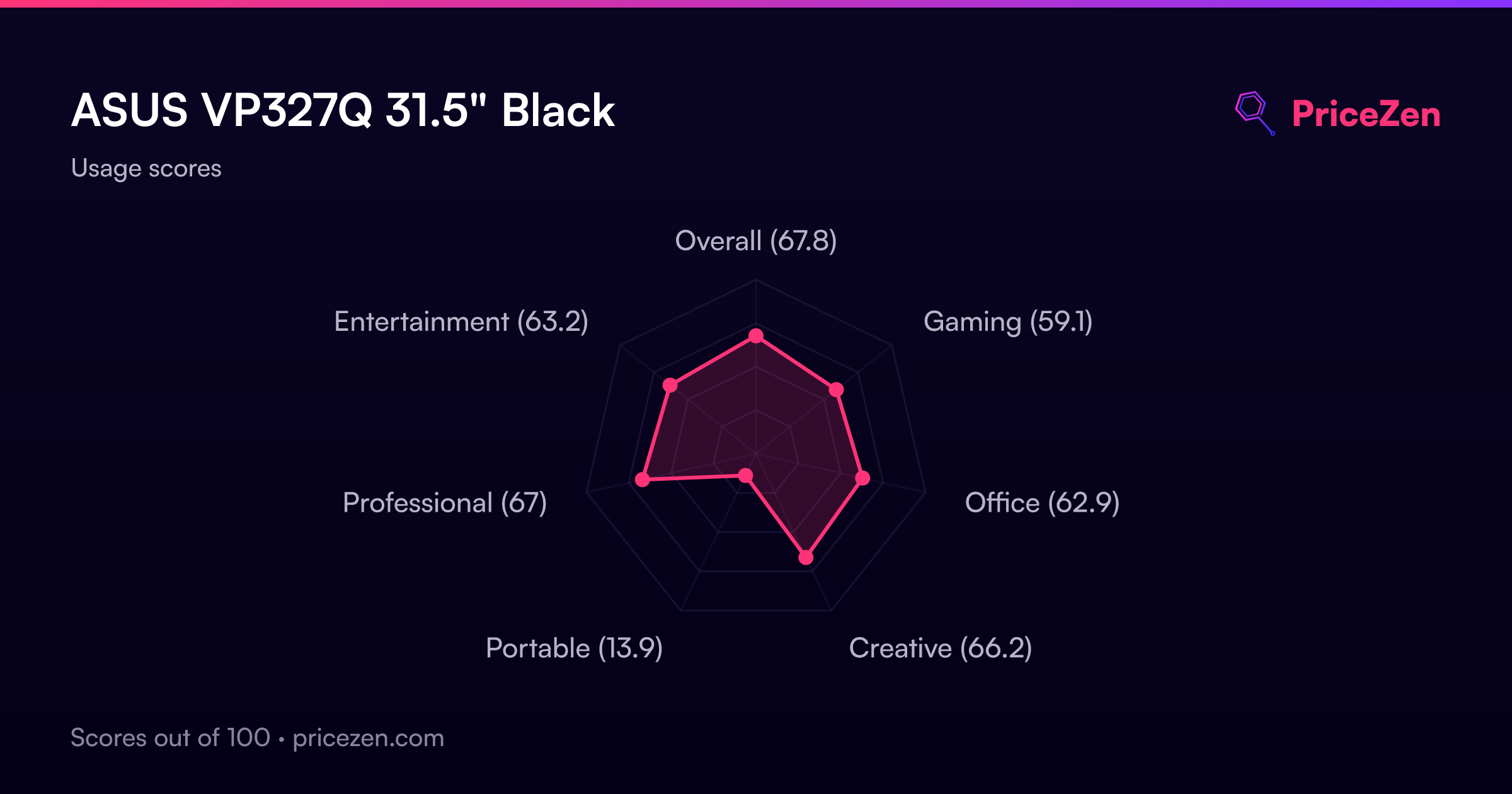
Usage Scores
- Overall67.8
- Gaming59.1
- Office62.9
- Creative66.2
- Portable13.9
- Professional67
- Entertainment63.1