ASUS TUF Gaming VG27VQ3B 27" Blue 2026

Tight 1000R curve wraps around your view verified Nov 29
52/100 overall score
- Screen
- 27"
- Resolution
- 1920 x 1080
- Panel
- IPS
- Refresh
- 180 Hz
- Response time
- 1 ms
- Adaptive sync
- FreeSync
- HDR
- HDR10
Snapshot
The 30-Second Version
The ASUS TUF Gaming VG27VQ3B is a 27-inch curved 1080p gaming monitor with 180Hz, 1ms GTG and FreeSync, currently CAD 264 at Newegg. It's fast and cheap, but the low pixel density, 250-nit panel and tilt-only stand keep it mid-pack overall. A solid budget pick for competitive shooters, not for text-heavy work.
Pros & Cons
Pros
- 180Hz and 1ms GTG at a budget price 91st
- FreeSync plus ELMB SYNC for tear-free, low-blur motion 82nd
- Feature set ranks among the best in its class 70th
- 99% sRGB coverage is plenty for gaming
- DisplayPort cable included in the box
Cons
- 1080p on 27 inches looks soft, especially text
- 250 nits is dim, and HDR10 is basically a checkbox
- Tilt-only stand, no height or swivel adjustment
- One HDMI and one DisplayPort, that's it
- Overall score lands mid-pack despite the speed
The proof
Performance
The headline numbers do the heavy lifting. 180Hz with a 1ms GTG rating and FreeSync variable refresh means tearing and stutter should be off the table in anything your GPU can push past 100fps, and ELMB SYNC is there to clean up ghosting on top of that. At 1080p, a mid-range card has a realistic shot of actually feeding 180 frames, which is the whole point of buying a low-resolution high-refresh panel. Shadow Boost lifts detail in dark corners without blowing out highlights, which competitive players will appreciate more than any color spec.
Where it settles back to earth is image quality. 250 nits is dim for a bright room, 99% sRGB is fine for games and web work, and the 90% DCI-P3 claim in ASUS's own copy is the more flattering number to quote. Color scores about average in our data, and the display metric sits at the 51st percentile. Text at 27 inches and 1080p looks chunky. If you're expecting crisp fonts, this isn't that.
Specifications
Full Specifications
Display
| Size | 27" |
| Resolution | 1920x1080 (Full HD) |
| Panel Type | IPS |
| Aspect Ratio | 16:9 |
| Curved | Yes |
| Curvature | 800 |
| Screen Finish | matte |
Performance
| Refresh Rate | 180 Hz |
| Response Time | 1 |
| Adaptive Sync | FreeSync |
Color & HDR
| Brightness | 250 nits |
| Color Gamut | sRGB 99% |
| Color Depth | 16.7 Million |
| HDR | HDR10 |
| HDR Support | HDR10 |
Connectivity
| HDMI Ports | 1 |
| DisplayPort | 1 |
| Thunderbolt | 1 HDMI 2.0, 1 DisplayPort 1.4, 1 VGA |
| Headphone Jack | Yes |
Ergonomics
| Height Adjustable | No |
| Tilt | Yes |
| Swivel | No |
| Pivot | No |
Features
| Weight | 6.3 kg / 13.9 lbs |
vs Competition
Against the Alienware AW3425DW 34-inch and the LG UltraGear 32GX850A-B 32-inch, the ASUS is the small, cheap, focused option. Those are bigger canvases for people who want immersion and desk-filling scale; this one is a single-purpose 27-inch esports panel with a 1500R curve and a tilt-only stand that ranks in the bottom quarter for ergonomics. Cross-shop them if you want a monitor that doubles as your everything screen.
The MSI MAG 271QPX QD-OLED E2 and Samsung Odyssey G60SD are the ones to look at if the 250-nit, 1080p panel here sounds like a compromise too far, because both are the kind of upgrade you buy for picture quality rather than raw Hz. And the BenQ MA270U is worth a look if your day is spreadsheets and text rather than ranked matches, since sharpness is exactly where this ASUS falls behind. Our ranking puts the VG27VQ3B ahead on features and speed relative to its price bracket, and behind on display and color.
| Spec | ASUS TUF Gaming VG27VQ3B 27" | LG UltraGear 45GX950A-B 45" | Dell UltraSharp U4025QW 39.7" | Alienware AW-Series AW3425DW 34" | MSI MAG 271QPX QD-OLED E2 27" | Samsung Odyssey G60SD 27" |
|---|---|---|---|---|---|---|
| Screen Size | 27 | 45 | 39.7 | 34 | 27 | 27 |
| Resolution | 1920 x 1080 | 5120 x 2160 | 5120 x 2160 | 3440 x 1440 | 2560 x 1440 | 2560 x 1440 |
| Panel Type | IPS | OLED | IPS | QD-OLED | QD-OLED | OLED |
| Refresh Rate | 180 | 330 | 120 | 240 | 240 | 360 |
| Response Time Ms | 1 | 0.03 | 5 | 0.03 | 0.03 | 0.03 |
| Adaptive Sync | FreeSync | FreeSync Premium Pro | Adaptive-Sync | FreeSync Premium Pro | FreeSync Premium Pro | FreeSync Premium Pro |
| Hdr | HDR10 | DisplayHDR True Black 400 | HDR600 | HDR400 | DisplayHDR True Black 400 | HDR10+ |
| Compare | Compare | Compare | Compare | Compare |
| Product | Color | Portability | Display | Feature | Ergonomic | Performance | Connectivity |
|---|---|---|---|---|---|---|---|
| ASUS TUF Gaming VG27VQ3B 27" | 49.9 | 39.3 | 50.5 | 90.7 | 21.4 | 81.7 | 70.1 |
| LG UltraGear 45GX950A-B 45" Compare | 99.4 | 76.5 | 99.7 | 96.3 | 90.7 | 99.4 | 96.9 |
| Dell UltraSharp U4025QW 39.7" Compare | 97.9 | 76.5 | 98.6 | 96.3 | 90.7 | 56.1 | 99.3 |
| Alienware AW-Series AW3425DW 34" Compare | 98.9 | 73.9 | 84.1 | 96.3 | 90.7 | 97.9 | 95.3 |
| MSI MAG 271QPX QD-OLED E2 27" Compare | 99.2 | 57.3 | 73.3 | 85 | 90.7 | 97.9 | 81 |
| Samsung Odyssey G60SD 27" Compare | 90.6 | 39.3 | 73.3 | 70.1 | 90.7 | 99.5 | 87.4 |
Price
Value & Pricing
At CAD 264, this is genuinely cheap for a 180Hz curved panel, and we track its price over time partly through our community browser extension so we can say that with a straight face. You're paying for refresh rate and motion handling, not resolution or brightness. If your budget stretches further, the MSI MAG 271QPX QD-OLED E2 and Samsung Odyssey G60SD are the obvious step-up cross-shops, and they exist in a different league of image quality. If it doesn't stretch, the VG27VQ3B gives you the part of the experience that actually affects your kill-death ratio.
Read more
Overview
The ASUS TUF Gaming VG27VQ3B is a 27-inch curved gaming monitor sitting at the budget end of the category, and right now we're tracking it at CAD 264 at Newegg. The pitch is simple: 1920 x 1080 on a 1500R curve, 180Hz refresh, 1ms GTG response, FreeSync and ASUS ELMB SYNC for motion blur. That's a spec sheet aimed squarely at people who play shooters and racers and don't want to spend OLED money.
Is it good for gaming? Mostly yes, with one big asterisk. Our scoring model puts its performance well above average for this category (82nd percentile) and its feature set among the best on the market at 91. But the display itself lands dead middle of the pack, because 1080p stretched across 27 inches isn't sharp, and 250 nits with HDR10 support is HDR in name only.
We collect specs, prices and owner ratings from multiple stores with our own automated system and rank every monitor against the others in its class. Nobody pays us for a verdict. So here's the honest read: this is a fast, cheap, slightly compromised panel, and whether that trade works depends entirely on what you play.
Common Questions
Q: Is the ASUS TUF Gaming VG27VQ3B good for gaming?
For fast-paced gaming, yes. The 180Hz refresh rate, 1ms GTG response and FreeSync VRR put its performance well above average among gaming monitors in our data, and 1080p is easy for a mid-range GPU to drive at high frame rates.
Q: Is 1080p on a 27-inch monitor too blurry?
It's noticeably softer than 1440p at the same size, and text is where you'll see it most. For games and video it's much less of an issue, which is why this panel's display score sits around the middle of the pack rather than at the bottom.
Q: Does the VG27VQ3B have height adjustment or built-in speakers?
No height adjustment, just tilt, and ergonomics is its weakest practical area in our rankings. There's a headphone jack for audio out, plus one HDMI and one DisplayPort.
Q: Is the HDR on this monitor worth using?
Not really. It accepts HDR10 but tops out at 250 nits, which isn't enough brightness for a meaningful HDR image, so treat it as an SDR gaming monitor.
Who Should Skip This
Skip this if you write, code or read all day, because 1080p across 27 inches makes text fuzzy and no amount of refresh rate fixes that. Skip it if your room is bright, since 250 nits will feel washed out, or if you need to raise the screen to eye level, because tilt is all you get. And skip it if you want one monitor for console, laptop and desktop, given a single HDMI and a single DisplayPort. The BenQ MA270U is the sharper-text direction, while the MSI MAG 271QPX QD-OLED E2 and Samsung Odyssey G60SD are where to look if picture quality is the priority.
Verdict
Buy it if you're a competitive player on a tight budget with a GPU that lives in the 100-180fps range at 1080p. That's the buyer this thing was built for, and at CAD 264 it delivers the specs that matter for that job. The 4.5/5 average across 20 owner ratings suggests buyers who wanted exactly that are getting it.
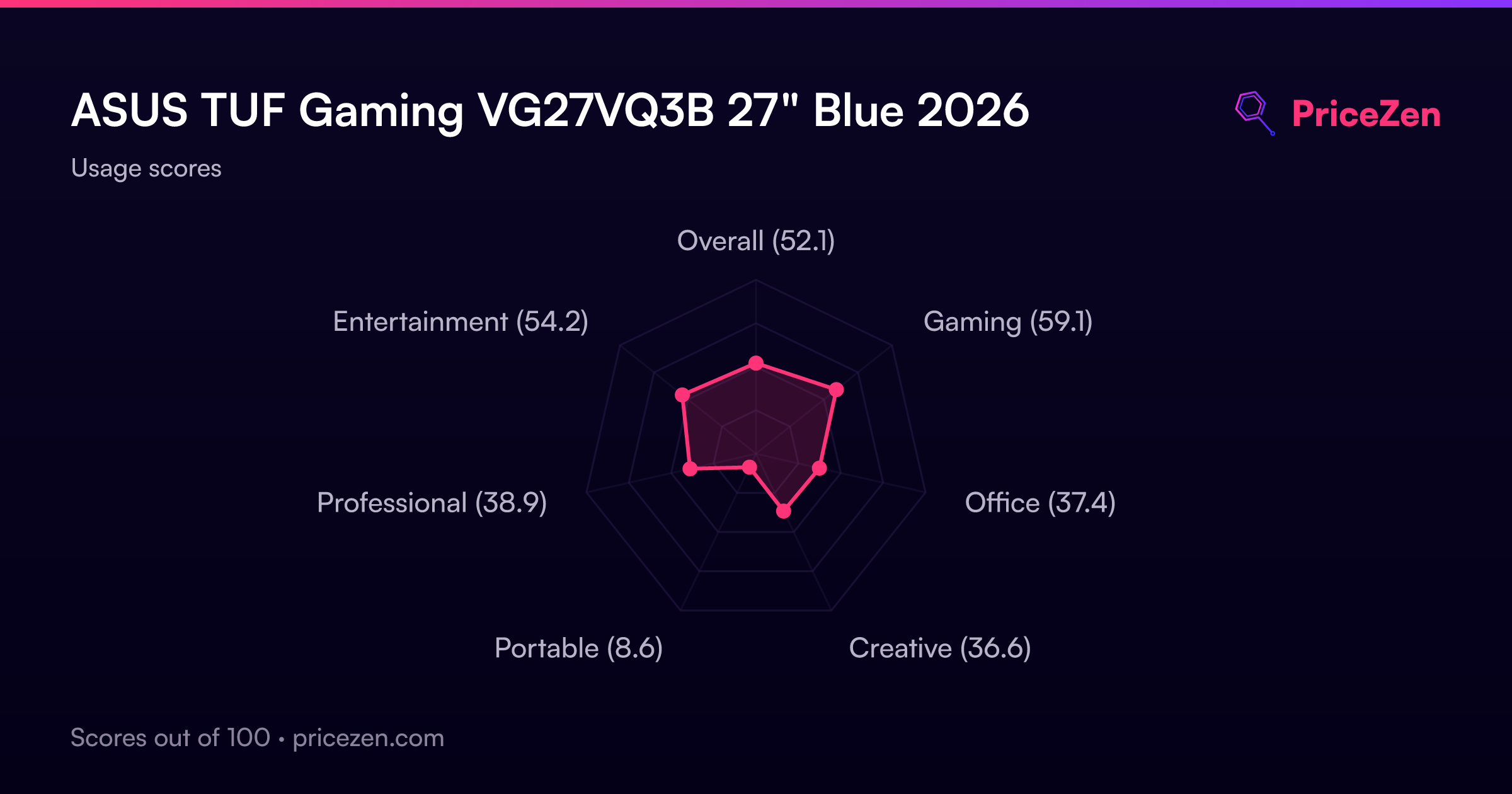
Don't buy it as your only monitor for work, browsing and movies. The overall score of 52.1 in our model tells the story: strong gaming fundamentals, average everything else. It's a specialist, not an all-rounder.
Usage Scores
- Overall52.1
- Gaming59.1
- Office37.4
- Creative36.6
- Portable8.6
- Professional38.9
- Entertainment54.2