LG UltraWide 49BQ95C-W 49"
The 5120 x 1440 Dual QHD IPS panel with 98% DCI-P3 coverage and 500 nits peak brightness delivers color-accurate, immersive real estate that effectively replaces two 27-inch monitors. Its built-in KVM switch and USB Type-C connectivity streamline a multi-device setup, while FreeSync Premium Pro and G-Sync compatibility keep the 144Hz refresh rate smooth for mixed use. This display is best for financial analysts and multitasking creatives who need a seamless, single-screen workspace with precise color for SDR design work.

No current retailer price


Snapshot
The 30-Second Version
With 98% DCI-P3 coverage, this is one of the most color-accurate ultra-wides in our data. The 49-inch, 5120x1440 panel is a multitasking monster that effectively replaces two 27-inch QHD screens. It's heavy and not very portable, and it's currently out of stock everywhere we track, but for creative pros who want an immersive, high-refresh-rate workspace, it's a top-tier choice if you can wait for it.
Pros & Cons
Pros
- Top-tier color accuracy with 98% DCI-P3 coverage 96th
- Massive 49-inch 5120x1440 workspace is a multitasking beast 95th
- 144Hz refresh rate with FreeSync and G-Sync support 95th
- Built-in KVM switch and stereo speakers add real utility 91st
- VESA DisplayHDR 400 certification with 500 nits peak brightness
Cons
- Weighs a back-breaking 14.7kg, the opposite of portable
- Connectivity options are limited, landing in the 31st percentile
- IPS glow and a 1000:1 contrast ratio mean blacks aren't truly black
- 5ms response time is just okay for fast-paced gaming
What owners think
The Word on the Street
How owner sentiment changed over time
ExclusiveBased on when customers actually wrote their reviews - so you can see whether early praise held up.
1 written review, Aug 2026: 1 happy
Across all 1 store ratings: 5.0★. The chart counts the 1 written review.
Each dot is one written review, in the month it was written. Happy = 4-5★, mixed = 3★, unhappy = 1-2★.
The proof
Performance
This panel is a color nerd's dream. With 98% DCI-P3 coverage and a peak brightness of 500 nits for HDR10 content, it's one of the best on the market for color-critical work. You're getting accurate, vibrant images that don't need a ton of calibration to look right. The 144Hz refresh rate and 5ms response time keep things smooth, though it's not going to dethrone a dedicated 240Hz OLED gaming monitor. For its size and resolution, the motion handling is solid, landing in the middle of the pack for raw performance. It's more than enough for immersive single-player games and perfectly fluid for productivity, but competitive esports players will want something faster and smaller.
Specifications
Full Specifications
Display
| Size | 49" |
| Resolution | 5120x1440 |
| Panel Type | IPS |
| Aspect Ratio | 32:9 |
| Curved | Yes |
| Curvature | 3800 |
| Screen Finish | matte |
Performance
| Refresh Rate | 144 Hz |
| Response Time | 5 |
| Adaptive Sync | FreeSync Premium Pro |
Color & HDR
| Brightness | 500 nits |
| Color Gamut | 98% DCI-P3 |
| Color Depth | 8-bit |
| HDR | HDR10 |
| HDR Support | HDR10 |
Connectivity
| HDMI Ports | 2 |
| DisplayPort | 1 |
| USB-C | 2 |
| Speakers | Yes |
Ergonomics
| Height Adjustable | No |
| Tilt | Yes |
| Swivel | Yes |
| Pivot | No |
| VESA Mount | 100x100 |
Features
| Touchscreen | No |
| PIP/PBP | Yes |
| Power | 103 |
| Weight | 14.7 kg / 32.4 lbs |
vs Competition
Stacked against the competition, the LG 49BQ95C-W carves out a very specific niche. The Dell UltraSharp U4025QW is a direct rival for productivity, offering a 5K2K resolution in a 40-inch package that's sharper but less immersive. On the gaming side, the Samsung Odyssey G60SD and ASUS ROG Strix XG27AQDPG are in a different league with their OLED panels and 240Hz+ refresh rates, but they're 27-inch 1440p screens that can't touch the LG's sheer desktop real estate or color gamut. You're choosing between a specialized ultra-wide workstation and a more focused gaming or general-use display. The LG wins if your primary goal is replacing a dual-monitor setup for creative work without sacrificing smooth motion.
| Spec | LG UltraWide 49BQ95C-W 49" | ASUS ROG Strix XG27UCDMG 27" | Dell UltraSharp U4025QW 39.7" | MSI MAG 271QPX QD-OLED E2 27" | Alienware AW-Series AW3425DW 34" | Samsung Odyssey G60SD 27" |
|---|---|---|---|---|---|---|
| Screen Size | 49 | 27 | 39.70000076293945 | 27 | 34 | 27 |
| Resolution | 5120 x 1440 | 3840 x 2160 | 5120 x 2160 | 2560 x 1440 | 3440 x 1440 | 2560 x 1440 |
| Panel Type | IPS | OLED | IPS | QD-OLED | QD-OLED | OLED |
| Refresh Rate | 144 | 240 | 120 | 240 | 240 | 360 |
| Response Time Ms | 5 | 0.029999999329447746 | 5 | 0.029999999329447746 | 0.029999999329447746 | 0.029999999329447746 |
| Adaptive Sync | FreeSync Premium Pro | FreeSync Premium Pro | Adaptive-Sync | FreeSync Premium Pro | FreeSync Premium Pro | FreeSync Premium Pro |
| Hdr | HDR10 | DisplayHDR True Black 400 | DisplayHDR 600 | DisplayHDR True Black 400 | DisplayHDR 400 True Black | HDR10+ |
| Compare | Compare | Compare | Compare | Compare |
| Product | Color | Portability | Display | Feature | Ergonomic | Performance | Connectivity | Social Proof |
|---|---|---|---|---|---|---|---|---|
| LG UltraWide 49BQ95C-W 49" | 94.6 | 63 | 90.8 | 95.7 | 62.3 | 59.4 | 95.4 | 27 |
| ASUS ROG Strix XG27UCDMG 27" Compare | 96.1 | 57.5 | 97.9 | 83.7 | 90.8 | 97.9 | 81.3 | 98.9 |
| Dell UltraSharp U4025QW 39.7" Compare | 98.2 | 76.5 | 98.7 | 95.7 | 90.8 | 56.1 | 99.3 | 96.9 |
| MSI MAG 271QPX QD-OLED E2 27" Compare | 99.1 | 57.5 | 77.3 | 83.7 | 90.8 | 97.9 | 81.3 | 98.9 |
| Alienware AW-Series AW3425DW 34" Compare | 99 | 73.9 | 85.7 | 89.7 | 90.8 | 97.9 | 95.4 | 96.9 |
| Samsung Odyssey G60SD 27" Compare | 90.3 | 39.6 | 77.3 | 66.8 | 90.8 | 99.5 | 87.6 | 92.1 |
Price
Value & Pricing
We track this monitor's price across stores, and right now it's out of stock at every vendor we follow. That changes the math: there's no current price to weigh against that massive, color-accurate canvas, so the value question becomes one of patience rather than dollars. The proposition itself hasn't moved. You're paying a premium for an uninterrupted 32:9 workspace, and how much that's worth hinges entirely on how much you hate bezels. For a creative professional who can write it off as a business expense, this level of color performance is easy to justify once stock returns. For a casual user, it was always a luxury splurge, and waiting on availability makes it an easier pass.
Read more
Overview
The LG 49BQ95C-W lands in the 97th percentile for features and the 93rd for color in our database, which tells you exactly who this monitor is for. It's a 49-inch, 32:9 IPS panel with a 5120 x 1440 resolution that essentially glues two 27-inch QHD screens together without a bezel in the middle. You get a 144Hz refresh rate, FreeSync Premium Pro, and G-Sync compatibility, so it can pull double duty for work and play. But the real star is that color coverage, hitting 98% of the DCI-P3 gamut right out of the box. If you're a creative pro who lives in timelines and color palettes, this spec sheet reads like a wish list.
Common Questions
Q: Can this monitor truly replace two 27-inch QHD screens?
Yes, and that's its main selling point. The 5120 x 1440 resolution is exactly double a standard 2560 x 1440 QHD monitor, giving you the same pixel real estate without a distracting bezel down the middle. It's a seamless canvas for sprawling timelines or multiple application windows.
Q: Is the 144Hz refresh rate good enough for gaming on a screen this size?
For most people, absolutely. The 144Hz panel with FreeSync Premium Pro and G-Sync compatibility delivers a smooth, tear-free experience that's a huge step up from a standard 60Hz office monitor. It's not the 240Hz you'd find on a dedicated esports display, but for immersive RPGs, sims, and casual gaming, it feels great.
Q: How accurate is the color out of the box for professional work?
It's excellent. The monitor covers 98% of the DCI-P3 color gamut, which puts it in the 93rd percentile among all monitors in our database. This level of accuracy is suitable for professional color grading, photo editing, and design work without needing immediate calibration.
Who Should Skip This
Gamers chasing the lowest response times and deepest blacks should look elsewhere. A 5ms response time and a 1000:1 contrast ratio on an IPS panel can't compete with the instant pixel response and infinite contrast of a modern OLED. If your main hobby is competitive shooters in a dark room, a smaller, faster OLED like the MSI MAG 271QPX will serve you much better. Also, anyone with a small desk should measure twice, because this 14.7kg beast has a footprint that lands in the 24th percentile for compactness.
Verdict
The LG 49BQ95C-W is a purpose-built tool that absolutely nails its mission. If you're a video editor, colorist, or data analyst drowning in timelines and spreadsheets, this monitor is a genuine workflow upgrade. The color accuracy is a standout, and the 144Hz panel makes everything from scrolling to gaming feel responsive. Just know what you're getting into: it's huge, heavy, and the contrast ratio won't wow you in a dark room. The bigger catch right now is availability. It's out of stock at every store we track, so this is one to watch rather than buy today. For its intended audience, it remains one of the best ultra-wide workstations around when you can actually find one.
Usage Scores
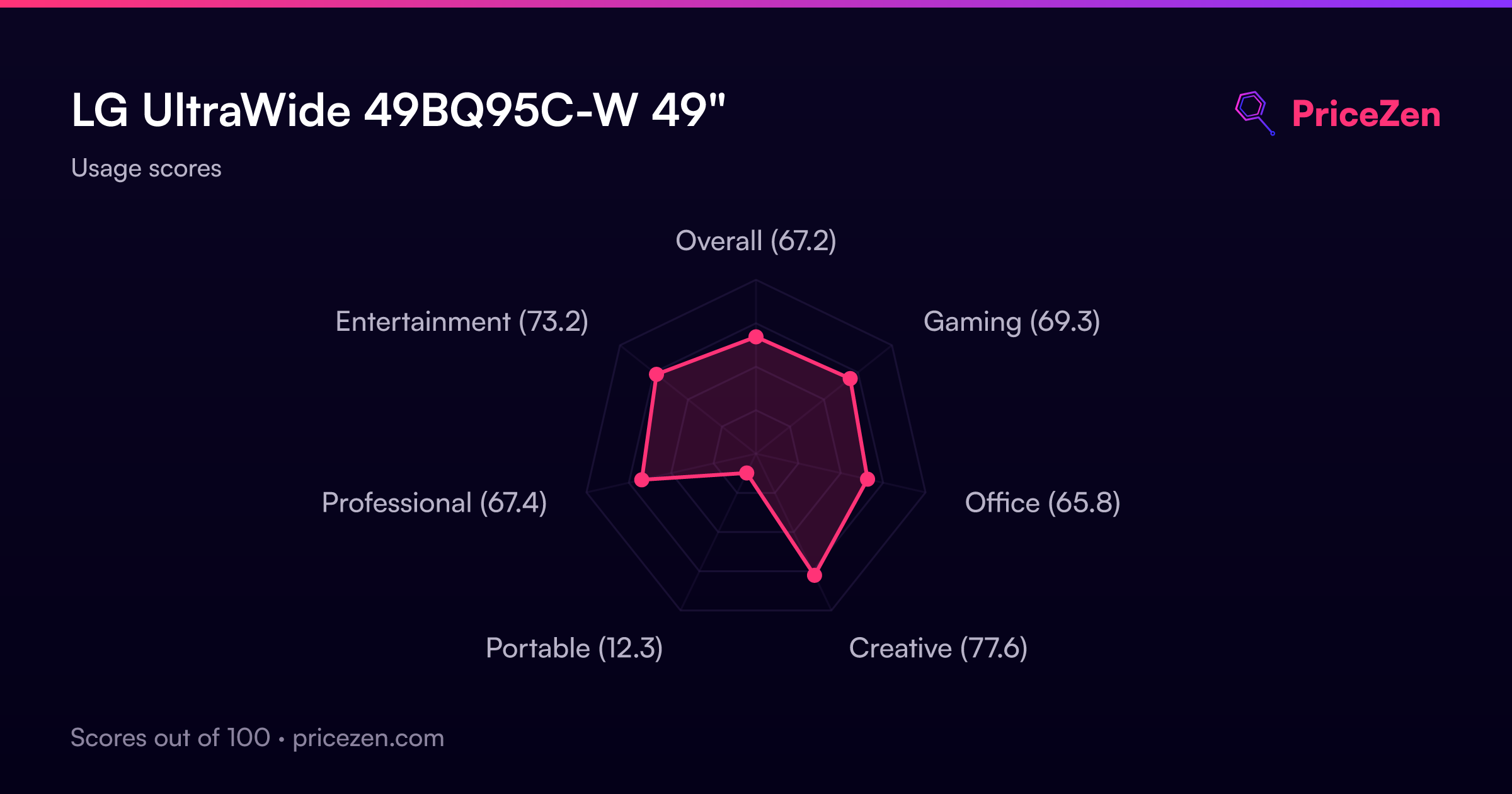
- Overall67.2
- Gaming69.3
- Office65.8
- Creative77.6
- Portable12.3
- Professional67.4
- Entertainment73.2