Gigabyte GeForce RTX 5060 Ti Gaming 16GB GDDR7 Black

Fast GDDR7 memory on board verified Nov 28
63/100 overall score
- GPU
- GeForce RTX 5060 Ti
- VRAM
- 16GB GDDR7
- Boost clock
- 2647 MHz
- TDP
- 180 W
- Memory bus
- 128 bit
- Ray tracing
- Yes
- Class
- consumer
Snapshot
The 30-Second Version
Efficient, cool-running 5060 Ti with 16GB of GDDR7 and a best-in-class power draw. Raster performance is only average and CAD 1,800 hurts. Good card, wait for a better price.
Pros & Cons
Pros
- 16GB of GDDR7 is well above average for this class. 86th
- 180W TDP makes it one of the most efficient cards we rank. 83rd
- Three DisplayPort 2.1b plus HDMI 2.1b covers basically any monitor setup. 81st
- Two slots and 281mm means it fits most mid-size cases. 72nd
Cons
- CAD 1,800 is steep for a 5060 Ti, and our affordability ranking agrees.
- Raw raster and ray tracing performance are only middle of the pack.
- Compute throughput lags behind most GPUs, so heavy workstation jobs suffer.
- PCIe 5.0 x8 rather than a full x16 link.
The proof
Performance
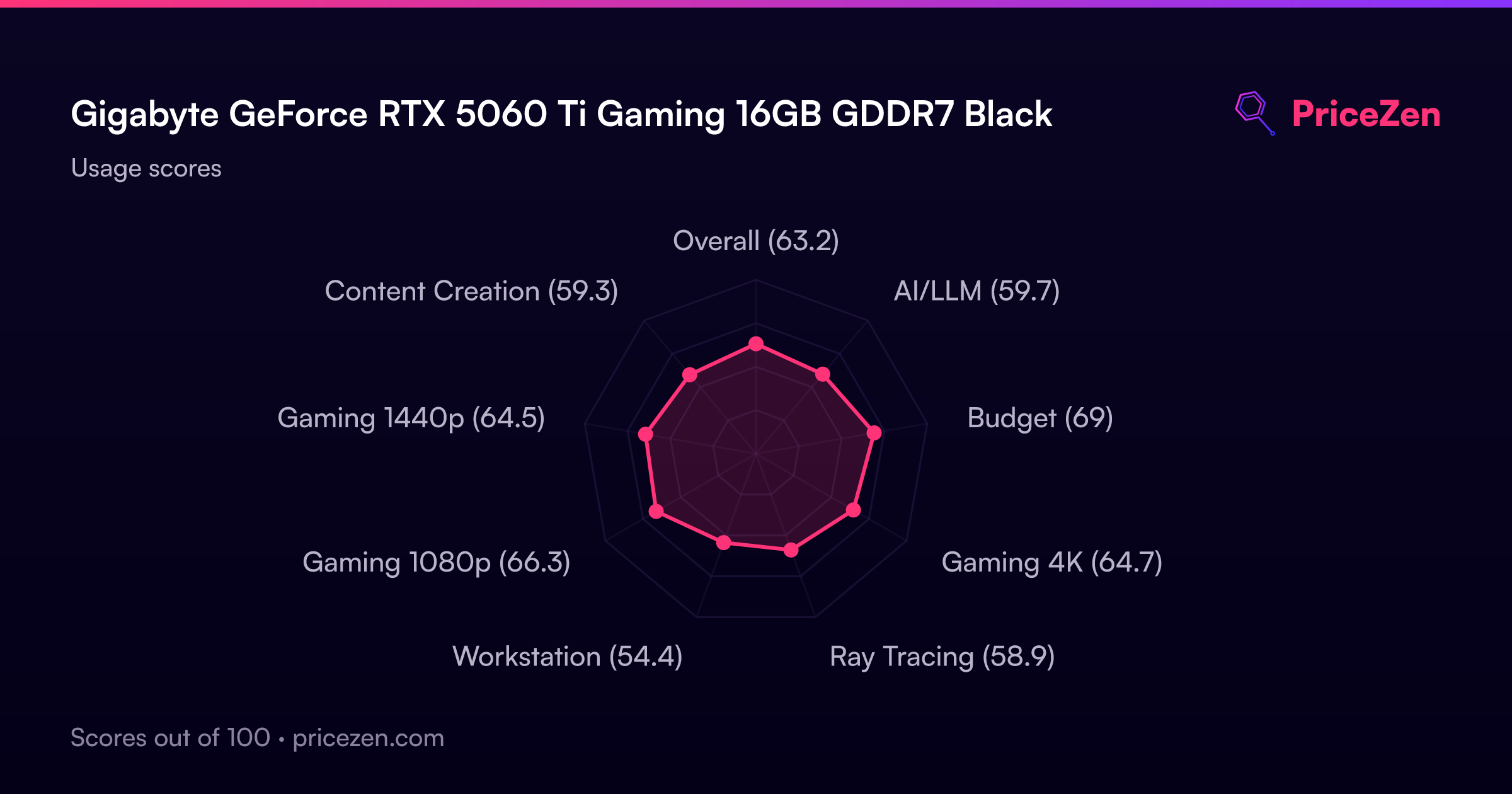
The PassMark G3D benchmark score of 22,099 lands this thing right in the middle of the pack for raw raster, and ray tracing sits about average too. So it's a solid 1080p card (66.4/100 in our scoring) that can dip into 4K at 64.8/100 if you're willing to lean on settings. Where it shines is efficiency: 180W TDP against that performance is one of the best results on the market, and the triple-fan cooler keeps thermals respectable. The 16GB buffer on a 128-bit bus gives you 448 GB/s, which is plenty of headroom for textures but not a bandwidth monster. Compute is the weak spot at 23.7 FP32 TFLOPS, and our workstation score of 54.4/100 reflects that. This is a gaming card, not a render farm.
Specifications
Full Specifications
Chipset
| GPU Chipset | GeForce RTX 5060 Ti |
| Brand | NVIDIA |
| Architecture | Blackwell |
| Class | consumer |
| Process | 5 |
Memory
| VRAM | 16 GB |
| Memory Type | GDDR7 |
| Memory Bus | 128 |
| Bandwidth | 448 |
Compute
| Tensor Cores | 144 |
| RT Cores | 36 |
| Base Clock | 2647 |
| Boost Clock | 2647 |
| FP16 TFLOPS | 23.7 |
| FP32 TFLOPS | 23.7 |
Performance
| PassMark G3D | 22099 |
| GPU Compute | 11371 |
Power & Cooling
| TDP | 180 |
| Recommended PSU | 650 |
| Power Connectors | 8-Pin |
| Cooler | Triple Fan |
| Fans | 3 |
Connectivity
| Interface | PCI Express 5.0 x8 |
| DisplayPort | 3 |
| HDMI | 1 |
| Max Displays | 4 |
| Max Resolution | 7680 x 4320 |
Physical
| Length | 281 |
| Slot Width | 2 |
| Form Factor | ATX |
Features
| Ray Tracing | Yes |
| VR Ready | Yes |
| DirectX | 12 Ultimate |
vs Competition
Against the ASUS GeForce RTX 5080 PRIME EVO OC, the ZOTAC GeForce RTX 5080 APOCALYPSE and the PNY GeForce RTX 5080 ARGB OC, this Gigabyte is clearly the lower tier: its raster and RT rankings are average while those cards live at the top of the charts. If your budget already stretches to CAD 1,800, that's exactly why you should look at them. The MSI GeForce RTX 5070 Ti Ventus 3X OC is the more natural step up if you want more frames without going full flagship. And the Sapphire Radeon RX 7900 XTX NITRO+ is worth a look if raw raster matters more to you than efficiency. Where this card wins is the 16GB buffer paired with a 180W draw and a single 8-pin, which none of that crowd can match on simplicity.
| Spec | Gigabyte GeForce RTX 5060 Ti Gaming | ASUS GeForce RTX 5090 TUF Gaming | MSI GeForce RTX 5070 Ti Ventus 3X OC | ZOTAC GeForce RTX 5080 APOCALYPSE | PNY GeForce RTX 5080 ARGB OC | Sapphire Radeon RX 7900 XTX NITRO+ |
|---|---|---|---|---|---|---|
| Chipset | GeForce RTX 5060 Ti | GeForce RTX 5090 | GeForce RTX 5070 Ti | GeForce RTX 5080 | GeForce RTX 5080 | Radeon RX 7900 XTX |
| Vram | 16GB GDDR7 | 32GB GDDR7 | 16GB GDDR7 | 16GB GDDR7 | 16GB GDDR7 | 24GB GDDR6 |
| Boost Clock Mhz | 2647 | 2407 | 2482 | 2730 | 2620 | 2680 |
| Tdp W | 180 | 575 | 300 | 360 | 360 | 339 |
| Memory Bus Bits | 128 | 512 | 256 | 256 | 256 | 384 |
| Ray Tracing | Yes | Yes | Yes | Yes | Yes | Yes |
| GPU Class | consumer | consumer | consumer | consumer | consumer | consumer |
| Compare | Compare | Compare | Compare | Compare |
| Product | AI | Rt | Vram | Raster | Compute | Feature | Thermal | Efficiency | Connectivity | Affordability |
|---|---|---|---|---|---|---|---|---|---|---|
| Gigabyte GeForce RTX 5060 Ti Gaming | 69.3 | 53.2 | 82.9 | 55.3 | 41 | 43.2 | 71.8 | 85.6 | 81.3 | 31.9 |
| ASUS GeForce RTX 5090 TUF Gaming Compare | 97.2 | 90.5 | 97.8 | 98.8 | 97.7 | 95.7 | 71.8 | 23.1 | 99.3 | 2.2 |
| MSI GeForce RTX 5070 Ti Ventus 3X OC Compare | 78.9 | 92.4 | 86 | 88.9 | 87.9 | 95.7 | 91.8 | 71.6 | 94.2 | 21.1 |
| ZOTAC GeForce RTX 5080 APOCALYPSE Compare | 85.5 | 97.7 | 89.1 | 94.4 | 93.3 | 95.7 | 91.8 | 56.6 | 94.2 | 23.3 |
| PNY GeForce RTX 5080 ARGB OC Compare | 85.5 | 97.7 | 89.1 | 94.4 | 93.3 | 95.7 | 91.8 | 56.6 | 94.2 | 15.9 |
| Sapphire Radeon RX 7900 XTX NITRO+ Compare | 95.3 | 96.4 | 92.1 | 83.4 | 95.6 | 95.7 | 91.8 | 51.3 | 98.8 | 13.7 |
Price
Value & Pricing
Here's the honest bit: the hardware is good, the price isn't. At CAD 1,800 you're paying flagship-adjacent money for a card whose raster benchmark score sits mid-table. Our budget score of 68.9/100 is generous mainly because the 16GB and low power draw age well. If you find it meaningfully cheaper, it becomes an easy recommendation. At the current Newegg price, we'd wait or cross-shop.
Read more
Overview
Gigabyte's Gaming take on the RTX 5060 Ti is a straightforward card: Blackwell silicon, 16GB of GDDR7, triple fans, two slots, 281mm long. It boosts to 2647MHz and pulls 180W off a single 8-pin. No drama, no weird power connector.
The catch is the price. We're tracking CAD 1,800 at Newegg, and our affordability ranking puts it in the bottom third of GPUs we compare. Great memory config, awkward money.
Common Questions
Q: Will it fit in my case and work with my power supply?
It's 281mm long and takes two slots, so most mid-tower cases are fine. Gigabyte specs a 650W PSU and a single 8-pin connector, with a 180W TDP.
Q: Is 16GB on a 128-bit bus a problem?
Not for capacity, since 16GB is well above average for this class and gives you texture headroom. Bandwidth is 448 GB/s, which is adequate rather than exceptional.
Q: Can it handle 4K gaming?
Our 4K gaming score is 64.8/100 versus 66.4/100 at 1080p, so it'll run 4K but you'll be trimming settings. It's happiest at 1080p.
Who Should Skip This
If you do Blender renders, video encoding marathons or local AI work, skip it. The 23.7 FP32 TFLOPS and 54.4/100 workstation score mean you're buying the wrong tool. And if you're chasing high-refresh 4K, the mid-pack raster ranking will disappoint you at this price.
Verdict
Buy this if you're building a quiet, low-power 1080p or light 1440p rig and you want 16GB of VRAM that won't feel cramped later. The efficiency and connectivity rankings are genuinely strong, and the 2-slot, 281mm design plays nice with normal cases. Just don't buy it at CAD 1,800 unless you've checked the alternatives first. Owners give it 4.2/5 across 16 reviews, which tracks with a decent card at an indecent price.
Usage Scores
- Overall63.2
- AI/LLM59.7
- Budget69
- Gaming 4K64.7
- Ray Tracing58.9
- Workstation54.4
- Gaming 1080p66.3
- Gaming 1440p64.5
- Content Creation59.3