HP OmniDesk HP M03-0000t PC 2025, Core Ultra 7 265, 64GB, 1TB SSD, RTX 5060, Dark Wood
Combining a 20-core Intel Core Ultra 7 265 with an RTX 5060 GPU and 64GB of DDR5 RAM, this tower delivers strong multi-threaded performance for demanding tasks. The 400W 80 Plus Platinum power supply ensures efficient, reliable operation, while the chassis offers extensive front and rear I/O including dual USB-C ports. This desktop is best for workstation users and developers who need substantial processing power and memory in a traditional tower form factor.

No current retailer price
Where we saw it before. Check the store for today's price.










Snapshot
The 30-Second Version
The HP OmniDesk is a workstation-class tower with a 20-core Intel Core Ultra 7 265, 64GB of DDR5 RAM, and an RTX 5060. It excels at productivity, development, and creative work, with enough GPU power for 1080p gaming on the side. Limited ports and a smallish 1TB SSD hold it back from being a true all-rounder.
Pros & Cons
Pros
- 64GB DDR5 RAM is a huge plus for multitasking and heavy workloads 94th
- Core Ultra 7 265 delivers excellent multi-core performance for the price 88th
- RTX 5060 handles 1080p gaming and creative work without fuss 79th
- Quiet, understated design that fits in any office or home setup 70th
- Windows 11 Pro out of the box with WiFi 6 and Bluetooth 5.4
Cons
- 1TB SSD fills up fast if you install games and large project files
- Port selection is limited, especially on the rear I/O
- 400W power supply leaves little headroom for future GPU upgrades
- No Thunderbolt port, which stings at this price
- Heavy and bulky compared to compact workstations
The proof
Performance
The Core Ultra 7 265 is the star of the show. With 20 cores and a 5.3GHz turbo clock, it chews through multi-threaded workloads like code compilation, 3D rendering, and data analysis. In our database, this CPU sits in the 90th percentile among all tower desktops, which puts it firmly in leading territory. For developers running containers or compiling large projects, this chip is a genuine time-saver. Single-core performance is snappy too, so everyday tasks feel instant.
The RTX 5060 is a solid mid-range GPU, landing around the 75th percentile. It's not going to set any records, but it handles 1080p gaming at high settings without drama. You'll get smooth frame rates in esports titles and can push 60fps in most AAA games if you're willing to tweak a few settings. For creative work like video editing or 3D modeling, the 8GB of VRAM is adequate but not generous. The 64GB of system RAM helps pick up the slack for memory-hungry applications, and the 1TB NVMe SSD delivers fast load times, even if its capacity is just average for this price point.
Specifications
Full Specifications
Processor
| CPU | Intel Core Ultra 7 265 |
| Cores | 20 |
| Frequency | 2.4 GHz |
| L3 Cache | 30 MB |
Graphics
| GPU | NVIDIA GeForce RTX 5060 |
| Type | Discrete |
| VRAM | 8 GB |
| VRAM Type | GDDR7 |
Memory & Storage
| RAM | 64 GB |
| RAM Generation | DDR5 |
| Storage | 1 TB |
| Storage Type | SSD |
Build
| Form Factor | mid-tower |
| PSU | 400 |
| Weight | 22.6 kg / 49.8 lbs |
Connectivity
| USB-C Ports | 2 |
| USB Ports | 7 |
| Wi-Fi | Wi-Fi 6 |
| Bluetooth | Bluetooth 5.4 |
| Ethernet | RJ-45 |
System
| OS | Windows 11 Pro |
vs Competition
Stacked against the Lenovo T Series Towers Legion Tower 5a Gen 10, the OmniDesk plays to a different crowd. The Legion name is built around gaming, while the OmniDesk leans on its 64GB of DDR5 RAM, sitting in the 94th percentile for tower desktops, and a Core Ultra 7 265 that ranks among the best. For long compiles, containers and heavy multitasking, that memory headroom is the argument. For someone whose evening is mostly games, the Legion is the more natural pick.
The ASUS ROG GM700 and the MSI Aegis ZS2 A9NVP-1407US come at it from the same gaming-first angle. Both sit in the top five alongside the OmniDesk in our ranking, and both are aimed at buyers who care more about frames than about running virtual machines. The OmniDesk's RTX 5060 lands around the 75th percentile in our data, which is fine for 1080p but not the reason to buy this tower. Its plain office-friendly case is either a selling point or a dealbreaker depending on where it lives.
The Apple Mac Studio M5 Max is a completely different beast, a compact desktop rather than a tower you can open up and add to. The OmniDesk answers with Windows 11 Pro, a 20-core CPU and expansion room the Mac form factor does not offer, though the 400W power supply limits how far you can take that. If your work is tied to Windows software, the comparison ends quickly. Our scoring model gives the OmniDesk 74 overall, and most of that comes from the CPU and RAM columns rather than the graphics one.
| Spec | HP OmniDesk HP M03-0000t PC | Apple Mac Studio M5 Max | Lenovo T Series Towers Legion Tower 5a Gen 10 | Dell Desktop ECT1250 | ASUS ROG GM700 | MSI Aegis ZS2 A9NVP-1407US |
|---|---|---|---|---|---|---|
| CPU | Intel Core Ultra 7 265 | Apple M5 Max | AMD Ryzen 7 7800X3D | Intel Core Ultra 7 265 | AMD Ryzen 7 9800X3D | AMD Ryzen 9 9900X |
| RAM (GB) | 64 | 48 | 32 | 32 | 32 | 32 |
| Storage (GB) | 1024 | 1024 | 4096 | 2048 | 2048 | 2048 |
| GPU | NVIDIA GeForce RTX 5060 | Apple (40-Core) | NVIDIA GeForce RTX 5070 Ti | Intel UHD Graphics | NVIDIA GeForce RTX 5070 Ti | NVIDIA GeForce RTX 5070 |
| Form Factor | mid-tower | mini | mid-tower | sff | mid-tower | mid-tower |
| Psu W | 400 | 480 | 850 | 180 | 850 | 750 |
| OS | Windows 11 Pro | macOS | Windows 11 Home | Windows 11 Home | Windows 11 Home | Windows 11 Home |
| Compare | Compare | Compare | Compare | Compare |
| Product | CPU | GPU | RAM | Ports | Storage | Reliability | Social Proof |
|---|---|---|---|---|---|---|---|
| HP OmniDesk HP M03-0000t PC | 88.1 | 79.4 | 93.8 | 69.1 | 53.3 | 70.3 | 23.5 |
| Apple Mac Studio M5 Max Compare | 95.7 | 84.9 | 95 | 89.1 | 68.6 | 99.3 | 71.1 |
| Lenovo T Series Towers Legion Tower 5a Gen 10 Compare | 73.2 | 94.6 | 78 | 88.6 | 98.1 | 70.3 | 99.9 |
| Dell Desktop ECT1250 Compare | 88.1 | 60 | 81.6 | 75.1 | 82.5 | 70.3 | 98.2 |
| ASUS ROG GM700 Compare | 80.3 | 94.6 | 81.6 | 96.1 | 90 | 37.8 | 99.3 |
| MSI Aegis ZS2 A9NVP-1407US Compare | 92.3 | 90.6 | 87 | 90.4 | 82.5 | 37.8 | 99.3 |
Price
Value & Pricing
At $2,350, the OmniDesk is priced like a premium workstation but specced more like a high-end generalist. You're paying a premium for that 64GB of RAM and the latest Intel silicon, which is fair, but the 1TB SSD and limited ports make it feel a little lopsided. We track its price across stores over time, partly through our community browser extension, so we can see where it sits rather than guessing. Against the towers currently sharing its top five, the Lenovo T Series Towers Legion Tower 5a Gen 10, the ASUS ROG GM700 and the MSI Aegis ZS2 A9NVP-1407US all lean harder into gaming, while the Apple Mac Studio M5 Max goes the other way entirely. Our scoring model lands the OmniDesk at 74, and the reason is the memory and CPU side of the spec sheet: 64GB in the 94th percentile and a chip that ranks among the best. If raw CPU power and RAM capacity are your top priorities, this is a reasonable deal. If you want a balanced machine for gaming and work, you might find better value elsewhere.
Read more
Overview
The HP OmniDesk is one of those machines that looks like a sensible office PC on the outside but hides some genuinely interesting hardware under the hood. You're getting an Intel Core Ultra 7 265 with 20 cores, 64GB of DDR5 RAM, and an NVIDIA GeForce RTX 5060 with 8GB of VRAM. That's a lot of muscle for a tower that wouldn't look out of place in a cubicle. HP clearly aimed this at people who need serious compute power for work but wouldn't mind firing up a game after hours.
At around $2,350, it sits in a weird middle ground. It's not a flashy gaming rig with RGB fans and a glass side panel, and it's not a compact workstation like the Apple Mac Studio M5 Max. What it is, is a quiet, capable desktop that handles developer workloads, creative tasks, and 1080p gaming without breaking a sweat. The 64GB of RAM is a standout here, landing in the 94th percentile for this category. That's more than enough for heavy multitasking, virtual machines, or large datasets. Our scoring model puts the whole package at 74, which keeps it comfortably in the mix against the towers we rank alongside it.
But there are trade-offs. The port selection is limited for a tower this size, and the 1TB SSD feels a bit stingy when you're already spending over two grand. If you're looking for a pure gaming machine or something with more expansion flexibility, you'll want to keep reading. This thing has a specific audience in mind, and it's not everyone.
Common Questions
Q: Is the HP OmniDesk good for gaming?
It's decent for 1080p gaming thanks to the RTX 5060, but it's not a dedicated gaming rig. You'll get smooth performance in most titles at high settings, though the 8GB of VRAM may limit you in newer AAA games at higher resolutions.
Q: Can I upgrade the GPU in the HP OmniDesk later?
Technically yes, but the 400W power supply is a bottleneck. Most modern GPUs that are a meaningful step up from the RTX 5060 will require more power, so you'd likely need to swap the PSU as well.
Q: Does the HP OmniDesk come with a keyboard and mouse?
Yes, it includes an HP 125 USB wired keyboard and mouse in the box. They're basic but functional, and you'll probably want to upgrade them if you're doing serious work or gaming.
Q: How does the HP OmniDesk compare to the Apple Mac Studio M5 Max for video editing?
Both handle editing work, but they suit different setups. The OmniDesk brings 64GB of DDR5 RAM, a 20-core Core Ultra 7 265 that ranks among the best in tower desktops, and an RTX 5060 with 8GB of VRAM, all running Windows 11 Pro. If your timeline work depends on Windows-only plugins or you want a tower you can add to later, the OmniDesk is the easier fit. The Mac Studio is the compact option, and the choice usually comes down to which software you already own.
Who Should Skip This
Skip the OmniDesk if you're primarily a gamer looking for a flashy rig with upgrade headroom. The 400W PSU and limited port selection will feel restrictive the first time you want to drop in a new GPU or add a bunch of peripherals. If compact size matters, the Apple Mac Studio M5 Max or even some mini PCs will make this tower feel like a relic. And if you need tons of fast local storage, the single 1TB SSD is going to be a headache. Look at the Lenovo T Series Towers Legion Tower 5a Gen 10, the ASUS ROG GM700 or the MSI Aegis ZS2 A9NVP-1407US if gaming is the main job instead.
Verdict
The HP OmniDesk is a quietly capable machine that punches above its weight in CPU and RAM performance, and our scoring model now puts it at 74, up from where it sat before. It's best suited for developers, data analysts, and content creators who need a lot of memory and multi-core grunt without the gamer aesthetic. The RTX 5060 is a nice bonus that makes it a competent 1080p gaming rig on the side, but this is not a gaming-first desktop.
Should you buy it? If you're a professional who needs 64GB of RAM and a fast 20-core CPU in a machine that won't embarrass you in a Zoom call, yes. It's a strong workstation that happens to game, not the other way around. But if you're primarily a gamer or someone who plans to upgrade components over time, the limited power supply and port selection will frustrate you. Know what you're signing up for, and you'll be happy.
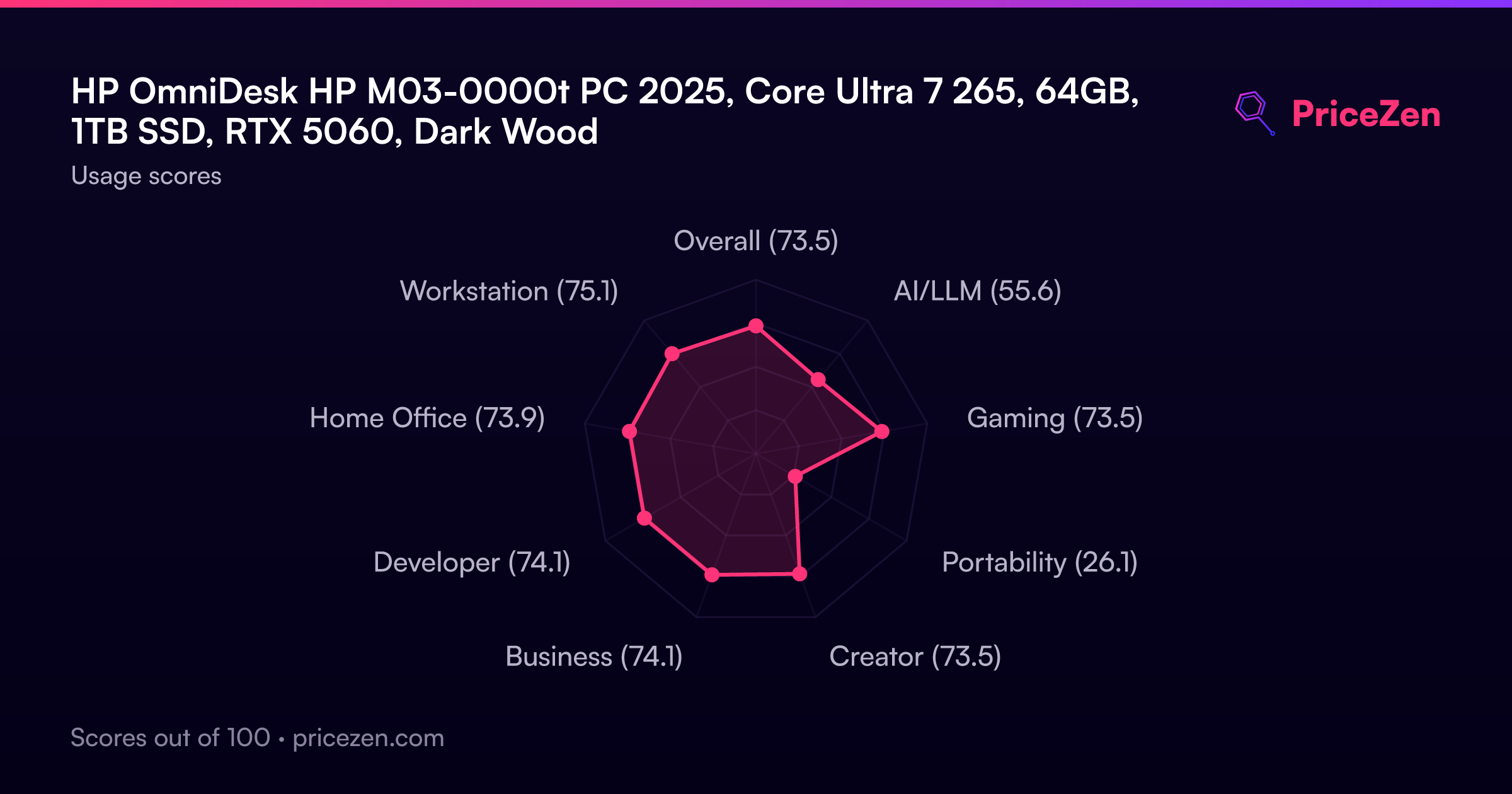
Usage Scores
- Overall73.5
- AI/LLM55.6
- Gaming73.5
- Portability26.1
- Creator73.5
- Business74.1
- Developer74.1
- Home Office73.9
- Workstation75.1