Lenovo A100 2026, Core i3-N305, 32GB, 2TB SSD, Gray

One cable, one screen, the PC built in verified Nov 28
58/100 overall score
- CPU
- Intel N-Series N305
- RAM
- 32 GB
- Storage
- 2 TB
- GPU
- Intel UHD Graphics
- Form factor
- aio
- OS
- Windows 11 Home
Snapshot
The 30-Second Version
The Lenovo A100 is a basic all-in-one with a standout 2TB SSD and 32GB of RAM, but a weak CPU and integrated graphics hold it back. It's fine for email, streaming, and office work, but terrible for gaming. At the low end of its price range, it's a decent buy for the right person.
Pros & Cons
Pros
- Huge 2TB SSD gives you plenty of room for files and apps 83rd
- 32GB of RAM is overkill for office work in the best way 70th
- Built-in webcam and Wi-Fi 6 make it ready for remote work
- Compact all-in-one design keeps your desk clutter-free
Cons
- Integrated graphics can't handle modern games at all
- Core i3-N305 CPU is below average for a desktop
- Only 4 USB-A ports and one HDMI, port selection is thin
- No touchscreen despite the all-in-one form factor
The proof
Performance
The Core i3-N305 has 8 cores, which sounds impressive until you realize it's a low-power chip designed for efficiency, not raw speed. In our database, its CPU performance lands in the 28th percentile, so it's below average compared to other desktops. The 32GB of DDR4 RAM is a nice surprise at this price and helps with multitasking, while the 2TB SSD sits in the 83rd percentile for storage, which is genuinely great. The weak link is the integrated Intel UHD Graphics, which ranks in the 35th percentile. Fine for video playback and light photo editing, but gaming is a non-starter at 13.2 out of 100.
Specifications
Full Specifications
Processor
| CPU | Intel N-Series N305 |
| Cores | 8 |
| L3 Cache | 6 MB |
Graphics
| GPU | Intel UHD Graphics |
| Type | Integrated |
| VRAM Type | Shared |
Memory & Storage
| RAM | 32 GB |
| RAM Generation | DDR4 |
| Storage | 2 TB |
| Storage Type | SSD |
Build
| Form Factor | aio |
| Weight | 4.3 kg / 9.5 lbs |
Connectivity
| USB-C Ports | 0 |
| USB Ports | 4 |
| HDMI | 1 x HDMI |
| Wi-Fi | Wi-Fi 6 |
| Bluetooth | Bluetooth 5.2 |
| Ethernet | 1x Ethernet |
System
| OS | Windows 11 Home |
vs Competition
Stacked against the competition, the A100 is a niche player. The Apple Mac Studio M3 Ultra and HP OMEN GT16-0364 are in completely different leagues for performance, but they also cost way more and target different buyers. The Dell Desktop ECT1250 is a more direct rival for office work, and it typically offers a stronger CPU for similar money. The MSI Aegis and CLX SET are gaming-focused towers that embarrass the A100 on graphics, but again, that's not the point of this machine. If you need raw power, look elsewhere. If you want a simple all-in-one for email and video calls, the A100 holds its own.
| Spec | Lenovo A100 | Apple Mac Studio M5 Max | HP OMEN GT16-0364 | Dell Desktop ECT1250 | ASUS ROG GM700 | MSI Aegis ZS2 A9NVP-1407US |
|---|---|---|---|---|---|---|
| CPU | Intel N-Series N305 | Apple M5 Max | AMD Ryzen 7 8700F | Intel Core Ultra 7 265 | AMD Ryzen 7 9800X3D | AMD Ryzen 9 9900X |
| RAM (GB) | 32 | 48 | 32 | 32 | 32 | 32 |
| Storage (GB) | 2048 | 1024 | 1024 | 2048 | 2048 | 2048 |
| GPU | Intel UHD Graphics | Apple (40-Core) | NVIDIA GeForce RTX 5070 | Intel UHD Graphics | NVIDIA GeForce RTX 5070 Ti | NVIDIA GeForce RTX 5070 |
| Form Factor | aio | mini | mid-tower | sff | mid-tower | mid-tower |
| Psu W | - | 480 | 850 | 180 | 850 | 750 |
| OS | Windows 11 Home | macOS | Windows 11 Home | Windows 11 Home | Windows 11 Home | Windows 11 Home |
| Compare | Compare | Compare | Compare | Compare |
| Product | CPU | GPU | RAM | Ports | Storage | Reliability |
|---|---|---|---|---|---|---|
| Lenovo A100 | 27.2 | 36.4 | 63.8 | 34.4 | 82.5 | 70.2 |
| Apple Mac Studio M5 Max Compare | 95.7 | 84.9 | 95 | 89.1 | 68.6 | 99.3 |
| HP OMEN GT16-0364 Compare | 69.3 | 90.7 | 87 | 97.9 | 53.2 | 70.2 |
| Dell Desktop ECT1250 Compare | 88 | 60 | 81.6 | 75 | 82.5 | 70.2 |
| ASUS ROG GM700 Compare | 80.3 | 94.6 | 81.6 | 96.1 | 90 | 37.7 |
| MSI Aegis ZS2 A9NVP-1407US Compare | 92.3 | 90.7 | 87 | 90.4 | 82.5 | 37.7 |
Price
Value & Pricing
Pricing is all over the place. We're seeing this unit listed between USD 979 and USD 1,369 across two US listings, which is a USD 390 spread. At the low end, the 32GB RAM and 2TB SSD combo makes this a reasonable deal for a home office machine. At the high end, you're paying too much for an entry-level processor. If you can snag it near USD 979, it's a fair buy. If it's closer to USD 1,369, walk away and look for something with a better CPU.
Read more
Overview
The Lenovo A100 is an all-in-one that knows exactly what it is: a no-fuss machine for email, spreadsheets, video calls, and streaming. It's not trying to impress gamers or creative pros, and that's fine. The 23.8-inch Full HD screen is crisp enough for daily work, and the built-in webcam plus Wi-Fi 6 make it a solid pick for remote work right out of the box.
The spec sheet is a bit of a mixed bag. You get a generous 32GB of RAM and a 2TB SSD, which is more than most people need for office work. But the Intel Core i3-N305 processor and integrated UHD graphics are entry-level parts. That combo means snappy everyday performance, but don't expect much headroom for demanding software.
Common Questions
Q: Can this run games like Fortnite or Minecraft?
Not well. The integrated Intel UHD Graphics score 13.2 out of 100 for gaming in our database, so even lighter titles will struggle at 1080p. This is strictly a work and streaming machine.
Q: Is 32GB of RAM overkill for this computer?
For most home office tasks, yes. But it means you can keep dozens of browser tabs open and run multiple apps without slowdowns, which is a nice perk at this price.
Q: Does the 23.8-inch screen support touch input?
No, this is a non-touchscreen all-in-one. You'll need to use the included wireless keyboard and mouse for navigation.
Who Should Skip This
Skip this if you need any kind of graphics horsepower. Gamers, video editors, and anyone running 3D software will be miserable with the integrated UHD graphics and entry-level CPU. Also skip it if you need lots of ports, since 4 USB-A and one HDMI is pretty bare for a desktop.
Verdict
The Lenovo A100 is for people who want a clean, simple desktop for everyday tasks without fussing over upgrades or external monitors. It's a good fit for remote workers, students, and anyone who lives in a browser and Office apps. The big RAM and SSD are genuinely useful, and the all-in-one design saves space. Just don't expect it to do anything demanding.
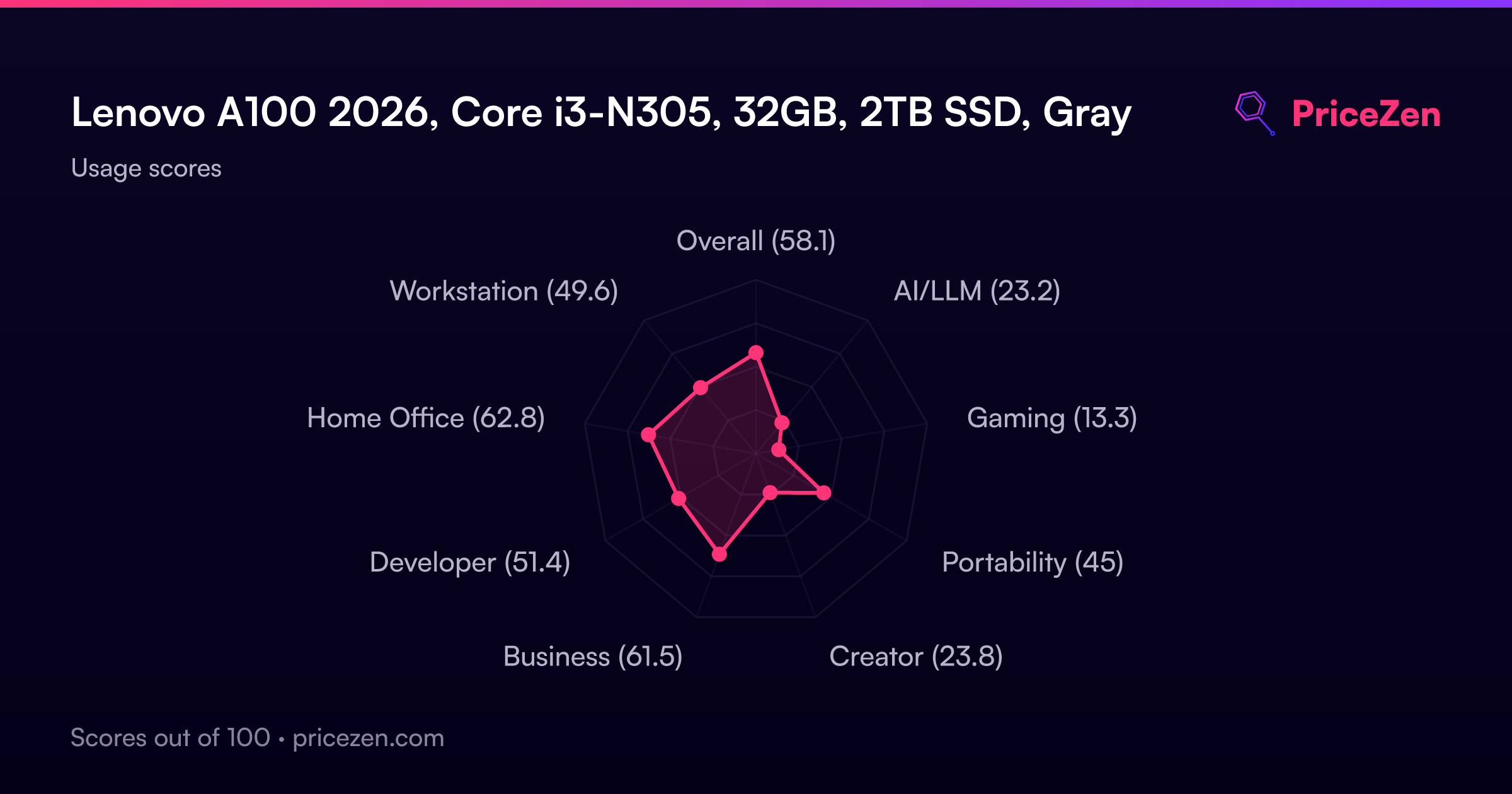
Usage Scores
- Overall58.1
- AI/LLM23.2
- Gaming13.3
- Portability45
- Creator23.8
- Business61.5
- Developer51.4
- Home Office62.8
- Workstation49.6