Wacom Cintiq DTK-2260 2019, Wacom Pro Pen 2, Black
The 21.5-inch IPS LCD panel delivers 1920x1080 resolution at 210 nits with a 22 ms response time, providing accurate color and crisp detail for precise digital work. The Wacom Pro Pen 2 offers 8,192 levels of pressure sensitivity and two customizable side switches, while integrated foldable legs allow comfortable angled use. This tablet suits digital artists and illustrators who need a reliable, color-accurate display for painting, retouching, and page layout, and it includes a six-month Clip Studio Paint EX license to get started.

Sem preço atual de lojas
Onde o vimos antes. Confira o preço de hoje na loja.











Resumo
The 30-Second Version
The Cintiq 22 is a big, beautiful drawing canvas with a pen that feels like magic. Just don't expect it to be portable or button-friendly.
Pros & Cons
Prós
- Excellent drawing experience with the Pro Pen 2 96th
- Large 21.5-inch canvas for comfortable work
- No pen charging required, ever
- Great value for a Cintiq this size
Contras
- No built-in buttons, you'll need a separate remote or keyboard
- Not portable, must be tethered to a computer
- Screen brightness is underwhelming at 210 nits
- Pen side buttons are easy to press accidentally
O que dizem os donos
The Word on the Street
Como a opinião dos donos mudou ao longo do tempo
ExclusivoCom base em quando os clientes realmente escreveram suas avaliações - para ver se os elogios iniciais se mantiveram.
5 avaliações escritas, abr. de 2026: 5 satisfeitos
Em todas as 47 notas das lojas: 4,9★. A maioria dos donos dá nota sem escrever avaliação. O gráfico conta as 5 avaliações escritas.
Cada ponto é uma avaliação escrita, no mês em que foi escrita. Satisfeitos = 4-5★, neutros = 3★, insatisfeitos = 1-2★.
As provas
Performance
The drawing performance is the star here, and it's not even close. The Pro Pen 2 tracks beautifully with no noticeable lag, and the 8,192 pressure levels mean you can go from feather-light sketches to bold strokes without fiddling with settings. The 1920x1080 IPS panel is fine for most work, but the 210 nits brightness is a weak spot, especially if you're near a window. And the 22ms response time isn't going to win any gaming awards, but for painting and retouching, it's perfectly serviceable. What surprised us most is how well this thing handles color accuracy despite the modest specs on paper.
Specifications
Full Specifications
Processor
| CPU | Wacom Pro Pen 2 |
Memory & Storage
| Expandable | No |
Display
| Resolution | 1920x1080 (Full HD) |
| Panel | IPS |
| Brightness | 210 nits |
Connectivity
| USB-C | 0 |
| Cellular | No |
Features
| Stylus Support | Yes |
| Stylus Model | Wacom Pro Pen 2 |
Physical
| OS | Windows |
vs Competition
Stacked against the Apple iPad Pro M5 or Samsung Galaxy Tab S11 Ultra, the Cintiq 22 is a different beast entirely. Those tablets are portable, standalone devices with gorgeous high-refresh displays, but they're not dedicated drawing tools with Wacom's pen tech. The Cintiq 22 requires a computer, which is a dealbreaker for some but a non-issue for studio work. The Microsoft Surface Pro 11 sits somewhere in between, but its pen experience, while good, doesn't match the Pro Pen 2's precision. If you want a portable all-rounder, get an iPad. If you want a dedicated drawing display that feels like paper, the Cintiq 22 is the better tool.
| Spec | Wacom Cintiq DTK-2260 | Apple iPad Pro 13" M5 | Microsoft Surface Pro 11 13" | Samsung Galaxy Tab S 12.4" S10+ | Lenovo Yoga Tab Plus 12.7" ZAEG0096US | Xiaomi Pad 11.2" 62751 |
|---|---|---|---|---|---|---|
| CPU | Wacom Pro Pen 2 | Apple M5 | Qualcomm Snapdragon X Elite X1E-84-100 | MediaTek Dimensity 9300+ | QTI SM8650 | Snapdragon 8s Gen 3 |
| RAM (GB) | - | 16 | 16 | 12 | 16 | 12 |
| Storage (GB) | - | 1024 | 1024 | 512 | 256 | 512 |
| Screen | ?" 1920x1080 | 13" 2752x2064 | 13" 2880x1920 | 12.4" 2800x1752 | 12.7" 2944x1840 | 11.2" 3200x2136 |
| OS | Windows | iPadOS | Windows 11 Home | Android 14 | Android 14 | Android 14 |
| Stylus | Yes | Yes | Yes | Yes | Yes | Yes |
| Cellular | No | Yes | No | No | No | No |
| Battery (Wh) | - | 39 | 53 | - | - | - |
| Compare | Compare | Compare | Compare | Compare |
| Produto | CPU | GPU | RAM | Tela | Battery | Feature | Armazenamento | User Sentiment | Connectivity | Prova social | Affordability | Water Resistance |
|---|---|---|---|---|---|---|---|---|---|---|---|---|
| Wacom Cintiq DTK-2260 | 38.1 | 36.6 | 31.2 | 30.1 | 32.1 | 42.6 | 30.2 | 96.4 | 8.6 | 44.8 | 1.7 | 46.4 |
| Apple iPad Pro 13" M5 Compare | 99.2 | 99.4 | 92.5 | 99.7 | 97.7 | 96.5 | 97.9 | 90.7 | 99.2 | 99.2 | 1.6 | 46.4 |
| Microsoft Surface Pro 11 13" Compare | 98.5 | 96.7 | 92.5 | 99.1 | 99.8 | 74.2 | 97.9 | 40.7 | 92.8 | 91 | 8.5 | 97.3 |
| Samsung Galaxy Tab S 12.4" S10+ Compare | 82.4 | 79.2 | 81.1 | 95.2 | 88.1 | 96.5 | 93.1 | 96.4 | 77 | 91 | 5.8 | 97.3 |
| Lenovo Yoga Tab Plus 12.7" ZAEG0096US Compare | 84.2 | 82.3 | 92.5 | 96.4 | 88.9 | 96.5 | 83.9 | 71.1 | 92.8 | 87.1 | 21.5 | 46.4 |
| Xiaomi Pad 11.2" 62751 Compare | 86.8 | 85.7 | 81.1 | 98 | 85.3 | 65 | 89.6 | 81.9 | 77 | 91 | 13.7 | 46.4 |
Preço
Value & Pricing
For around $1,000 USD, this is a genuinely good deal if you're a hobbyist ready to level up or a professional who wants a reliable workhorse without the premium price of Wacom's higher-end Cintiqs. You're getting the same Pro Pen 2 tech found in pricier models, just in a more basic chassis. The included 6 months of Clip Studio Paint EX sweetens the pot. If you're serious about digital art and have the desk space, this is worth every penny.
Saiba mais
Overview
The Wacom Cintiq 22 is the drawing tablet you buy when you're done squinting at a small screen and want a proper canvas without selling a kidney. It's a 21.5-inch Full HD pen display that nails the core drawing experience, and honestly, that's what matters most here. The Pro Pen 2 with 8,192 levels of pressure sensitivity feels fantastic, and the flow from pen to screen is smooth enough to make you forget you're working on a digital surface. At around $1,000 USD, it's not cheap, but for a Cintiq this size, it's a solid entry point into Wacom's pro lineup.
Common Questions
Q: Does the Cintiq 22 work without a computer?
No, it's a pen display, not a standalone tablet. You'll need to plug it into a Windows or Mac computer to use it.
Q: Do I need to charge the pen?
Nope. The Pro Pen 2 is battery-free and never needs charging, which is one of the best things about Wacom's tech.
Q: What's the screen quality like?
It's a 1920x1080 IPS panel with good color accuracy, but the 210 nits brightness is on the dim side. Fine for indoor work, not great in bright rooms.
Who Should Skip This
If you want a portable drawing device you can use on the couch or on the go, this isn't it. Go get an iPad Pro or Galaxy Tab instead. And if you're a professional who needs a 4K display with built-in ExpressKeys, save up for the Cintiq Pro line. This is a desk-bound tool for people who want the Wacom pen experience without the premium price tag.
Verdict
The Wacom Cintiq 22 is a fantastic drawing display for anyone who prioritizes pen feel and canvas size over portability and bells and whistles. It's not flashy, and the lack of built-in buttons is annoying, but the core experience is so good that you'll forgive its quirks. Buy it if you want a serious drawing tool that just works. Skip it if you need something you can toss in a bag.
Usage Scores
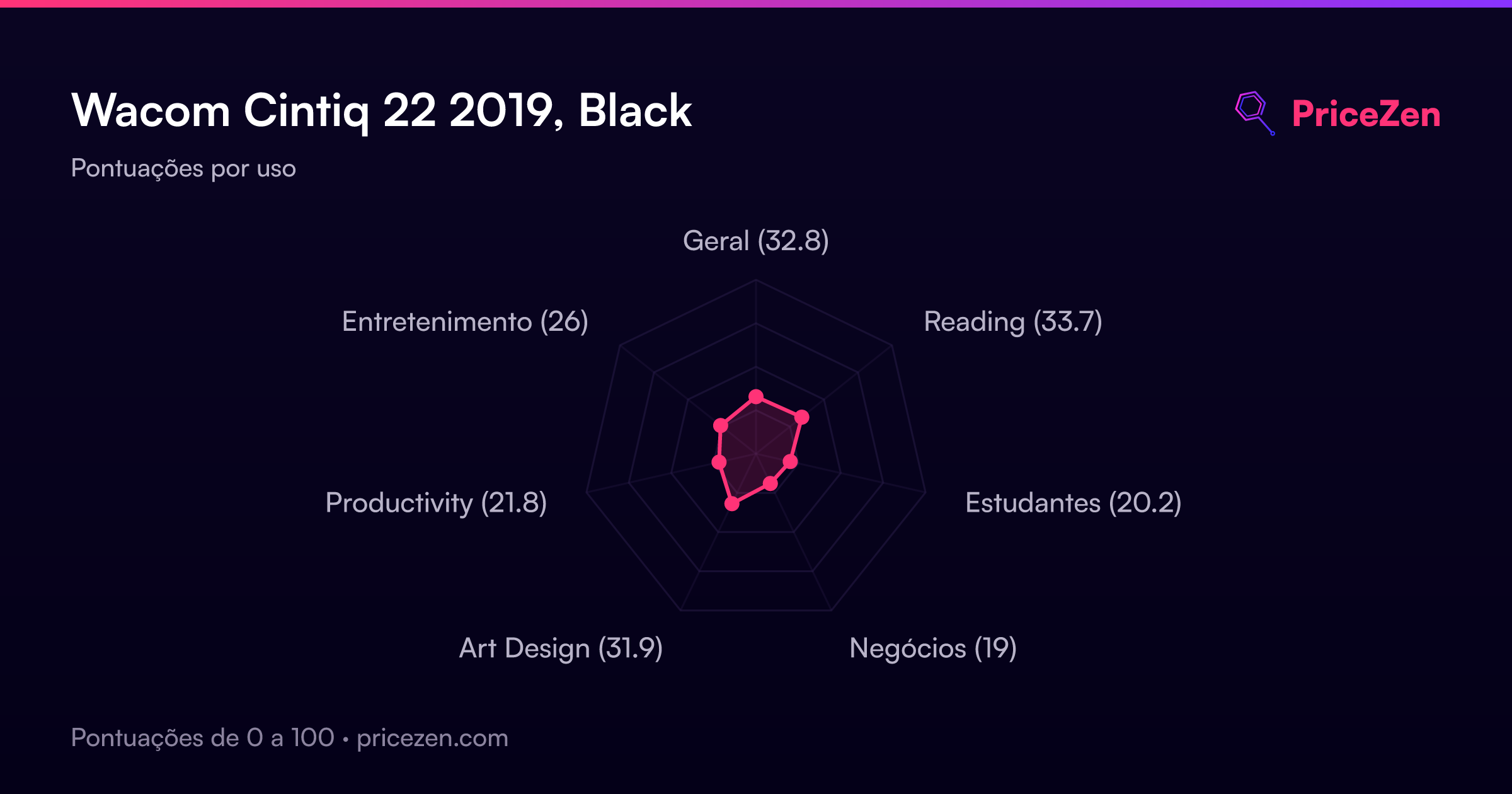
- Geral32.8
- Reading33.6
- Estudantes20.7
- Negócios19
- Art Design32
- Productivity21.8
- Entretenimento26