Microsoft Surface Pro 8 13" 2026, Core i5-1145G7, 16GB, 256GB, Platinum

16 GB de RAM para multitarefa de notebook verificado em 29 de nov.
49/100 pontuação geral 5,0 média de 1 avaliações de proprietários
- CPU
- Intel Core i5 1145G7
- RAM
- 16 GB
- Storage
- 256 GB
- Screen
- 13"
- OS
- Windows 11
- Stylus
- Sim


Resumo
The 30-Second Version
The Microsoft Surface Pro 8 is a 13" Windows 11 2-in-1 tablet with a Core i5-1145G7, 16GB RAM and 256GB SSD, currently around USD 669 refurbished. It's a strong pick for pen-based productivity and light creative work, but battery life and value rank near the bottom of its category.
Pros & Cons
Prós
- 16GB RAM is one of the best configs in this class 88th
- 256GB SSD ranks well above average for storage 84th
- Full Windows 11, not a mobile OS with limits 82nd
- Slim Pen 2 stylus support and keyboard connector 66th
- 539g tablet body is genuinely light
Contras
- Battery ranking falls behind most rivals
- Affordability is a weak spot at this price
- Reading comfort is its worst-scoring area
- CPU is only middle of the pack
- Refurb/open box condition varies by unit
O que dizem os donos
The Word on the Street
- Buyers praise the design and feel there's more than enough power and storage for everyday use.
- Owners appreciate running full Windows 11, which lets them keep using their favorite desktop software.
- Feedback volume is thin, with only a single rating on record, so the perfect score comes with a small-sample caveat.
Como a opinião dos donos mudou ao longo do tempo
ExclusivoCom base em quando os clientes realmente escreveram suas avaliações - para ver se os elogios iniciais se mantiveram.
1 avaliação escrita, nov. de 2026: 1 satisfeito
Em todas as 1 notas das lojas: 5,0★. O gráfico conta 1 avaliação escrita.
Cada ponto é uma avaliação escrita, no mês em que foi escrita. Satisfeitos = 4-5★, neutros = 3★, insatisfeitos = 1-2★.
As provas
Performance
The Core i5-1145G7 is a 4-core chip clocked at 2.60GHz, and in our rankings it lands solidly mid-pack for CPU performance among comparable devices. That means browser tabs, Office, Teams calls and light photo editing are all fine, but this isn't the machine you buy for heavy video exports or compiling large projects. The 16GB of RAM is the real highlight, sitting in the 88th percentile, so multitasking headroom is one of the best you'll find at this size. The 256GB SSD ranks well above average for storage in this category, and the integrated graphics score is strong for a tablet-class device.
Where it stumbles is endurance. Battery ranks in the bottom third of the category, so plan on staying near an outlet during longer work days. Eye comfort scores about average, and the display itself lands mid-pack, which lines up with that weak reading score. Owners who've bought this config talk about having plenty of power and more storage than they'll realistically fill, which matches what the numbers suggest: capable for everyday work, not a marathon machine.
Specifications
Full Specifications
Processor
| CPU | Intel Core i5 1145G7 |
| Cores | 4 |
Memory & Storage
| RAM | 16 GB |
| Storage | 256 GB |
| Storage Type | SSD |
Display
| Size | 13" |
Connectivity
| Wi-Fi | Wi-Fi 6 |
| Bluetooth | YES |
| Cellular | No |
Features
| Stylus Support | Yes |
| Stylus Model | Slim Pen 2 |
Physical
| Weight | 0.5 kg / 1.2 lbs |
| OS | Windows 11 |
vs Competition
Cross-shopping this against the Apple iPad Pro 11" M5 is the obvious move, and the deciding question is software. The Surface runs full Windows 11, so desktop apps, file systems and peripherals behave the way you expect from a PC. If your workflow lives in iPadOS and you want a tablet-first experience, the iPad Pro is the better fit. Against the Samsung Galaxy Tab S 12.4" S10+ and the Lenovo Idea Tab Pro Gen 2 13", the Surface's argument is that 16GB RAM ranking and real desktop productivity, while those two lean toward media consumption and lighter work at friendlier prices.
The Xiaomi Pad 11.2" 62751 and TABWEE T60 Pro 13.4" are the budget end of this comparison, and honestly, if entertainment is your main use case, the Surface's 49.2 entertainment score doesn't justify its price premium over them. Buy the Surface Pro 8 when you need Windows and a pen in the same slab. Buy something else when you don't.
| Spec | Microsoft Surface Pro 8 13" | Apple iPad Pro 11" M5 | Samsung Galaxy Tab S 12.4" S10+ | Lenovo Idea Tab Pro Gen 2 13" | Xiaomi Pad 11.2" 62751 | TABWEE T60 Pro 13.4" |
|---|---|---|---|---|---|---|
| CPU | Intel Core i5 1145G7 | Apple M5 | Mediatek MT6989 | Qualcomm® Snapdragon™ 8s Gen 4 Processor (3.20 GHz ) | Snapdragon 8s Gen 3 | Unisoc |
| RAM (GB) | 16 | 12 | 12 | 8 | 12 | 8 |
| Storage (GB) | 256 | 512 | 512 | 128 | 512 | 256 |
| Screen | 13" | 11" 2420x1668 | 12.4" 2800x1752 | 13" 3504x2190 | 11.2" 3200x2136 | 13.4" 1920x1200 |
| OS | Windows 11 | iPadOS | Android 14 | Android 16 | Android 14 | Android 15 |
| Stylus | Yes | Yes | Yes | Yes | Yes | Yes |
| Cellular | No | Yes | No | No | No | No |
| Battery (Wh) | - | 31 | - | - | - | - |
| Compare | Compare | Compare | Compare | Compare |
| Produto | CPU | GPU | RAM | Tela | Battery | Feature | Armazenamento | Portability | Connectivity | Prova social | Affordability | Water Resistance |
|---|---|---|---|---|---|---|---|---|---|---|---|---|
| Microsoft Surface Pro 8 13" | 65.8 | 81.7 | 88 | 42.5 | 31.7 | 54.7 | 84.2 | 54.1 | 43.1 | 20.2 | 21.1 | 46.3 |
| Apple iPad Pro 11" M5 Compare | 99.1 | 99.4 | 84.5 | 98.8 | 95.1 | 96.2 | 93.1 | 81.7 | 98.1 | 99.3 | 6 | 46.3 |
| Samsung Galaxy Tab S 12.4" S10+ Compare | 82.6 | 79.4 | 81.4 | 95.2 | 87.7 | 96.2 | 93.1 | 49.9 | 76.9 | 91.2 | 5.7 | 97.2 |
| Lenovo Idea Tab Pro Gen 2 13" Compare | 85.1 | 83.1 | 78.2 | 98.1 | 88.5 | 97.8 | 67 | 46.5 | 92.9 | 91.2 | 31 | 46.3 |
| Xiaomi Pad 11.2" 62751 Compare | 87.1 | 85.9 | 81.4 | 97.9 | 85 | 65.2 | 89.8 | 79 | 76.9 | 91.2 | 14.8 | 46.3 |
| TABWEE T60 Pro 13.4" Compare | 95.5 | 89 | 66.3 | 55.4 | 86.5 | 88.5 | 75.4 | 32.9 | 76.9 | 87.5 | 37.1 | 46.3 |
Preço
Value & Pricing
At USD 669 (or CAD 800 north of the border), this refurb Surface Pro 8 isn't the bargain it might first appear. Our affordability ranking puts it in the bottom quarter of the category, meaning you're paying a premium for the Windows-on-a-tablet experience and the Surface name. We track prices over time, partly through our community browser extension, and this config sits firmly in premium-refurb territory. If your budget is tight and you mainly want a big screen for media and browsing, the Android tablets in this bracket will stretch your money further. If you specifically need Windows apps and pen input in one device, the price starts making more sense.
Saiba mais
Overview
The Surface Pro 8 is Microsoft's Windows tablet that wants to be your laptop too, and this particular listing is a refurbished/open box unit with a Core i5-1145G7, 16GB of RAM and a 256GB SSD. It's sitting at USD 669 in the US and CAD 800 in Canada, which puts it in the same shopping cart territory as a decent mid-range 2-in-1 rather than a premium flagship. If you've been searching for a Surface Pro 8 with 16GB RAM at a refurb price, this is roughly what that looks like.
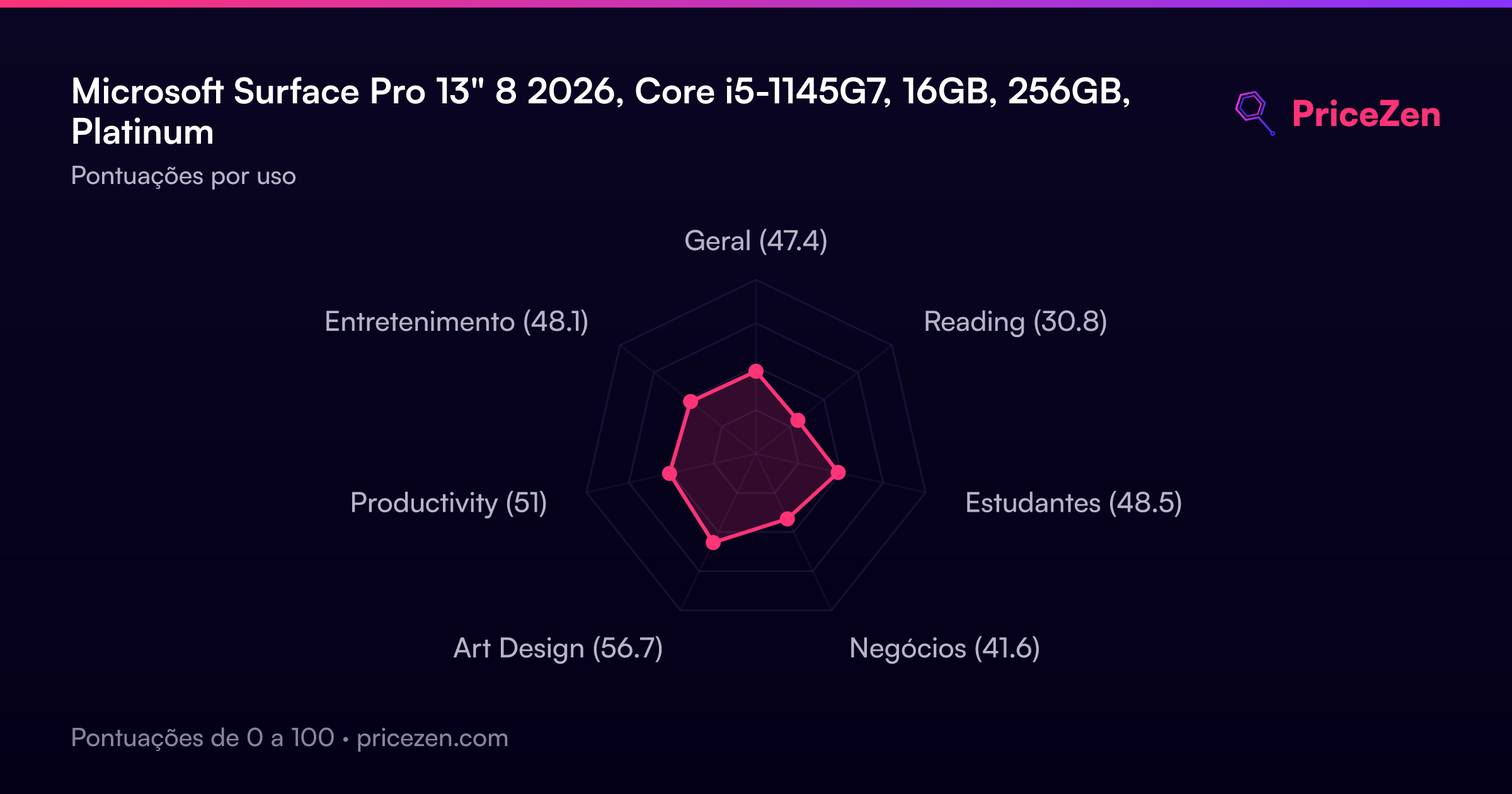
The pitch is simple: a 13" touchscreen running full Windows 11, stylus support via the Slim Pen 2, and a keyboard connector so it can flip between tablet and laptop duty. At 539g for the tablet itself, it's genuinely easy to carry. Our scoring model puts it strongest in art and design work (58.1/100) and productivity (52.4/100), with entertainment trailing at 49.2. Reading is its weakest area at 30.7, which tells you something about how this screen behaves during long sessions.
We collect specs, prices and owner feedback from multiple stores with our own automated system and compare every product against the rest of its category. Nobody pays us to like anything. So here's the honest read: the memory and storage config is a standout for this class, but the value story and battery ranking are where things get uncomfortable.
Common Questions
Q: Is the Surface Pro 8 good for drawing and digital art?
It's the strongest use case for this tablet, scoring 58.1/100 for art and design in our model, and it supports the Slim Pen 2 stylus on its 13" touchscreen. For sketching and illustration on Windows, it's a reasonable pick.
Q: Can the Surface Pro 8 replace a laptop?
For everyday productivity, mostly yes: it runs full Windows 11, has 16GB of RAM and a keyboard connector. Just know the battery ranking falls behind most rivals, so it's better as a desk-and-outlet laptop replacement than an all-day roamers.
Q: Is 256GB of storage enough on the Surface Pro 8?
For documents, schoolwork and a moderate app library, 256GB ranks well above average in this category and owners report having more space than they need. Heavy video or game libraries will fill it fast.
Q: How does the Surface Pro 8 compare to the iPad Pro 11" M5?
The biggest difference is the operating system: the Surface runs full Windows 11 with desktop apps, while the iPad Pro runs iPadOS. Choose the Surface if you need Windows software and pen input in one device.
Who Should Skip This
Skip this if you mainly want a couch tablet for movies, reading or casual browsing. The reading score of 30.7 and bottom-third battery ranking make it a poor fit for long unplugged sessions, and the entertainment score doesn't justify the price. The Samsung Galaxy Tab S 12.4" S10+, Xiaomi Pad 11.2" 62751 or TABWEE T60 Pro 13.4" will serve media-first buyers better for less. Also skip it if you do heavy sustained workloads like video editing, since the 4-core i5 sits mid-pack for CPU performance.
Verdict
Should you buy the Surface Pro 8 at this refurb price? Yes, if you need a genuine Windows machine that doubles as a drawing tablet and you value the 16GB of RAM for multitasking. It's a solid productivity companion for students, note-takers and light creative work, and owners of this config seem genuinely happy with the power and storage on offer.
But go in with eyes open about the battery ranking and the price. This isn't an all-day unplugged machine, and it isn't a value pick. If either of those matters more to you than running Windows, keep scrolling.
Usage Scores
- Geral48.6
- Reading30.7
- Estudantes48.2
- Negócios42.5
- Art Design58.1
- Productivity52.4
- Entretenimento49.2