XPG SX6000 Lite 256GB PCIe 3.0 x4 NVMe M.2 2280

Criptografia por hardware protege seus arquivos verificado em 29 de nov.
39/100 pontuação geral 3,7 média de 45 avaliações de proprietários
- Capacity
- 256GB
- Form factor
- M.2 2280
- Interface
- PCIe 3.0 x4
- Read speed
- 1,800 MB/s
- NAND
- TLC
- Endurance
- 120 TBW
Compare preços em 1 loja
Da mais barata à mais cara. Ofertas novas, recondicionadas e em kit ficam separadas para você comparar o que é comparável.
| Loja | Vendido por | Cor e condição | Preço | vs. o menor | Última verificação | Link |
|---|---|---|---|---|---|---|
| Novo1 ofertaUnidade única | ||||||
| Esgotado na última verificação | ||||||
| Amazon | Desconhecido | Não informado | Sem preço | Esgotado | 11 de nov. | Ir para a loja |
 Fonte: PriceZen, verificado em 11 de nov. de 2026
Um preço é considerado atual quando o verificamos nos últimos 7 dias. «Vendedor parceiro» significa um vendedor terceiro naquela loja, não a própria loja.
Histórico de preços
Nenhuma oferta desse tipo neste período.
Verificado nesse diaNão verificado nesse dia, ainda em oferta
Fonte: PriceZen, checked 30 de mar. de 2026











Resumo
The 30-Second Version
The XPG SX6000 Lite delivers 1800 MB/s reads for SATA-level money, and for basic upgrades it's a decent deal. But the DRAM-less design, 256GB capacity, and a worrying pattern of reliability complaints from owners make it hard to recommend as a primary drive. At $71 USD, it's overpriced for what you get, and better budget options exist. If you find it cheap and just need a boot drive for light use, it's fine. Otherwise, look elsewhere.
Pros & Cons
Prós
- 1800 MB/s read speed is triple what SATA SSDs offer, making boot and load times noticeably faster 83rd
- 85th percentile for affordability means you're getting NVMe speed for SATA money 80th
- Easy M.2 2280 installation with no cables to manage 76th
- Hardware encryption support for basic data protection
- 3-year warranty and 1.8M hour MTBF rating provide a baseline of manufacturer confidence
Contras
- DRAM-less design hurts sustained write performance and heavy multitasking
- Reliability complaints are a real pattern, with multiple owners reporting failures and data loss
- 256GB capacity is small by modern standards, sitting at the 18th percentile
- No M.2 screw included in the box, which is annoying if your motherboard doesn't have a spare
- Gets hot under load according to multiple user reports
O que dizem os donos
The Word on the Street
- A lot of owners are genuinely impressed with the speed, especially those coming from SATA SSDs or hard drives. The performance jump for the price is the most common praise.
- Installation gets a lot of love. The M.2 form factor is easy to work with, and several buyers mention installing multiple units without issues.
- Reliability is the big concern. Multiple owners report drive failures, data loss, and having to reformat repeatedly, with one reviewer describing half a dozen failures over two years.
- Value for money is a recurring theme, but it's tempered by the reliability worries. Some buyers feel the speed justifies the price, while others regret the purchase after dealing with failures.
Como a opinião dos donos mudou ao longo do tempo
ExclusivoCom base em quando os clientes realmente escreveram suas avaliações - para ver se os elogios iniciais se mantiveram.
8 avaliações escritas, jul. de 2019 – set. de 2021: 6 satisfeitos, 2 insatisfeitos
Em todas as 45 notas das lojas: 3,7★. A maioria dos donos dá nota sem escrever avaliação. O gráfico conta as 8 avaliações escritas.
Cada ponto é uma avaliação escrita, no mês em que foi escrita. Satisfeitos = 4-5★, neutros = 3★, insatisfeitos = 1-2★.
As provas
Performance
Let's talk about what 1800 MB/s read and 900 MB/s write actually feels like. For booting Windows, launching apps, and loading games, this drive is going to feel snappy. You're looking at roughly 3x the sequential read speed of a SATA SSD, and that shows up in faster boot times and quicker level loads. The 100K random read IOPS and 170K random write IOPS put it right around the middle of the pack in our database, at the 46th percentile for random performance and 45th for speed. That's not bad for a budget drive, but it's also not going to blow anyone away.
The DRAM-less design is the thing to understand here. Without a dedicated DRAM buffer, the drive relies on your system's memory via HMB (Host Memory Buffer) to keep track of where data lives. For everyday tasks, that's fine. But push it with large file transfers or sustained writes, and you'll see performance dip as the drive works harder to manage its mapping tables. The 900 MB/s write speed is respectable for this class, but it's not going to sustain that under heavy load. And the heat complaints from owners suggest the controller can get toasty when you're hammering it, which can lead to thermal throttling on top of everything else.
Specifications
Full Specifications
Drive
| Capacity | 256 |
| Form Factor | M.2 2280 |
| Interface | PCIe 3.0 x4 |
| Protocol | NVMe |
| PCIe Generation | 3 |
| External | No |
Performance
| Sequential Read (MB/s) | 1800 |
| Sequential Write (MB/s) | 900 |
| Random Read (IOPS) | 100000 |
| Random Write (IOPS) | 170000 |
Hardware
| NAND | TLC |
| DRAM Cache | No |
Reliability
| Endurance (TBW) | 120 |
| MTBF (hours) | 1800000 |
| Warranty (years) | 3 |
Features
| Hardware Encryption | Yes |
vs Competition
Stack this against the Crucial T500, Western Digital Black SN850X, or Samsung 990 EVO and the gap is immediately obvious. Those drives are PCIe 4.0 or even 5.0, with read speeds in the 5000-7000 MB/s range and DRAM caches that keep performance consistent. They also come in capacities starting at 500GB or 1TB, which makes the SX6000 Lite's 256GB feel cramped. But those drives cost significantly more, and if you're just booting Windows and running a few apps, you won't feel the difference in day-to-day use.
The MSI SPATIUM M480 PRO and Corsair MP700 Elite are even further ahead on raw speed, but again, that's not the point of this drive. The SX6000 Lite is competing against other budget DRAM-less drives like the Crucial P3 or Kingston NV2. Against those, it's a mixed bag. The read speed is competitive, but the reliability complaints in our data are concerning. If you're shopping in this price bracket, the Crucial P3 tends to have a better reputation for longevity, even if the specs look similar on paper.
| Spec | XPG SX6000 Lite | Western Digital WD_BLACK SN8100 | Samsung 9100 PRO | Kingston FURY Renegade G5 | Crucial T500 | SanDisk WD_BLACK |
|---|---|---|---|---|---|---|
| Capacity | 256GB | 4TB | 8TB | 4TB | 2TB | 8TB |
| Form Factor | M.2 2280 | M.2 2280 | M.2 2280 | M.2 2280 | M.2 2280 | M.2 2280 |
| Interface | PCIe 3.0 x4 | PCIe 5.0 x4 | PCIe 5.0 x4 | PCIe 5.0 x4 | PCIe 4.0 x4 | PCIe 5.0 x4 |
| Seq Read | 1,800 MB/s | 14,900 MB/s | 14,800 MB/s | 14,800 MB/s | 7,400 MB/s | 14,900 MB/s |
| Nand Type | TLC | TLC | TLC | TLC | TLC | TLC |
| Dram Cache | No | No | Yes | Yes | Yes | Yes |
| Endurance | 120 TBW | 2400 TBW | 4800 TBW | 4000 TBW | 1200 TBW | 4800 TBW |
| Compare | Compare | Compare | Compare | Compare |
| Produto | Speed | Random | Feature | Capacity | User Sentiment | Endurance | Prova social | Affordability |
|---|---|---|---|---|---|---|---|---|
| XPG SX6000 Lite | 46.3 | 46.3 | 79.7 | 20.9 | 15.2 | 76.4 | 28.6 | 83.1 |
| Western Digital WD_BLACK SN8100 Compare | 99.7 | 99.6 | 86.7 | 91.3 | 95.3 | 81 | 95.1 | 10.1 |
| Samsung 9100 PRO Compare | 99.3 | 99.8 | 99.8 | 96.8 | 58.8 | 86.1 | 95.1 | 2.1 |
| Kingston FURY Renegade G5 Compare | 99.5 | 99.1 | 91.4 | 91.3 | 67.9 | 93.7 | 85.9 | 9.6 |
| Crucial T500 Compare | 94.2 | 97.1 | 99 | 78 | 80.6 | 83.1 | 95.1 | 17.2 |
| SanDisk WD_BLACK Compare | 99.1 | 99.4 | 97.7 | 96.8 | 95.3 | 81 | 40.1 | 3.8 |
Preço
Value & Pricing
Pricing on this drive is a bit of a moving target. We're seeing it listed at $71 USD in the US and £75 GBP in the UK, which is... not great for a 256GB drive in 2024. For context, you can often find 500GB or even 1TB NVMe drives from competitors hovering around that same price point when sales hit. The 85th percentile affordability ranking in our database reflects where this drive sat historically, but the current street price feels high for what you're getting.
The value proposition really depends on what you're upgrading from. If you're on a SATA SSD and want a cheap taste of NVMe speed, this drive delivers that. But if you're building new or have any flexibility in budget, spending a bit more for a drive with DRAM and better reliability track record is the smarter move. The 120 TBW endurance rating works out to about 131GB of writes per day over three years, which is fine for light use but will make power users nervous.
Saiba mais
Overview
The XPG SX6000 Lite is ADATA's pitch to anyone still booting off a SATA SSD and wondering what all this NVMe fuss is about. It's a 256GB M.2 2280 drive running PCIe 3.0 x4, and the headline numbers are 1800 MB/s read and 900 MB/s write. That's roughly triple what a good SATA drive manages on reads, so the upgrade path is real, especially if you're on a budget. The drive sits at the 85th percentile for affordability in our database, which tells you exactly who ADATA is chasing here.
But there's a catch, and it's a big one. This is a DRAM-less drive with TLC NAND. That's not unusual at this price point, but it does mean sustained writes and heavy multitasking will hit a wall faster than drives with a dedicated DRAM cache. The 120 TBW endurance rating and 3-year warranty are fine for light use, but they're not exactly confidence-inspiring when you look at what owners are actually saying.
And that's the real story here. The spec sheet looks decent for the money, but our sentiment analysis across 45 reviews and Q&A threads paints a much more cautious picture. Owners love the speed and the price, but a meaningful chunk of them have dealt with failures, data loss, and the drive getting uncomfortably hot. This is one of those products where the numbers and the lived experience don't quite line up, and we'll dig into that throughout this review.
Common Questions
Q: Does this drive have DRAM?
No, the SX6000 Lite is a DRAM-less design. It uses TLC NAND and relies on your system's Host Memory Buffer to manage data mapping. For everyday tasks like booting Windows and launching apps, you won't notice much difference. But sustained writes and heavy multitasking will show performance dips compared to drives with dedicated DRAM.
Q: Does it come with an M.2 screw?
No, ADATA doesn't include an M.2 screw in the box. Most motherboards come with one, but if you've lost yours or your board didn't include any, you'll need to buy a screw separately. It's a small thing, but it's annoying when you're ready to install and realize you're missing a part.
Q: Is this drive reliable?
This is where things get tricky. The spec sheet shows a 120 TBW endurance rating, 3-year warranty, and 1.8 million hour MTBF, which are all reasonable for a budget drive. But our analysis of user reviews shows a concerning pattern of failures and data loss reports. The overall customer rating is 3.7 out of 5, and while many owners have no issues, enough have reported problems that we'd recommend keeping good backups if you use this drive.
Q: How hot does this drive get?
Several owners mention the drive getting hot under load. The DRAM-less controller has to work harder during sustained operations, which generates more heat. If your motherboard has an M.2 heatsink, use it. If not, and you're planning heavy workloads, you might want to consider an aftermarket heatsink or a drive with better thermal characteristics.
Who Should Skip This
If you're building a new system in 2024, skip this. The 256GB capacity is going to feel cramped almost immediately, and the reliability concerns make it a poor choice for a primary drive. You'd be better off spending a bit more on a 500GB or 1TB drive from Crucial, Samsung, or Western Digital that has DRAM and a better track record. The price difference isn't as big as you might think, especially when sales hit.
Power users should also look elsewhere. If you're doing video editing, running virtual machines, or moving large files regularly, the DRAM-less design and 900 MB/s write speed will bottleneck you. The 120 TBW endurance rating means heavy daily writes will eat through the drive's lifespan faster than you'd like. Look at the Crucial T500 or WD Black SN850X if you need sustained performance and higher endurance. And if you've been burned by drive failures before, the pattern of reliability complaints here should be enough to steer you toward something with a more solid reputation.
Verdict
If you're upgrading an older laptop or desktop from a spinning hard drive or SATA SSD, and you find this drive on sale for under $40, it's a reasonable buy. The speed jump is real, installation is straightforward, and for basic web browsing, office work, and light gaming, it'll do the job. Just don't expect it to be a workhorse.
But if you're building a new system, or if you value your data, we'd steer you toward something with a better reliability track record. The pattern of failures and data loss reports in our sentiment data is hard to ignore, even if the overall rating sits at 3.7 out of 5. For a boot drive, reliability matters more than raw speed, and there are better options in this price range. If you need cheap storage for a secondary drive or a budget build where you're backing up regularly, this works. For anything else, spend a bit more and sleep better.
Usage Scores
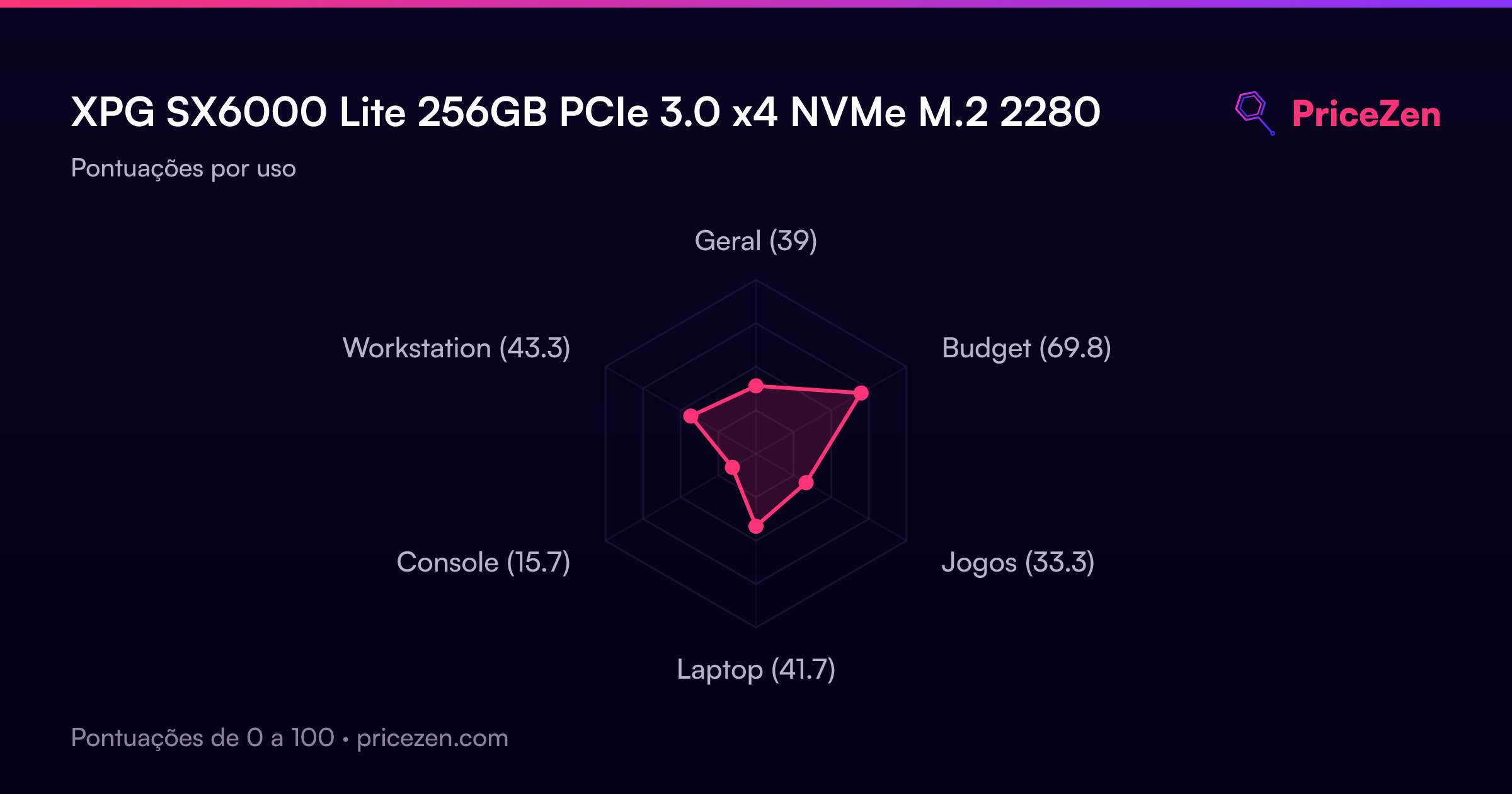
- Geral39
- Budget69.8
- Jogos33.3
- Laptop41.7
- Console15.7
- Workstation43.3