128GB SSD SATA III 2.5"
The 2.5-inch SATA III interface with 3D NAND flash delivers 500 MB/s read speeds, improving boot times and system responsiveness for older laptops and desktops. Its silent, power-efficient operation and broad compatibility with Windows, macOS, and Linux make it a straightforward drop-in upgrade without extra drivers. Best for budget-conscious users replacing a slow hard drive in a legacy machine for everyday work, study, or home computing.

Sem preço atual de lojas











Resumo
The 30-Second Version
This 128GB SATA SSD is one of the cheapest drives we track at BRL 189, with 500 MB/s reads that will transform an old hard-drive laptop. But it ranks near the bottom of the category overall, with capacity near the bottom and weak endurance. Buy it to revive a secondary machine on a shoestring, skip it as a main drive.
Pros & Cons
Prós
- 99th percentile affordability, BRL 189 is about as cheap as SSDs get 99th
- 500 MB/s reads hit roughly the SATA III ceiling, a huge jump over any hard drive
- Standard 2.5-inch SATA form factor drops into most older laptops and desktops
- Works with Windows, macOS and Linux with no extra drivers
- Silent, low power and low heat, good for quiet study and home machines
Contras
- 128GB capacity ranks near the bottom, barely enough for an OS plus a few apps
- Overall score of 12.7/100 against the wider internal SSD category
- Endurance ranks 15th percentile, not built for heavy write workloads
- Speed ranks 14th percentile, SATA can't keep up with modern NVMe drives
- Feature set ranks 15th percentile, this is bare-bones storage
As provas
Performance
The headline number is 500 MB/s sequential reads, which is about the practical limit of the SATA III interface. In real terms, that means booting an OS, launching apps and opening files will feel dramatically snappier than a mechanical drive. But our speed ranking tells a more sober story: 14th percentile among internal SSDs. Most of the category has moved to NVMe drives that leave SATA far behind, so while this is fast compared to what it replaces, it lags behind most of what it competes against on paper.
Random performance, the thing that actually governs how snappy an OS feels under load, ranks at 23rd percentile, which is underwhelming. And endurance at 15 means this isn't a drive we'd trust with heavy daily writes, like video editing scratch space or constant large file transfers. The 3D NAND helps consistency over older planar flash, but the small 128GB capacity compounds the problem: less free space means less room for the controller to manage wear. For light workloads, browsing, documents, a lean OS install, it'll do the job quietly and efficiently. Push it harder and you're asking a budget drive to punch well above its weight.
Specifications
Full Specifications
Drive
| Capacity | 128 |
| Form Factor | 2.5" |
| Interface | SATA III |
| Protocol | SATA |
| External | No |
Performance
| Sequential Read (MB/s) | 500 |
vs Competition
Our data lines this up against the Samsung 9100 PRO, Kingston 2TB SSD, Crucial T700, Western Digital WD_BLACK SN850P and Lexar Professional NM1090 PRO, and honestly, it's a bit like comparing a bicycle to sport bikes. Those are the drives our category rankings favor, and this one's 14th percentile speed and near-bottom capacity scores show the gap plainly. Where it wins is the two things they can't touch: its 99th percentile affordability, and its 2.5-inch SATA form factor, which fits older laptops that physically can't take a modern NVMe drive. If your machine only has a SATA bay, the comparison is moot, this is the kind of part that fits.
If you're building or upgrading a newer desktop with an M.2 slot, cross-shop the Crucial T700 or Samsung 9100 PRO instead, because our rankings put drives like those far ahead on speed and features, and this SATA drive would be a bottleneck by choice. Need serious space? The Kingston 2TB SSD is the obvious direction to look, given this drive's capacity ranks near dead last in the category. And for gaming rigs, the WD_BLACK SN850P or Lexar NM1090 PRO are the names our data surfaces for a reason. This drive's lane is narrow: old hardware, tiny budget, light duties. Inside that lane, it's fine. Outside it, everything named above beats it.
| Spec | 128GB SSD | Samsung 9100 PRO | Kingston KC3000 | Crucial T700 | Western Digital WD_BLACK SN8100 | Team Group MP44 |
|---|---|---|---|---|---|---|
| Capacity | 128GB | 2TB | 2TB | 2TB | 1TB | 4TB |
| Form Factor | 2.5" | M.2 2280 | M.2 2280 | M.2 2280 | M.2 2280 | M.2 2280 |
| Interface | SATA III | PCIe 5.0 x4 | PCIe 4.0 x4 | PCIe 5.0 x4 | PCIe 5.0 x4 | PCIe 4.0 x4 |
| Seq Read | 500 MB/s | 14,700 MB/s | 7,000 MB/s | 12,400 MB/s | 14,900 MB/s | 7,400 MB/s |
| Nand Type | - | TLC | TLC | TLC | TLC | TLC |
| Dram Cache | - | true | true | true | true | false |
| Endurance | - | 1200 TBW | 1600 TBW | 1200 TBW | 600 TBW | 2000 TBW |
| Compare | Compare | Compare | Compare | Compare |
| Produto | Speed | Random | Feature | Capacity | Endurance | Affordability |
|---|---|---|---|---|---|---|
| 128GB SSD | 14.4 | 23.3 | 14.8 | 8.1 | 14.9 | 98.7 |
| Samsung 9100 PRO Compare | 98.9 | 99.8 | 99.8 | 78.7 | 85.6 | 21 |
| Kingston KC3000 Compare | 88.6 | 94.5 | 94.1 | 78.7 | 92.9 | 25.8 |
| Crucial T700 Compare | 96.7 | 97.6 | 97.6 | 78.7 | 82.5 | 24 |
| Western Digital WD_BLACK SN8100 Compare | 97.8 | 98.7 | 99.8 | 56 | 80.4 | 38.2 |
| Team Group MP44 Compare | 93.7 | 88.8 | 53.3 | 92.5 | 76.6 | 16.1 |
Preço
Value & Pricing
At BRL 189 on Amazon, with free delivery on eligible purchases, the value case is simple: this is the cheapest door into SSD territory that our price tracking shows, sitting in the 99th percentile for affordability. If your alternative is keeping a decade-old laptop on a clattering hard drive, the responsiveness gain per real spent here is enormous. Our budget-use score of 50.3 out of 100 reflects exactly that, decent for the money, held back by everything else.
The catch is that value only holds if 128GB genuinely covers your needs. An OS install plus updates plus a handful of programs fills that quickly, and once you're juggling free space, the drive's weak endurance ranking starts to matter more. We only have pricing from one Brazilian listing, so there's no cross-store shopping story here. If the budget stretches at all, more capacity is usually the better long-term buy. But as a pure revival part for a secondary machine, BRL 189 is hard to argue with.
Acompanhamos os preços deste produto desde 15 de nov. de 2026. O gráfico aparecerá quando tivermos mais dados.
Saiba mais
Overview
Let's be honest about what this is: a 128GB 2.5-inch SATA III internal SSD, rated for reads up to 500 MB/s, built on 3D NAND flash, and priced at BRL 189 on Amazon Brazil. That's the whole pitch. It slots into the standard 2.5-inch bay found in older laptops, desktops and all-in-ones, works with Windows, macOS and Linux without extra drivers, runs silent and cool, and costs about as little as an SSD can cost. Our automated system pulls specs, prices and rankings across stores, and on affordability this drive sits in the 99th percentile. It's one of the cheapest ways into solid state storage that we track.
So who's it for? Someone with a tired laptop still spinning a mechanical hard drive, where boot times are measured in patience rather than seconds. Or someone building a lightweight Linux box, a study machine, a home office PC that mostly lives in a browser and a word processor. For those jobs, swapping a hard disk for any SSD is the single biggest responsiveness upgrade you can make, and this drive does it for pocket change. The 500 MB/s read rating is roughly the ceiling of what SATA III can deliver anyway, so you're not leaving much interface speed on the table.
But here's the trade-off, and it's a big one: our scoring model puts its overall score at 12.7 out of 100 against everything else in the internal SSD category. Capacity ranks near the bottom, one of the worst we've seen, and endurance and features both land at 15. This is a specialist tool for reviving old hardware on a shoestring, not a general-purpose drive. Buy it knowing exactly what it is, and it can make sense. Buy it expecting a modern main drive, and you'll be disappointed fast.
Common Questions
Q: Will 128GB actually be enough for everyday use?
It's tight. Windows or a lean Linux install plus updates and a few core programs will fit, but our capacity ranking puts this drive near the bottom of the category, so there's very little headroom for games, media or large files. It works best as a boot drive in a light-use machine, ideally alongside other storage.
Q: Is 500 MB/s fast enough compared to modern SSDs?
For reviving an old laptop, absolutely, it's roughly the SATA III ceiling and miles ahead of a mechanical drive. Against the wider category, though, its speed ranks in the 14th percentile, since most current internal SSDs use NVMe and are far quicker. Fast compared to what it replaces, slow compared to what's available.
Q: Can I use this as my main drive for gaming or heavy work?
We wouldn't. Its workstation score is 11.2 out of 100, endurance ranks 15th percentile, and 128GB won't hold a modern game library. Heavy writes and constant large transfers are exactly the workloads this budget drive handles worst. Look at higher-ranked drives like the Crucial T700 or WD_BLACK SN850P for those jobs.
Q: Will it fit and work in my computer?
If your machine has a standard 2.5-inch SATA bay, which most older laptops, desktops and all-in-ones do, it drops right in. It supports Windows, macOS and Linux with no additional drivers needed. Newer thin laptops with only M.2 slots won't accept it, so check your bay type before ordering.
Who Should Skip This
Anyone buying a primary drive should walk away. If this is going into your main work machine or gaming rig, the 128GB capacity (near the bottom in our rankings), 15th percentile endurance and 11.2 workstation score mean you'll hit walls within months, whether that's full storage, sluggish heavy workloads or both. Content creators, gamers and anyone who installs more than a handful of programs should look at the Kingston 2TB SSD for space, or the Crucial T700 and Samsung 9100 PRO if their system supports NVMe.
Also skip it if your computer is reasonably new. Putting a 14th-percentile-speed SATA drive into a machine with an M.2 slot is choosing a bottleneck on purpose. The WD_BLACK SN850P and Lexar Professional NM1090 PRO are the kinds of drives our rankings favor for modern systems. This one earns its keep in exactly one scenario: cheap breathing room for old hardware. Everywhere else, it's the wrong tool.
Verdict
If you've got an aging laptop or a spare desktop stuck on a mechanical hard drive, and you mainly browse, write documents or study, we'd say go for it. At BRL 189 it's a low-risk gamble that pays off in boot times and general snappiness, and the silent, cool operation suits a quiet home machine. Just install the OS and your core apps, keep expectations modest, and treat it as a revival part rather than a forever drive.
For anything else, a main work machine, a gaming PC, content creation, or a system you want to grow into, skip it. The 12.7 overall score and 11.2 workstation score aren't accidents; the capacity, endurance and speed rankings all say this drive is out of its depth in demanding roles. Save a bit longer and buy something from the higher end of our rankings instead. Cheap is only a bargain when it does the job you need.
Usage Scores
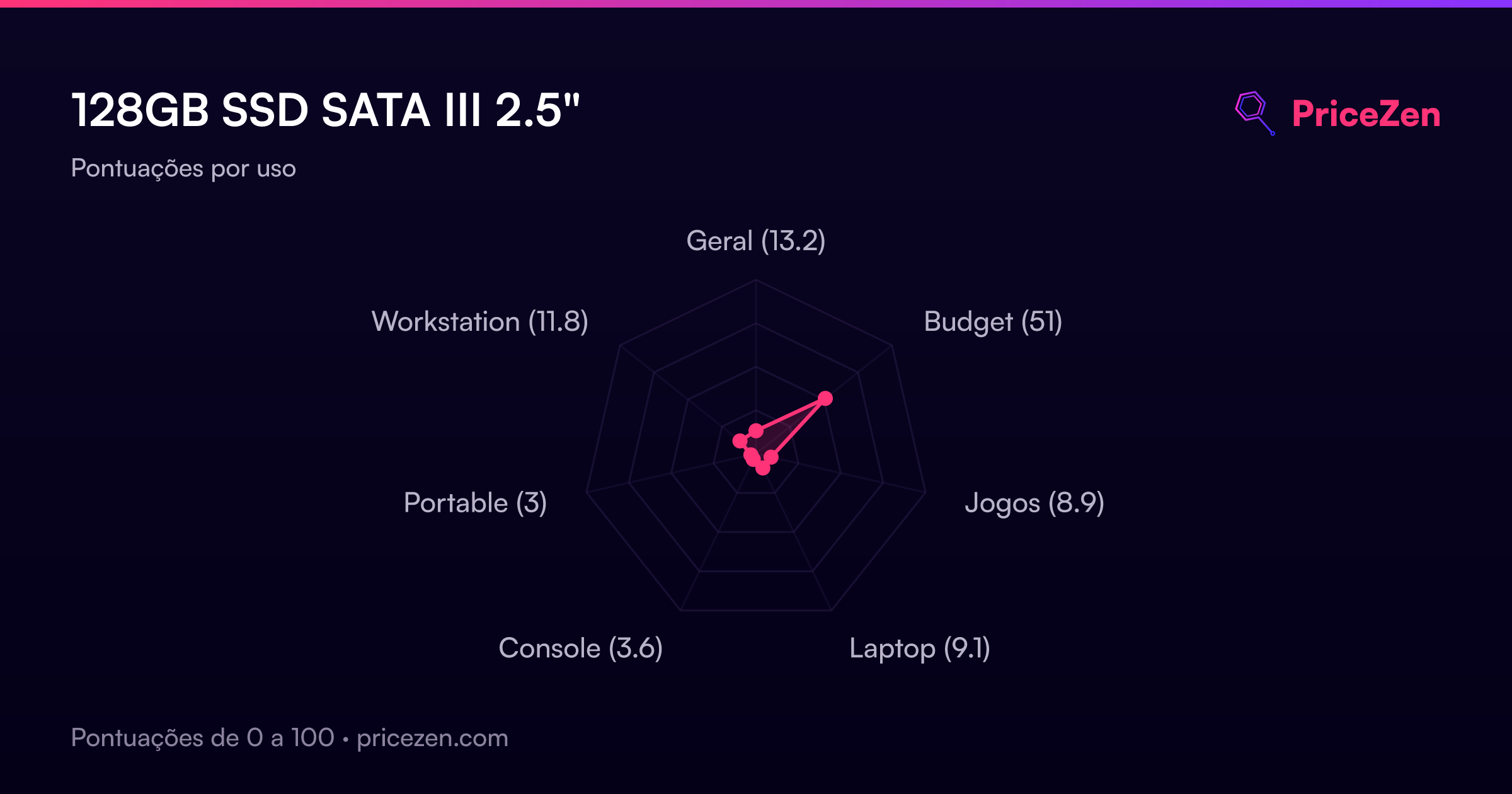
- Geral13.2
- Budget51
- Jogos8.9
- Laptop9.1
- Console3.6
- Portable3
- Workstation11.8