Kingston ValueRAM 8GB DDR3-1600 CL11 Black
The 8GB DDR3-1600 module runs at CL11 with 1.5V voltage, fully tested to JEDEC standards for reliable compatibility. It is a 240-pin unbuffered DIMM, ideal for system builders who need spec-based memory without overclocking features. Best for budget desktop upgrades or workstation builds where stable, standard DDR3 performance is the priority.

Sem preço atual de lojas
Onde o vimos antes. Confira o preço de hoje na loja.











Resumo
The 30-Second Version
The Kingston ValueRAM KVR16N11/8 is boring in the best way. It's reliable, compatible with older Dells, and backed by a lifetime warranty. Speed is nothing special, but for DDR3-era desktops that's not the point. Grab it at USD 28, not at EUR 109.
Pros & Cons
Prós
- Rock solid reliability, owners report zero issues in stress tests 90th
- Plug-and-play on older Dell and OEM boards 86th
- Kingston lifetime warranty and solid support
- Low profile, fits in tight cases without clearance drama
Contras
- No heat spreaders, though DDR3 at 1.5V barely needs them
- Single 8GB stick means no dual-channel unless you buy two
- Speed and feature scores are near the bottom of our database
- Price varies wildly depending on where you shop
O que dizem os donos
The Word on the Street
Como a opinião dos donos mudou ao longo do tempo
ExclusivoCom base em quando os clientes realmente escreveram suas avaliações - para ver se os elogios iniciais se mantiveram.
23 avaliações escritas, mai. de 2026: 22 satisfeitos, 1 insatisfeito
Cada ponto é uma avaliação escrita, no mês em que foi escrita. Satisfeitos = 4-5★, neutros = 3★, insatisfeitos = 1-2★.
As provas
Performance
This stick runs at 1600 MT/s with CL11 timings at 1.5V. That's about average for DDR3, sitting in the 58th percentile for latency and a lowly 14th for speed. But here's the thing: for the systems this RAM goes into, raw speed barely matters. What matters is that it posts every time and survives stress tests. Users report exactly that, with flawless compatibility on older Dell boards and stable performance under load. The 2Rx8 dual-rank config helps a bit with bandwidth on some chipsets too.
Specifications
Full Specifications
Memory
| Type | DDR3 |
| Form Factor | UDIMM |
| Total Capacity | 8192 |
| Modules | 1 |
| Per Module | 8192 |
| Pins | 240 |
| Rank | 2Rx8 |
Performance
| Speed | 1600 |
| CAS Latency | 11 |
| Timings | 11-11-11 |
| Voltage | 1.5 |
Class
| ECC | No |
| Registered | No |
Features
| RGB | No |
| Heat Spreader | No |
vs Competition
Against the Timetec 76, this Kingston stick trades blows on reliability but gives up some speed. The Netac Shadow III and Team Group Elite are DDR4 parts, so they're not even in the same conversation if your board needs DDR3. The Crucial CT16G4DFRA32A doubles the capacity at 16GB, but again, wrong generation. If you're stuck on DDR3, the ValueRAM's main edge is the Kingston name and lifetime warranty. Timetec is often cheaper but with less brand trust behind it.
| Spec | Kingston ValueRAM | Corsair Vengeance RGB | G.Skill Ripjaws S5 | Crucial Pro Overclocking | Patriot Viper Venom | V-Color Manta XSky |
|---|---|---|---|---|---|---|
| Capacity | 8GB | 32GB | 32GB | 32GB | 32GB | 32GB |
| Kit | 1 x 8GB | 2 x 16GB | 2 x 16GB | 2 x 16GB | 2 x 16GB | 2 x 16GB |
| Memory Type | DDR3 | DDR5 | DDR5 | DDR5 | DDR5 | DDR5 |
| Speed Mts | 1600 | 6200 | 6000 | 6000 | 6000 | 6400 |
| Cas Latency | CL11 | CL36 | CL36 | CL36 | CL30 | CL32 |
| Form Factor | UDIMM | UDIMM | UDIMM | UDIMM | UDIMM | UDIMM |
| Ecc | No | No | No | No | No | No |
| Compare | Compare | Compare | Compare | Compare |
| Produto | Speed | Feature | Latency | Capacity | User Sentiment | Prova social | Affordability |
|---|---|---|---|---|---|---|---|
| Kingston ValueRAM | 13.4 | 18 | 57.5 | 22.3 | 90.1 | 9.5 | 85.8 |
| Corsair Vengeance RGB Compare | 92.6 | 89.6 | 76.8 | 70.5 | 77.5 | 69.1 | 16.6 |
| G.Skill Ripjaws S5 Compare | 87.6 | 74.8 | 75.1 | 70.5 | 62.3 | 87.3 | 26.5 |
| Crucial Pro Overclocking Compare | 87.6 | 74.8 | 75.1 | 70.5 | 29 | 96.4 | 29 |
| Patriot Viper Venom Compare | 87.6 | 74.8 | 87.6 | 70.5 | 0 | 57.9 | 31 |
| V-Color Manta XSky Compare | 94.8 | 74.8 | 87.6 | 70.5 | 90.1 | 50.7 | 29.3 |
Preço
Value & Pricing
Pricing is all over the place. In the US you'll find it between USD 28 and USD 44, with Newegg carrying the cheaper listings. Europe is worse, spanning EUR 29 to EUR 109 across four listings. If you're paying anywhere near the top of that range, stop. This is budget RAM and should cost budget money. At USD 28 it's a no-brainer for reviving an old desktop. At EUR 109 you're getting fleeced.
Acompanhamos os preços deste produto desde 2 de out. de 2026. O gráfico aparecerá quando tivermos mais dados.
Saiba mais
Overview
The Kingston ValueRAM KVR16N11/8 is an 8GB stick of DDR3-1600 desktop memory. No heat spreaders, no RGB, no marketing nonsense. Just a green PCB doing exactly what it says on the box.
It's aimed at older desktops that need a cheap, stable RAM bump. Think Dell Optiplexes, XPS 8500s, and other DDR3-era machines still kicking around. Our data puts user sentiment in the 90th percentile, which tells you owners are happy with it.
Common Questions
Q: Will this work in my Dell Optiplex or XPS desktop?
Yes, owners report flawless compatibility with Dell XPS 8500 and Optiplex 7010 systems. It's a standard 240-pin DDR3 UDIMM, so any desktop board that takes DDR3-1600 should accept it.
Q: Can I use this in a laptop?
No. This is a full-size 240-pin DIMM for desktops only. Laptops need smaller SODIMM modules, and several buyers learned that the hard way.
Q: Is one 8GB stick better than two 4GB sticks?
One 8GB stick leaves you in single-channel mode, which can cost a little bandwidth. If your board has four slots, buying two of these gives you 16GB in dual-channel and is the better setup for most users.
Who Should Skip This
Skip this if you're building anything modern. DDR4 and DDR5 platforms won't even accept this stick physically. Also skip it if you need laptop memory, since this is a full-size DIMM. And if you're chasing performance numbers, look elsewhere. This is stability RAM, not speed RAM.
Verdict
If you've got an aging DDR3 desktop that needs a memory bump, this is about as safe a purchase as you can make. It's not fast, it's not flashy, and it won't win any benchmark contests. But it works, it's stable, and Kingston backs it for life. Buy it when the price is right, and skip it if you see a markup.
Usage Scores
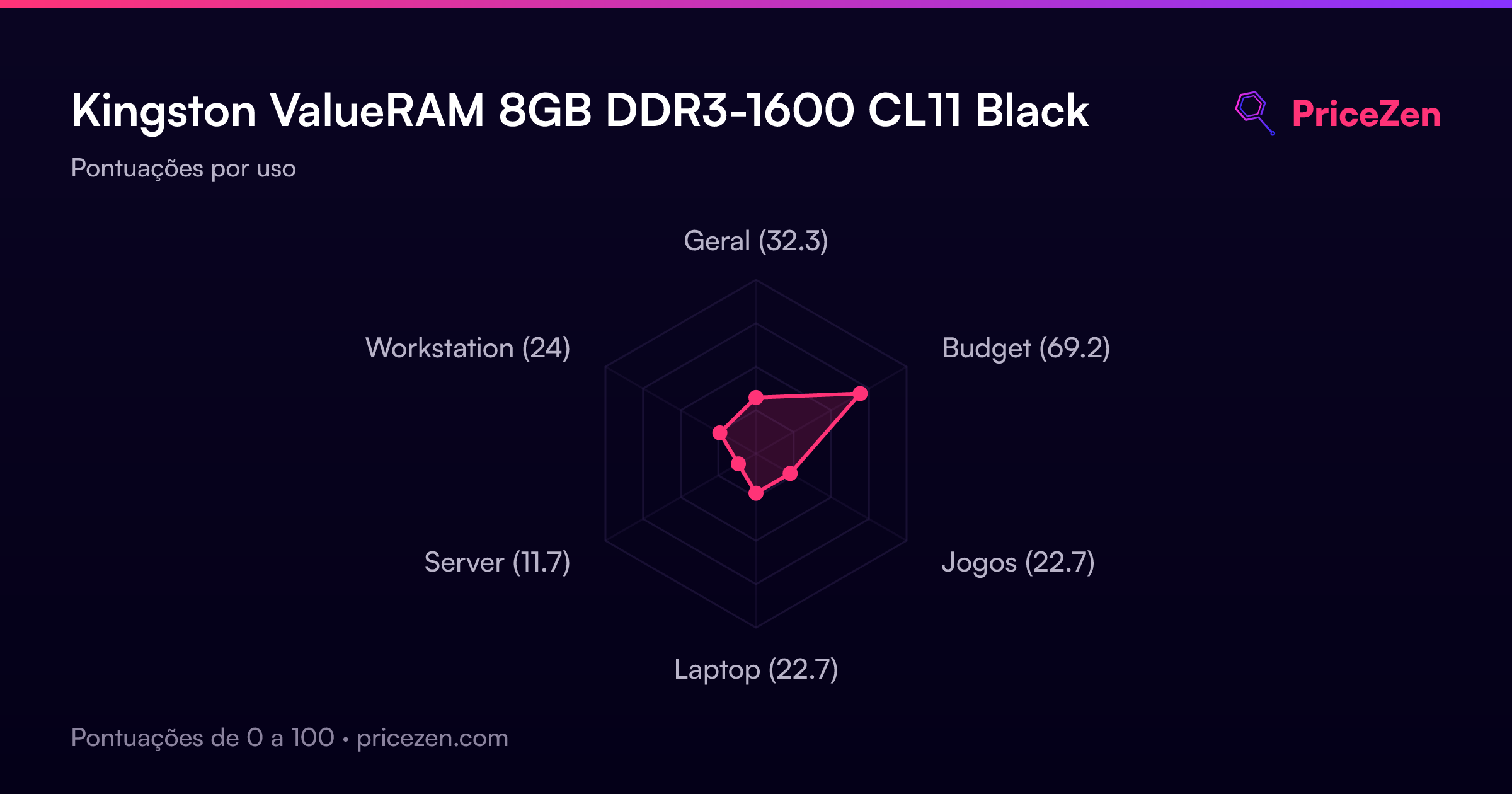
- Geral32.3
- Budget69.2
- Jogos22.7
- Laptop22.7
- Server11.7
- Workstation24