Crucial 4GB DDR3-1333 CL9 (CT51264BA1339)
The 4GB DDR3 UDIMM runs at 1333 MT/s with CL9 latency and 1.5V voltage, offering a straightforward upgrade for older desktop systems. Its 240-pin unbuffered design and 2Rx8 configuration ensure broad compatibility with mainstream DDR3 motherboards. This module suits budget-conscious users refreshing an aging office or home PC, though its capacity and speed limit gaming or server workloads.

Sem preço atual de lojas


Resumo
The 30-Second Version
A boring, reliable 4GB DDR3 stick that keeps old desktops chugging along. It's slow and tiny by today's standards, but it's cheap and it just works.
Pros & Cons
Prós
- Rock solid stability across tons of motherboard combos 93rd
- Dirt cheap way to revive an old desktop 67th
- Crucial compatibility is basically a guarantee
- Runs cool and quiet at 1.5V
Contras
- 4GB capacity is laughable by modern standards
- 1333 MT/s is slow even for DDR3
- No overclocking headroom to speak of
- Feature set is bare bones, nothing fancy here
O que dizem os donos
The Word on the Street
Como a opinião dos donos mudou ao longo do tempo
ExclusivoCom base em quando os clientes realmente escreveram suas avaliações - para ver se os elogios iniciais se mantiveram.
31 avaliações escritas, ago. de 2010 – abr. de 2026: 31 satisfeitos
Em todas as 78 notas das lojas: 4,7★. A maioria dos donos dá nota sem escrever avaliação. O gráfico conta as 31 avaliações escritas.
Cada ponto é uma avaliação escrita, no mês em que foi escrita. Satisfeitos = 4-5★, neutros = 3★, insatisfeitos = 1-2★.
As provas
Performance
At 1333 MT/s with CL9 timings and 1.5V, this stick sits near the bottom of our speed charts, 7th percentile to be exact. But here's the thing that surprised us: owners don't care. The stability is rock solid across budget workstations and even some gaming rigs. One buyer tried to overclock it to 1600 and got shut down, which tracks with the conservative binning. It's not fast, but it's predictable.
Specifications
Full Specifications
Memory
| Type | DDR3 |
| Form Factor | UDIMM |
| Total Capacity | 4096 |
| Modules | 1 |
| Per Module | 4096 |
| Pins | 240 |
| Rank | 2Rx8 |
Performance
| Speed | 1333 |
| CAS Latency | 9 |
| Voltage | 1.5 |
Class
| ECC | No |
| Registered | No |
Features
| RGB | No |
| Heat Spreader | No |
vs Competition
Against the Kingston ValueRAM KVR64A52BS6-8, you're getting half the capacity for a similar price, so Kingston wins if your board supports 8GB sticks. The G.Skill Ripjaws F4-2400C16S-4GRS runs at 2400 MT/s, which absolutely embarrasses this Crucial stick on speed, but you'll pay more and older boards may not even support it. For pure budget compatibility, Crucial holds its own. For anything resembling performance, look elsewhere.
| Spec | Crucial 4GB DDR3 | Kingston FURY Beast | Corsair VENGEANCE RGB | G.Skill Trident Z5 Royal | Team Group T-CREATE EXPERT | ADATA Lancer Blade RGB |
|---|---|---|---|---|---|---|
| Capacity | 4GB | 64GB | 64GB | 64GB | 32GB | 32GB |
| Kit | 1 x 4GB | 2 x 32GB | 2 x 32GB | 2 x 32GB | 2 x 16GB | 2 x 16GB |
| Memory Type | DDR3 | DDR5 | DDR5 | DDR5 | DDR5 | DDR5 |
| Speed Mts | 1333 | 6400 | 6400 | 6000 | 6400 | 6000 |
| Cas Latency | CL9 | CL32 | CL32 | CL26 | CL32 | CL30 |
| Form Factor | UDIMM | UDIMM | UDIMM | UDIMM | UDIMM | UDIMM |
| Ecc | false | false | false | false | false | false |
| Compare | Compare | Compare | Compare | Compare |
| Produto | Speed | Feature | Latency | Capacity | User Sentiment | Prova social | Affordability |
|---|---|---|---|---|---|---|---|
| Crucial 4GB DDR3 | 7.4 | 18.1 | 66.8 | 8.9 | 61.5 | 59.9 | 93.3 |
| Kingston FURY Beast Compare | 94.8 | 89.6 | 87.6 | 89.6 | 89.6 | 96.4 | 8.1 |
| Corsair VENGEANCE RGB Compare | 94.8 | 89.6 | 87.6 | 89.6 | 97.2 | 96.4 | 7 |
| G.Skill Trident Z5 Royal Compare | 87.6 | 89.6 | 99 | 89.6 | 89.6 | 58.5 | 3.8 |
| Team Group T-CREATE EXPERT Compare | 94.8 | 74.8 | 87.6 | 70.6 | 89.6 | 87.3 | 24.1 |
| ADATA Lancer Blade RGB Compare | 87.6 | 89.6 | 87.6 | 70.6 | 0 | 96.4 | 15.8 |
Preço
Value & Pricing
Pricing is all over the map depending on where you shop. US buyers can grab it for $20, which is fine for a legacy upgrade. But Canadian listings swing from CAD 33 to CAD 54 across two vendors, and that spread is annoying. If you're in Canada, hunt down the cheaper listing. At the low end, it's a no-brainer for old hardware. At the high end, you're paying too much for 4GB of DDR3.
Saiba mais
Overview
This is a 4GB stick of DDR3 1333 from Crucial, and honestly, it's a relic that still does its job. The one thing to know: it's cheap, stable, and boring in the best way possible. If you're nursing an old LGA1155 or AM3 system back to life, this is the kind of no-drama RAM you want.
Common Questions
Q: Will this work in my old Dell or HP desktop?
Almost certainly. Crucial's compatibility is the main reason people buy this. Check your board supports DDR3 1333 UDIMMs and you're good.
Q: Can I mix this with my existing RAM?
Usually yes, as long as the other sticks are also DDR3 1333 or faster. Your system will run everything at the slowest stick's speed, so don't pair it with 1600 and expect magic.
Q: Is 4GB enough for Windows 10?
Barely. It'll boot and handle web browsing and office work, but you'll feel it choke with more than a few tabs open. If your board has four slots, grab two of these at minimum.
Who Should Skip This
If you're looking for any kind of performance upgrade, this isn't it. Go grab a 16GB kit of DDR4 or DDR5 and stop trying to resurrect a machine that belongs in a museum. And if you need more than 4GB per stick, the Kingston ValueRAM 8GB modules are the better play.
Verdict
Buy it if you need to keep an old DDR3 system alive on the cheap and you don't care about speed. The stability and compatibility are genuinely excellent, and at $20 USD it's hard to argue. But if you're building anything even remotely modern, this stick has no business in your cart. It's a maintenance part, not an upgrade.
Usage Scores
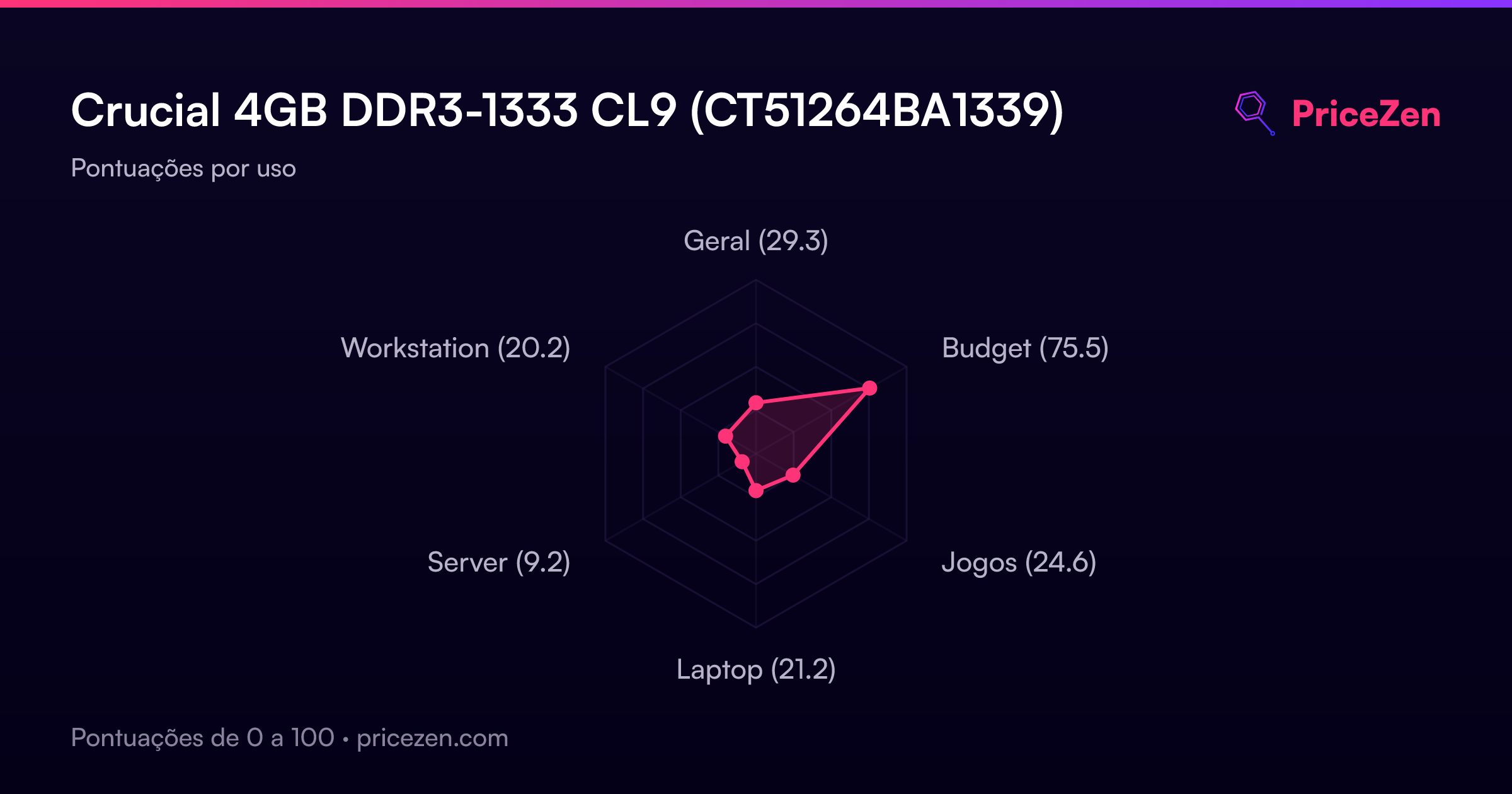
- Geral29.3
- Budget75.5
- Jogos24.6
- Laptop21.2
- Server9.2
- Workstation20.2