Kingston FURY Impact 16GB DDR5-6400 CL38 SODIMM

SODIMM DDR5 para notebooks e mini PCs verificado em 28 de nov.
71/100 pontuação geral 5,0 média de 11 avaliações de proprietários
- Capacity
- 16GB
- Kit
- 1 x 16GB
- Memory
- DDR5
- Speed
- 6400 MT/s
- CAS latency
- CL38
- Form factor
- SODIMM
Compare preços em 1 loja
Da mais barata à mais cara. Ofertas novas, recondicionadas e em kit ficam separadas para você comparar o que é comparável.
| Loja | Vendido por | Cor e condição | Preço | vs. o menor | Última verificação | Link |
|---|---|---|---|---|---|---|
| Novo1 ofertaUnidade única | ||||||
| Não verificados nos últimos 7 dias, então estes preços podem ter mudado | ||||||
| Amazon | Vendedor parceiro | Não informado | R$ 3.925,41 | 5 de nov. | Ir para a loja | |
 Fonte: PriceZen, verificado em 5 de nov. de 2026
Um preço é considerado atual quando o verificamos nos últimos 7 dias. «Vendedor parceiro» significa um vendedor terceiro naquela loja, não a própria loja.
Histórico de preços
Verificado nesse diaNão verificado nesse dia, ainda em oferta
Fonte: PriceZen, checked 5 de nov. de 2026











Resumo
The 30-Second Version
The Kingston FURY Impact KF564S38IB-16 is one of the fastest laptop RAM sticks we've tested, hitting 6400 MT/s at the 95th percentile. It's plug and play with XMP 3.0 support, but it's a single stick and pricing is steep. Worth it if you need top speed in a laptop, less so if you just want more capacity on a budget.
Pros & Cons
Prós
- Blazing fast 6400 MT/s speed, top of the charts for laptop RAM 95th
- Plug and play auto-overclocking, no BIOS fiddling required 77th
- Slim heat spreader fits tight laptop chassis
- Intel XMP 3.0 support for easy profile selection
Contras
- Single stick means no dual-channel bandwidth out of the box
- CL38 latency is good but not the tightest available
- 16GB capacity is modest for heavy multitaskers
- Pricing can be steep depending on your region
O que dizem os donos
The Word on the Street
- Several owners report smooth installations in gaming laptops like the Asus ROG Zephyrus G14, with no issues after weeks of use.
- Buyers appreciate the plug and play behavior, noting the RAM works as described without needing manual BIOS tweaks.
- A few reviewers mention the price feels high for a single 16GB stick, even if the performance justifies it.
Como a opinião dos donos mudou ao longo do tempo
ExclusivoCom base em quando os clientes realmente escreveram suas avaliações - para ver se os elogios iniciais se mantiveram.
3 avaliações escritas, set. de 2024 – abr. de 2026: 3 satisfeitos
Em todas as 11 notas das lojas: 5,0★. A maioria dos donos dá nota sem escrever avaliação. O gráfico conta as 3 avaliações escritas.
Cada ponto é uma avaliação escrita, no mês em que foi escrita. Satisfeitos = 4-5★, neutros = 3★, insatisfeitos = 1-2★.
As provas
Performance
6400 MT/s at CL38 is fast, plain and simple. The 95th percentile speed ranking means this module outruns the vast majority of laptop memory we've tested. Latency sits at the 77th percentile, which is well above average but not class-leading. The 38-40-40 timings are respectable for DDR5, though some desktop kits with tighter CL28 or CL32 timings will edge it out in latency-sensitive workloads. For gaming and general productivity, the raw bandwidth is what matters most, and this stick delivers. The plug and play auto-overclocking is a nice touch for anyone who doesn't want to mess with BIOS settings.
Specifications
Full Specifications
Memory
| Type | DDR5 |
| Form Factor | SODIMM |
| Total Capacity | 16384 |
| Modules | 1 |
| Per Module | 16384 |
| Pins | 262 |
Performance
| Speed | 6400 |
| CAS Latency | 38 |
| Timings | 38-40-40 |
| Voltage | 1.35 |
Class
| ECC | No |
| Registered | No |
| OC Profile | Intel XMP 3.0 |
Features
| RGB | No |
| Heat Spreader | Yes |
vs Competition
Against the G.Skill Trident Z5 Royal Neo and Corsair Vengeance RGB kits, the Kingston trades RGB flair for pure laptop compatibility. Those desktop kits run at 6000 MT/s with tighter CL28 timings, so they'll win on latency, but they won't fit in a laptop. The Crucial Pro Overclocking kit is a closer rival in the SODIMM space, though it runs at 6400 MT/s with CL32, which is actually tighter than the Kingston's CL38. The Team Group T-CREATE EXPERT also hits 6400 MT/s with CL32. So the Kingston isn't the only fast SODIMM in town, but its plug and play behavior and XMP 3.0 support make it one of the easiest to live with.
| Spec | Kingston FURY Impact | G.Skill Trident Z5 Royal | Corsair VENGEANCE RGB | V-Color TUF GAMING ALLIANCE | Team Group T-CREATE EXPERT | Patriot Viper Elite 5 Ultra |
|---|---|---|---|---|---|---|
| Capacity | 16GB | 64GB | 64GB | 64GB | 64GB | 64GB |
| Kit | 1 x 16GB | 2 x 32GB | 2 x 32GB | 2 x 32GB | 2 x 32GB | 2 x 32GB |
| Memory Type | DDR5 | DDR5 | DDR5 | DDR5 | DDR5 | DDR5 |
| Speed Mts | 6400 | 6000 | 6400 | 6400 | 6000 | 6000 |
| Cas Latency | CL38 | CL26 | CL32 | CL32 | CL34 | CL28 |
| Form Factor | SODIMM | UDIMM | UDIMM | UDIMM | UDIMM | UDIMM |
| Ecc | No | No | No | No | No | No |
| Compare | Compare | Compare | Compare | Compare |
| Produto | Speed | Feature | Latency | Capacity | Prova social | Affordability |
|---|---|---|---|---|---|---|
| Kingston FURY Impact | 94.8 | 61.4 | 76.5 | 44.8 | 43.7 | 39.2 |
| G.Skill Trident Z5 Royal Compare | 87.6 | 89.5 | 99 | 89.5 | 58.4 | 3.9 |
| Corsair VENGEANCE RGB Compare | 94.8 | 89.5 | 87.6 | 89.5 | 96.4 | 6.7 |
| V-Color TUF GAMING ALLIANCE Compare | 94.8 | 89.5 | 87.6 | 89.5 | 26.8 | 10.6 |
| Team Group T-CREATE EXPERT Compare | 87.6 | 74.7 | 77.1 | 89.5 | 87.3 | 10.6 |
| Patriot Viper Elite 5 Ultra Compare | 87.6 | 89.5 | 97.1 | 89.5 | 0 | 9.7 |
Preço
Value & Pricing
Value is tricky here because pricing varies wildly by region. US listings run anywhere from $300 to $400, while European buyers are looking at roughly 389-405 EUR and Canadians face 503-526 CAD. That's a lot of money for 16GB of RAM, even fast RAM. The 41st percentile affordability score confirms it's not a budget pick. We track its price over time, partly through our community browser extension, so watch for the low end of that range before you pull the trigger. If you need the speed and your laptop supports it, the premium might be worth it. But if you're just adding RAM for more capacity, there are cheaper DDR5 SODIMM options that will do the job.
Saiba mais
Overview
The Kingston FURY Impact KF564S38IB-16 is a single 16GB stick of DDR5 SODIMM running at 6400 MT/s. That speed puts it at the 95th percentile in our database, which is basically the top of the charts for laptop memory right now. If you want a fast, no-nonsense upgrade for a gaming laptop or compact workstation, this is a serious contender.
It's a plug and play module with Intel XMP 3.0 support, so you can either let it auto-overclock or dial in the 6400 profile in BIOS. The heat spreader is slim enough for tight laptop chassis, and the 1.35V draw is reasonable for the speed. Just remember this is a single stick, so you're leaving dual-channel performance on the table unless you buy two.
Common Questions
Q: Will this work in my laptop?
It's a standard 262-pin DDR5 SODIMM, so it should fit any laptop that supports DDR5 memory. Check your laptop's spec sheet for DDR5 support and maximum supported speed before buying.
Q: Do I need to enable XMP to get 6400 MT/s?
The module supports plug and play auto-overclocking, so it should hit 6400 MT/s automatically on compatible systems. You can also select the XMP 3.0 profile in BIOS if you want to manually confirm the speed.
Q: Should I buy one stick or two?
Two sticks in dual-channel mode will give you significantly better memory bandwidth than a single stick. If your laptop has two SODIMM slots and your budget allows, buy a pair for the best performance.
Who Should Skip This
Skip this if you're just looking to add more RAM capacity on a budget. The 41st percentile affordability score means you're paying a premium for speed you might not need. If you're not gaming or doing memory-intensive work, a cheaper DDR5 SODIMM at 4800 or 5600 MT/s will serve you just fine. Also skip it if your laptop doesn't support DDR5 or can't run memory at 6400 MT/s, because you'll be paying for performance you can't use.
Verdict
This is a great pick for laptop owners who want maximum memory speed without a lot of hassle. The plug and play overclocking means you can drop it in and go, and the 6400 MT/s speed is genuinely top-tier. Buy it if you have a gaming laptop or compact workstation that supports DDR5 and you want the fastest single stick available. Just remember to grab two if you want dual-channel performance.
Usage Scores
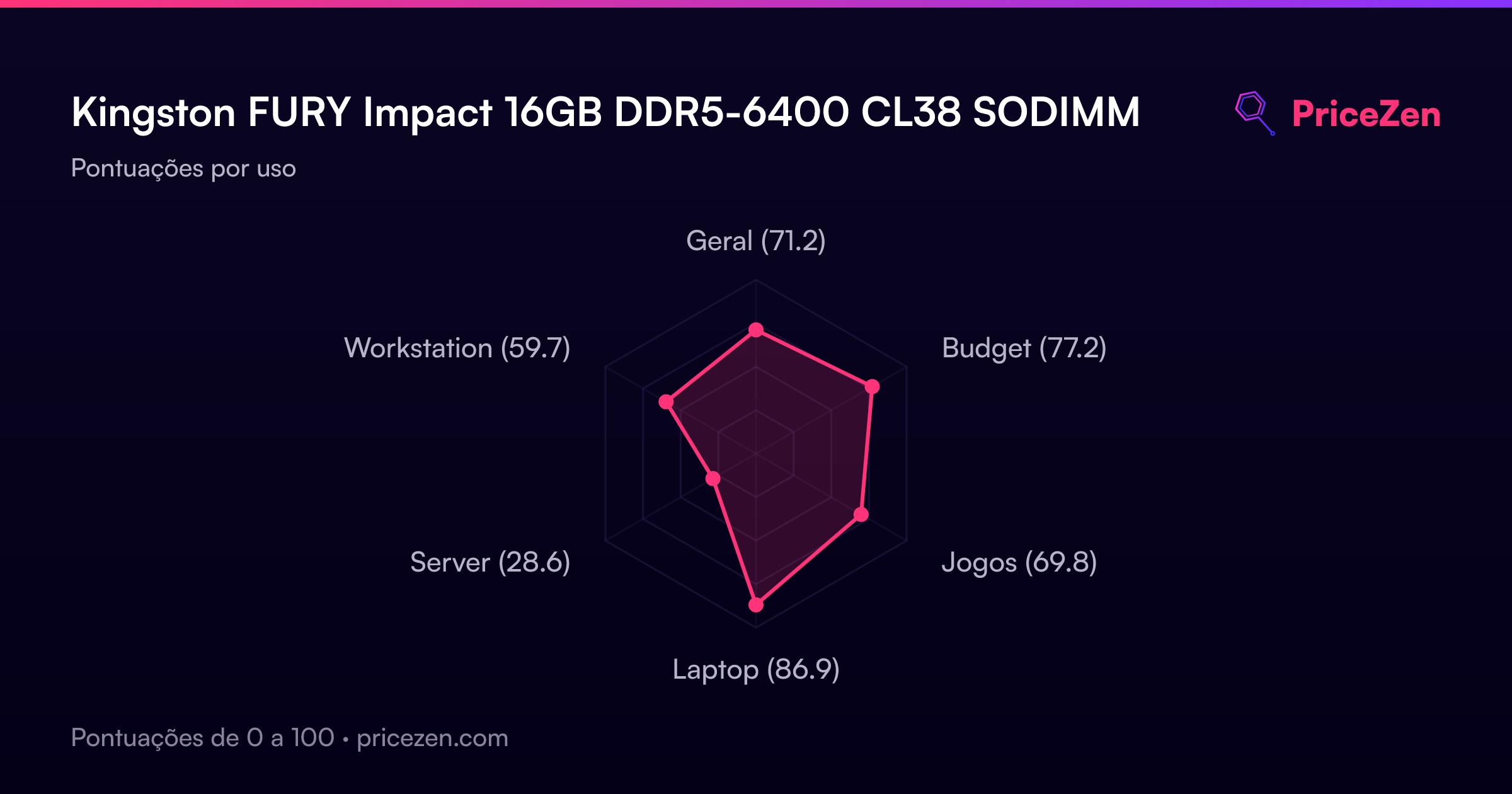
- Geral71.2
- Budget77.2
- Jogos69.8
- Laptop86.9
- Server28.6
- Workstation59.7