HyperX FURY 16GB (2x8GB) DDR3-1866 CL10 Blue
The 1866 MT/s CL10 (10-11-10) timings at 1.5V deliver a balanced performance boost for DDR3 systems, with a heat spreader that keeps thermals in check during extended sessions. Its plug-and-play auto-overclocking recognizes the host platform and runs at the highest supported speed without BIOS tweaks, making installation effortless for beginners. Best for budget-conscious gamers upgrading older Intel or AMD desktops to improve in-game FPS and overall system responsiveness.

Sem preço atual de lojas


Resumo
The 30-Second Version
The Kingston FURY HX318C10FK2/16 is a 16GB DDR3 memory kit that's still a solid pick for older desktops. It runs at 1866 MT/s with CL10 timings, overclocks automatically without BIOS tweaks, and carries a lifetime warranty. Just make sure your motherboard and CPU play nice with it, and watch out for that tall heat spreader if you're using a big air cooler.
Pros & Cons
Prós
- Plug-and-play overclocking, no BIOS tweaking needed 84th
- Strong value, especially when on sale 79th
- Stable even with overclocking 78th
- Attractive heat spreader design with color options 69th
- Lifetime warranty and reliable brand reputation
Contras
- DDR3 is outdated for new builds
- Large heat spreader can block tower coolers
- Compatibility issues with some AMD CPUs and motherboards
- May underclock to 1333 MHz on older CPUs
- Listing info about chipset compatibility is thin
O que dizem os donos
The Word on the Street
Como a opinião dos donos mudou ao longo do tempo
ExclusivoCom base em quando os clientes realmente escreveram suas avaliações - para ver se os elogios iniciais se mantiveram.
8 avaliações escritas, mai. de 2014 – abr. de 2016: 8 satisfeitos
Em todas as 407 notas das lojas: 4,5★. A maioria dos donos dá nota sem escrever avaliação. O gráfico conta as 8 avaliações escritas.
Cada ponto é uma avaliação escrita, no mês em que foi escrita. Satisfeitos = 4-5★, neutros = 3★, insatisfeitos = 1-2★.
As provas
Performance
At 1866 MT/s with CL10 timings, this kit is about as fast as DDR3 gets without getting exotic. The latency lands at the 79th percentile in our database, which is solid for this memory class. In practice, that means snappy responsiveness in everyday tasks and decent frame pacing in games that aren't memory-bandwidth-starved. The speed itself sits at the 19th percentile overall, but that's comparing against DDR4 and DDR5 kits. Within the DDR3 world, 1866 is near the top of the stack.
For gaming, our scoring puts this kit at 45.3 out of 100. That sounds rough, but it's honest. DDR3 platforms are old, and modern games will bottleneck on CPU and GPU long before RAM speed becomes the hero. Where this kit shines is in older titles and general desktop use. If you're pairing it with something like an i7-4790K or an FX-8350, you'll get a responsive system that handles multitasking fine. Just don't expect it to turn a 2013 build into a 2024 gaming monster.
Specifications
Full Specifications
Memory
| Type | DDR3 |
| Form Factor | DIMM |
| Total Capacity | 16384 |
| Modules | 2 |
| Per Module | 8192 |
| Pins | 240 |
Performance
| Speed | 1866 |
| CAS Latency | 10 |
| Timings | 10-11-10 |
| Voltage | 1.5 |
Class
| ECC | No |
| Registered | No |
Features
| RGB | No |
| Heat Spreader | Yes |
vs Competition
The obvious comparison is the Corsair Vengeance LPX CMK32GX4M2B3200C16, but that's DDR4, so it's not really a fair fight. If you're on a DDR3 board, the Corsair kit won't even fit. The more relevant comparison is against other DDR3 kits still floating around, like G.Skill's older Ripjaws or Trident lines. The HyperX FURY holds its own there, especially on latency and stability. The Team Group T-FORCE VULCAN Z and Patriot Viper Elite 5 are DDR4 and DDR5 respectively, so they're only relevant if you're considering a platform upgrade instead of a RAM upgrade.
Where the FURY kit stands out is the plug-and-play behavior. A lot of DDR3 kits need manual timing tweaks to hit their rated speeds, especially on AMD boards. The FURY just works, which is why it's been a go-to for budget builders for years. The trade-off is the heat spreader. It's taller than it looks in photos, and if you're running a big air cooler like a Noctua NH-D15, you might have clearance issues. The Corsair Vengeance LPX, by contrast, is low-profile and fits under almost anything, but again, that's DDR4 territory.
| Spec | HyperX FURY | Kingston FURY Beast | Corsair VENGEANCE RGB | G.Skill Trident Z5 Royal | Team Group T-CREATE EXPERT | XPG Lancer Blade RGB |
|---|---|---|---|---|---|---|
| Capacity | 16GB | 64GB | 64GB | 64GB | 32GB | 32GB |
| Kit | 2 x 8GB | 2 x 32GB | 2 x 32GB | 2 x 32GB | 2 x 16GB | 2 x 16GB |
| Memory Type | DDR3 | DDR5 | DDR5 | DDR5 | DDR5 | DDR5 |
| Speed Mts | 1866 | 6400 | 6400 | 6000 | 6400 | 6000 |
| Cas Latency | CL10 | CL32 | CL32 | CL26 | CL32 | CL30 |
| Form Factor | DIMM | UDIMM | UDIMM | UDIMM | UDIMM | UDIMM |
| Ecc | false | false | false | false | false | false |
| Compare | Compare | Compare | Compare | Compare |
| Produto | Speed | Feature | Latency | Capacity | User Sentiment | Prova social | Affordability |
|---|---|---|---|---|---|---|---|
| HyperX FURY | 19.1 | 53.4 | 79.3 | 45 | 77.9 | 69.2 | 83.6 |
| Kingston FURY Beast Compare | 94.8 | 89.6 | 87.6 | 89.6 | 90.3 | 96.4 | 8.2 |
| Corsair VENGEANCE RGB Compare | 94.8 | 89.6 | 87.6 | 89.6 | 97.5 | 96.4 | 6.3 |
| G.Skill Trident Z5 Royal Compare | 87.6 | 89.6 | 99 | 89.6 | 90.3 | 58.5 | 3.9 |
| Team Group T-CREATE EXPERT Compare | 94.8 | 74.8 | 87.6 | 70.6 | 90.3 | 87.3 | 24.4 |
| XPG Lancer Blade RGB Compare | 87.6 | 89.6 | 87.6 | 70.6 | 0 | 96.4 | 15.8 |
Preço
Value & Pricing
Pricing on this kit is a bit of a moving target since it's discontinued in most markets. We see one listing at CAD 68, which is reasonable for 16GB of DDR3 if you're keeping an older system alive. But here's the thing: DDR3 prices have gotten weird on the used market. Sometimes you'll find this kit cheaper than generic green sticks, sometimes it's marked up because it's HyperX. If you can grab it under CAD 70, it's a good deal. If someone's asking CAD 100 or more, walk away and look at used Corsair Vengeance or G.Skill Ripjaws DDR3 instead.
Saiba mais
Overview
The Kingston FURY HX318C10FK2/16 is a 16GB kit of DDR3 memory, two 8GB sticks running at 1866 MT/s with CL10 timings. It's aimed at older desktops still rocking DDR3 platforms, whether that's an aging gaming rig or a budget workstation that just needs a RAM bump. The kit sits in the budget-friendly end of the memory market, and our database puts its affordability at the 83rd percentile, which means it's cheaper than most RAM kits we track.
People searching for this kit usually want to know if it's good for gaming on older hardware, or whether it'll just drop into their system without BIOS fiddling. The short answer is yes on the drop-in part. HyperX FURY uses plug-and-play overclocking, so it automatically runs at the highest speed your motherboard's BIOS allows, up to 1866MHz. No manual tweaking needed. The longer answer on gaming is more nuanced, and we'll get into that below.
One thing to know up front: this is DDR3, not DDR4 or DDR5. If you're building a new system in 2024 or later, this isn't for you. But if you're keeping an older Intel or AMD platform alive, this kit is one of the better value options still floating around.
Common Questions
Q: Is the Kingston FURY HX318C10FK2/16 good for gaming?
It's decent for gaming on older DDR3 platforms, but our database scores it at 45.3 out of 100 for gaming overall. You'll get stable frame rates in older titles, but modern games will be limited by your CPU and GPU long before this RAM becomes the bottleneck.
Q: Does the HyperX FURY 16GB DDR3 work with AMD motherboards?
It works with most AMD boards, but some users report it underclocking to 1333 MHz on older AMD CPUs like the FX series. Check your motherboard's QVL list before buying to avoid surprises.
Q: Will this RAM fit under a large CPU cooler?
The heat spreader on the FURY kit is taller than standard low-profile RAM, so it can interfere with big tower coolers. If you're running something like a Noctua NH-D15, you may need to raise the fan or look for low-profile memory instead.
Q: Is DDR3 still worth buying in 2024?
Only if you're keeping an existing DDR3 system alive. For a new build, DDR4 and DDR5 are faster, cheaper per gigabyte in many cases, and supported by current motherboards. DDR3 is a stopgap, not a foundation.
Who Should Skip This
Skip this if you're building a new PC. DDR3 is a dead end, and you'd be better off putting that money toward a DDR4 or DDR5 platform. Also skip it if you're running an older AMD FX system without checking compatibility first, since some users report the kit downclocking to 1333 MHz on those chips. And if you're using a massive air cooler, the tall heat spreader might not clear your fan. In that case, look for low-profile DDR3 sticks or consider a platform upgrade instead.
Verdict
Should you buy this? If you're on a DDR3 platform and need 16GB of reliable, fast memory without messing with BIOS settings, yes. This kit is one of the best DDR3 options still available, and the lifetime warranty means Kingston stands behind it. The plug-and-play overclocking is genuinely useful, especially for people who don't want to spend an afternoon tweaking timings.
But be honest with yourself about what you're buying. This is a stopgap for an aging system, not an upgrade path. If you're planning to build a new PC within a year, save your money and put it toward a DDR4 or DDR5 platform instead. And if you're running an older AMD CPU like an FX series, do a quick compatibility check first. Some users report the kit underclocking to 1333 MHz on those chips, which defeats the purpose of buying 1866 memory.
Usage Scores
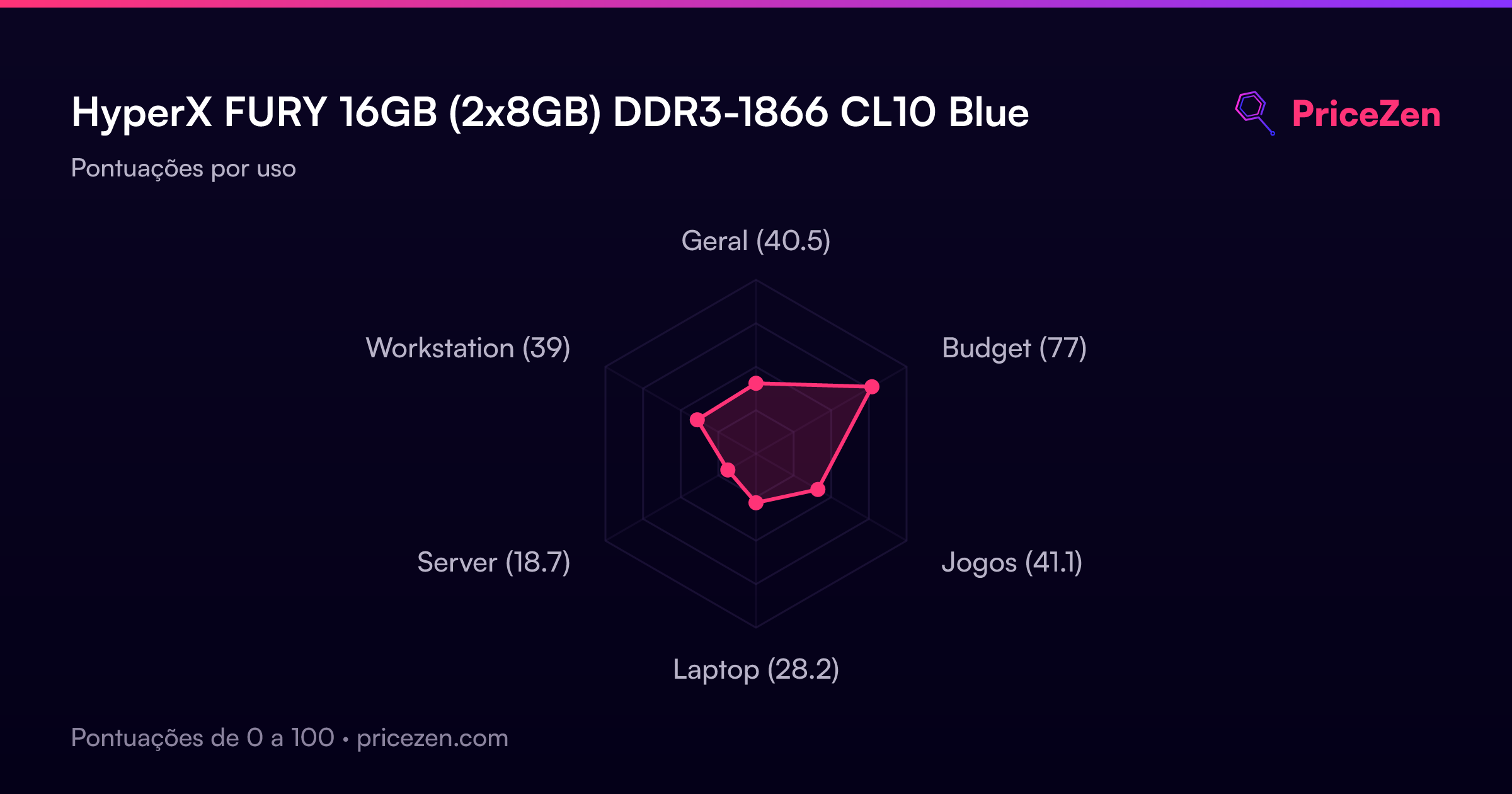
- Geral40.5
- Budget77
- Jogos41.1
- Laptop28.2
- Server18.7
- Workstation39