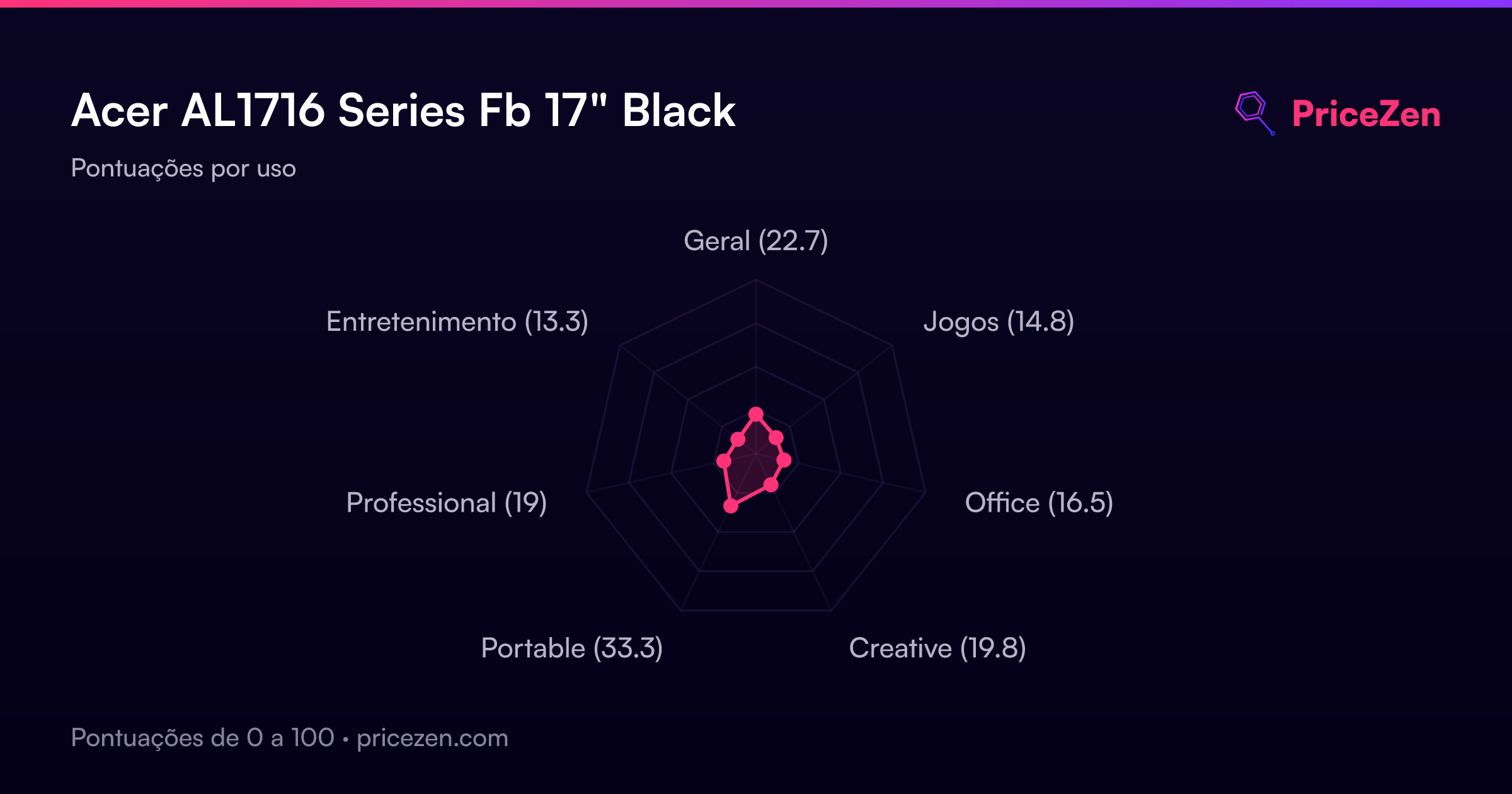
Acer AL1716 Series Fb 17" Black
The 17-inch TFT LCD SXGA panel delivers 1280 x 1024 resolution with 300 nits brightness and a 5ms response time, making it a straightforward choice for basic desktop tasks. Its 800:1 contrast ratio and 16.7 million colors provide decent image quality for a monitor in this class, while the tilt adjustment adds basic ergonomic flexibility. This monitor is best for budget-conscious office workers or students who need a reliable secondary display for document editing and web browsing, not for gaming or creative work.

Sem preço atual de lojas
Onde o vimos antes. Confira o preço de hoje na loja.











Resumo
The 30-Second Version
The Acer AL1716 Fb is a 17-inch 5:4 LCD monitor from the VGA era, available used for around $75 USD. It's fine for basic office work and legacy software, but the VGA-only input, narrow viewing angles, and high power draw make it a tough sell against cheap used 24-inch monitors. Buy it only if you specifically need the square aspect ratio.
Pros & Cons
Prós
- Compact 5:4 footprint fits tight desks 79th
- Cheap on the used market
- 300 nits brightness is usable in bright rooms
- Simple, no-frills setup with VGA cable included
- Decent 80th percentile compactness score
Contras
- VGA only, no HDMI or DisplayPort
- Terrible 7th percentile connectivity score
- Viewing angles are narrow and colors shift
- 40W power draw is high for the size
- No height adjustment, tilt only
- 6th percentile display score overall
As provas
Performance
The AL1716 Fb has a 5ms response time according to the retailer listing, though Acer's own description says 8ms. Either way, this is not a gaming monitor. Ghosting will be visible in fast motion, and the 800:1 contrast ratio means blacks look more like dark gray. The 300 nits brightness is actually decent for an older panel, enough for a well-lit office.
In our database, this monitor sits at the 22nd percentile for performance. That's not a typo. It's slow, it's dim by modern standards, and the color reproduction, while listed at 16.7 million colors, doesn't hold up next to even a budget IPS panel from the last five years. The 43rd percentile color score tells you it's mediocre at best. For spreadsheets and text, it's fine. For anything involving color accuracy or fast motion, it's a struggle.
Specifications
Full Specifications
Display
| Size | 17" |
| Resolution | 1280x1024 |
| Panel Type | IPS |
| Aspect Ratio | 5:4 |
| Curved | No |
Performance
| Response Time | 5 |
Color & HDR
| Brightness | 300 nits |
| Color Depth | 24-bit |
Connectivity
| HDMI Ports | 0 |
| DisplayPort | 0 |
| Speakers | No |
| Headphone Jack | No |
Ergonomics
| Height Adjustable | No |
| Tilt | Yes |
| Swivel | No |
| Pivot | No |
Features
| Power | 40 |
| Weight | 4.6 kg / 10.1 lbs |
vs Competition
Stacked against something like the ASUS TUF Gaming VG27AQL5A or the LG UltraGear 27G640A-B, the AL1716 Fb looks like a museum piece. Those are 27-inch 1440p gaming monitors with high refresh rates, HDMI and DisplayPort, and color performance in a different universe. The Samsung Odyssey LS27BG402ENXGO and Lenovo Legion R27qc-30 are similarly modern, with curved panels and gaming features. Even the SANSUI 27 inch, a budget option, absolutely crushes the Acer in every measurable way except desk space.
But that's not really a fair fight. The Acer is a 17-inch office monitor from a different era. The real comparison is against other used 17-19 inch monitors. Against those, it's middle of the pack. The 5:4 ratio is actually a plus for certain legacy applications, and the build quality is typical Acer, which is to say adequate. If you're comparing it to anything modern, it loses. If you're comparing it to other old square monitors, it's fine.
| Spec | Acer AL1716 Series Fb 17" | LG UltraGear 45GX950A-B 45" | ASUS ROG Strix XG27UCDMG 27" | Dell UltraSharp U4025QW 39.7" | Alienware AW-Series AW3425DW 34" | MSI MAG 271QPX QD-OLED E2 27" |
|---|---|---|---|---|---|---|
| Screen Size | 17 | 45 | 27 | 39.7 | 34 | 27 |
| Resolution | 1280 x 1024 | 5120 x 2160 | 3840 x 2160 | 5120 x 2160 | 3440 x 1440 | 2560 x 1440 |
| Panel Type | IPS | OLED | QD-OLED | IPS | QD-OLED | QD-OLED |
| Refresh Rate | - | 330 | 240 | 120 | 240 | 240 |
| Response Time Ms | 5 | 0.03 | 0.03 | 5 | 0.03 | 0.03 |
| Adaptive Sync | - | FreeSync Premium Pro | FreeSync Premium Pro | Adaptive-Sync | FreeSync Premium Pro | FreeSync Premium Pro |
| Hdr | - | DisplayHDR True Black 400 | DisplayHDR True Black 400 | HDR600 | HDR400 | DisplayHDR True Black 400 |
| Compare | Compare | Compare | Compare | Compare |
| Produto | Color | Portabilidade | Display | Feature | Ergonomic | Performance | Connectivity |
|---|---|---|---|---|---|---|---|
| Acer AL1716 Series Fb 17" | 41.8 | 79.4 | 6.8 | 21.1 | 21.5 | 22.4 | 6.5 |
| LG UltraGear 45GX950A-B 45" Compare | 99.4 | 76.5 | 99.7 | 96.3 | 90.8 | 99.4 | 96.9 |
| ASUS ROG Strix XG27UCDMG 27" Compare | 96.5 | 57.3 | 97.7 | 85 | 90.8 | 97.9 | 81.1 |
| Dell UltraSharp U4025QW 39.7" Compare | 97.9 | 76.5 | 98.6 | 96.3 | 90.8 | 56.1 | 99.3 |
| Alienware AW-Series AW3425DW 34" Compare | 98.9 | 73.9 | 84.1 | 96.3 | 90.8 | 97.9 | 95.4 |
| MSI MAG 271QPX QD-OLED E2 27" Compare | 99.2 | 57.3 | 73.4 | 85 | 90.8 | 97.9 | 81.1 |
Preço
Value & Pricing
At $75 USD used, the AL1716 Fb is competing with used 22-24 inch monitors that offer HDMI, better panels, and lower power draw. You can find a used Dell or HP 24-inch IPS monitor for around the same price if you're patient. The only reason to pick this Acer is if you specifically need a 5:4 aspect ratio or a small footprint. The $173 CAD listing is harder to justify, that's firmly in used 24-inch 1080p territory. Unless you're replacing an identical unit in a kiosk or industrial setup, the value proposition is weak.
Saiba mais
Overview
The Acer AL1716 Fb is a 17-inch TFT LCD monitor from a time when 5:4 aspect ratios were the norm and 1280 x 1024 was considered sharp. It's a used-market item at this point, floating around $75 USD or $173 CAD depending on where you look. This isn't a monitor anyone should be buying new in 2024, but as a cheap second screen or a retro setup piece, it has a certain charm.
People searching for this are usually trying to figure out if it's still usable for basic office work, or if it works with modern PCs. The short answer is yes, with caveats. It only has a VGA (D-Sub) input, so you'll need an adapter for most modern graphics cards. And the viewing angles are rough, 140 degrees horizontal and 130 vertical, which is typical for older TN-style panels despite the IPS label floating around in some listings.
At 4600 grams, this thing is a chunky boy. The stand only tilts, no height adjustment, no pivot. Power draw is 40W, which is more than a modern 24-inch LED monitor uses. But if you need a square-ish screen for legacy software, point-of-sale systems, or just want that old-school look, it does the job without fuss.
Common Questions
Q: Does the Acer AL1716 Fb work with modern computers?
Yes, but you'll need a VGA to HDMI or VGA to DisplayPort adapter since the monitor only has a D-Sub VGA input. Most modern graphics cards no longer include VGA ports.
Q: Is the Acer AL1716 Fb good for gaming?
No. The 5ms to 8ms response time and 800:1 contrast ratio make it a poor choice for gaming. Fast motion will show ghosting, and the 5:4 aspect ratio means most modern games will letterbox or stretch.
Q: What resolution is the Acer AL1716 Fb?
It runs at 1280 x 1024, which is the standard SXGA resolution for 17-inch 5:4 monitors. It's sharp enough for text at this screen size, but it's low by modern standards.
Q: Can I mount the Acer AL1716 Fb on a monitor arm?
The AL1716 Fb only has a tilt stand and no VESA mount holes listed in the specs. You'd need an adapter bracket if you want to mount it on an arm.
Who Should Skip This
Skip this if you need a monitor for gaming, photo editing, video, or anything involving color accuracy. The entertainment score of 10.2 out of 100 tells the story. Also skip it if you don't want to deal with VGA adapters, or if you have the desk space for a larger used monitor. Anyone doing creative work should look at a used 24-inch IPS panel with HDMI, which will cost about the same and perform dramatically better. If you're setting up a modern home office, this isn't the monitor you want.
Verdict
Should you buy the Acer AL1716 Fb? Only if you need a 5:4 monitor for a specific purpose and you find one cheap. At $75 USD, it's a functional second screen for reading documents or running legacy software. At $173 CAD, it's a hard pass.
The lack of digital inputs is the real killer. VGA adapters add cost and hassle, and the image quality over VGA on a modern GPU is noticeably softer than a native digital connection. The narrow viewing angles mean you have to sit dead center, and the tilt-only stand doesn't help. If you just need a cheap monitor, buy a used 24-inch 1080p panel instead. If you need 5:4 specifically, this is one of the few options left, and it works.
Usage Scores
- Geral22.7
- Jogos14.8
- Office16.5
- Creative19.8
- Portable33.3
- Professional19
- Entretenimento13.3