Dell P5525QC 54.6"
The 55-inch IPS panel delivers a native 4K resolution at 400 nits brightness, making it suitable for large meeting spaces that need clear, anti-glare visuals. Crestron Connected and XiO Cloud certification simplifies remote management and deployment across an organization’s display fleet. This display is best for IT administrators outfitting corporate boardrooms or classrooms with a network-managed, large-format presentation screen.

Sem preço atual de lojas


Resumo
The 30-Second Version
The Dell P5525QC is a 55-inch 4K commercial display built for meeting rooms and classrooms. The display quality is top-tier, but the 60Hz refresh rate and weak color coverage mean it's not for gaming or creative work. Worth it if you need managed collaboration screens, skip it if you want a personal monitor.
Pros & Cons
Prós
- Huge 55-inch 4K panel with a bright 400-nit anti-glare finish 96th
- Crestron Connected and XiO Cloud certification makes IT management easy 88th
- USB-C, dual HDMI, and DisplayPort cover most meeting room setups 73rd
- Built-in 10W speakers and headphone jack keep audio simple
Contras
- 60Hz refresh rate and 8ms response time rule out gaming or fast video
- 72% NTSC coverage is fine for slides but weak for color work
- Ergonomics are basically nonexistent beyond VESA mounting
- At 22.4kg, you'll want a second person and a sturdy mount
As provas
Performance
The display itself is the star here, landing in the 96th percentile in our database. 3840 x 2160 on a 55-inch IPS panel gives you plenty of real estate for spreadsheets, slides, or a video call with a dozen faces. Color sits at a solid 75th percentile, so it's fine for presentations but not something you'd grade footage on. The weak spot is raw performance, 6th percentile, which makes sense given the 60Hz cap and 8ms response time. This thing is built for static content and video conferencing, not fast motion. The 77W power draw is reasonable for a screen this size.
Specifications
Full Specifications
Display
| Size | 54.6" |
| Resolution | 3840x2160 (4K UHD) |
| Panel Type | IPS |
| Aspect Ratio | 16:9 |
| Curved | No |
Performance
| Refresh Rate | 60 Hz |
| Response Time | 8 |
Color & HDR
| Brightness | 400 nits |
| Color Gamut | 72% NTSC |
| Color Depth | 8-bit + FRC |
Connectivity
| HDMI Ports | 2 |
| DisplayPort | 1 |
| USB-C | 1 |
| Speakers | Yes |
| Headphone Jack | Yes |
Ergonomics
| VESA Mount | 400x300 |
Features
| Webcam | No |
| Touchscreen | No |
| PIP/PBP | No |
| Power | 77 |
| Weight | 22.4 kg / 49.4 lbs |
vs Competition
Against something like the LG UltraGear 45GX950A-B or the ASUS ROG Strix XG27UCDMG, the Dell looks slow and color-limited. Those are gaming and creator panels with high refresh rates and wide gamuts. The Samsung Odyssey G60SD and MSI MAG 271QPX QD-OLED E2 are similarly built for speed and contrast. The Apple Studio Display XDR is a different beast entirely, aimed at Mac users who want reference-grade color. None of those are direct competitors for a 55-inch commercial collaboration screen. The Dell wins on size and manageability, loses on everything else.
| Spec | Dell P5525QC 54.6" | LG UltraGear 45GX950A-B 45" | ASUS ROG Strix XG27UCDMG 27" | MSI MAG 271QPX QD-OLED E2 27" | Alienware AW-Series AW3425DW 34" | Samsung Odyssey G60SD 27" |
|---|---|---|---|---|---|---|
| Screen Size | 54.599998474121094 | 45 | 27 | 27 | 34 | 27 |
| Resolution | 3840 x 2160 | 5120 x 2160 | 3840 x 2160 | 2560 x 1440 | 3440 x 1440 | 2560 x 1440 |
| Panel Type | IPS | OLED | OLED | QD-OLED | QD-OLED | OLED |
| Refresh Rate | 60 | 330 | 240 | 240 | 240 | 360 |
| Response Time Ms | 8 | 0.029999999329447746 | 0.029999999329447746 | 0.029999999329447746 | 0.029999999329447746 | 0.029999999329447746 |
| Adaptive Sync | - | FreeSync Premium Pro | FreeSync Premium Pro | FreeSync Premium Pro | FreeSync Premium Pro | FreeSync Premium Pro |
| Hdr | - | DisplayHDR True Black 400 | DisplayHDR True Black 400 | DisplayHDR True Black 400 | DisplayHDR 400 True Black | HDR10+ |
| Compare | Compare | Compare | Compare | Compare |
| Produto | Color | Portabilidade | Display | Feature | Ergonomic | Performance | Connectivity |
|---|---|---|---|---|---|---|---|
| Dell P5525QC 54.6" | 72.8 | 62.9 | 95.5 | 19.2 | 30.6 | 6.2 | 87.6 |
| LG UltraGear 45GX950A-B 45" Compare | 99.4 | 76.5 | 99.7 | 95.7 | 90.8 | 99.4 | 97 |
| ASUS ROG Strix XG27UCDMG 27" Compare | 96.1 | 57.5 | 97.9 | 83.7 | 90.8 | 98 | 81.2 |
| MSI MAG 271QPX QD-OLED E2 27" Compare | 99.1 | 57.5 | 77.3 | 83.7 | 90.8 | 98 | 81.2 |
| Alienware AW-Series AW3425DW 34" Compare | 99 | 73.9 | 85.7 | 89.7 | 90.8 | 98 | 95.4 |
| Samsung Odyssey G60SD 27" Compare | 90.3 | 39.5 | 77.3 | 66.8 | 90.8 | 99.5 | 87.6 |
Preço
Value & Pricing
Pricing lands around $1,312 to $1,399 USD, which is a lot of money for a 60Hz panel until you remember this is a commercial display with management features baked in. You're paying for the Crestron certification, the XiO Cloud support, and the fact that your IT team can push firmware updates to a dozen of these without walking room to room. If you just want a big 4K screen for your living room, you can do better for less. If you're outfitting a huddle room, the price makes more sense.
Saiba mais
Overview
The Dell P5525QC is a 55-inch 4K panel built for conference rooms and classrooms, not your desk. It's bright enough at 400 nits, has an anti-glare coating, and plays nice with Crestron and XiO Cloud for IT folks who manage fleets of these things. The built-in 10W speakers and USB-C input mean you can run a meeting without a pile of dongles.
But this is a commercial display first. The 60Hz refresh rate and 8ms response time tell you everything about its priorities. Nobody's buying this for gaming or color-critical work. It's a wall-mounted or cart-mounted collaboration screen, and it's good at that specific job.
Common Questions
Q: Can I use this as a regular desktop monitor?
Technically yes, but the 55-inch size and 60Hz refresh rate make it awkward for close-up desk use. It's designed to be viewed from across a room, not two feet away.
Q: Does the USB-C port charge a connected laptop?
The USB-C input supports video and data, but Dell doesn't list power delivery specs here, so don't count on it charging a laptop. Plan on a separate power adapter for your device.
Q: How hard is this to mount on a wall?
It uses a VESA 400x300 pattern and weighs 22.4kg, so you'll need a mount rated for that size and weight. Two people and a stud finder are strongly recommended.
Who Should Skip This
Skip this if you want a personal monitor for gaming, photo editing, or video work. The 60Hz refresh rate, 8ms response time, and 72% NTSC coverage will frustrate you. Also skip it if you need something portable or adjustable, the ergonomics score is near the bottom and this thing weighs as much as a small child.
Verdict
Buy this if you're an IT manager or facilities person outfitting a meeting room, classroom, or shared space. The Dell P5525QC does exactly what it says on the box: big 4K picture, easy management, simple connectivity. It's not a monitor for your desk, not a gaming display, and not a color grading reference. It's a collaboration tool, and for that job it's a solid pick.
Usage Scores
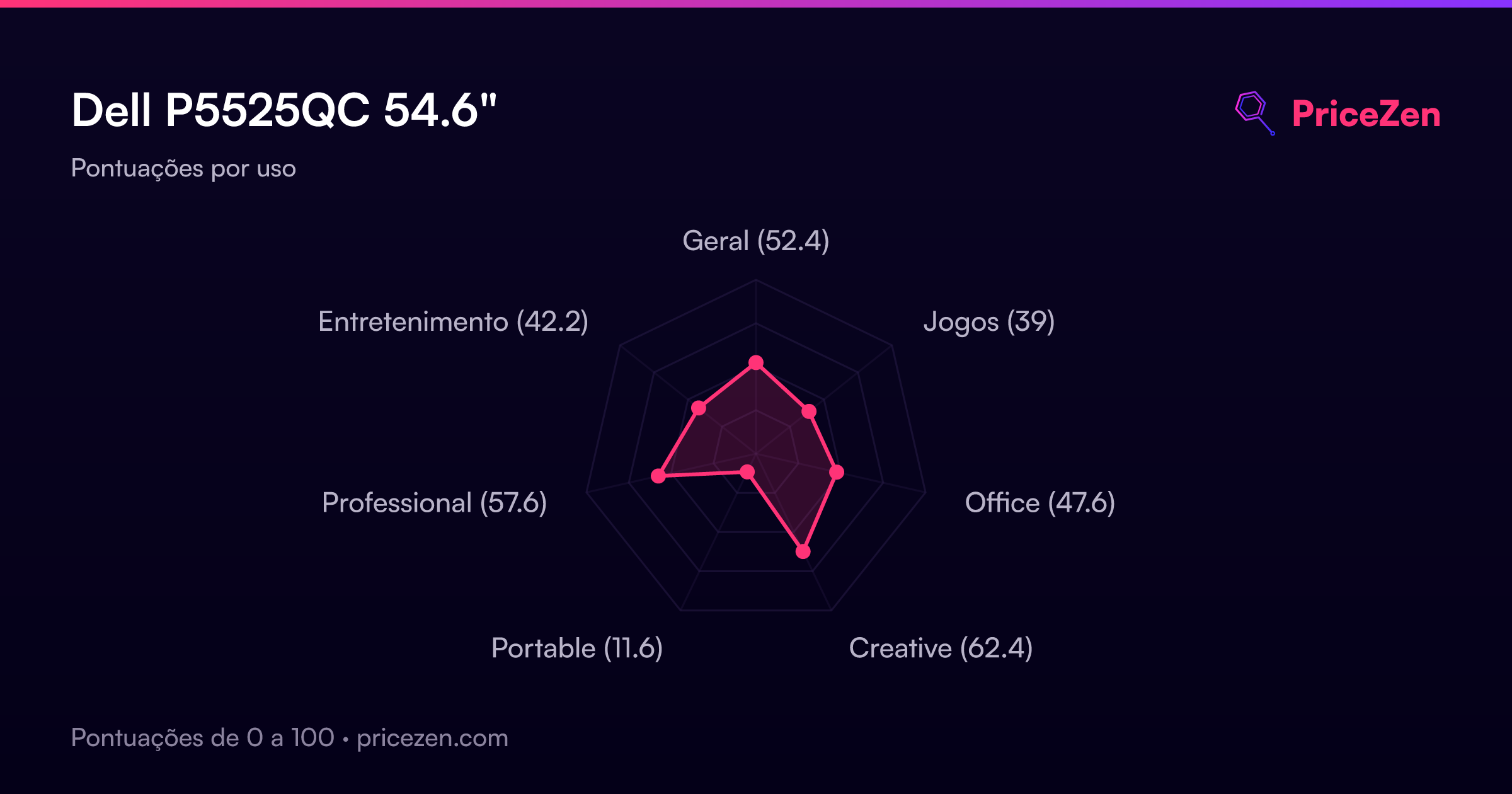
- Geral52.4
- Jogos39
- Office47.6
- Creative62.4
- Portable11.6
- Professional57.6
- Entretenimento42.2