Acer V7 UM.WV7AA.002 21.5" Black 2019
The 21.5-inch IPS panel delivers 1920x1080 resolution with a 100,000,000:1 dynamic contrast ratio and 4ms response time, plus Adaptive-Sync for smoother motion. Its three-sided frameless design and tilt ergonomics pair with VGA, HDMI, DisplayPort, and Thunderbolt connectivity for flexible setups. Best for budget-conscious office workers needing a reliable, space-saving secondary monitor for spreadsheets and document work.

Sem preço atual de lojas
Onde o vimos antes. Confira o preço de hoje na loja.









Resumo
The 30-Second Version
A budget 1080p IPS panel that's fine for office work but underwhelming everywhere else. Buy it only if the price is right and you don't care about brightness or color.
Pros & Cons
Prós
- IPS panel with solid viewing angles 79th
- HDMI, DisplayPort, and VGA for broad compatibility 70th
- VESA mount support for easy arm mounting
- Lightweight and compact for a desk setup
Contras
- 250 nits brightness is dim in bright rooms
- Color performance is near the bottom of our database
- No built-in speakers despite what the listing claims
- 75Hz is barely above the office monitor baseline
O que dizem os donos
The Word on the Street
Como a opinião dos donos mudou ao longo do tempo
ExclusivoCom base em quando os clientes realmente escreveram suas avaliações - para ver se os elogios iniciais se mantiveram.
1 avaliação escrita, set. de 2020: 1 satisfeito
Em todas as 1 notas das lojas: 4,0★. O gráfico conta 1 avaliação escrita.
Cada ponto é uma avaliação escrita, no mês em que foi escrita. Satisfeitos = 4-5★, neutros = 3★, insatisfeitos = 1-2★.
As provas
Performance
The 75Hz refresh rate and 4ms response time are a small step up from the 60Hz office norm, but that's about as exciting as it gets. The 250 nits brightness is dim by modern standards, and the color performance lands in the bottom fifth of our database. Adaptive-Sync is there, but with a 75Hz ceiling, this isn't a gaming monitor no matter what the marketing says.
Specifications
Full Specifications
Display
| Size | 21.5" |
| Resolution | 1920x1080 (Full HD) |
| Panel Type | IPS |
| Aspect Ratio | 16:9 |
| Curved | No |
Performance
| Refresh Rate | 75 Hz |
| Response Time | 4 |
| Adaptive Sync | Adaptive-Sync |
Color & HDR
| Brightness | 250 nits |
| Color Depth | 8-bit |
Connectivity
| HDMI Ports | 1 |
| DisplayPort | 1 |
| USB-C | 0 |
| Thunderbolt | N/A |
| Speakers | No |
Ergonomics
| Height Adjustable | No |
| Tilt | Yes |
| Pivot | No |
| VESA Mount | 100x100 |
Features
| Power | 66 |
| Weight | 2.8 kg / 6.2 lbs |
vs Competition
Stacked against the MSI MAG 271QPX QD-OLED or the LG UltraGear 27G810A-B, the V227Q looks like a relic. Those are 27-inch high-refresh gaming panels with real color performance. The Acer's only advantage is size and price, and even then, a used 24-inch Dell Ultrasharp would give you better color and brightness for similar money. The Samsung Odyssey G7 and Alienware AW2725D aren't even in the same conversation.
| Spec | Acer V7 UM.WV7AA.002 21.5" | LG UltraGear 45GX950A-B 45" | ASUS ROG Strix XG27UCDMG 27" | Dell UltraSharp U4025QW 39.7" | Alienware AW-Series AW3425DW 34" | MSI MAG 271QPX QD-OLED E2 27" |
|---|---|---|---|---|---|---|
| Screen Size | 21.5 | 45 | 27 | 39.7 | 34 | 27 |
| Resolution | 1920 x 1080 | 5120 x 2160 | 3840 x 2160 | 5120 x 2160 | 3440 x 1440 | 2560 x 1440 |
| Panel Type | IPS | OLED | QD-OLED | IPS | QD-OLED | QD-OLED |
| Refresh Rate | 75 | 330 | 240 | 120 | 240 | 240 |
| Response Time Ms | 4 | 0.03 | 0.03 | 5 | 0.03 | 0.03 |
| Adaptive Sync | Adaptive-Sync | FreeSync Premium Pro | FreeSync Premium Pro | Adaptive-Sync | FreeSync Premium Pro | FreeSync Premium Pro |
| Hdr | - | DisplayHDR True Black 400 | DisplayHDR True Black 400 | HDR600 | HDR400 | DisplayHDR True Black 400 |
| Compare | Compare | Compare | Compare | Compare |
| Produto | Color | Portabilidade | Display | Feature | Ergonomic | Performance | Connectivity | Prova social |
|---|---|---|---|---|---|---|---|---|
| Acer V7 UM.WV7AA.002 21.5" | 15.4 | 79.4 | 21.4 | 21.1 | 47.1 | 50.2 | 70.1 | 6.8 |
| LG UltraGear 45GX950A-B 45" Compare | 99.4 | 76.5 | 99.7 | 96.3 | 90.7 | 99.4 | 96.9 | 92 |
| ASUS ROG Strix XG27UCDMG 27" Compare | 96.5 | 57.3 | 97.7 | 85 | 90.7 | 97.9 | 81 | 98.9 |
| Dell UltraSharp U4025QW 39.7" Compare | 97.9 | 76.5 | 98.6 | 96.3 | 90.7 | 56.1 | 99.3 | 96.8 |
| Alienware AW-Series AW3425DW 34" Compare | 98.9 | 73.9 | 84.1 | 96.3 | 90.7 | 97.9 | 95.3 | 96.8 |
| MSI MAG 271QPX QD-OLED E2 27" Compare | 99.2 | 57.3 | 73.4 | 85 | 90.7 | 97.9 | 81 | 98.9 |
Preço
Value & Pricing
At USD 179 in the US, this is a tough sell when you can find 24-inch 1080p IPS panels with better brightness for similar money. The CAD pricing is all over the place too, ranging from CAD 181 to CAD 437 across two listings. If you're in Canada, the CAD 181 listing is the only one worth considering. Anything above CAD 250 for this panel is a bad deal.
Saiba mais
Overview
The Acer V227Q is a basic 21.5-inch 1080p IPS monitor that gets the job done for office work and not much else. It's cheap, it's simple, and it won't blow your socks off. The one thing to know? It's a fine budget panel for spreadsheets and email, but the specs are dated and the feature set is thin even for the price.
Common Questions
Q: Does the Acer V227Q have built-in speakers?
No. Despite what some listings claim, multiple owners confirm there are no functional speakers. Plan on using external speakers or headphones.
Q: Is this monitor good for gaming?
Not really. The 75Hz refresh rate and Adaptive-Sync help a little, but the 4ms response time and dim panel hold it back. It's fine for casual games, but serious gamers should look elsewhere.
Q: Can I mount this on a monitor arm?
Yes. It has a standard VESA 100x100 mount, so any compatible arm or wall mount will work.
Who Should Skip This
If you want a monitor for photo editing, gaming, or anything color-critical, this isn't it. The 250 nits brightness and bottom-tier color performance will frustrate you. Go grab a 24-inch Dell Ultrasharp or a budget 144Hz gaming panel instead.
Verdict
If you need a basic second monitor for documents and web browsing, and you can grab it for under USD 150 or CAD 200, it's fine. But at its typical asking price, you're better off spending a little more on a 24-inch panel with better brightness and color. This is a monitor you buy because it's cheap, not because it's good.
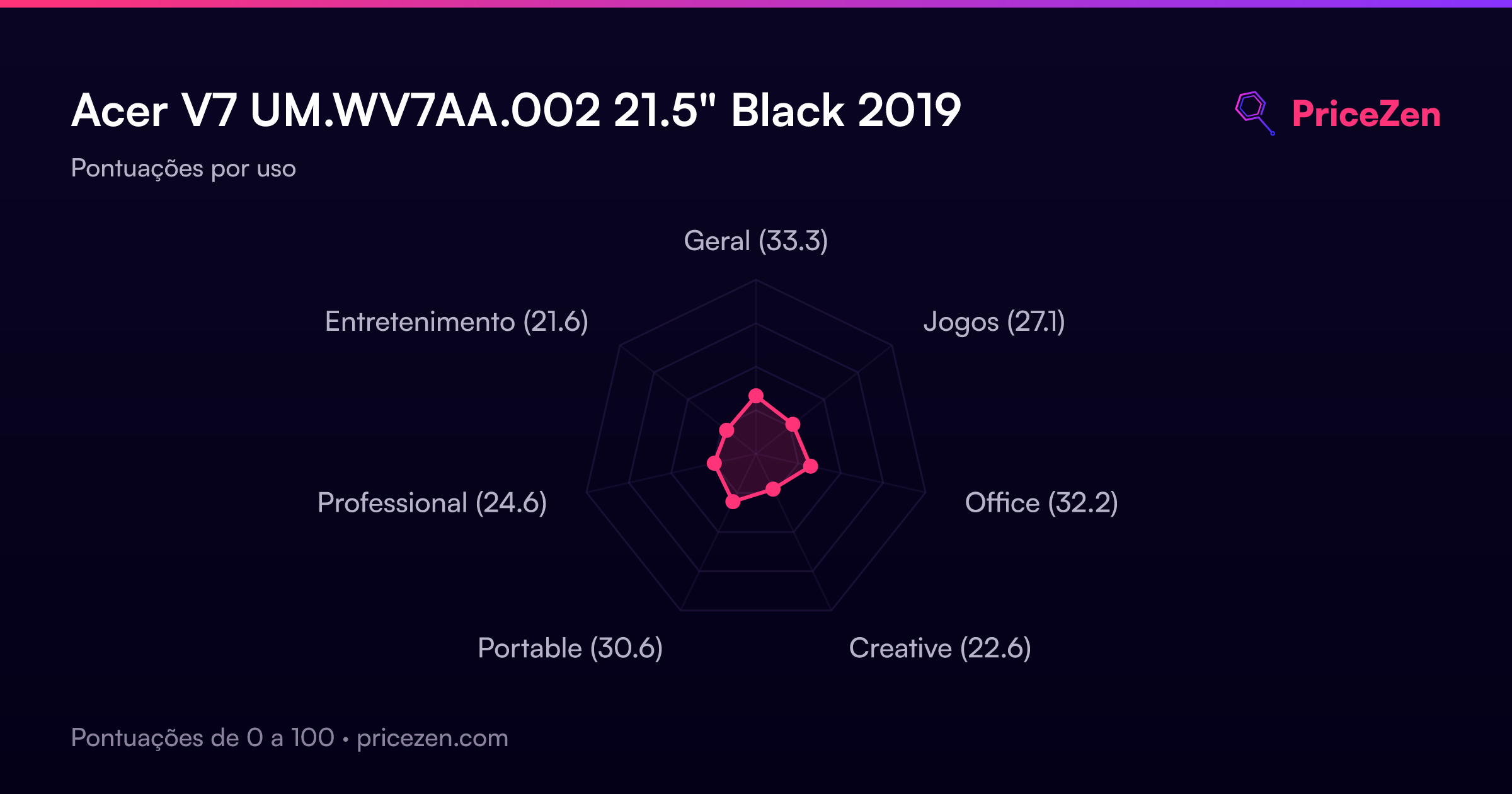
Usage Scores
- Geral33.3
- Jogos27.1
- Office32.2
- Creative22.6
- Portable30.6
- Professional24.6
- Entretenimento21.6