Samsung Odyssey OLED G8 LS34DG856SNXZA 34" Black 2024

Pixels OLED com luz própria para pretos reais verificado em 29 de nov.
77/100 pontuação geral 4,4 média de 365 avaliações de proprietários
- Screen
- 34"
- Resolution
- 3440 x 1440
- Panel
- OLED
- Refresh
- 175 Hz
- Response time
- 0.03 ms
- Adaptive sync
- FreeSync Premium Pro
- HDR
- HDR10
Compare preços em 1 loja
Da mais barata à mais cara. Ofertas novas, recondicionadas e em kit ficam separadas para você comparar o que é comparável.
| Loja | Vendido por | Cor e condição | Preço | vs. o menor | Última verificação | Link |
|---|---|---|---|---|---|---|
| Novo1 ofertaUnidade única | ||||||
| Esgotado na última verificação | ||||||
| Amazon | Desconhecido | Não informado | Sem preço | Esgotado | 3 de nov. | Ir para a loja |
 Fonte: PriceZen, verificado em 3 de nov. de 2026
Um preço é considerado atual quando o verificamos nos últimos 7 dias. «Vendedor parceiro» significa um vendedor terceiro naquela loja, não a própria loja.
Histórico de preços
Verificado nesse diaNão verificado nesse dia, ainda em oferta
Fonte: PriceZen, checked 27 de out. de 2026











Resumo
The 30-Second Version
The Samsung Odyssey OLED G8 delivers a breathtaking 34-inch QD-OLED picture with elite 175Hz performance. The smart TV interface is a frustrating mess, and the colors need work out of the box. But if you can get it on sale, the core gaming experience is so good that it's easy to forgive the software quirks.
Pros & Cons
Prós
- Stunning QD-OLED picture with perfect blacks and vibrant colors. 96th
- Blazing 175Hz refresh rate and 0.03ms response time for elite motion clarity. 91st
- Glare-free coating works wonders in bright rooms. 84th
- Includes a remote and full smart TV apps for standalone streaming. 79th
Contras
- The smart TV interface is clunky and gets in the way of basic monitor functions.
- Default color calibration is poor and needs manual tweaking.
- Plastic back panel feels cheap for a premium monitor.
- No full ultrawide support on PS5, leaving black bars on the sides.
O que dizem os donos
The Word on the Street
- Owners consistently rave about the stunning OLED picture quality and deep contrast, calling it a huge upgrade for both gaming and work.
- The built-in smart TV features are divisive, with some loving the streaming convenience and others finding the interface overly complex for a monitor.
- Several buyers mention frustrating setup issues, including poor default color calibration and limited ultrawide support on consoles like the PS5.
Como a opinião dos donos mudou ao longo do tempo
ExclusivoCom base em quando os clientes realmente escreveram suas avaliações - para ver se os elogios iniciais se mantiveram.
42 avaliações escritas, fev. de 2025 – out. de 2026: 33 satisfeitos, 4 neutros, 5 insatisfeitos
Em todas as 365 notas das lojas: 4,4★. A maioria dos donos dá nota sem escrever avaliação. O gráfico conta as 42 avaliações escritas.
Cada ponto é uma avaliação escrita, no mês em que foi escrita. Satisfeitos = 4-5★, neutros = 3★, insatisfeitos = 1-2★.
As provas
Performance
This thing is fast. Really fast. The 175Hz refresh rate and 0.03ms response time put it in the 96th percentile for performance, which means motion clarity is best-in-class. You won't see any ghosting or smearing in fast-paced shooters. The 3440x1440 resolution on a 34-inch panel hits a sweet spot for detail without crushing your GPU. The main performance hiccup isn't speed, it's color out of the box. The default calibration is pretty rough, so you'll want to spend a few minutes tweaking settings or loading a color profile to get the most out of that 99% DCI-P3 coverage.
Specifications
Full Specifications
Display
| Size | 34" |
| Resolution | 3440x1440 |
| Panel Type | OLED |
| Aspect Ratio | 21:9 |
| Curved | Yes |
| Curvature | 1800 |
Performance
| Refresh Rate | 175 Hz |
| Response Time | 0.03 |
| Adaptive Sync | FreeSync Premium Pro |
Color & HDR
| Brightness | 250 nits |
| Color Gamut | DCI Coverage 99% |
| Color Depth | 10-bit |
| HDR | HDR10 |
| HDR Support | HDR10 |
Connectivity
| HDMI Ports | 2 |
| DisplayPort | 1 |
| USB-C | 0 |
| Speakers | Yes |
| Headphone Jack | No |
Ergonomics
| Height Adjustable | Yes |
| Tilt | Yes |
| Swivel | No |
| Pivot | Yes |
| VESA Mount | 100x100 |
Features
| Webcam | No |
| Power | 180 |
| Weight | 7.5 kg / 16.5 lbs |
vs Competition
Stacked against the Alienware AW3425DW, the Samsung holds its own with a newer panel and that smart TV hub, but the Alienware often has better out-of-the-box color accuracy and a more gamer-focused OSD. The MSI MAG 271QPX QD-OLED E2 is a strong 27-inch alternative if you want even higher PPI and don't need the ultrawide form factor. The ASUS ROG Strix XG27UCDMG is another 27-inch QD-OLED that competes hard on speed and color. Samsung's own Odyssey G60SD is a 27-inch option that shares the same smart TV DNA in a smaller package. Samsung's main edge is blending a top-tier gaming panel with lifestyle features, but it stumbles on the software execution.
| Spec | Samsung Odyssey OLED G8 LS34DG856SNXZA 34" | ASUS ROG Strix XG27UCDMG 27" | LG UltraGear 45GX950A-B 45" | Dell UltraSharp U4025QW 39.7" | Alienware AW-Series AW3425DW 34" | MSI MAG 271QPX QD-OLED E2 27" |
|---|---|---|---|---|---|---|
| Screen Size | 34 | 27 | 45 | 39.7 | 34 | 27 |
| Resolution | 3440 x 1440 | 3840 x 2160 | 5120 x 2160 | 5120 x 2160 | 3440 x 1440 | 2560 x 1440 |
| Panel Type | OLED | QD-OLED | OLED | IPS | QD-OLED | QD-OLED |
| Refresh Rate | 175 | 240 | 330 | 120 | 240 | 240 |
| Response Time Ms | 0.03 | 0.03 | 0.03 | 5 | 0.03 | 0.03 |
| Adaptive Sync | FreeSync Premium Pro | FreeSync Premium Pro | FreeSync Premium Pro | Adaptive-Sync | FreeSync Premium Pro | FreeSync Premium Pro |
| Hdr | HDR10 | DisplayHDR True Black 400 | DisplayHDR True Black 400 | HDR600 | HDR400 | DisplayHDR True Black 400 |
| Compare | Compare | Compare | Compare | Compare |
| Produto | Color | Portabilidade | Display | Feature | User Sentiment | Ergonomic | Performance | Connectivity | Prova social |
|---|---|---|---|---|---|---|---|---|---|
| Samsung Odyssey OLED G8 LS34DG856SNXZA 34" | 62.7 | 20.7 | 84 | 90.8 | 48.4 | 78.6 | 96.4 | 62.1 | 75.1 |
| ASUS ROG Strix XG27UCDMG 27" Compare | 96.5 | 57.3 | 97.7 | 85 | 99.3 | 90.7 | 97.9 | 81 | 98.9 |
| LG UltraGear 45GX950A-B 45" Compare | 99.4 | 76.5 | 99.7 | 96.3 | 62 | 90.7 | 99.4 | 96.9 | 92.2 |
| Dell UltraSharp U4025QW 39.7" Compare | 97.9 | 76.5 | 98.6 | 96.3 | 85.5 | 90.7 | 56 | 99.3 | 92.2 |
| Alienware AW-Series AW3425DW 34" Compare | 98.9 | 73.9 | 84 | 96.3 | 95.8 | 90.7 | 97.9 | 95.3 | 96.9 |
| MSI MAG 271QPX QD-OLED E2 27" Compare | 99.1 | 57.3 | 73.3 | 85 | 95.8 | 90.7 | 97.9 | 81 | 98.9 |
Preço
Value & Pricing
Pricing on this monitor is all over the map, with a wild spread from $810 to over $24,000 across vendors. Obviously, ignore the crazy high outliers. At the low end around $800, this is a fantastic deal for a high-refresh QD-OLED ultrawide. It undercuts many direct competitors while delivering a top-tier gaming experience. Just make sure you're buying from a reputable seller with a solid return policy, because you don't want to get stuck with a panel lottery loser and no recourse.
Saiba mais
Overview
The Samsung Odyssey OLED G8 is a 34-inch ultrawide that absolutely nails the fundamentals. You're getting a gorgeous QD-OLED panel with perfect blacks, a blistering 175Hz refresh rate, and a near-instant 0.03ms response time. It's a monitor that makes everything from spreadsheets to horror games look incredible, and the glare-free coating is a genuinely nice touch for daytime use.
But Samsung couldn't just leave well enough alone. They stuffed a full smart TV interface in here, complete with a remote and streaming apps. For some, it's a neat bonus. For others, it's an annoying layer of complexity between you and your desktop. If you can snag it on sale and you're a PC gamer first, the picture quality alone makes it a top contender.
Common Questions
Q: Does this monitor work well with a PS5 or Xbox Series X?
It works, but it's not ideal. The PS5 doesn't support the 21:9 ultrawide resolution, so you'll get black bars on the sides. The Xbox Series X handles 1440p better, but you still won't get a full ultrawide picture. This monitor is best paired with a PC.
Q: Is burn-in a real concern with this OLED panel?
Samsung includes several safeguards like a thermal modulation system, logo detection, and a screen saver to minimize the risk. For mixed use, it shouldn't be a major worry, but static desktop elements for 8+ hours a day could still be a long-term risk.
Q: Can I use this monitor for productivity work without text looking fuzzy?
Yes, the 110 pixels per inch on the 3440x1440 resolution provides sharp text clarity. The QD-OLED subpixel layout can cause slight color fringing on high-contrast edges, but most people don't notice it unless they're looking for it.
Who Should Skip This
Console gamers should look elsewhere. The PS5 can't output a 21:9 signal, so you're paying for screen real estate you can't use. If you want a dead-simple monitor that just works without a smart TV interface getting in the way, the Alienware AW3425DW is a cleaner, more focused gaming experience.
Verdict
If you're a PC gamer who wants a stunning ultrawide OLED and can find this for under a grand, buy it. The picture quality and gaming performance are absolutely top-shelf. You'll just need to spend a few minutes wrestling with the smart interface and fixing the colors. Once that's done, you'll have one of the best gaming displays on the market.
Usage Scores
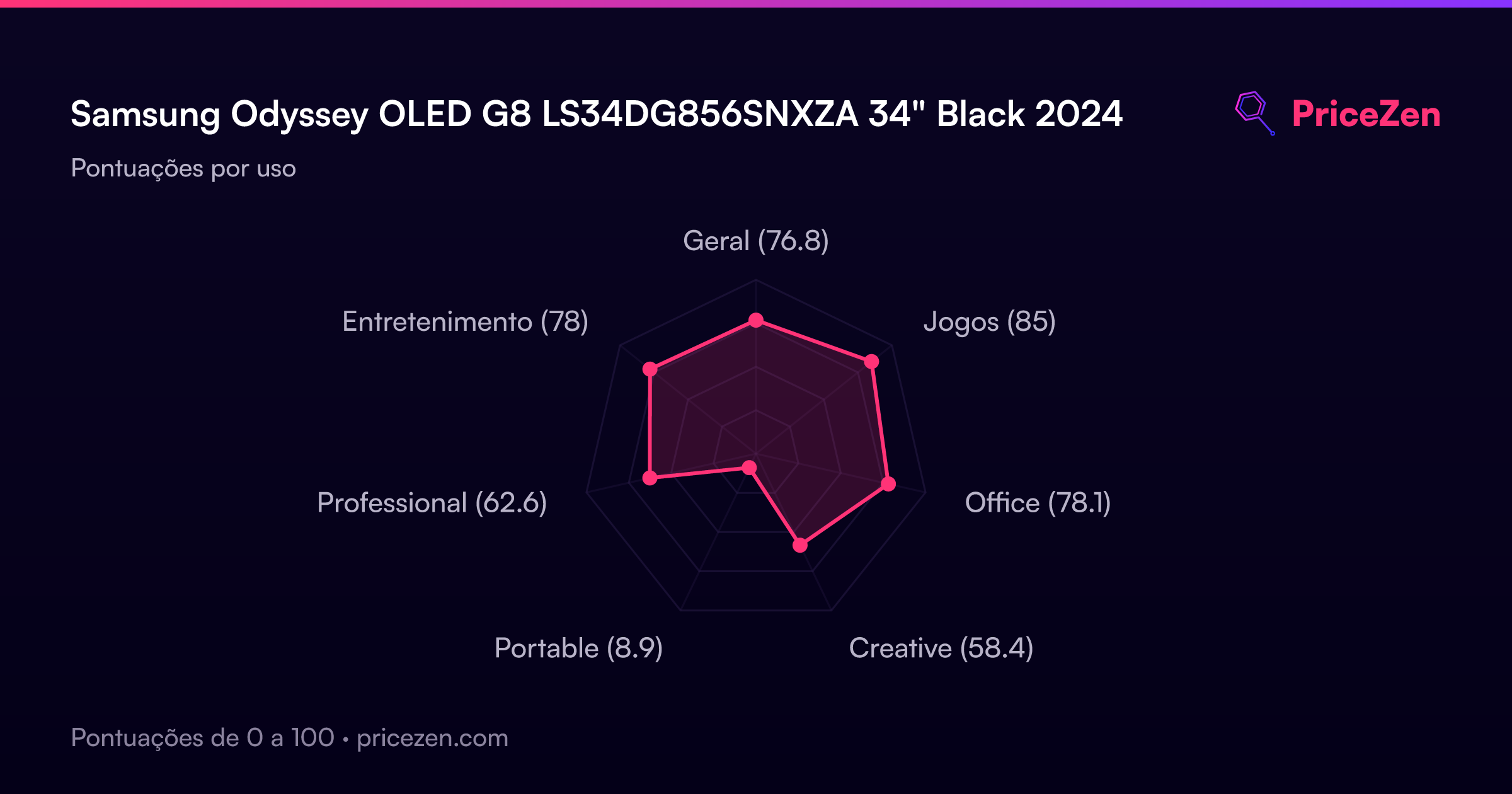
- Geral76.8
- Jogos85
- Office78.1
- Creative58.4
- Portable8.9
- Professional62.6
- Entretenimento78