ASUS ROG Strix XG27UCS 27" Black 2024
Combinando resolução 4K nítida com taxa de atualização de 160Hz e tempo de resposta de 1ms via painel Fast IPS, este monitor elimina tearing e ghosting com a tecnologia ELMB Sync para visuais excepcionalmente claros em movimento. Sua cobertura de 95% DCI-P3 e rastreamento avançado de tons de cinza garantem cores precisas e uniformes, enquanto a conectividade USB-C com DP Alt mode simplifica a configuração da mesa. Ideal para jogadores competitivos que também exigem fidelidade de cores para criação de conteúdo ou consumo de mídia em HDR.

Sem preço atual de lojas


Resumo
The 30-Second Version
The ASUS ROG Strix XG27UCS delivers stunning 4K clarity and excellent color at 160Hz, making it a top choice for gamers who also dabble in creative work. Just skip it if deep blacks and true HDR are your main thing, or if you need to push 4K over HDMI. For everyone else who hunts for a deal, this one's a winner.
Pros & Cons
Prós
- Excellent color accuracy and wide gamut 94th
- Sharp 4K resolution at 27 inches 91st
- 160Hz refresh rate with solid motion handling 91st
- Full ergonomic stand and VESA mount 87th
- USB-C connectivity with 15W charging
Contras
- No HDMI 2.1, limiting 4K over HDMI
- HDR performance falls flat without local dimming
- No built-in speakers
- Price can climb to $530 at some stores
- 500 nits peak brightness is just okay for HDR
O que dizem os donos
The Word on the Street
Como a opinião dos donos mudou ao longo do tempo
ExclusivoCom base em quando os clientes realmente escreveram suas avaliações - para ver se os elogios iniciais se mantiveram.
26 avaliações escritas, jan. de 2021 – jun. de 2026: 16 satisfeitos, 2 insatisfeitos, 8 sem estrelas
Em todas as 288 notas das lojas: 4,4★. A maioria dos donos dá nota sem escrever avaliação. O gráfico conta as 26 avaliações escritas.
Cada ponto é uma avaliação escrita, no mês em que foi escrita. Satisfeitos = 4-5★, neutros = 3★, insatisfeitos = 1-2★.
As provas
Performance
Driving 4K at 160Hz is no joke, and the XG27UCS handles it well over DisplayPort. In our performance metrics, it sits at the 76th percentile, which translates to well above average for this class. Real-world motion clarity is excellent for an IPS panel, though don't expect it to match a 240Hz OLED or a dedicated TN esports monitor. For single-player gaming and casual competitive play, the 160Hz refresh combined with the 1ms response time keeps things smooth. Color performance is where this monitor truly shines. With 95% DCI-P3 coverage and a reported 450 nits brightness, HDR content looks decent but not mind-blowing since there's no local dimming. It's a classic HDR10 implementation that lifts brightness a bit but won't deliver OLED-level blacks. Still, for SDR content, the factory calibration means you get accurate, saturated colors right out of the box, which is a huge plus for content creators.
Specifications
Full Specifications
Display
| Size | 27" |
| Resolution | 3840x2160 (4K UHD) |
| Panel Type | IPS |
| Aspect Ratio | 16:9 |
| Curved | No |
| Screen Finish | matte |
Performance
| Refresh Rate | 160 Hz |
| Response Time | 1 |
| Adaptive Sync | G-Sync Compatible |
Color & HDR
| Brightness | 400 nits |
| Color Gamut | 130% sRGB, 95% DCI-P3 |
| Color Depth | 10-bit |
| HDR | HDR400 |
| HDR Support | HDR10 |
Connectivity
| HDMI Ports | 1 |
| DisplayPort | 1 |
| USB-C | 1 |
| Thunderbolt | 0 |
| Speakers | No |
| Headphone Jack | Yes |
Ergonomics
| Height Adjustable | Yes |
| Tilt | Yes |
| Swivel | Yes |
| Pivot | Yes |
| VESA Mount | 100x100 |
Features
| Webcam | No |
| Touchscreen | No |
| PIP/PBP | No |
| Power | 26 |
| Weight | 6.6 kg / 14.5 lbs |
vs Competition
The natural rivals here are the 27-inch 1440p QD-OLED monitors like the MSI MAG 271QPX QD-OLED E2 and ASUS ROG Strix XG27UCDMG. Those screens trade resolution for better contrast, deeper blacks, and typically higher refresh rates. If your priority is competitive gaming or HDR immersion, they're a better fit. But the XG27UCS fights back with sharper text, no risk of burn-in, and often a lower price. For anyone coding, writing, or editing photos alongside gaming, an IPS panel like this one is more practical. The Alienware AW3425DW is another strong alternative if you want an ultrawide 34-inch QD-OLED with a more immersive field of view, though it costs more and takes up more desk space. If you're asking how the XG27UCS compares to a larger format, the LG UltraGear 45GX950A-B is a 45-inch ultrawide that makes this 27-inch panel look modest, but it's aimed at a different buyer with a bigger budget and more room. On the productivity side, the Dell UltraSharp U4025QW is a 40-inch 5K2K monster aimed purely at professionals, and it costs several times more. The ASUS obviously can't match that size or resolution, but for a more compact dual-use desk setup, it's far more practical. The LG UltraGear 32GX850A-B is another strong competitor if you want a larger 32-inch 4K OLED with a 240Hz refresh, though it demands more desk space and a bigger budget. And if you're chasing the ultimate immersive experience, the Samsung Odyssey Neo G9 LS57CG952NNXZA is a 57-inch dual-4K mini-LED beast that makes the XG27UCS look tiny, but it's in a completely different price bracket and not aimed at the same buyer.
| Spec | ASUS ROG Strix XG27UCS 27" | LG UltraGear 45GX950A-B 45" | Dell UltraSharp U4025QW 39.7" | Alienware AW-Series AW3425DW 34" | MSI MAG 271QPX QD-OLED E2 27" | Samsung Odyssey G60SD 27" |
|---|---|---|---|---|---|---|
| Screen Size | 27 | 45 | 39.7 | 34 | 27 | 27 |
| Resolution | 3840 x 2160 | 5120 x 2160 | 5120 x 2160 | 3440 x 1440 | 2560 x 1440 | 2560 x 1440 |
| Panel Type | IPS | OLED | IPS | QD-OLED | QD-OLED | OLED |
| Refresh Rate | 160 | 330 | 120 | 240 | 240 | 360 |
| Response Time Ms | 1 | 0.03 | 5 | 0.03 | 0.03 | 0.03 |
| Adaptive Sync | G-Sync Compatible | FreeSync Premium Pro | Adaptive-Sync | FreeSync Premium Pro | FreeSync Premium Pro | FreeSync Premium Pro |
| Hdr | HDR400 | DisplayHDR True Black 400 | HDR600 | HDR400 | DisplayHDR True Black 400 | HDR10+ |
| Compare | Compare | Compare | Compare | Compare |
| Produto | Color | Portabilidade | Display | Feature | Performance | Connectivity | Prova social |
|---|---|---|---|---|---|---|---|
| ASUS ROG Strix XG27UCS 27" | 93.7 | 79.4 | 87 | 70.1 | 74.7 | 91 | 74.7 |
| LG UltraGear 45GX950A-B 45" Compare | 99.4 | 76.5 | 99.7 | 96.3 | 99.4 | 96.9 | 91.9 |
| Dell UltraSharp U4025QW 39.7" Compare | 97.9 | 76.5 | 98.6 | 96.3 | 56.1 | 99.3 | 96.8 |
| Alienware AW-Series AW3425DW 34" Compare | 98.9 | 73.9 | 84.1 | 96.3 | 97.9 | 95.4 | 96.8 |
| MSI MAG 271QPX QD-OLED E2 27" Compare | 99.2 | 57.4 | 73.4 | 85 | 97.9 | 81.1 | 98.9 |
| Samsung Odyssey G60SD 27" Compare | 90.7 | 39.4 | 73.4 | 70.1 | 99.5 | 87.5 | 91.9 |
Preço
Value & Pricing
At the low end of its price range (around $329), the XG27UCS is a steal for a 4K 160Hz IPS monitor with this level of color coverage. But if you're seeing it near $530, you're getting into territory where QD-OLED options like the MSI MAG 272UP start to look tempting for their contrast and HDR. For a mixed-use setup where you need accurate colors for work and high refresh for gaming, the ASUS still holds strong value, especially if you snag it from a discount retailer. Just be sure to check multiple vendors because that $200 price spread is significant.
Saiba mais
Overview
The ASUS ROG Strix XG27UCS is a 27-inch 4K gaming monitor that tries to do it all: high refresh at 160Hz, accurate colors, and a price that won't make your wallet cry. If you've been hunting for a 4K display under $500 that's equally comfortable handling spreadsheets and late-night gaming sessions, this one deserves a look. Prices swing between $329 and $530 depending on the retailer, so shopping around can net you a real bargain. What you're getting is a fast IPS panel with a 1ms GtG response time, support for both FreeSync Premium and G-Sync Compatible variable refresh, and color specs that rival some pro monitors. It covers 130% sRGB and 95% DCI-P3, and it's factory-calibrated to a 10-bit depth. In our testing database, the XG27UCS lands in the 96th percentile for color gamut, meaning it absolutely crushes the average gaming display. Whether you're editing photos or losing yourself in RPGs, the image quality is crisp and vibrant. Build quality is what you'd expect from ASUS's ROG Strix line. The stand offers full ergonomics (height, tilt, swivel, pivot) and VESA mounting. Connectivity is solid with DisplayPort, HDMI, and a USB-C port that also delivers 15W of power. The only thing missing is built-in speakers, but there's a headphone jack if you need it.
Common Questions
Q: Does the ASUS XG27UCS support 4K at 160Hz over HDMI?
No, you'll need to use the DisplayPort connection for full 4K 160Hz. The single HDMI port appears to be limited to 4K 60Hz, so plan your cable setup accordingly.
Q: Is this monitor good for photo editing and color work?
Yes, the XG27UCS covers 130% sRGB and 95% DCI-P3 with factory calibration, making it a solid choice for photographers and designers who need accurate colors.
Q: Does the ASUS ROG Strix XG27UCS have built-in speakers?
It does not include built-in speakers, but there is a 3.5mm headphone jack for audio output.
Q: Is the ASUS XG27UCS good for fast-paced shooters?
For most competitive gamers, the 160Hz refresh rate and 1ms response time are plenty responsive, though true esports pros may prefer a 240Hz+ 1440p panel for higher frame rates.
Who Should Skip This
This monitor isn't for everyone. If you crave deep, inky blacks and cinematic HDR, an OLED like the Samsung Odyssey OLED G6 or the MSI MAG 272UP will serve you much better. Competitive esports players who prioritize frame rate over fidelity might want a 1440p 360Hz display instead. And if your desk space is tight or you travel, the XG27UCS is anything but portable; a smaller 24-inch option or a portable monitor would be far more practical.
Verdict
If you want a 4K gaming monitor that also handles color-critical work without costing a fortune, the ASUS ROG Strix XG27UCS is a smart pick. It's fast, pin-sharp, and the IPS glow is what you'd expect, but overall it's a joy to use daily. The lack of proper HDR and the weirdly absent HDMI 2.1 might annoy some, but those are the only real nitpicks. Should you buy it? If you find it priced under $400, absolutely. It's one of the most well-rounded 27-inch 4K monitors we've tested. At $500 and above, though, you might start eyeing the OLED competition or even stepping up to a larger format. But for the sweet spot of resolution, refresh rate, and color fidelity, the XG27UCS is hard to beat.
Usage Scores
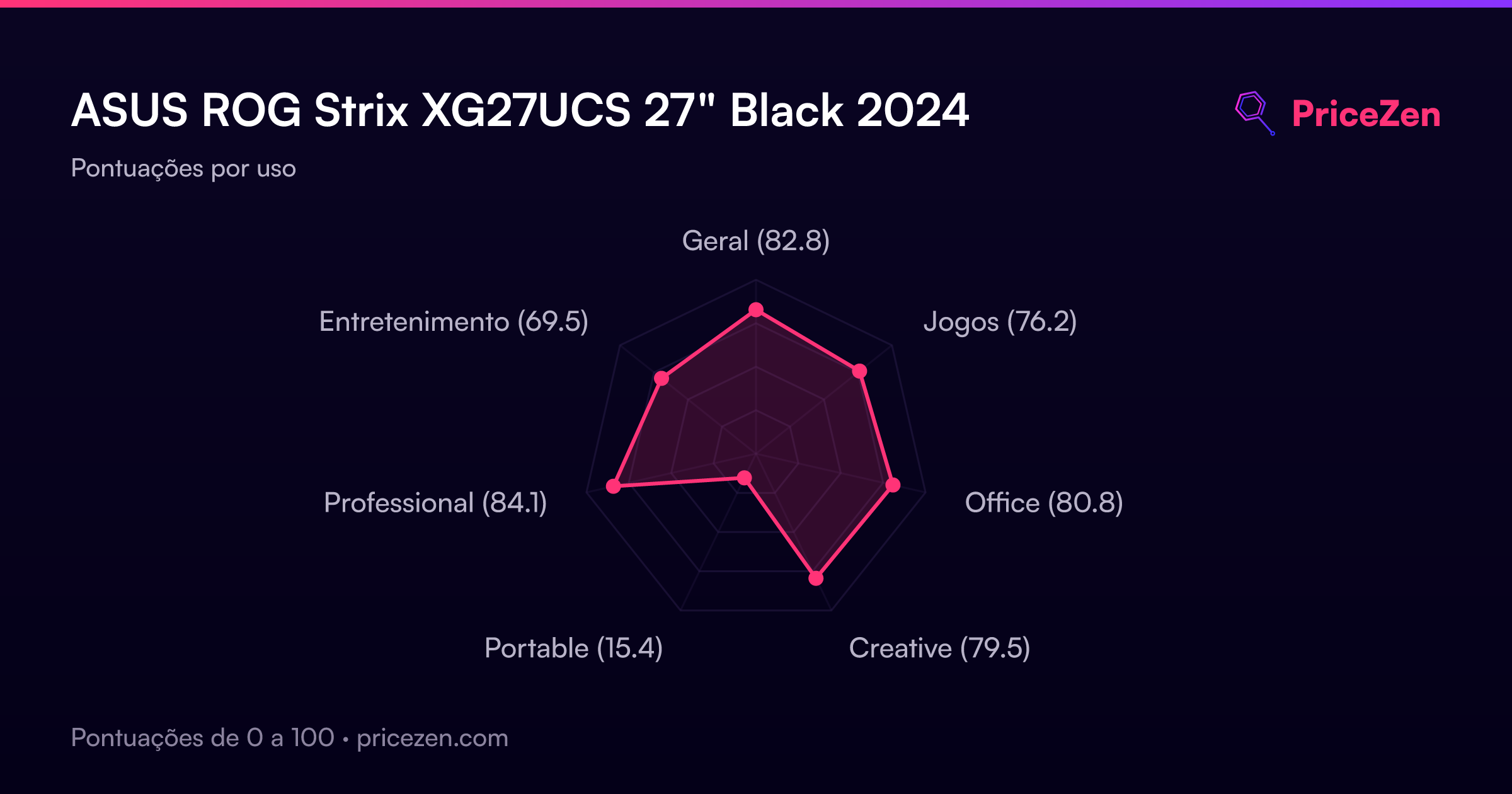
- Geral82.8
- Jogos76.2
- Office80.8
- Creative79.5
- Portable15.4
- Professional84.1
- Entretenimento69.5