BenQ GW2490T 23.8" Black 2024
The 100Hz refresh rate on its 24-inch IPS panel delivers visibly smoother scrolling than standard 60Hz office displays, while the 99% sRGB coverage ensures accurate color for basic design tasks. Its fully adjustable stand with height, swivel, and pivot functionality, combined with BenQ's proprietary eye-care and adaptive brightness tech, sets it apart in ergonomics at this price point. This monitor is best for office workers and students who spend long hours reading documents and spreadsheets and need a flicker-free, low-blue-light display with flexible positioning.

Sem preço atual de lojas






Resumo
The 30-Second Version
The BenQ GW2490T is a comfortable office monitor with excellent ergonomics and a smooth 100Hz refresh rate. The panel is the weak link, and our score reflects that: dim, average color, no HDR. Fine for everyday productivity if you catch it cheap. Shop around, Canadian prices swing by CAD 79 depending on the retailer.
Pros & Cons
Prós
- Excellent ergonomics with height, tilt, swivel, and pivot adjustments 92nd
- 100Hz refresh rate makes everyday scrolling feel smooth 91st
- Eye-care tech actually reduces strain during long sessions 91st
- Strong connectivity with dual HDMI, DisplayPort, and a headphone jack 77th
Contras
- 250 nits brightness is dim for bright rooms
- No HDR support limits media and gaming punch
- Built-in speakers are weak, as expected
- Color performance is just average for an IPS panel
O que dizem os donos
The Word on the Street
Como a opinião dos donos mudou ao longo do tempo
ExclusivoCom base em quando os clientes realmente escreveram suas avaliações - para ver se os elogios iniciais se mantiveram.
14 avaliações escritas, dez. de 2019 – fev. de 2026: 12 satisfeitos, 2 sem estrelas
Em todas as 20.080 notas das lojas: 4,6★. A maioria dos donos dá nota sem escrever avaliação. O gráfico conta as 14 avaliações escritas.
Cada ponto é uma avaliação escrita, no mês em que foi escrita. Satisfeitos = 4-5★, neutros = 3★, insatisfeitos = 1-2★.
As provas
Performance
The 100Hz refresh rate is the headline spec here, and it makes everyday use feel noticeably smoother than a standard 60Hz office monitor. The 5ms response time is fine for casual use, though serious gamers will want something faster. Brightness tops out at 250 nits, which is adequate for indoor office lighting but will struggle near a sunny window. Color coverage at 99% sRGB is decent, but the 8-bit panel without HDR means it's not going to wow anyone doing photo or video work. Our scoring model puts performance in the lower half of the category now, and that tracks: the comfort features carry this monitor, the panel itself doesn't.
Specifications
Full Specifications
Display
| Size | 23.8" |
| Resolution | 1920x1080 (Full HD) |
| Panel Type | IPS |
| Aspect Ratio | 16:9 |
| Curved | No |
| Screen Finish | matte |
Performance
| Refresh Rate | 100 Hz |
| Response Time | 5 |
| Adaptive Sync | Adaptive-Sync |
Color & HDR
| Brightness | 250 nits |
| Color Gamut | 99% sRGB |
| Color Depth | 8-bit |
Connectivity
| HDMI Ports | 2 |
| DisplayPort | 1 |
| USB-C | 0 |
| Thunderbolt | N/A |
| Speakers | Yes |
| Headphone Jack | Yes |
Ergonomics
| Height Adjustable | Yes |
| Tilt | Yes |
| Swivel | Yes |
| Pivot | Yes |
| VESA Mount | 100x100 |
Features
| Webcam | No |
| Touchscreen | No |
| PIP/PBP | No |
| Power | 20 |
| Weight | 6.4 kg / 14.1 lbs |
vs Competition
Against the LG UltraGear 27G810A-B or HP OMEN 27qs G2, the GW2490T looks positively modest. Those are gaming monitors with higher refresh rates and better color, but they also cost more and lack the office-focused ergonomics. The Dell S2725QC brings 4K resolution and USB-C, but you'll pay for it and lose the 100Hz smoothness. The Acer Nitro XV272U W2bmiiprx is a closer match on price and size, but it's aimed at gamers with a faster panel. For pure office work, the BenQ's combination of eye-care features, full ergonomic adjustability, and that 100Hz refresh rate is hard to beat at this price point.
| Spec | BenQ GW2490T 23.8" | ASUS ROG Strix XG27UCDMG 27" | LG UltraGear 45GX950A-B 45" | Dell UltraSharp U4025QW 39.7" | Alienware AW-Series AW3425DW 34" | MSI MAG 271QPX QD-OLED E2 27" |
|---|---|---|---|---|---|---|
| Screen Size | 23.8 | 27 | 45 | 39.7 | 34 | 27 |
| Resolution | 1920 x 1080 | 3840 x 2160 | 5120 x 2160 | 5120 x 2160 | 3440 x 1440 | 2560 x 1440 |
| Panel Type | IPS | QD-OLED | OLED | IPS | QD-OLED | QD-OLED |
| Refresh Rate | 100 | 240 | 330 | 120 | 240 | 240 |
| Response Time Ms | 5 | 0.03 | 0.03 | 5 | 0.03 | 0.03 |
| Adaptive Sync | Adaptive-Sync | FreeSync Premium Pro | FreeSync Premium Pro | Adaptive-Sync | FreeSync Premium Pro | FreeSync Premium Pro |
| Hdr | - | DisplayHDR True Black 400 | DisplayHDR True Black 400 | HDR600 | HDR400 | DisplayHDR True Black 400 |
| Compare | Compare | Compare | Compare | Compare |
| Produto | Color | Portabilidade | Display | Feature | Performance | Connectivity | Prova social |
|---|---|---|---|---|---|---|---|
| BenQ GW2490T 23.8" | 35.8 | 76.5 | 21.4 | 21.2 | 52.6 | 91 | 91.9 |
| ASUS ROG Strix XG27UCDMG 27" Compare | 96.5 | 57.4 | 97.7 | 85 | 97.9 | 81.1 | 98.9 |
| LG UltraGear 45GX950A-B 45" Compare | 99.4 | 76.5 | 99.7 | 96.3 | 99.4 | 96.9 | 91.9 |
| Dell UltraSharp U4025QW 39.7" Compare | 97.9 | 76.5 | 98.6 | 96.3 | 56.1 | 99.3 | 96.8 |
| Alienware AW-Series AW3425DW 34" Compare | 98.9 | 73.9 | 84.1 | 96.3 | 97.9 | 95.4 | 96.8 |
| MSI MAG 271QPX QD-OLED E2 27" Compare | 99.2 | 57.4 | 73.4 | 85 | 97.9 | 81.1 | 98.9 |
Preço
Value & Pricing
Pricing is a bit of a rollercoaster depending on where you shop. In Canada, we're seeing prices swing from CAD 115 all the way up to CAD 194 across four listings. That's a CAD 79 spread, which is wild for the same monitor. If you can snag it near the low end, it's a fantastic deal. At the high end, you're getting into territory where better panels start appearing. Memory Express tends to have competitive pricing on BenQ gear, so check there first if you're north of the border.
Saiba mais
Overview
The BenQ GW2490T is a 24-inch 1080p IPS monitor aimed squarely at office workers who want a comfortable, flicker-free screen without spending a fortune. It's not trying to be a gaming beast or a color-critical pro display. It's trying to be the monitor you can stare at for eight hours without your eyes staging a revolt.
And honestly, it nails that. The ergonomics are excellent, the eye-care features are legit, and the 100Hz refresh rate is a nice bonus for smoother scrolling. It's not the brightest or most colorful panel out there, but for spreadsheets, documents, and the occasional YouTube break, it's a solid pick.
Common Questions
Q: Is the 100Hz refresh rate worth it for office work?
Yes, it makes scrolling and window movement noticeably smoother than a standard 60Hz monitor, and it's a rare feature at this price point.
Q: Can I mount this on a monitor arm?
Absolutely. It has a standard VESA 100x100 mount, so any compatible arm or wall mount will work.
Q: How are the built-in speakers?
They're serviceable for system sounds and video calls, but you'll want external speakers or headphones for music or media.
Who Should Skip This
Gamers should look elsewhere. The 5ms response time and lack of HDR won't satisfy anyone chasing fast-paced titles. Content creators and photo editors will also find the 250 nits brightness and average color accuracy limiting. If you need a bright, color-accurate panel for creative work, spend a bit more on something like the Dell S2725QC instead.
Verdict
If you spend your days in documents, spreadsheets, or code, and your eyes feel fried by 3 PM, the GW2490T still has a case. The height-adjustable stand alone is a back-saver, and owners say the eye-care tech isn't just marketing fluff. But our ranking has slipped, and the reason is the panel: dim, average color, no HDR. Buy it for comfort at a low price, not for picture quality. Gamers and content creators should keep walking.
Usage Scores
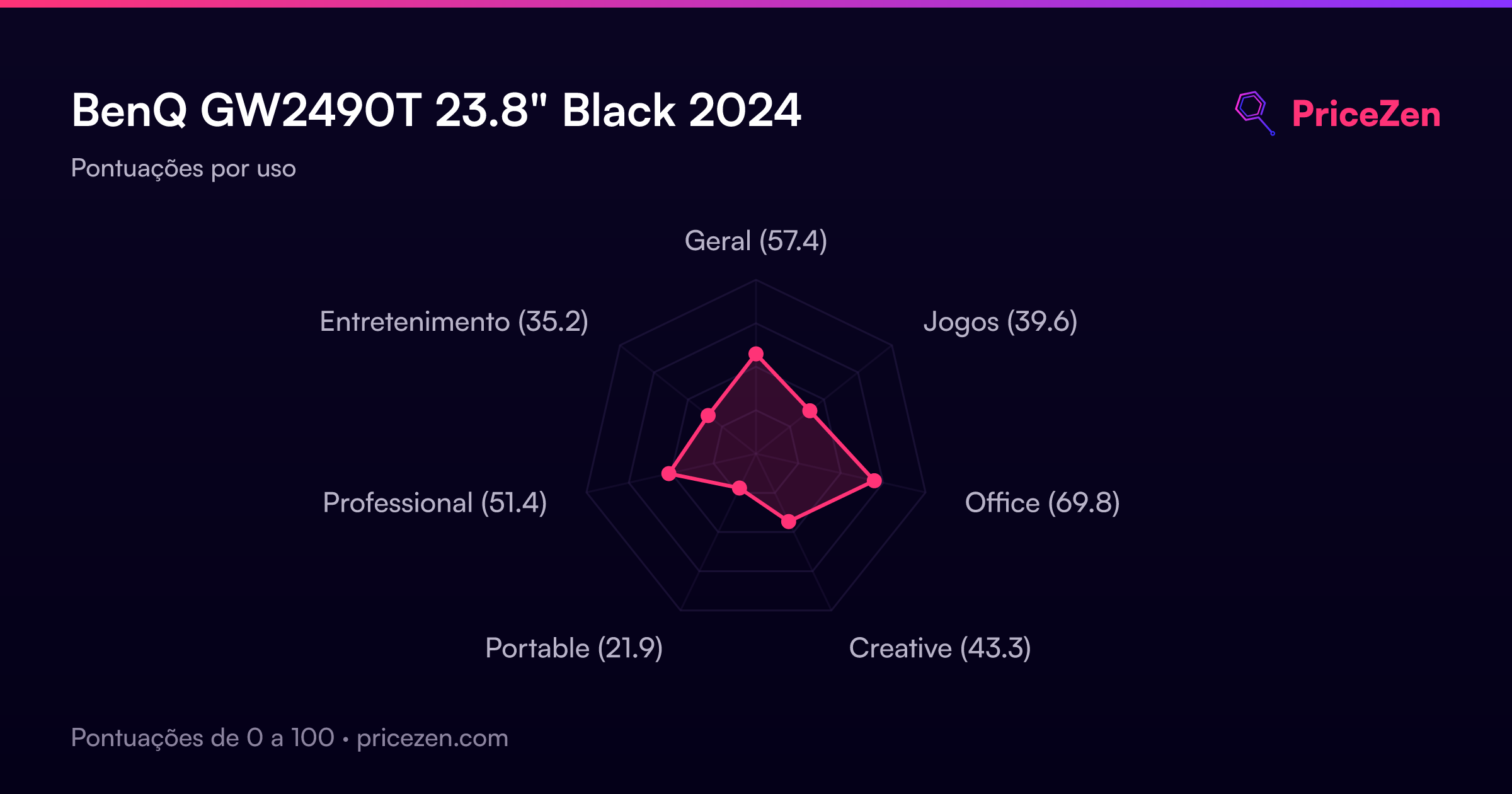
- Geral57.4
- Jogos39.6
- Office69.8
- Creative43.3
- Portable21.9
- Professional51.4
- Entretenimento35.2