Pixio PXC348CNW 34" White
The 34-inch VA panel with 3440x1440 resolution and 1000R curvature delivers an immersive ultrawide view, while the 180Hz refresh rate and 1ms response time keep fast-paced action fluid. Its USB-C port with 65W charging simplifies laptop setups, and the 400-nit brightness with 95.26% DCI-P3 coverage supports HDR content. This monitor suits gamers and multitaskers who want a curved, high-refresh display for both competitive play and daily productivity.

Sem preço atual de lojas
Onde o vimos antes. Confira o preço de hoje na loja.











Resumo
The 30-Second Version
The Pixio PXC348C Neo is a 34-inch ultrawide with a 180Hz refresh rate, 1000R curve, and USB-C with 65W charging, all for around $300 USD. Color coverage is strong at 95.26% DCI-P3, and the feature set lands in the 96th percentile in our database. Just know that HDMI caps at 100Hz, so you'll want DisplayPort or USB-C to get the full 180Hz. If you're a PC gamer on a budget, this is one of the best ultrawide deals out there.
Pros & Cons
Prós
- 180Hz refresh rate over DisplayPort and USB-C 96th
- Strong color coverage: 95.26% DCI-P3 and 115.59% sRGB 88th
- USB-C with 65W charging and DisplayPort Alt mode 85th
- 34-inch ultrawide with 1000R curve at a budget price 84th
- PIP/PBP support for multitasking
Contras
- HDMI ports limited to 100Hz at 1440p
- VA panel can show ghosting in dark scenes
- Ergonomics are weak, only VESA 75x75 and no height adjust
- 400 nits brightness is fine but not true HDR
- Not portable at all, 28.4/100 portable score
As provas
Performance
The 180Hz refresh rate is the headline number here, and it lands in the 82nd percentile for performance. That's not the absolute fastest panel we've tested, but it's plenty for most people. You'll notice the smoothness immediately in fast-paced shooters and racing games. The 1ms response time is the marketing number, so real-world performance will vary depending on the overdrive setting, but VA panels have come a long way. You might see some ghosting in dark scenes if you crank the overdrive too high, which is a classic VA trade-off.
One thing to watch: that 180Hz only applies over DisplayPort 1.4 or USB-C. The two HDMI 2.0 ports cap out at 100Hz at 1440p. So if you're planning to plug in a console or a laptop with only HDMI, you're leaving 80Hz on the table. For PC gamers with a DisplayPort cable, this is a non-issue. For everyone else, it's worth knowing before you buy.
Specifications
Full Specifications
Display
| Size | 34" |
| Resolution | 3440x1440 |
| Panel Type | VA |
| Aspect Ratio | 21:9 |
| Curved | Yes |
| Curvature | 1000 |
| Screen Finish | matte |
Performance
| Refresh Rate | 180 Hz |
| Response Time | 1 |
| Adaptive Sync | Adaptive-Sync |
Color & HDR
| Brightness | 400 nits |
| Color Gamut | 115.59% sRGB | 95.26% DCI-P3 | 91.28% NTSC |
| HDR | ✓ |
| HDR Support | HDR |
Connectivity
| HDMI Ports | 2 |
| DisplayPort | 1 |
| USB-C | 1 |
| Speakers | Yes |
| Headphone Jack | Yes |
Ergonomics
| VESA Mount | 75x75 |
Features
| PIP/PBP | Yes |
vs Competition
The obvious comparison is against the OLED crowd: the ASUS ROG Strix XG27UCDMG, MSI MAG 271QPX QD-OLED E2, LG UltraGear 27GX790A-B, Samsung Odyssey G60SD, and Gigabyte M Series OLED MO27U2 SA. Those are all 27-inch 1440p OLED panels with faster response times and true HDR. They'll beat the Pixio in contrast, motion clarity, and HDR performance. But they also cost significantly more, and they're 16:9. If you want the ultrawide form factor, the Pixio is in a different conversation entirely.
Against other budget ultrawides, the Pixio holds up well. The 1000R curve is more aggressive than the 1500R or 1800R curves you'll find on some competitors, which some people love and others find distracting for productivity. The VA panel means deeper blacks than IPS at this price, but worse viewing angles. If you're sitting directly in front of it, which you will be, that's a fine trade-off.
| Spec | Pixio PXC348CNW 34" | ASUS ROG Strix XG27UCDMG 27" | LG UltraGear 45GX950A-B 45" | Dell UltraSharp U4025QW 39.7" | Alienware AW-Series AW3425DW 34" | MSI MAG 271QPX QD-OLED E2 27" |
|---|---|---|---|---|---|---|
| Screen Size | 34 | 27 | 45 | 39.7 | 34 | 27 |
| Resolution | 3440 x 1440 | 3840 x 2160 | 5120 x 2160 | 5120 x 2160 | 3440 x 1440 | 2560 x 1440 |
| Panel Type | VA | OLED | OLED | IPS | QD-OLED | QD-OLED |
| Refresh Rate | 180 | 240 | 330 | 120 | 240 | 240 |
| Response Time Ms | 1 | 0.03 | 0.03 | 5 | 0.03 | 0.03 |
| Adaptive Sync | Adaptive-Sync | FreeSync Premium Pro | FreeSync Premium Pro | Adaptive-Sync | FreeSync Premium Pro | FreeSync Premium Pro |
| Hdr | HDR | DisplayHDR True Black 400 | DisplayHDR True Black 400 | HDR600 | HDR400 | DisplayHDR True Black 400 |
| Compare | Compare | Compare | Compare | Compare |
| Produto | Color | Portabilidade | Display | Feature | Ergonomic | Performance | Connectivity | Prova social |
|---|---|---|---|---|---|---|---|---|
| Pixio PXC348CNW 34" | 84.7 | 62.9 | 76.1 | 96.3 | 30.1 | 81.7 | 87.5 | 83.9 |
| ASUS ROG Strix XG27UCDMG 27" Compare | 96.5 | 57.4 | 97.7 | 85 | 90.7 | 97.9 | 81.1 | 98.9 |
| LG UltraGear 45GX950A-B 45" Compare | 99.4 | 76.5 | 99.7 | 96.3 | 90.7 | 99.4 | 96.9 | 92 |
| Dell UltraSharp U4025QW 39.7" Compare | 97.9 | 76.5 | 98.6 | 96.3 | 90.7 | 56.1 | 99.3 | 96.8 |
| Alienware AW-Series AW3425DW 34" Compare | 98.9 | 73.9 | 84.1 | 96.3 | 90.7 | 97.9 | 95.4 | 96.8 |
| MSI MAG 271QPX QD-OLED E2 27" Compare | 99.2 | 57.4 | 73.5 | 85 | 90.7 | 97.9 | 81.1 | 98.9 |
Preço
Value & Pricing
At $300 USD, the PXC348C Neo is aggressively priced for what you get. A 34-inch ultrawide with 180Hz, USB-C, and this level of color coverage usually costs $400 to $500. The CAD price of $444 is also reasonable for the Canadian market, though it's not the same screaming deal as the US price. Pixio is undercutting the big names here, and it shows in the feature-to-price ratio.
The value proposition gets even better when you consider the connectivity. The 88th percentile connectivity score means you're getting USB-C with 65W charging, two HDMI ports, DisplayPort, a headphone jack, and even built-in speakers. The speakers aren't going to replace a soundbar, but they're there for when you just need sound without headphones. For a budget monitor, that's a lot of ports.
Saiba mais
Overview
The Pixio PXC348C Neo is one of those monitors that makes you wonder why you put up with a 16:9 screen for so long. It's a 34-inch ultrawide with a 3440x1440 resolution and a 1000R curve, which wraps around your field of view enough to feel immersive without making your spreadsheets look like they're bending into another dimension. At $300 USD, it's also one of the cheapest ways to get into the ultrawide gaming scene without buying something used or suspiciously cheap.
Pixio has built a reputation as the budget brand that doesn't feel budget, and the PXC348C Neo leans into that. You get a 180Hz refresh rate, a 1ms response time, Adaptive-Sync, and a VA panel with surprisingly strong color coverage. The spec sheet says 115.59% sRGB, 95.26% DCI-P3, and 91.28% NTSC, which puts it in the 86th percentile for color in our database. That's not OLED territory, but it's way better than most monitors at this price.
Who's this for? Gamers who want the ultrawide experience without selling a kidney, and remote workers who want one screen to replace two. The USB-C port with 65W charging is a nice touch for laptop users. Just don't expect it to be a portable monitor. The 28.4/100 portable score is our database's way of saying this thing is a desk anchor, not a travel buddy.
Common Questions
Q: Can I get 180Hz over HDMI?
No. The two HDMI 2.0 ports max out at 100Hz at 3440x1440. To hit the full 180Hz, you need to use DisplayPort 1.4 or the USB-C port with DisplayPort Alt mode. If your device only has HDMI output, you'll be limited to 100Hz.
Q: Does the USB-C port charge my laptop?
Yes. The USB-C port delivers up to 65W of power, which is enough to charge most ultrabooks and some gaming laptops at a slower rate. It also carries the display signal, so one cable handles video, data, and charging. That's a big deal for a monitor at this price.
Q: Is the VA panel good for gaming?
For most people, yes. VA panels have deeper blacks and better contrast than IPS, which makes games look great in dark scenes. The trade-off is potential ghosting or smearing in fast motion, especially if you push the overdrive setting too high. At 180Hz with a 1ms response time, the PXC348C Neo handles motion well, but it won't match an OLED or a high-end IPS panel for pixel response.
Q: Can I mount this monitor on a monitor arm?
Yes, it has a VESA 75x75 mount. The included stand is basic with limited ergonomic adjustments, so a monitor arm is a good upgrade if you want height adjustment or more desk space. The ergonomic score in our database is only in the 32nd percentile, so plan on adding an arm or a riser.
Who Should Skip This
If you're a console gamer, this monitor is a tough sell. The HDMI ports cap at 100Hz, which means you're not getting the full 180Hz experience on a PS5 or Xbox. You'd be better off with a 16:9 monitor that supports 120Hz or 144Hz over HDMI 2.1. The Samsung Odyssey G60SD or LG UltraGear 27GX790A-B would serve you better for console gaming, though they cost more.
Also skip this if you need a monitor for color-critical work. The color coverage is strong for a gaming monitor, but it's not factory calibrated for professional photo or video editing. And if you're tight on desk space, the 34-inch ultrawide footprint plus the weak ergonomics means you'll need a monitor arm or a bigger desk. The 1000R curve is also divisive for productivity, some people find it distracting when working with straight lines in design software or spreadsheets.
Verdict
For PC gamers who want to try ultrawide without spending a fortune, the PXC348C Neo is an easy recommendation. The 180Hz refresh rate over DisplayPort, the strong color coverage, and the USB-C connectivity make it a versatile main monitor. The 1000R curve is immersive for gaming and fine for most productivity work once you get used to it.
For console gamers or anyone planning to use HDMI as their primary connection, this is a harder sell. The 100Hz HDMI cap is a real limitation, and if you're not using DisplayPort or USB-C, you're paying for refresh rate you can't access. In that case, you might be better off with a 16:9 monitor that hits 120Hz or 144Hz over HDMI.
Usage Scores
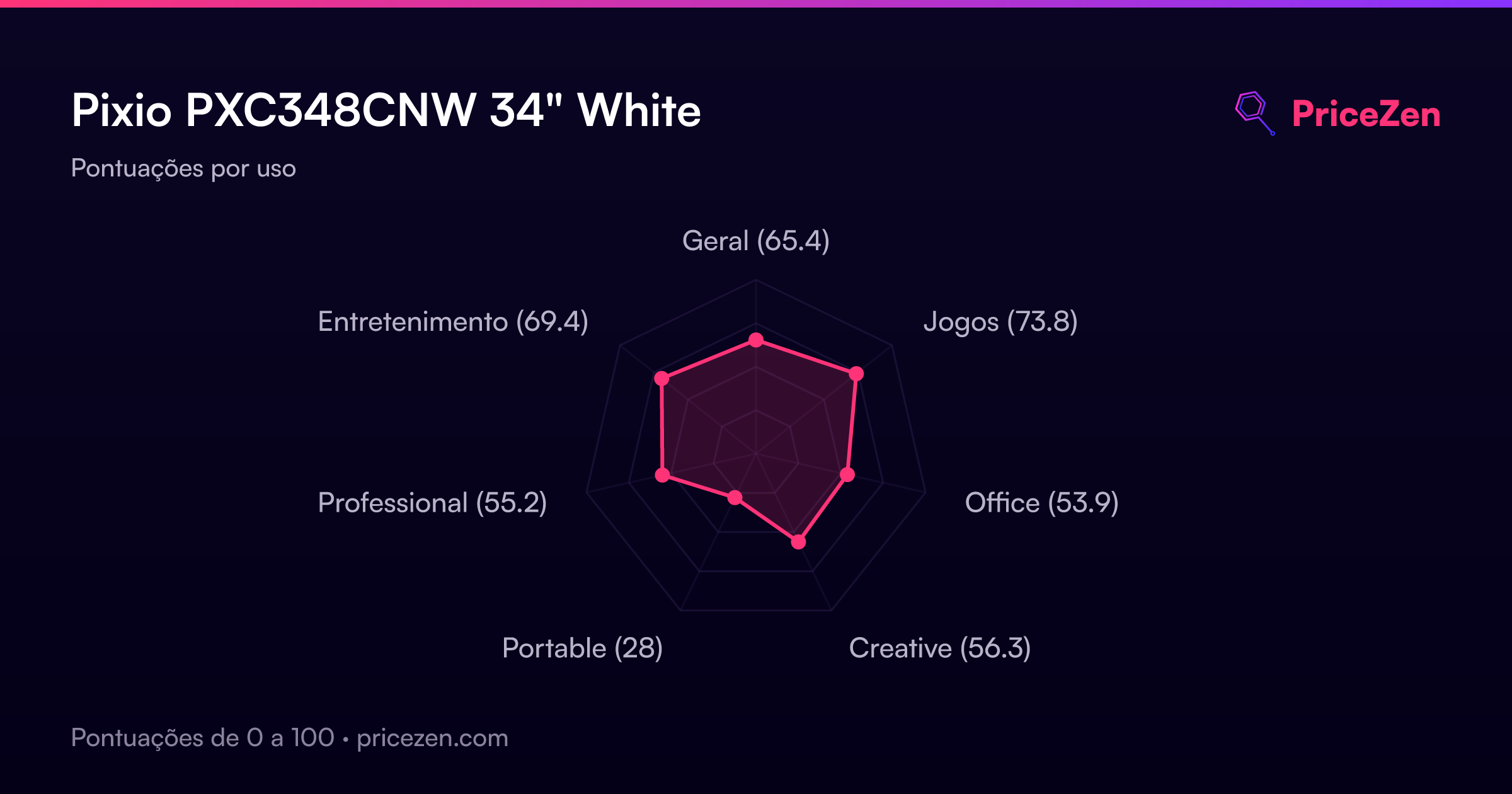
- Geral65.4
- Jogos73.8
- Office53.9
- Creative56.3
- Portable28
- Professional55.2
- Entretenimento69.4