Acer Nitro KG241Y Sbiip 23.8" Black 2022
A 165Hz refresh rate, 1ms response time, and AMD FreeSync Premium on a 23.8-inch VA panel deliver fluid, tear-free gameplay for competitive titles. Its ZeroFrame bezels and VESA mount support allow seamless multi-monitor arrangements, complemented by a simple tilt stand for basic ergonomic adjustments. This monitor is best for budget-conscious esports players who prioritize high frame rates and low input lag over color precision or HDR brightness.

Sem preço atual de lojas
Onde o vimos antes. Confira o preço de hoje na loja.











Resumo
The 30-Second Version
The Acer Nitro KG241Y Sbiip is a budget 1080p gaming monitor with a real 165Hz refresh rate and FreeSync Premium. The VA panel causes some ghosting and color accuracy needs tweaking, but with prices currently running from $110 to $230 USD, catching the low end makes it very hard to argue with. Console gamers should skip it due to HDMI 2.0 limitations. PC gamers on a budget, especially AMD users, will get a lot of monitor for the money.
Pros & Cons
Prós
- 165Hz refresh rate at a budget price 92nd
- FreeSync Premium works well with AMD GPUs 87th
- Slim bezels make it great for multi-monitor setups 77th
- Easy setup, works out of the box with minimal fuss 77th
- Sturdy build quality for the price point
Contras
- VA panel causes noticeable ghosting at high frame rates
- HDMI 2.0 limits 120Hz on consoles, black screens reported
- No built-in speakers or USB ports
- Color accuracy needs manual adjustment out of the box
- HDR10 support is basically decorative at 250 nits
O que dizem os donos
The Word on the Street
Como a opinião dos donos mudou ao longo do tempo
ExclusivoCom base em quando os clientes realmente escreveram suas avaliações - para ver se os elogios iniciais se mantiveram.
20 avaliações escritas, jan. de 2024 – mai. de 2026: 20 satisfeitos
Em todas as 4.399 notas das lojas: 4,6★. A maioria dos donos dá nota sem escrever avaliação. O gráfico conta as 20 avaliações escritas.
Cada ponto é uma avaliação escrita, no mês em que foi escrita. Satisfeitos = 4-5★, neutros = 3★, insatisfeitos = 1-2★.
As provas
Performance
The headline number is 165Hz, and it's legit. In our database, this monitor ranks in the 79th percentile for performance, which is well above average for the price. The 1ms VRB claim is worth unpacking though. That's Acer's Visual Response Boost, which strobes the backlight to reduce motion blur. It works, but it also dims the screen and can cause eye strain for some people. The actual pixel response time of a VA panel is slower, and that's where the ghosting complaints come from.
At high frame rates, especially in fast-paced shooters, you'll see some smearing on dark scenes. It's the classic VA trade-off. The panel hits 250 nits brightness, which is fine for a dim room but struggles in bright spaces. Color accuracy out of the box is mediocre, though users report it improves significantly with some tweaking. The sRGB coverage is listed at 99%, but that's a gamut number, not an accuracy number. Don't expect to do color-critical work on this thing.
Specifications
Full Specifications
Display
| Size | 23.8" |
| Resolution | 1920x1080 (Full HD) |
| Panel Type | VA |
| Aspect Ratio | 16:9 |
| Curved | No |
| Screen Finish | matte |
Performance
| Refresh Rate | 165 Hz |
| Response Time | 1 |
| Adaptive Sync | FreeSync Premium |
Color & HDR
| Brightness | 250 nits |
| Color Gamut | sRGB 99% |
| HDR | HDR10 |
| HDR Support | HDR10 |
Connectivity
| HDMI Ports | 2 |
| DisplayPort | 1 |
| Thunderbolt | 1 HDMI 2.0, 1 DisplayPort 1.4, 1 VGA |
Ergonomics
| Tilt | Yes |
| VESA Mount | 100x100 |
Features
| Weight | 3.8 kg / 8.4 lbs |
vs Competition
The competitors sitting alongside this monitor in our database are the ASUS ROG Strix XG27JCG, the LG UltraGear 27GS75Q-B, and the Alienware AW2724HF. All three are 27 inch panels, and all three live in a different tier of the market than a budget 1080p Acer. Our scoring model, which we build from specs and external benchmark results, ranks them ahead, and that's not a surprise. They're aimed at people who've decided the monitor is a serious part of the build rather than the place to save money.
So what does the Acer actually give up? Mostly image quality. It sits at the 12th percentile for display quality in our data, and that number tells you everything about the VA panel trade-off: decent contrast, weak viewing angles, color accuracy that needs manual work. Where it holds its own is performance, at the 79th percentile, because 165Hz is 165Hz regardless of what the panel costs. If your games are Valorant, CS2, or Rocket League and your GPU is mid-range, the extra money buys you things you may not notice at 1080p esports settings.
The size difference is worth thinking about too, and it cuts in the Acer's favor more often than people expect. At 1080p, a 23.8 inch panel packs its pixels tighter than a 27 inch one, so text and edges look cleaner up close. If you sit near your screen or you're squeezing a monitor onto a small desk, the smaller Acer is the more sensible shape. If you want a big, sharp, color-accurate picture and you have the budget for it, the three above are the ones to look at. If you want frames per dollar, the Acer at the low end of its current price range is a different kind of win.
| Spec | Acer Nitro KG241Y Sbiip 23.8" | LG UltraGear 45GX950A-B 45" | ASUS ROG Strix XG27UCDMG 27" | Dell UltraSharp U4025QW 39.7" | Alienware AW-Series AW3425DW 34" | MSI MAG 271QPX QD-OLED E2 27" |
|---|---|---|---|---|---|---|
| Screen Size | 23.8 | 45 | 27 | 39.7 | 34 | 27 |
| Resolution | 1920 x 1080 | 5120 x 2160 | 3840 x 2160 | 5120 x 2160 | 3440 x 1440 | 2560 x 1440 |
| Panel Type | VA | OLED | QD-OLED | IPS | QD-OLED | QD-OLED |
| Refresh Rate | 165 | 330 | 240 | 120 | 240 | 240 |
| Response Time Ms | 1 | 0.03 | 0.03 | 5 | 0.03 | 0.03 |
| Adaptive Sync | FreeSync Premium | FreeSync Premium Pro | FreeSync Premium Pro | Adaptive-Sync | FreeSync Premium Pro | FreeSync Premium Pro |
| Hdr | HDR10 | DisplayHDR True Black 400 | DisplayHDR True Black 400 | HDR600 | HDR400 | DisplayHDR True Black 400 |
| Compare | Compare | Compare | Compare | Compare |
| Produto | Color | Portabilidade | Display | Feature | User Sentiment | Ergonomic | Performance | Connectivity | Prova social |
|---|---|---|---|---|---|---|---|---|---|
| Acer Nitro KG241Y Sbiip 23.8" | 49.9 | 49.3 | 11.7 | 70.1 | 76.6 | 47.1 | 77.1 | 87.4 | 92 |
| LG UltraGear 45GX950A-B 45" Compare | 99.4 | 76.5 | 99.7 | 96.3 | 76.6 | 90.7 | 99.4 | 96.9 | 92 |
| ASUS ROG Strix XG27UCDMG 27" Compare | 96.5 | 57.3 | 97.7 | 85 | 99.3 | 90.7 | 97.9 | 81 | 98.9 |
| Dell UltraSharp U4025QW 39.7" Compare | 97.9 | 76.5 | 98.6 | 96.3 | 85.4 | 90.7 | 56.1 | 99.3 | 96.8 |
| Alienware AW-Series AW3425DW 34" Compare | 98.9 | 73.9 | 84.1 | 96.3 | 95.7 | 90.7 | 97.9 | 95.4 | 96.8 |
| MSI MAG 271QPX QD-OLED E2 27" Compare | 99.2 | 57.3 | 73.4 | 85 | 95.7 | 90.7 | 97.9 | 81 | 98.9 |
Preço
Value & Pricing
Here's where things get interesting, and lately it's gotten a lot more interesting. We track this monitor's price across stores over time, partly through our community browser extension, and the USD range now runs from $110 to $230. That's a $120 spread on a budget monitor, which is enormous. The floor has dropped well below where it used to sit, so if you catch it near $110 you're getting 165Hz and FreeSync Premium for less than most basic office displays cost. At $230, you're paying more than double for the exact same panel, and that's where better options start to exist. Same product, wildly different deal depending on where you buy.
Canadian buyers see a similar story, with prices ranging from CAD 220 to CAD 286. That's a CAD 66 spread, so the same advice applies: check a few stores before you commit rather than grabbing the first listing you find. For context, the customer rating sits at 4.6 out of 5 across 4,157 reviews, and the social proof ranking is in the 95th percentile. People buy this thing, and they mostly like it. The value proposition was already real at the old pricing. With the low end where it is right now, it's hard to beat if you shop carefully.
Saiba mais
Overview
The Acer Nitro KG241Y Sbiip is one of those monitors that makes you wonder why you'd spend more. It's a 23.8 inch 1080p VA panel pushing 165Hz with FreeSync Premium, and we're currently tracking it as low as $110 USD. For a lot of people, that's the whole pitch right there. You get high refresh rate gaming without the high refresh rate price tag.
Who's this for? Budget-conscious PC gamers, mostly. If you're running an AMD card and want buttery frame rates in esports titles like Valorant, CS2, or Rocket League, this thing delivers where it counts. The 1ms VRB response time is a bit of marketing magic (it's backlight strobing, not true pixel response), but the 165Hz refresh rate is real and it works. Setup is genuinely painless, and the slim bezels make it a decent pick for multi-monitor setups on a budget.
But here's the thing. This monitor sits at the 12th percentile for display quality in our database. That's rough. The VA panel means you're trading color accuracy and viewing angles for contrast and price. If you're coming from an IPS panel, you'll notice the difference. If you're coming from a 60Hz office monitor, you'll probably be too busy enjoying the smoothness to care.
Common Questions
Q: Does this monitor work with PS5 or Xbox Series X at 120Hz?
This is a known issue. The monitor only has HDMI 2.0 ports, which limits bandwidth. Multiple users report black screens or failure to display when trying to run 120Hz on consoles. If you're primarily a console gamer, look for a monitor with HDMI 2.1 support instead.
Q: Is the 1ms response time real?
The 1ms figure is Acer's Visual Response Boost (VRB), which uses backlight strobing to reduce perceived motion blur. The actual pixel response time of the VA panel is slower, which is why some users notice ghosting. VRB works but dims the screen and can cause eye strain for some people.
Q: Does FreeSync work with Nvidia GPUs?
Yes, users report that G-Sync compatibility works despite this being a FreeSync monitor. Nvidia has supported FreeSync displays over DisplayPort for years now. Just make sure you're using the DisplayPort connection for the best results, not HDMI.
Q: Is this monitor good for photo or video editing?
Not really. The VA panel has mediocre color accuracy out of the box, and while it can be improved with calibration, the 250 nits brightness and limited color performance put it well behind even budget IPS panels for color-critical work. This is a gaming monitor first.
Who Should Skip This
Console gamers should absolutely skip this one. The HDMI 2.0 ports are a dealbreaker for 120Hz gaming on PS5 or Xbox Series X, with multiple users reporting black screens. You'll want HDMI 2.1 support, which means spending a bit more or looking at different models.
If you're sensitive to motion blur or ghosting, the VA panel will bother you. Fast-paced shooters with dark scenes are where it's most noticeable. In that case, look for an IPS panel with a high refresh rate instead. And if you need built-in speakers or USB passthrough, this monitor has neither. It's a bare-bones gaming display, and that's fine for what it is, but it's not for everyone.
Verdict
For PC gamers on a tight budget, especially those with AMD GPUs, this monitor is an easy recommendation at the right price, and the right price has gotten a lot easier to find. The 165Hz refresh rate and FreeSync Premium support deliver smooth gameplay in esports titles, and the 1080p resolution means you don't need a monster GPU to push those frame rates. We're seeing it as low as $110 USD right now, and at that number it's close to a no-brainer. Canadian buyers should aim for the bottom of the CAD 220 to CAD 286 range rather than the top.
Console gamers should look elsewhere. The HDMI 2.0 limitation is a real problem, with multiple users reporting black screens when trying to run 120Hz on PS5 or Xbox Series X. If you're on console, you'll want a monitor with HDMI 2.1 support. And if you're sensitive to ghosting or do any kind of color-critical work, the VA panel will frustrate you no matter how cheap it gets. This is a gaming monitor first, and a budget one at that.
Usage Scores
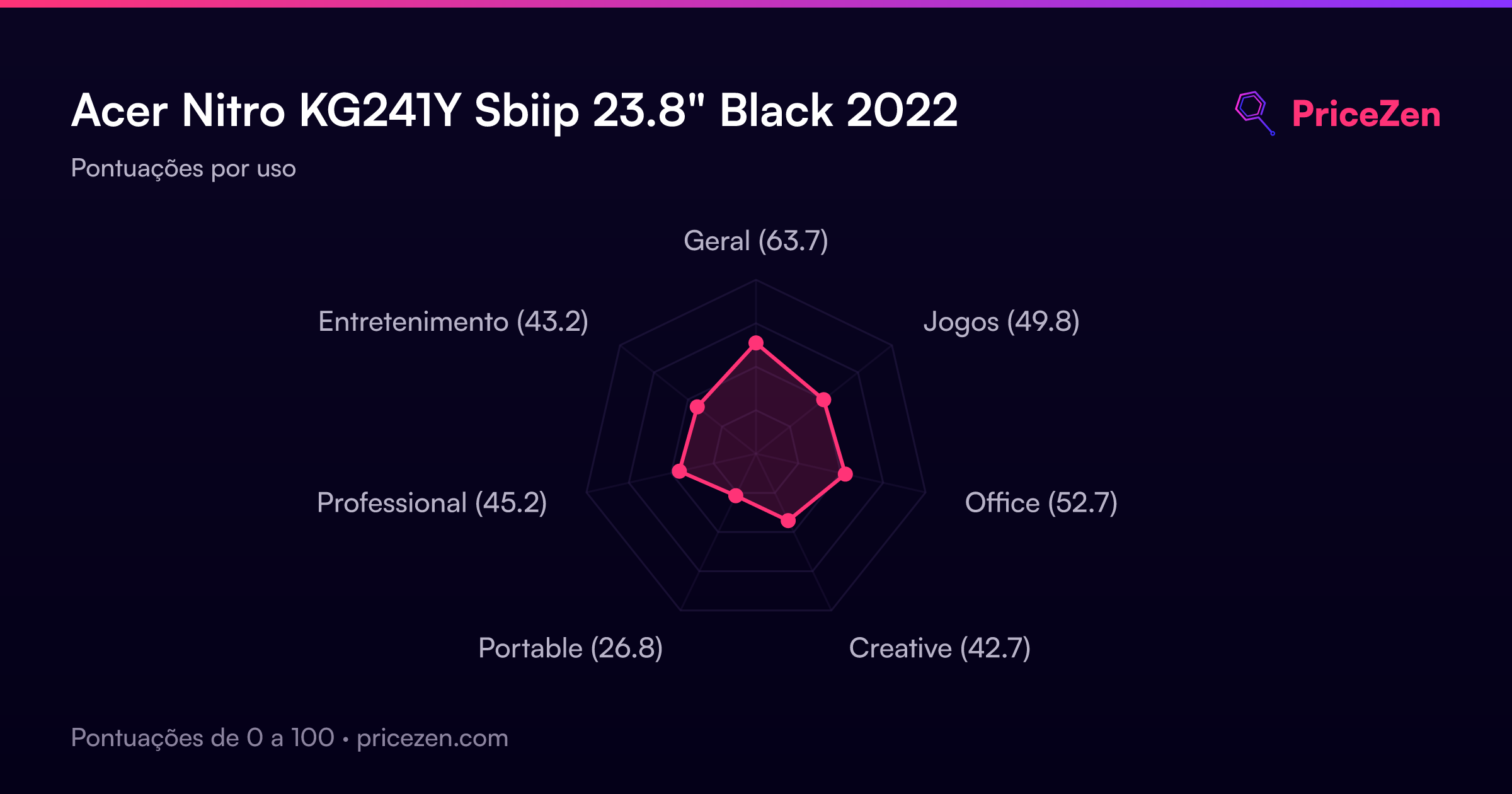
- Geral63.7
- Jogos49.8
- Office52.7
- Creative42.7
- Portable26.8
- Professional45.2
- Entretenimento43.2