ASUS TUF Gaming VG34WQ5A 34" Black
The 34-inch 1500R curved VA panel hits 400Hz in HD dual mode or 200Hz at WQHD, with a 0.5ms response time and ELMB SYNC to cut ghosting and tearing. FreeSync Premium and Variable Overdrive keep gameplay smooth, while DisplayHDR 400 and 95% DCI-P3 cover color and contrast. Best for competitive esports players who want one ultrawide for both high-refresh 720p and detailed WQHD gaming.

Sem preço atual de lojas
Resumo
The 30-Second Version
The VG34WQ5A is a 34-inch ultrawide that switches between 200Hz WQHD and 400Hz 720p modes with a hotkey. Performance and features rank in the top 5% of our database, and at CAD 391 it's a steal. Ergonomics are weak and HDR is basic, but the dual mode trick makes it worth buying for split-personality gamers.
Pros & Cons
Prós
- Dual mode gives you 200Hz ultrawide or 400Hz esports in one panel 96th
- 0.5ms response time is genuinely fast for a VA panel 95th
- 95% DCI-P3 color coverage is above average for gaming 87th
- ELMB SYNC works with FreeSync, which most monitors can't do 84th
Contras
- Ergonomics are bare bones, tilt only, no height adjustment
- 720p in 400Hz mode looks rough on a 34-inch screen
- DisplayHDR 400 is the weakest HDR tier you can get
- Weighs 7.4kg, so a sturdy desk or mount is non-negotiable
As provas
Performance
This panel is fast. The 0.5ms GTG response time and 200Hz refresh rate put it near the top of our charts, and the 400Hz mode is a standout for competitive play. Variable Overdrive and ELMB SYNC work together to keep ghosting and tearing in check, which is rare to see done well on a VA panel. The 400 nits brightness is fine for most rooms, but DisplayHDR 400 is the entry-level HDR tier, so don't expect OLED-style contrast. Color coverage at 95% DCI-P3 is strong for a gaming monitor, though VA viewing angles mean colors shift a bit at the edges of that 1500R curve.
Specifications
Full Specifications
Display
| Size | 34" |
| Resolution | 3440x1440 |
| Panel Type | VA |
| Aspect Ratio | 21:9 |
| Curved | Yes |
| Curvature | 1500 |
| Screen Finish | matte |
Performance
| Refresh Rate | 400 Hz |
| Response Time | 0.5 |
| Adaptive Sync | FreeSync Premium |
Color & HDR
| Brightness | 400 nits |
| Color Gamut | 95% DCI-P3 |
| HDR | HDR400 |
| HDR Support | HDR10 |
Connectivity
| HDMI Ports | 2 |
| DisplayPort | 2 |
| Speakers | Yes |
Ergonomics
| Height Adjustable | No |
| Tilt | Yes |
| Swivel | No |
| Pivot | No |
| VESA Mount | 100x100 |
Features
| Webcam | No |
| PIP/PBP | Yes |
| Power | 25 |
| Weight | 7.4 kg / 16.3 lbs |
vs Competition
Against the OLED crowd like the MSI MAG 271QPX or Alienware AW3425DW, the VG34WQ5A loses on contrast and HDR punch, but it costs a fraction of the price and offers the 400Hz mode those panels can't touch. The Samsung Odyssey G60SD and LG UltraGear 32GX850A-B are closer in spirit, but they're flat 16:9 panels without the dual mode trick. The Gigabyte MO27U2 is a 4K panel, so sharper text but slower refresh. If you want one monitor that does both immersive ultrawide and competitive esports, nothing else in this price range comes close.
| Spec | ASUS TUF Gaming VG34WQ5A 34" | LG UltraGear 45GX950A-B 45" | Dell UltraSharp U4025QW 39.7" | MSI MAG 271QPX QD-OLED E2 27" | Alienware AW-Series AW3425DW 34" | Samsung Odyssey G60SD 27" |
|---|---|---|---|---|---|---|
| Screen Size | 34 | 45 | 39.70000076293945 | 27 | 34 | 27 |
| Resolution | 3440 x 1440 | 5120 x 2160 | 5120 x 2160 | 2560 x 1440 | 3440 x 1440 | 2560 x 1440 |
| Panel Type | VA | OLED | IPS | QD-OLED | QD-OLED | OLED |
| Refresh Rate | 400 | 330 | 120 | 240 | 240 | 360 |
| Response Time Ms | 0.5 | 0.029999999329447746 | 5 | 0.029999999329447746 | 0.029999999329447746 | 0.029999999329447746 |
| Adaptive Sync | FreeSync Premium | FreeSync Premium Pro | Adaptive-Sync | FreeSync Premium Pro | FreeSync Premium Pro | FreeSync Premium Pro |
| Hdr | HDR400 | DisplayHDR True Black 400 | HDR600 | DisplayHDR True Black 400 | HDR400 | HDR10+ |
| Compare | Compare | Compare | Compare | Compare |
| Produto | Color | Portabilidade | Display | Feature | Ergonomic | Performance | Connectivity |
|---|---|---|---|---|---|---|---|
| ASUS TUF Gaming VG34WQ5A 34" | 86.6 | 35.5 | 76.1 | 96.3 | 47.4 | 95.1 | 84 |
| LG UltraGear 45GX950A-B 45" Compare | 99.4 | 76.7 | 99.7 | 96.3 | 90.8 | 99.4 | 97 |
| Dell UltraSharp U4025QW 39.7" Compare | 97.9 | 76.7 | 98.6 | 96.3 | 90.8 | 56 | 99.3 |
| MSI MAG 271QPX QD-OLED E2 27" Compare | 99.2 | 57.6 | 73.4 | 85 | 90.8 | 97.9 | 81.2 |
| Alienware AW-Series AW3425DW 34" Compare | 98.9 | 74.1 | 84.2 | 90.8 | 90.8 | 97.9 | 95.5 |
| Samsung Odyssey G60SD 27" Compare | 90.8 | 39.7 | 73.4 | 70.2 | 90.8 | 99.5 | 87.6 |
Preço
Value & Pricing
At CAD 391, this is aggressively priced for what you get. A 34-inch ultrawide with this refresh rate and response time usually costs more, and the dual mode feature is something you won't find on most competitors at any price. The trade-off is build quality and ergonomics. You're getting a plastic stand with tilt-only adjustment and no USB hub. If you already have a monitor arm, that's a non-issue. If you don't, factor in another CAD 50-100 for a VESA mount.
Saiba mais
Overview
The ASUS TUF Gaming VG34WQ5A is a 34-inch ultrawide that tries to be two monitors at once. You get a 3440x1440 VA panel at 200Hz for immersive gaming, then hit a hotkey and it drops to 720p at 400Hz for esports. That dual mode trick is the headline feature, and it's a genuinely clever idea for people who split their time between cinematic RPGs and twitchy shooters.
Specs are solid across the board. 0.5ms response time, FreeSync Premium, 95% DCI-P3, DisplayHDR 400, and a 1500R curve. Our database puts the feature set in the 96th percentile and performance in the 95th. The catch? Ergonomics are basically tilt and that's it, and the whole thing weighs over 7kg.
Common Questions
Q: Does the 400Hz mode actually look usable?
It drops the resolution to 720p, so text and fine details get soft, but in fast-paced shooters the motion clarity is the point. For esports titles like Valorant or CS2, the trade-off is worth it.
Q: Can I mount this on a monitor arm?
Yes, it has a standard VESA 100x100 mount. Given the 7.4kg weight and tilt-only stand, a monitor arm is honestly the better way to use this panel.
Q: Is the VA panel going to have ghosting issues?
The 0.5ms response time and Variable Overdrive do a lot to minimize VA smearing, and ELMB SYNC helps too. It's not OLED-fast, but it's one of the better VA implementations we've seen.
Who Should Skip This
Skip this if you need a monitor for color-critical work or HDR content creation. The DisplayHDR 400 certification and VA panel won't cut it for professional grading, and the tilt-only stand will annoy anyone who needs height adjustment without buying an arm. Also skip if you're purely a competitive esports player, a dedicated 24-inch 1080p high-refresh panel will be sharper and lighter.
Verdict
This is for the gamer who wants an ultrawide for single-player games but also grinds ranked matches and doesn't want two monitors on the desk. The dual mode hotkey is the killer feature, and it works. If you're purely a competitive player, a dedicated 24-inch 1080p 360Hz+ panel will be sharper and lighter. If you're purely a story-mode player, an OLED ultrawide will look better. But if you want both in one box without spending OLED money, this is the pick.
Usage Scores
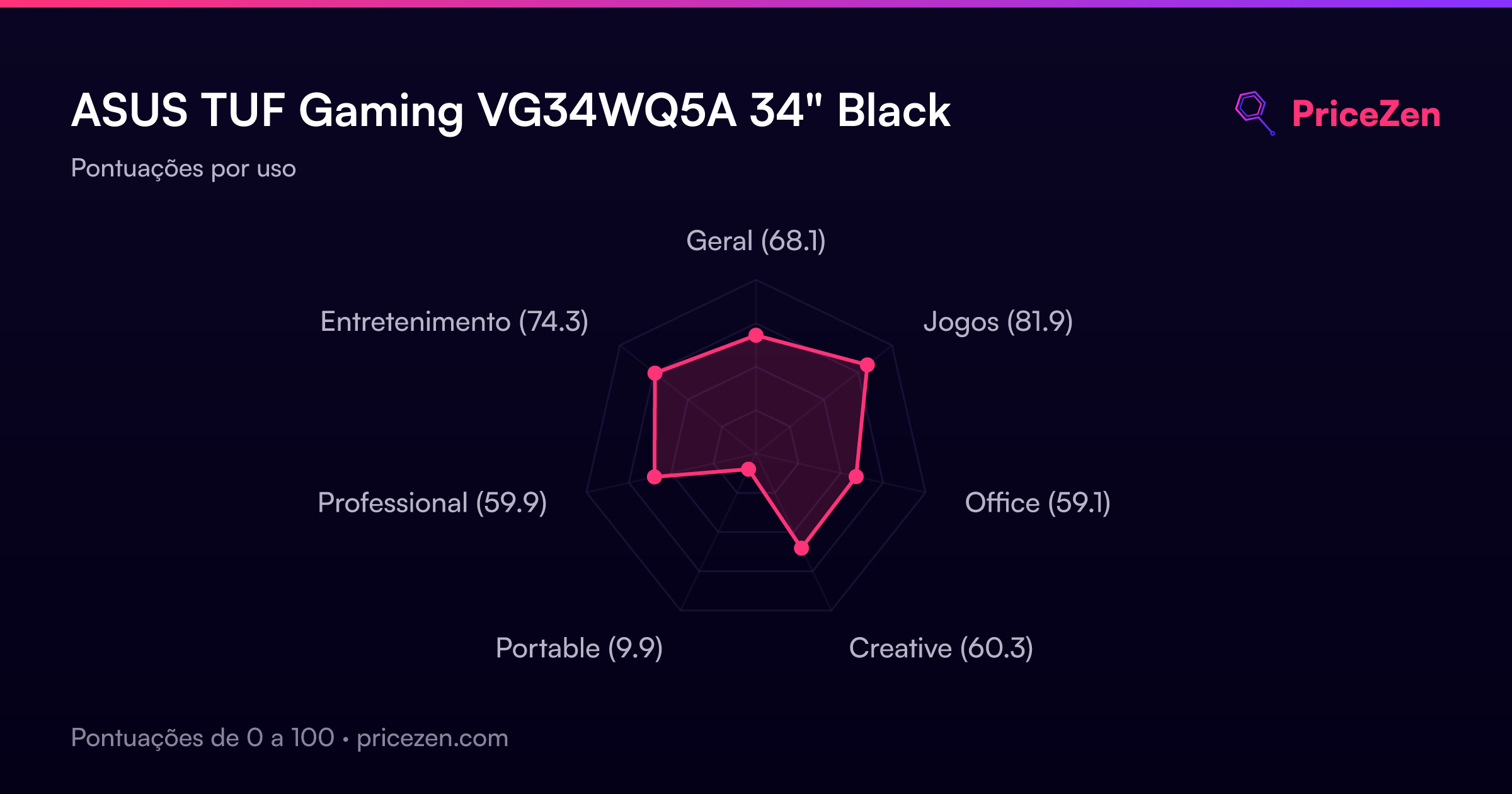
- Geral68.1
- Jogos81.9
- Office59.1
- Creative60.3
- Portable9.9
- Professional59.9
- Entretenimento74.3