BenQ GW2490TC 23.8" White

Jogos fluidos com 144 Hz verificado em 28 de nov.
63/100 pontuação geral 5,0 média de 5 avaliações de proprietários
- Screen
- 23.8"
- Resolution
- 1920 x 1080
- Panel
- IPS
- Refresh
- 144 Hz
- Response time
- 5 ms
- Adaptive sync
- FreeSync
- HDR
- HDR10







Resumo
The 30-Second Version
A 144Hz office monitor with USB-C and real eye-care tech for under USD 135. If you work long hours and want smooth scrolling without breaking the bank, this is it.
Pros & Cons
Prós
- 144Hz refresh rate at this price is a steal 93rd
- USB-C connectivity with power delivery is genuinely useful 91st
- Full ergonomic stand with height, tilt, swivel, and pivot 87th
- Eye-care features actually work for long sessions 70th
Contras
- 250 nits brightness is dim for bright rooms
- 1080p at 23.8 inches is fine but not sharp
- 5ms response time won't satisfy competitive gamers
- Only 9 customer reviews so far, thin track record
As provas
Performance
The 144Hz refresh rate is the star of the show. Most monitors in this category are stuck at 60Hz or 75Hz, so getting 144Hz on a 23.8-inch office panel is a genuine surprise. The 5ms response time is fine for office work and light gaming, though competitive players will want something faster. The 250 nits brightness is adequate for indoor use but won't win any awards, and the 1500:1 contrast ratio is solid for an IPS panel. FreeSync support is a nice bonus if you have an AMD GPU.
Specifications
Full Specifications
Display
| Size | 23.8" |
| Resolution | 1920x1080 (Full HD) |
| Panel Type | IPS |
| Aspect Ratio | 16:9 |
| Curved | No |
| Screen Finish | matte |
Performance
| Refresh Rate | 144 Hz |
| Response Time | 5 |
| Adaptive Sync | FreeSync |
Color & HDR
| Brightness | 250 nits |
| Color Gamut | 99% sRGB |
| Color Depth | 8-bit |
| HDR | HDR10 |
Connectivity
| HDMI Ports | 1 |
| DisplayPort | 1 |
| USB-C | 1 |
| Thunderbolt | 20 |
| Speakers | Yes |
| Headphone Jack | Yes |
Ergonomics
| Height Adjustable | Yes |
| Tilt | Yes |
| Swivel | Yes |
| Pivot | Yes |
| VESA Mount | 100x100 |
Features
| Webcam | No |
| Touchscreen | No |
| PIP/PBP | No |
| Power | 12 |
| Weight | 5.7 kg / 12.6 lbs |
vs Competition
The LG UltraGear 27G810A-B is the obvious alternative if you want a bigger screen and better gaming performance, but it costs more and lacks the eye-care focus. The Dell S2725QC is a better choice for pure productivity with its 4K resolution and USB-C hub, but you're giving up the 144Hz refresh rate. The ASUS TUF Gaming VG34VQL1B is a completely different beast with its ultrawide curved panel, overkill for office work. For a dedicated home office monitor that can handle light gaming, the BenQ GW2490TC is the sweet spot.
| Spec | BenQ GW2490TC 23.8" | LG UltraGear 45GX950A-B 45" | ASUS ROG Strix XG27UCDMG 27" | Dell UltraSharp U4025QW 39.7" | Alienware AW-Series AW3425DW 34" | MSI MAG 271QPX QD-OLED E2 27" |
|---|---|---|---|---|---|---|
| Screen Size | 23.8 | 45 | 27 | 39.7 | 34 | 27 |
| Resolution | 1920 x 1080 | 5120 x 2160 | 3840 x 2160 | 5120 x 2160 | 3440 x 1440 | 2560 x 1440 |
| Panel Type | IPS | OLED | QD-OLED | IPS | QD-OLED | QD-OLED |
| Refresh Rate | 144 | 330 | 240 | 120 | 240 | 240 |
| Response Time Ms | 5 | 0.03 | 0.03 | 5 | 0.03 | 0.03 |
| Adaptive Sync | FreeSync | FreeSync Premium Pro | FreeSync Premium Pro | Adaptive-Sync | FreeSync Premium Pro | FreeSync Premium Pro |
| Hdr | HDR10 | DisplayHDR True Black 400 | DisplayHDR True Black 400 | HDR600 | HDR400 | DisplayHDR True Black 400 |
| Compare | Compare | Compare | Compare | Compare |
| Produto | Color | Portabilidade | Display | Feature | Performance | Connectivity | Prova social |
|---|---|---|---|---|---|---|---|
| BenQ GW2490TC 23.8" | 53.4 | 86.7 | 21.4 | 70 | 59.4 | 93 | 36.2 |
| LG UltraGear 45GX950A-B 45" Compare | 99.4 | 76.5 | 99.7 | 96.3 | 99.4 | 96.9 | 91.9 |
| ASUS ROG Strix XG27UCDMG 27" Compare | 96.5 | 57.3 | 97.7 | 85 | 97.9 | 81 | 98.9 |
| Dell UltraSharp U4025QW 39.7" Compare | 97.9 | 76.5 | 98.6 | 96.3 | 56.1 | 99.3 | 96.8 |
| Alienware AW-Series AW3425DW 34" Compare | 98.9 | 73.9 | 84 | 96.3 | 97.9 | 95.4 | 96.8 |
| MSI MAG 271QPX QD-OLED E2 27" Compare | 99.2 | 57.3 | 73.4 | 85 | 97.9 | 81 | 98.9 |
Preço
Value & Pricing
At USD 130-135 in the US, this is a no-brainer for office work. The CAD pricing has a wider spread from CAD 175 to CAD 209, so Canadian buyers should shop around. Memory Express and Newegg both list it, and the lower end of that range makes it a much better deal. For a 144Hz IPS panel with USB-C and a full ergonomic stand, you're getting features that usually cost USD 200 or more.
Saiba mais
Overview
The BenQ GW2490TC is a 23.8-inch 1080p IPS monitor that punches way above its weight class for office work. The headline feature is the 144Hz refresh rate, which is rare at this size and price, and it makes everything from scrolling spreadsheets to casual gaming feel noticeably smoother. BenQ's eye-care tech is the real selling point here, with flicker-free backlighting and low blue light modes that actually make a difference during long workdays.
Common Questions
Q: Is 23.8 inches big enough for office work?
For a single monitor setup, 23.8 inches at 1080p is workable but not spacious. You'll fit a document and a browser side by side, but it gets tight. If you multitask heavily, consider a 27-inch 1440p display instead.
Q: Can this monitor charge my laptop over USB-C?
Yes, the USB-C port supports power delivery, so you can connect a laptop with a single cable and charge it while using the monitor. The exact wattage isn't specified, but it's enough for most ultrabooks and thin-and-light laptops.
Q: Is the 144Hz refresh rate worth it for office work?
Absolutely. Even if you never game, the smoother cursor movement and scrolling make a noticeable difference in daily comfort. Once you use 144Hz for a week, going back to 60Hz feels sluggish.
Who Should Skip This
If you're a competitive gamer, this isn't your monitor. The 5ms response time and 250 nits brightness will hold you back, and you'd be better off with a dedicated gaming panel like the LG UltraGear 27G810A-B. If you need 4K for photo or video work, the Dell S2725QC is the better pick. This BenQ is for office workers who want smooth performance and eye comfort, not for pixel peepers or esports players.
Verdict
The BenQ GW2490TC is the monitor to buy if you want a 144Hz office display without spending gaming monitor money. The eye-care features are legitimately useful, the USB-C connectivity is a modern convenience you'll appreciate, and the ergonomic stand is better than what you get on most monitors at this price. The 250 nits brightness is the main compromise, but for indoor office use it's perfectly fine. Buy it.
Usage Scores
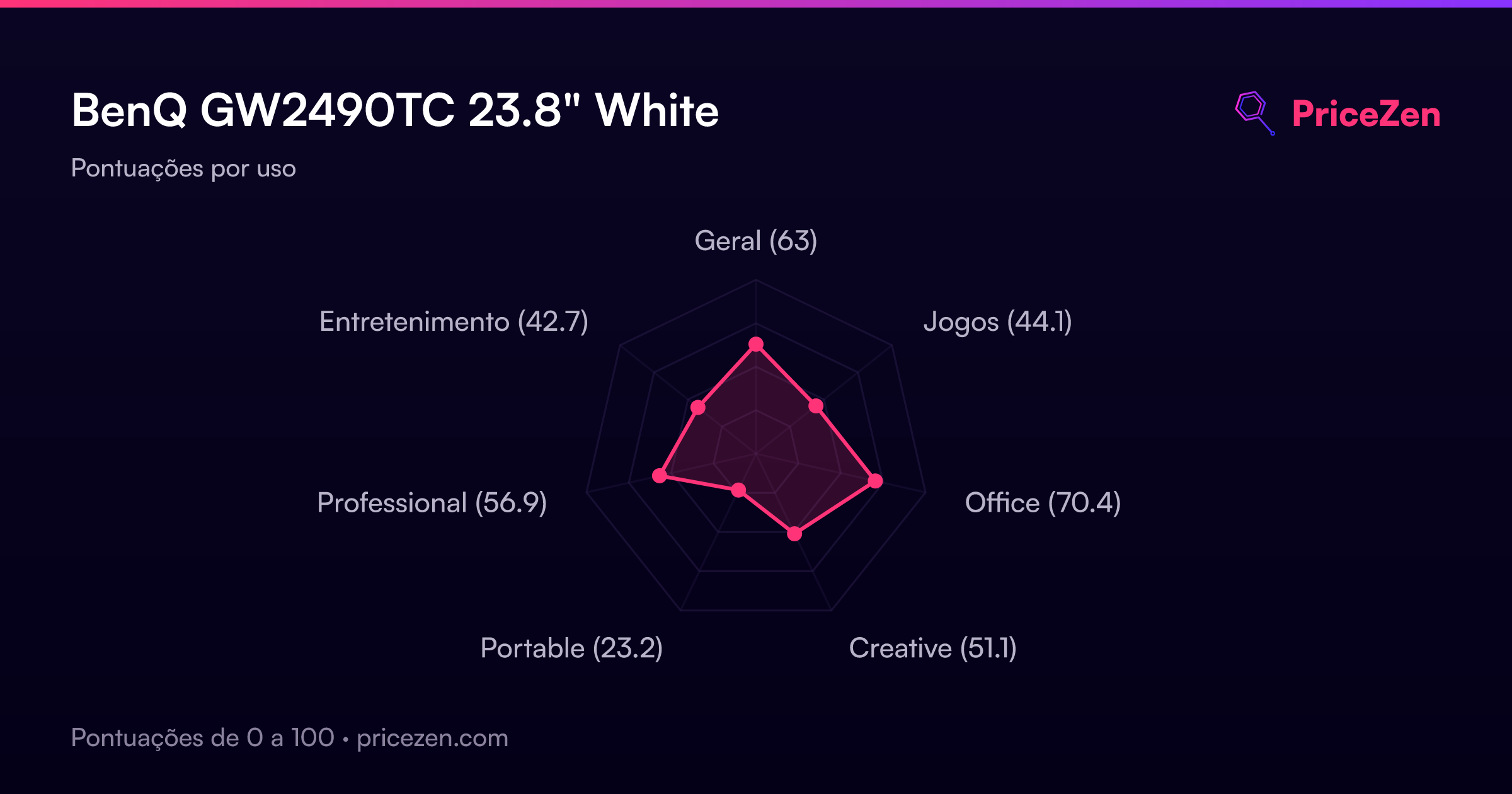
- Geral63
- Jogos44.1
- Office70.4
- Creative51.1
- Portable23.2
- Professional56.9
- Entretenimento42.7