Acer Swift SF16-71T-70PN 2026, Core Ultra X7 358H, 16GB, 1TB SSD, Basalt Gray
The Intel Core Ultra X7 358H with a 50 TOPS NPU and Intel Arc B390 graphics deliver smooth 1080p gaming and fast AI-assisted multitasking in a 1.55kg chassis. The 16-inch 3K OLED touchscreen with 120Hz and 100% DCI-P3, plus a haptic touchpad and stylus, makes it a strong creative tool. Best for digital artists and content creators who want a portable, AI-ready Windows laptop for drawing, editing, and everyday productivity.

Sem preço atual de lojas
Resumo
The 30-Second Version
The Acer Swift SF16-71T-70PN (Swift 16 AI) is a 16-inch OLED Windows laptop with a fast Core Ultra X7 CPU, a best-in-class touchscreen, and weak gaming chops. It's a strong creator and entertainment machine if you catch it near USD 1,110 rather than USD 1,550.
Pros & Cons
Prós
- Stunning 16-inch 3K OLED touchscreen, 120Hz, 100% DCI-P3 94th
- Fast 16-core Core Ultra X7 CPU, near the top of its class 90th
- Excellent port selection: Thunderbolt, HDMI 2.1, USB-A, Wi-Fi 7 89th
- Light for a 16-incher at 1.55kg 84th
- Stylus included, plus a huge haptic touchpad
Contras
- Gaming is a weak spot (21.4/100 in our scoring)
- Affordability lags behind most rivals at current prices
- Reliability ranking is one of the worst we've seen in this category
- 16GB RAM is only average for creative work at this price
- 340 nits is modest for outdoor use
O que dizem os donos
The Word on the Street
Como a opinião dos donos mudou ao longo do tempo
ExclusivoCom base em quando os clientes realmente escreveram suas avaliações - para ver se os elogios iniciais se mantiveram.
23 avaliações escritas, mai. – jun. de 2026: 22 satisfeitos, 1 neutro
Em todas as 107 notas das lojas: 4,5★. A maioria dos donos dá nota sem escrever avaliação. O gráfico conta as 23 avaliações escritas.
Cada ponto é uma avaliação escrita, no mês em que foi escrita. Satisfeitos = 4-5★, neutros = 3★, insatisfeitos = 1-2★.
As provas
Performance
The Core Ultra X7 358H lands in the 89th percentile for CPU performance in our data, which means this thing is genuinely quick for compiling code, juggling browser tabs, and running creative apps. The integrated Arc B390 scores in the 78th percentile for graphics, well above what most integrated GPUs manage. Acer claims smooth 1080p gaming with XeSS upscaling and AI frame generation pushing some AAA titles from around 40 FPS to 70+ FPS. Treat those as manufacturer claims, not guarantees. Our category scoring still rates gaming at just 21.4/100, because integrated graphics with shared memory can't match a dedicated GPU no matter how clever the upscaling gets.
The display is the star: a 94th-percentile screen with 340 nits peak brightness, 120Hz refresh, and full DCI-P3 coverage makes this a great pick for photo editing, video timelines, and honestly just watching stuff. The 16GB of RAM and 1TB SSD are solid but middle of the pack for this class. Fine for most workloads, tight if you're editing 4K footage with heavy multitasking. Acer claims up to 24 hours of battery from the 70Wh cell; real-world numbers will depend heavily on how hard you push that OLED.
Specifications
Full Specifications
Processor
| CPU | Intel Core Ultra X7 358H |
| Cores | 16 |
| Frequency | 1.9 GHz |
| L3 Cache | 18 MB |
Graphics
| GPU | Intel Arc B390 |
| Type | Integrated |
| VRAM | 16 GB |
| VRAM Type | Shared |
Memory & Storage
| RAM | 16 GB |
| RAM Generation | LPDDR5X |
| Storage | 1 TB |
| Storage Type | SSD |
Display
| Size | 16" |
| Resolution | 2880x1800 |
| Panel | OLED |
| Refresh Rate | 120 Hz |
| Brightness | 340 nits |
| Color Gamut | 100% DCI-P3 |
Connectivity
| USB-C Ports | 2 |
| USB Ports | 2 |
| Thunderbolt | Thunderbolt 4 |
| HDMI | HDMI 2.1 |
| Wi-Fi | Wi-Fi 7 |
| Bluetooth | Bluetooth 6 |
Physical
| Weight | 1.6 kg / 3.4 lbs |
| Battery | 70 Wh |
| OS | Windows 11 Home |
vs Competition
Cross-shopping this against the Apple MacBook Pro 14.2" M5? The Swift's case rests on its 16-inch OLED touchscreen, included stylus, and Windows 11 with Copilot+ features, none of which the Mac offers in the same package. But the MacBook Pro is the machine to beat for sustained creative workloads, and the Swift's 16GB of RAM looks modest next to what serious editors want. Against the Samsung Galaxy Book5 Pro 14", the Swift counters with a bigger 16:10 canvas and stronger port coverage including HDMI 2.1 and USB-A.
If gaming is anywhere on your list, stop looking at the Swift and check the ASUS ROG Zephyrus 14", Lenovo Legion Pro 7i Gen 10 16", or HP OMEN Transcend 14 instead. Our gaming score of 21.4/100 for the Swift tells the whole story: the Arc B390 is impressive for integrated graphics, but those machines exist for a different job entirely.
| Spec | Acer Swift SF16-71T-70PN | Apple MacBook Pro 14.2" M4 Pro | ASUS ROG Zephyrus 14" GA403WW-G14.R95080 | Lenovo Legion Pro 7i Gen 10 16" | HP OMEN Transcend | Samsung Galaxy Book5 Pro 14" NP944XHA-KG3US |
|---|---|---|---|---|---|---|
| CPU | Intel Core Ultra X7 358H | Apple M4 Pro | AMD Ryzen AI 9 HX 370 | Intel Core Ultra 9 275HX | Intel Core Ultra 9 285H | Intel Core Ultra 7 258V |
| RAM (GB) | 16 | 48 | 32 | 32 | 32 | 32 |
| Storage (GB) | 1024 | 4096 | 2048 | 1024 | 1024 | 1024 |
| Screen | 16" 2880x1800 | 14.2" 3024x1964 | 14" 2880x1800 | 16" 2560x1600 | 14" 2880x1800 | 14" 2880x1800 |
| GPU | Intel Arc B390 | Apple (16-Core) | NVIDIA GeForce RTX 5080 | NVIDIA GeForce RTX 5070 Ti | NVIDIA GeForce RTX 5070 | Intel Arc Graphics 140V |
| OS | Windows 11 Home | macOS | Windows 11 Home | Windows 11 Home | Windows 11 Home | Windows 11 Pro |
| Weight (kg) | 1.6 | 1.6 | 1.6 | 2.7 | 1.6 | 1.2 |
| Battery (Wh) | 70 | 72 | - | 99 | 71 | 63 |
| Compare | Compare | Compare | Compare | Compare |
| Produto | CPU | GPU | RAM | Portas | Tela | Portabilidade | Armazenamento | Confiabilidade | Prova social | Affordability |
|---|---|---|---|---|---|---|---|---|---|---|
| Acer Swift SF16-71T-70PN | 88.8 | 77.6 | 63.8 | 83.5 | 94.3 | 41.2 | 65.4 | 11 | 90.4 | 26.7 |
| Apple MacBook Pro 14.2" M4 Pro Compare | 92.4 | 78.9 | 90.6 | 73.9 | 99.1 | 68.9 | 98.4 | 98.2 | 99.7 | 4.7 |
| ASUS ROG Zephyrus 14" GA403WW-G14.R95080 Compare | 91.2 | 98.3 | 90.8 | 89.5 | 96 | 73.6 | 89.7 | 60.6 | 95.6 | 6.1 |
| Lenovo Legion Pro 7i Gen 10 16" Compare | 97.2 | 96.7 | 89 | 97.3 | 95 | 9.5 | 79.3 | 82 | 99.7 | 5.9 |
| HP OMEN Transcend Compare | 90.1 | 93.5 | 89.7 | 89.5 | 96 | 72.2 | 65.4 | 33.7 | 93.2 | 9.1 |
| Samsung Galaxy Book5 Pro 14" NP944XHA-KG3US Compare | 65.8 | 69.7 | 79.5 | 83.5 | 90.3 | 89.4 | 79.3 | 82 | 95.6 | 21.3 |
Preço
Value & Pricing
Here's the deal: we track this laptop between USD 1,110 and USD 1,550 across listings, a USD 440 spread that's frankly wild for the same machine. Best Buy currently lists it at USD 1,550, the top of that range, so shopping around could save you serious money. Our affordability ranking puts it in the 26th percentile, meaning most laptops in this category give you more spec per dollar. You're paying for the OLED panel, the stylus, and the premium chassis. If those matter to you, hunt for the low end of that price range. If they don't, alternatives like the Samsung Galaxy Book5 Pro 14" or a Legion are worth a look.
Saiba mais
Overview
The Acer Swift SF16-71T-70PN, sold as the Swift 16 AI, is a thin-and-light 16-inch Windows laptop aimed at creators and everyday multitaskers rather than gamers. It pairs an Intel Core Ultra X7 358H (16 cores, 1.9GHz) with integrated Intel Arc B390 graphics, 16GB of LPDDR5X running at 7467 MT/s, and a 1TB PCIe 4.0 SSD. The headline feature is the 16-inch 2880x1800 OLED touchscreen: 120Hz, 100% DCI-P3, VESA DisplayHDR True Black 500, and a 0.2ms response time. At 1.55kg with a 70Wh battery, it's a big-screen machine that doesn't weigh like one.
Is the Acer Swift 16 AI good for creative work? On paper, yes. That OLED panel ranks among the best screens we track in this category, the CPU sits near the top of the pack, and Acer includes an MPP 2.5 tilt-enabled stylus plus what it calls the world's largest haptic touchpad. Port coverage is strong too: Thunderbolt, two USB-C, two USB-A, HDMI 2.1, and Wi-Fi 7 mean you're not living the dongle life. It ships with Windows 11 Home and qualifies as a Copilot+ PC thanks to the 50 TOPS NPU.
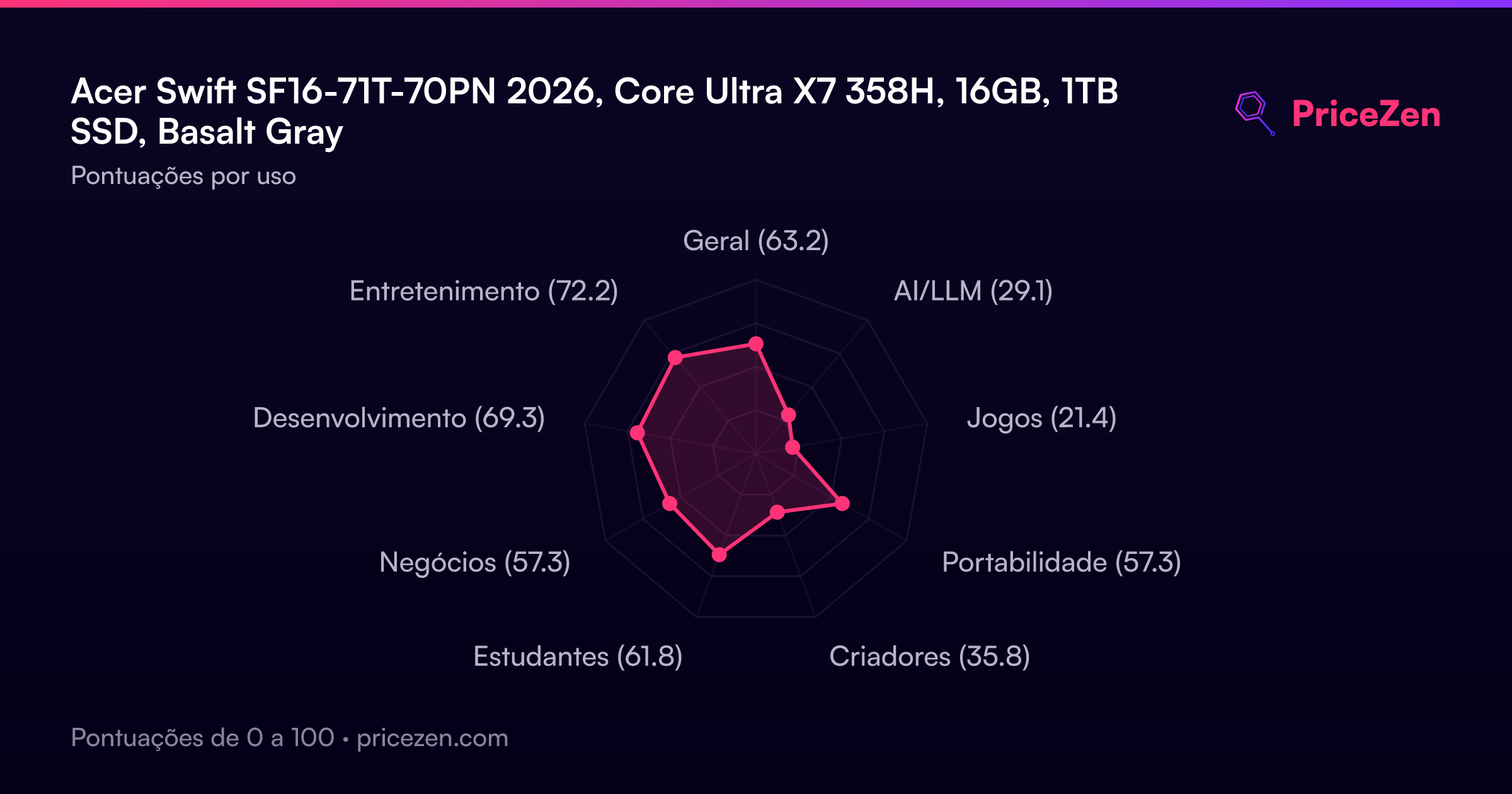
Pricing is where things get interesting. We track listings from USD 1,110 to USD 1,550, so where you buy matters a lot here. Our scoring model puts its overall score at 62.9/100, with entertainment (71.9) and developer use (69) as its strongest suits and gaming (21.4) as a clear weak spot.
Common Questions
Q: Is the Acer Swift 16 AI good for gaming?
Not really. The integrated Intel Arc B390 handles casual and older titles at 1080p, but our gaming score of 21.4/100 puts it well behind dedicated gaming laptops like the ASUS ROG Zephyrus 14" or Lenovo Legion Pro 7i.
Q: Does the Acer Swift 16 AI have a touchscreen and stylus?
Yes, the 16-inch 2880x1800 OLED panel is a multi-touch screen, and Acer includes an MPP 2.5 tilt-enabled stylus in the box, which is great for notes and drawing.
Q: How does the Acer Swift 16 AI compare to the MacBook Pro 14.2" M5?
The Swift offers a larger 16-inch OLED touchscreen, a stylus, and Windows 11 with Copilot+ AI features, while the MacBook Pro M5 is the stronger choice for sustained heavy creative work. Pick based on OS preference and whether touch input matters to you.
Q: Is 16GB of RAM enough on the Acer Swift 16 AI?
For browsing, office work, coding, and photo editing, 16GB of LPDDR5X at 7467 MT/s is plenty. Heavy 4K video editing or running many virtual machines will feel the ceiling, since the RAM is soldered and can't be upgraded.
Who Should Skip This
Skip this one if gaming is a priority. With a 21.4/100 gaming score, you'll be much happier with an ASUS ROG Zephyrus 14", HP OMEN Transcend 14, or Lenovo Legion Pro 7i Gen 10. Video editors working with 4K timelines should also look elsewhere, since 16GB of non-upgradeable RAM will bottleneck you; the MacBook Pro 14.2" M5 is the safer creative workstation. And if our low reliability ranking makes you nervous, that's a fair reason to walk away. No spec sheet fixes a bad repair record.
Verdict
Should you buy the Acer Swift 16 AI? If you want a gorgeous big OLED screen for media, writing, coding, and light creative work in a 1.55kg body, and you can find it near USD 1,110, it's a compelling pick. The screen and CPU are standouts, the port selection is better than most thin-and-lights, and the included stylus adds real value for note-takers and sketchers.
But go in with eyes open. The reliability ranking is a genuine red flag in our data, gaming performance is weak, and at USD 1,550 you're overpaying relative to the category. Our advice: buy it for the display and portability at the right price, not as an all-purpose powerhouse.
Usage Scores
- Geral63.2
- AI/LLM29.1
- Jogos21.4
- Portabilidade57.3
- Criadores35.8
- Estudantes61.8
- Negócios57.3
- Desenvolvimento69.3
- Entretenimento72.2