Lenovo LOQ 15.6" 144Hz 2025, Core i7-13650HX, 16GB, 1TB SSD, RTX 5060, Luna Grey

Tela fluida de 144 Hz para jogar verificado em 29 de nov.
63/100 pontuação geral
- CPU
- Intel Core i7 13650HX
- RAM
- 16 GB
- Storage
- 1 TB
- Screen
- 15.6" 1920x1080
- GPU
- NVIDIA GeForce RTX 5060
- OS
- Windows 11 Home
- Weight
- 2.3 kg
- Battery
- 60 Wh
Resumo
The 30-Second Version
The LOQ 15.6" pairs an 88th-percentile RTX 5060 with a 14-core, 20-thread i7-13650HX and a 144Hz 1080p panel that covers 100% sRGB, which is a genuinely strong gaming combo at USD 1,249 from Newegg. The trade-offs are physical: 2.29kg, a 60Wh battery and a 245W adapter mean this belongs on a desk. Owners rate it 4.8/5 across 20 reviews. Recommended for desk gamers and creators, not for commuters or anyone chasing local AI workloads.
Pros & Cons
Prós
- RTX 5060 with 8GB GDDR7 ranks in the 88th percentile for GPU, one of the stronger options in this category 88th
- 14-core, 20-thread i7-13650HX boosts to 4.90GHz and sits in the 86th percentile for CPU 86th
- 1TB PCIe Gen 4x4 NVMe SSD, well above average for storage in this class 82nd
- 144Hz IPS panel with 100% sRGB coverage and anti-glare coating, so colors aren't an afterthought 79th
- HDMI 2.1, DisplayPort 1.4 over USB-C, RJ45 Ethernet and three USB-A ports cover most desk setups
Contras
- Affordability ranks in the 36th percentile, so USD 1,249 isn't the bargain the LOQ badge suggests
- Only one USB-C port, and it's pulling double duty for DisplayPort output
- 60Wh battery is small next to a 14-core HX CPU, with a claimed ceiling of 7 hours
- 2.29kg and a 245W adapter make it a poor daily commuter, compactness sits in the 31st percentile
- 8GB VRAM caps local AI work, reflected in a 44/100 AI/LLM score
As provas
Performance
Start with the silicon. The i7-13650HX is a 14-core, 20-thread chip with P-cores boosting to 4.90GHz and E-cores to 3.60GHz, and it ranks among the best in our gaming laptop data. In plain terms: this is not the CPU that bottlenecks your game. It's also genuinely useful outside games, since those 20 threads are what chew through video exports, compiles and running a couple of VMs while your browser eats the rest. The RTX 5060 sits even higher, making it one of the stronger GPUs in this category, and the 8GB of GDDR7 is the newer, faster memory standard rather than the older stuff. Pair that with a 1920x1080 target and a 144Hz refresh ceiling and you've got a machine built to actually fill its own screen's refresh rate in most titles.
The catch is VRAM headroom and battery. 8GB is fine at 1080p today, but it's the spec most likely to feel tight if you crank texture packs or move to an external higher-res monitor, and there's no upgrade path for soldered GPU memory. Our AI/LLM score for this machine is just 44/100, which tracks: 8GB of VRAM is not where you want to be loading local models. On the flip side, storage is a real strength, with a 1TB PCIe Gen 4x4 NVMe drive landing well above average, so load times and file transfers aren't your problem. The 60Wh battery is modest for a 14-core HX chip and a discrete GPU, and Lenovo's own claim tops out at 7 hours, which is a light-load number, not a gaming-on-the-bus number. The 245W power brick is coming with you.
Specifications
Full Specifications
Processor
| CPU | Intel Core i7 13650HX |
| Cores | 14 |
| Frequency | 2.6 GHz |
| L3 Cache | 24 MB |
Graphics
| GPU | NVIDIA GeForce RTX 5060 |
| Type | Discrete |
| VRAM | 8 GB |
| VRAM Type | GDDR7 |
Memory & Storage
| RAM | 16 GB |
| RAM Generation | DDR5 |
| Storage | 1 TB |
| Storage Type | NVMe SSD |
Display
| Size | 15.6" |
| Resolution | 1920x1080 (Full HD) |
| Panel | IPS |
| Refresh Rate | 144 Hz |
| Brightness | 300 nits |
| Color Gamut | 100% sRGB |
Connectivity
| USB-C Ports | 1 |
| USB Ports | 3 |
| HDMI | HDMI 2.1 |
| Wi-Fi | Wi-Fi 6 |
| Bluetooth | Bluetooth 5.1 |
| Ethernet | Gigabit Ethernet |
Physical
| Weight | 2.3 kg / 5.1 lbs |
| Battery | 60 Wh |
| OS | Windows 11 Home |
vs Competition
The competitor set our system pulls for this machine is telling, because most of it isn't really competing on the same axis. The ASUS ROG Zephyrus 14" GA403WW-G14.R95080 and the HP OMEN Transcend 14-fb1023dx are the two you should genuinely cross-shop if you want a gaming machine you can carry. Both are 14" designs, and this Lenovo's 2.29kg and 31st-percentile compactness score make it obvious which way that fight goes. Where the LOQ argues back is the 15.6" panel size and the 88th-percentile GPU ranking: if the laptop lives on a desk and you want the biggest screen and the most frames per dollar, the bigger chassis is working for you, not against you.
The Apple MacBook Pro 14.2" M4 Pro, Samsung Galaxy Book5 Pro 14" NP944XHA-KG3US and Dell Premium 14.5" LDA14250-7667SLV-PUS are a different conversation entirely. Those are thin, premium machines aimed at people whose heaviest task is a spreadsheet or a Lightroom catalog, and this Lenovo's discrete RTX 5060 and 144Hz gaming panel are simply not what they're built around. If you want Windows gaming with a dedicated GPU, the LOQ wins that comparison by default. But note where it gives ground even inside its own category: the screen ranks in the 67th percentile and RAM in the 60th, both merely solid, because 1080p at 300 nits and 16GB of DDR5-5600 are competent rather than exciting. If a brighter, higher-resolution display matters more to you than refresh rate, some of those alternatives deserve a look.
| Spec | Lenovo LOQ 15.6" 144Hz | Apple MacBook Pro 14.2" M4 Pro | ASUS ROG Zephyrus 14" GA403WW-G14.R95080 | HP OMEN Transcend | Samsung Galaxy Book5 Pro 14" NP944XHA-KG3US | MSI Raider 16 Max HX |
|---|---|---|---|---|---|---|
| CPU | Intel Core i7 13650HX | Apple M4 Pro | AMD Ryzen AI 9 HX 370 | Intel Core Ultra 9 285H | Intel Core Ultra 7 258V | Intel Core Ultra 9 290HX |
| RAM (GB) | 16 | 48 | 32 | 32 | 32 | 32 |
| Storage (GB) | 1024 | 4096 | 2048 | 1024 | 1024 | 1024 |
| Screen | 15.6" 1920x1080 | 14.2" 3024x1964 | 14" 2880x1800 | 14" 2880x1800 | 14" 2880x1800 | 16" 2560x1600 |
| GPU | NVIDIA GeForce RTX 5060 | Apple (16-Core) | NVIDIA GeForce RTX 5080 | NVIDIA GeForce RTX 5070 | Intel Arc Graphics 140V | NVIDIA GeForce RTX 5080 |
| OS | Windows 11 Home | macOS | Windows 11 Home | Windows 11 Home | Windows 11 Pro | Windows 11 Home |
| Weight (kg) | 2.3 | 1.6 | 1.6 | 1.6 | 1.2 | 2.6 |
| Battery (Wh) | 60 | 72 | - | 71 | 63 | 100 |
| Compare | Compare | Compare | Compare | Compare |
| Produto | CPU | GPU | RAM | Portas | Tela | Portabilidade | Armazenamento | Confiabilidade | Affordability |
|---|---|---|---|---|---|---|---|---|---|
| Lenovo LOQ 15.6" 144Hz | 85.7 | 88.3 | 59.9 | 68.3 | 67.3 | 30.6 | 79.3 | 82 | 35.9 |
| Apple MacBook Pro 14.2" M4 Pro Compare | 92.4 | 78.9 | 90.6 | 73.8 | 99.1 | 68.9 | 98.4 | 98.2 | 4.7 |
| ASUS ROG Zephyrus 14" GA403WW-G14.R95080 Compare | 91.2 | 98.3 | 90.8 | 89.4 | 96 | 73.6 | 89.7 | 60.6 | 6.1 |
| HP OMEN Transcend Compare | 90.1 | 93.5 | 89.6 | 89.4 | 96 | 72.3 | 65.4 | 33.7 | 9.1 |
| Samsung Galaxy Book5 Pro 14" NP944XHA-KG3US Compare | 65.8 | 69.6 | 79.5 | 83.5 | 90.3 | 89.4 | 79.3 | 82 | 21.4 |
| MSI Raider 16 Max HX Compare | 99.6 | 98.3 | 86.3 | 98.6 | 91.4 | 10.9 | 79.3 | 60.6 | 7.9 |
Preço
Value & Pricing
At USD 1,249 from Newegg, this is a lot of compute per dollar even if our affordability ranking (36th percentile) says it's not a standout deal within the gaming laptop category. That's the honest tension: the GPU and CPU rankings are both in the high 80s, but you're paying enough that the value score gets dragged down. You're buying performance, not a discount. If your priority is the cheapest possible entry into PC gaming, this isn't it. If your priority is a machine that won't need replacing when the next batch of games lands, the math looks better.
We track prices over time, partly through our community browser extension, and right now our data shows a single US listing at USD 1,249. That means no cross-store shopping arbitrage to chase here, so the usual advice applies: watch it for a bit before you pull the trigger, because gaming laptop pricing moves around a lot. What you're getting for the money is clear enough though: a top-tier-for-the-class GPU, a 20-thread CPU, a terabyte of fast storage and a color-accurate 144Hz panel. The corners cut were chassis bulk and battery capacity, not the parts that make games run.
Saiba mais
Overview
Lenovo's LOQ line is the sensible sibling to Legion: same idea, less flash, lower sticker. This particular config pairs a 14-core Intel Core i7-13650HX with an RTX 5060 carrying 8GB of GDDR7, then wraps it in a 15.6" 1080p IPS panel running at 144Hz. That combination tells you exactly who it's for. Someone who wants high frame rates in actual games at a price that doesn't require a payment plan, and who isn't chasing 4K or a metal unibody.
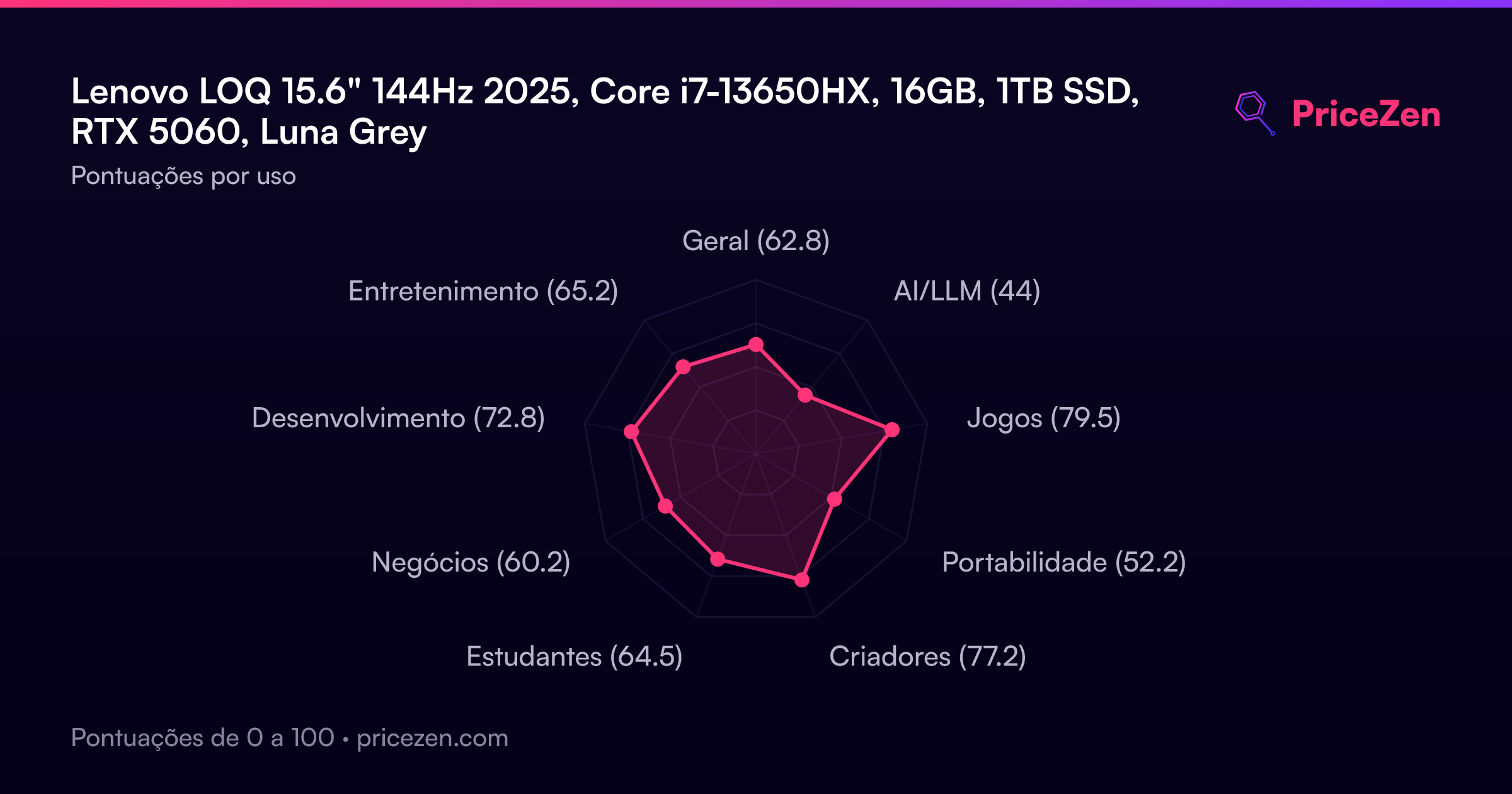
The interesting part is how the pieces line up. A 1080p screen is a much easier target for a mid-range GPU than a 1440p or 1600p panel, so the RTX 5060 gets to spend its budget on frames instead of pixels. Our scoring model puts this thing at 79.5/100 for gaming and 77.2/100 for creator work, which is a strong showing for a machine sitting at USD 1,249. The 100% sRGB coverage on the display is the quiet bonus here, because plenty of budget gaming panels look like a washed-out dishrag and this one, on paper, shouldn't.
We collect specs, prices and owner ratings from multiple stores with our own automated system and rank every laptop against the rest of its category, so we can tell you where this lands without anyone paying for the privilege. And where it lands is mostly good: GPU and CPU both sit near the front of the pack, reliability scores well above average, and the trade-offs show up in portability and price rather than raw speed. Owners seem to agree, with a 4.8/5 average across 20 reviews.
Common Questions
Q: Is 8GB of VRAM on the RTX 5060 enough, or will I regret it?
At the panel's native 1920x1080, 8GB of GDDR7 is a reasonable match, and the GPU still ranks in the 88th percentile against everything else in our gaming laptop data. Where it gets tight is maxed-out texture settings and driving a higher-resolution external display, since GPU memory isn't something you can add later. Our AI/LLM score of 44/100 is the clearest warning sign: if you plan to load local models, 8GB is the wrong starting point.
Q: Can I actually use this unplugged, or is it a desktop replacement?
Treat it as a desk machine with an escape hatch. The battery is 60Wh, which is modest next to a 14-core HX processor and a discrete GPU, and Lenovo's own claim tops out at 7 hours under light loads. Add the 245W adapter and 2.29kg body, and our compactness ranking in the 31st percentile makes sense: fine for occasional trips, rough for daily commuting.
Q: Is 16GB of RAM going to hold me back for creative or dev work?
It's the most average spec here, sitting in the 60th percentile in our data, though it is fast DDR5 running at 5600MHz. For gaming and photo editing it's fine, and the 14-core, 20-thread CPU carries most of the load in video exports and compiles. If you routinely run several containers or virtual machines at once, that 16GB is the first wall you'll hit, which is part of why the developer score lands at 72.8/100 rather than higher.
Q: How good is the display for color-sensitive work?
Better than the price suggests. It's a 15.6" IPS panel with 100% sRGB coverage, an anti-glare finish and 300 nits of brightness, which is why the creator score reaches 77.2/100. The limits are resolution and brightness rather than accuracy: 1920x1080 at 300 nits is comfortable indoors but not a bright-room or HDR panel, and overall our screen ranking is a solid 67th percentile.
Who Should Skip This
Skip this if the laptop spends more time in your bag than on your desk. At 2.29kg with a 245W power adapter and a 60Wh battery, it's one of the less portable options in our data, and the claimed 7-hour ceiling is optimistic for anything demanding. Students, frequent travelers and café workers should be looking at the 14" machines in this comparison set instead, like the ASUS ROG Zephyrus 14" GA403WW-G14.R95080 or the HP OMEN Transcend 14-fb1023dx, or at the thin-and-light crowd represented by the Samsung Galaxy Book5 Pro 14" NP944XHA-KG3US.
Also skip it if your reason for wanting an RTX GPU is local AI rather than gaming. The 44/100 AI/LLM score reflects that 8GB of VRAM, and no amount of CPU muscle fixes it. And if display quality is your top priority, a 1080p 300-nit panel ranking in the 67th percentile isn't the machine to buy, even with full sRGB coverage. Look at the premium 14" and 14.5" options like the Apple MacBook Pro 14.2" M4 Pro or Dell Premium 14.5" LDA14250-7667SLV-PUS if screen and build matter more than frame rates.
Verdict
For a desk-bound gamer who wants high frame rates at 1080p without spending flagship money, this is an easy recommendation. The GPU and CPU rankings are both near the top of the category, the 1TB Gen 4 SSD means you're not immediately shopping for storage, and the 144Hz panel with full sRGB coverage is a better screen than the price bracket usually buys. Content creators land in similar territory at 77.2/100: the 20 threads handle exports, the color coverage is there for photo and video work, and HDMI 2.1 plus DisplayPort 1.4 over USB-C let you drive a proper external monitor. Developers get a respectable 72.8/100, mostly on CPU muscle, though 16GB of RAM is the ceiling you'll notice first if you like running containers.
For anyone who moves around a lot, we'd hesitate. 2.29kg plus a 245W brick and a 60Wh battery is a laptop you tolerate carrying, not one you enjoy carrying, and the claimed 7-hour figure is a best case. Students hopping between classes and anyone working from cafés should weight that heavily. And if your interest in the RTX badge is about running local language models rather than games, the 44/100 AI score is your answer: 8GB of VRAM will frustrate you fast. Buy this for frames, not for inference.
Usage Scores
- Geral62.8
- AI/LLM44
- Jogos79.5
- Portabilidade52.2
- Criadores77.2
- Estudantes64.5
- Negócios60.2
- Desenvolvimento72.8
- Entretenimento65.2