Thunderobot Radiant 16, Core i7-14650HX, 32GB, 2TB SSD, RTX 5060, Black
The 16-inch 2560x1600 IPS panel hits 300Hz for ultra-smooth motion, paired with an Intel Core i7-14650HX and RTX 5060 to handle demanding games and creative workloads. The 32GB DDR5 RAM and 2TB NVMe SSD provide fast loading and ample storage, while the 2.10kg build stays portable for a gaming laptop. Best for gamers and creators who want a high-refresh display and strong performance without paying a premium for a compact design.

Sem preço atual de lojas
Resumo
The 30-Second Version
The Radiant 16 packs a 2TB SSD at the 94th percentile and a 300Hz 2560x1600 display at the 89th percentile, with CPU and GPU both at the 88th. But the reliability score is a brutal 4th percentile, one of the worst in our database. Great specs, serious gamble.
Pros & Cons
Prós
- 2TB NVMe SSD at the 94th percentile, massive storage for the price 94th
- 16-core i7-14650HX and RTX 5060 both at the 88th percentile 88th
- 300Hz 2560x1600 display at the 89th percentile, a standout panel 88th
- 32GB DDR5 at the 80th percentile, plenty for gaming and multitasking 88th
- Full port spread with Ethernet and 3 USB-A ports
Contras
- Reliability score at the 4th percentile, one of the worst we've seen
- Compact score at the 17th percentile, 2.10kg is chunky
- Affordability at the 30th percentile despite the $1,399 USD price
- Only 4 customer reviews, social proof at the 56th percentile
- Battery specs unknown, which is never a good sign
As provas
Performance
The CPU and GPU both land at the 88th percentile, which puts this machine in 'one of the best on the market' territory. The i7-14650HX is a 16-core monster with a 1.6GHz base clock, and paired with the RTX 5060's 8GB of VRAM, you're looking at a combo that chews through modern games at 1440p without breaking a sweat. The 32GB of DDR5 sits at the 80th percentile, which is strong, and the 2TB NVMe SSD at the 94th percentile means you won't be uninstalling games to make room for the next one anytime soon.
The display is the real showstopper here. 2560x1600 at 300Hz is the kind of panel that makes competitive shooters feel like a different game. The 89th percentile screen score backs that up. You'll need to enable GPU direct output to actually hit that 300Hz refresh rate, which is a small hoop to jump through, but worth it. The port selection is middle of the pack at the 61st percentile, with 1 USB-C, 3 USB-A, HDMI, and Ethernet. No card reader, but the retailer notes say you won't need one. We'll take their word for it.
Specifications
Full Specifications
Processor
| CPU | Intel Core i7 14650HX |
| Cores | 16 |
| Frequency | 2.2 GHz |
| L3 Cache | 30 MB |
Graphics
| GPU | NVIDIA GeForce RTX 5060 |
| Type | Discrete |
| VRAM | 8 GB |
| VRAM Type | GDDR7 |
Memory & Storage
| RAM | 32 GB |
| RAM Generation | DDR5 |
| Storage | 2 TB |
| Storage Type | NVMe SSD |
Display
| Size | 16" |
| Resolution | 2560x1600 (QHD) |
| Panel | IPS |
| Refresh Rate | 300 Hz |
Connectivity
| USB-C Ports | 1 |
| USB Ports | 3 |
| HDMI | 1 x HDMI |
| Wi-Fi | Wi-Fi 6 |
| Bluetooth | Yes |
| Ethernet | RJ-45 |
Physical
| Weight | 2.1 kg / 4.6 lbs |
| OS | Windows 11 Home |
vs Competition
Stacked against the ASUS ROG Zephyrus G14, the Radiant 16 wins on raw specs but loses on portability and polish. The G14 is a 14-inch machine that's actually compact, while the Thunderobot sits at the 17th percentile for compactness. The Lenovo Legion Pro 7i Gen 10 is a closer match on performance, but Lenovo's reliability track record is in a different universe compared to Thunderobot's 4th percentile score. The HP OMEN Transcend 14 and MSI Raider are both more established names with better social proof. The Apple MacBook Pro M4 Pro isn't a direct gaming competitor, but if you're doing creator work, the Mac's efficiency and reliability make the Radiant 16's 79.2 creator score look less appealing. You're trading brand trust for raw specs here, and that's a trade you need to make with your eyes open.
| Spec | Thunderobot Radiant 16 | Apple MacBook Pro 14.2" M4 Max | ASUS ROG Zephyrus 14" GA403WW-G14.R95080 | Lenovo Legion Pro 7i Gen 10 16" | HP OMEN Transcend | Samsung Galaxy Book5 Pro 14" NP944XHA-KG3US |
|---|---|---|---|---|---|---|
| CPU | Intel Core i7 14650HX | Apple M4 Max | AMD Ryzen AI 9 HX 370 | Intel Core Ultra 9 275HX | Intel Core Ultra 9 285H | Intel Core Ultra 7 258V |
| RAM (GB) | 32 | 64 | 32 | 32 | 32 | 32 |
| Storage (GB) | 2048 | 4096 | 2048 | 1024 | 1024 | 1024 |
| Screen | 16" 2560x1600 | 14.2" 3024x1964 | 14" 2880x1800 | 16" 2560x1600 | 14" 2880x1800 | 14" 2880x1800 |
| GPU | NVIDIA GeForce RTX 5060 | Apple (40-Core) | NVIDIA GeForce RTX 5080 | NVIDIA GeForce RTX 5070 Ti | NVIDIA GeForce RTX 5070 | Intel Arc Graphics 140V |
| OS | Windows 11 Home | macOS | Windows 11 Home | Windows 11 Home | Windows 11 Home | Windows 11 Pro |
| Weight (kg) | 2.1 | 1.6 | 1.6 | 2.7 | 1.6 | 1.2 |
| Battery (Wh) | - | 72 | - | 99 | 71 | 63 |
| Compare | Compare | Compare | Compare | Compare |
| Produto | CPU | GPU | RAM | Portas | Tela | Portabilidade | Armazenamento | Confiabilidade | Affordability |
|---|---|---|---|---|---|---|---|---|---|
| Thunderobot Radiant 16 | 88.1 | 88.3 | 79.4 | 61.2 | 87.7 | 17.6 | 93.9 | 4.1 | 31.1 |
| Apple MacBook Pro 14.2" M4 Max Compare | 93.7 | 91.5 | 95.6 | 73.8 | 99.1 | 68.9 | 98.4 | 98.3 | 1.7 |
| ASUS ROG Zephyrus 14" GA403WW-G14.R95080 Compare | 91.2 | 98.3 | 90.8 | 89.4 | 96 | 73.7 | 89.7 | 60.7 | 5.9 |
| Lenovo Legion Pro 7i Gen 10 16" Compare | 97.2 | 96.7 | 89 | 97.3 | 95 | 9.5 | 79.2 | 82.1 | 5.7 |
| HP OMEN Transcend Compare | 90.1 | 93.5 | 89.6 | 89.4 | 96 | 72.3 | 65.2 | 33.7 | 8.8 |
| Samsung Galaxy Book5 Pro 14" NP944XHA-KG3US Compare | 65.7 | 69.6 | 79.4 | 83.4 | 90.3 | 89.5 | 79.2 | 82.1 | 21 |
Preço
Value & Pricing
At $1,399 USD, the Radiant 16 is a weird value proposition. The specs scream 'premium gaming laptop,' but the affordability percentile says 30th, which means most gaming laptops in our database offer better price-to-performance. That said, you're getting a 2TB SSD and 32GB of RAM, which are usually the first things manufacturers cheap out on. The single US listing at that price is the only data point we have, so there's no cross-retailer price war to exploit. If the reliability score weren't so concerning, this would be a steal. As it stands, you're rolling the dice on longevity.
Saiba mais
Overview
The Thunderobot Radiant 16 comes out swinging with a spec sheet that reads like a wishlist. A 16-core i7-14650HX, RTX 5060 with 8GB of VRAM, 32GB of DDR5, and a 2TB SSD. That storage lands in the 94th percentile of our database, which is genuinely impressive. The 16-inch 2560x1600 panel running at 300Hz sits at the 89th percentile for screens, so you're getting a display that's a standout for both gaming and color work. On paper, this thing is a beast for $1,399 USD.
But here's the catch. The reliability score is a 4th percentile, which is one of the worst we've seen. That's a massive red flag. The compact score is also rough at the 17th percentile, and at 2.10kg this isn't a laptop you'll forget is in your bag. The affordability sits at the 30th percentile, which is a bit odd given the specs, but that's what happens when you pack this much hardware into a chassis. The social proof is thin too, just 4 reviews at a 4.7 rating. We'll dig into what that means below.
Common Questions
Q: Can the RTX 5060 handle 2560x1600 gaming at high refresh rates?
The RTX 5060 with 8GB of VRAM sits at the 88th percentile for GPUs in our database, so it's one of the best mobile GPUs available right now. At 2560x1600, you'll hit high frame rates in esports titles and should manage 60+ fps in demanding AAA games with settings tuned. To actually see those frames, you need to enable GPU direct output to bypass the integrated graphics and unlock the full 300Hz refresh rate.
Q: Is 32GB of RAM overkill for a gaming laptop?
For pure gaming, 16GB is usually enough, but 32GB at the 80th percentile gives you serious headroom for streaming, video editing, or running a browser with 47 tabs while you game. The 2TB SSD at the 94th percentile means you won't be juggling installs either. It's not overkill, it's future-proofing.
Q: How does the display compare to other gaming laptops?
The 16-inch 2560x1600 IPS panel at 300Hz ranks at the 89th percentile for screens in our database, making it a standout. That resolution gives you sharper text and more detail than standard 1440p, and the 300Hz refresh rate is top-tier for competitive gaming. The manufacturer also claims pro-grade color accuracy, which lines up with the 79.2 creator score.
Who Should Skip This
If you need a laptop you can count on, skip this one. The 4th percentile reliability score is a glaring warning sign, and with only 4 reviews backing a 4.7 rating, there's just not enough real-world data to feel confident. The 17th percentile compact score means this 2.10kg machine is a pain to carry around, so frequent travelers should look at the ASUS ROG Zephyrus G14 or HP OMEN Transcend 14 instead. And if you're on a tight budget, the 30th percentile affordability score suggests you can find better price-to-performance elsewhere, even if it means sacrificing the 2TB SSD.
Verdict
The Thunderobot Radiant 16 is a spec monster with a serious reliability problem. The 94th percentile storage, 88th percentile CPU and GPU, and 89th percentile display are all genuinely impressive. But a 4th percentile reliability score is the kind of number that keeps us up at night. Four reviews at 4.7 stars isn't enough data to override that concern. If you're a spec chaser who doesn't mind a gamble, this laptop delivers a lot of hardware for $1,399 USD. If you need a machine that won't let you down mid-project or mid-match, look elsewhere. The numbers say the hardware is great. The numbers also say the track record is not.
Usage Scores
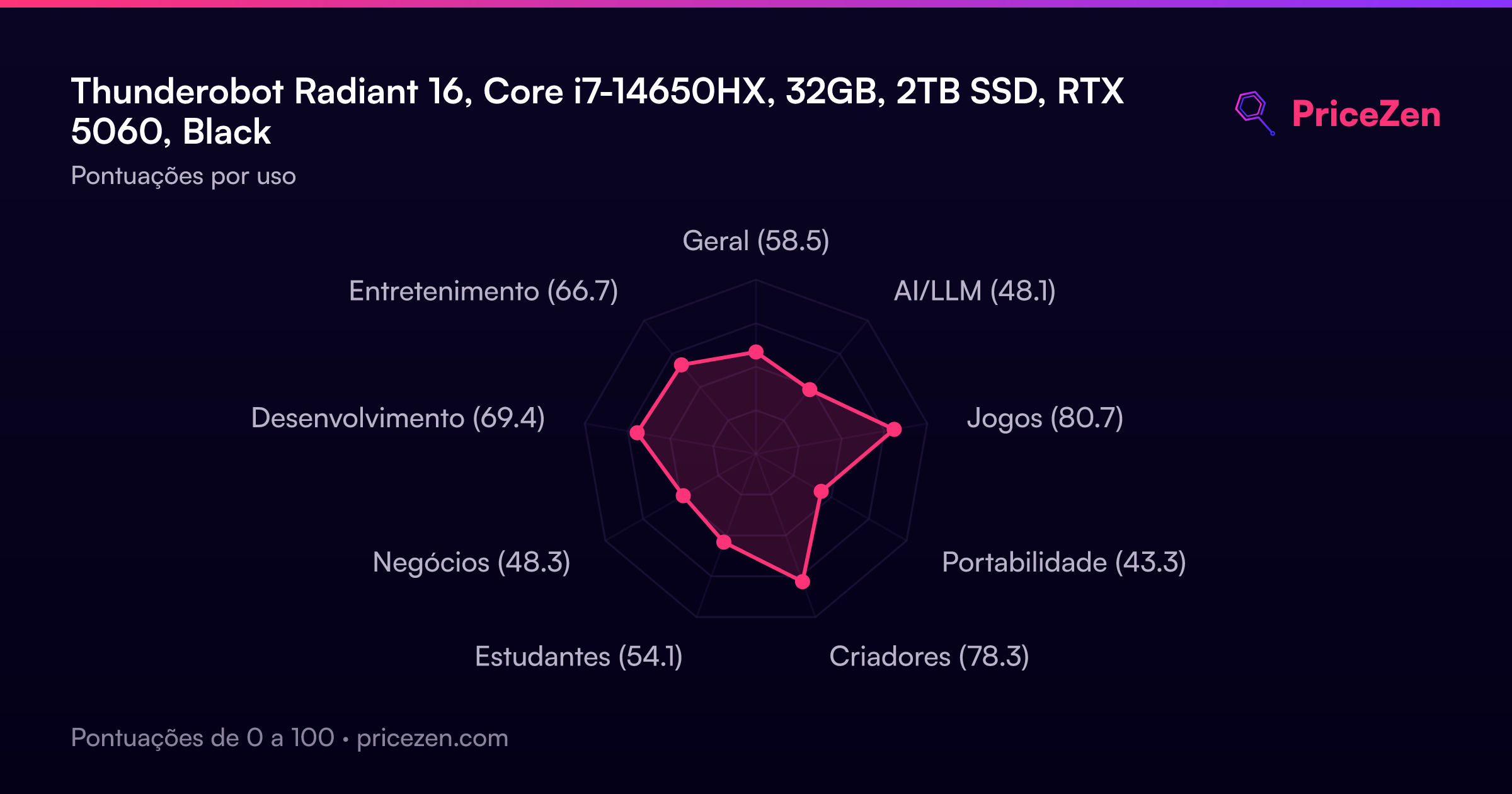
- Geral58.5
- AI/LLM48.1
- Jogos80.6
- Portabilidade43.2
- Criadores78.3
- Estudantes53.6
- Negócios48.3
- Desenvolvimento69.3
- Entretenimento66.6