ASUS Zenbook 14 UX3405CA-ES99T 2026, Core Ultra 9 285H, 32GB, 1TB SSD, Foggy Silver
The Intel Core Ultra 9 285H with AI Boost NPU and Intel Arc Graphics delivers fast, AI-accelerated performance in a 1.20kg all-metal chassis. The 14-inch 3K OLED touchscreen hits 1100 nits and 120Hz, paired with a 75Wh battery for all-day use. Best for mobile professionals and developers who need a lightweight, high-performance Windows laptop for productivity and entertainment.

Sem preço atual de lojas
Resumo
The 30-Second Version
The Zenbook 14 UX3405CA-ES99T pairs a 16-core Core Ultra 9 285H and 32GB of RAM with a 14-inch 2880x1800 120Hz OLED touch panel, all in 1.20kg. The screen is top of the charts in our rankings and the compact score is 84.2/100, but gaming sits at 23/100 thanks to integrated Arc graphics. Listings run USD 1,620 to USD 1,800, with Best Buy currently at the top of that range. Buy it for portable CPU-heavy work and gorgeous media, skip it if you need real graphics muscle.
Pros & Cons
Prós
- 14-inch 2880x1800 OLED at 120Hz with 1100-nit HDR peaks, top of the charts in our screen ranking 98th
- Core Ultra 9 285H, 16 cores at 2.9GHz, one of the fastest CPUs in this category 90th
- 32GB LPDDR5X, well beyond what most 14-inch machines ship with 90th
- 1.20kg and 0.59 inches thick, giving it an 84.2/100 compact score 89th
- Real port selection for a thin chassis: Thunderbolt, 2x USB-C, USB-A, HDMI 2.1 and Wi-Fi 7
Contras
- Gaming score of just 23/100, integrated Arc can't drive that 3K panel in demanding titles
- Affordability sits near the bottom of our data, this is expensive for an integrated-GPU laptop
- 1TB storage only ranks mid-pack, tight for large local media libraries
- Only 5 owner ratings in our data, so the 5/5 average rests on a very small sample
- Windows 11 Home, so no Pro-level business security features out of the box
As provas
Performance
The Core Ultra 9 285H is a 16-core part clocked at 2.9GHz, and our CPU ranking places it among the best in this category. In practical terms that means compile jobs, container stacks, big spreadsheet models and heavy browser sessions have real headroom, and the 32GB of LPDDR5X (also a standout in our data) means you're not going to hit a memory wall while running an IDE, a local database and forty tabs. The 1TB PCIe 4.0 SSD is more middling, sitting at the 65th percentile, so it's solid rather than exceptional: fine for large projects, but if you keep raw video libraries locally you'll be reaching for external storage sooner than you'd like. There's also an integrated NPU for AI-accelerated tasks, which matters more as software catches up than it does today.
Graphics are where the story changes. Intel Arc integrated lands at the 70th percentile in our GPU ranking, which sounds respectable until you remember it's being compared against a field full of other integrated and modest mobile GPUs. Our gaming score of 23/100 tells you what that means in practice: light titles and older games at reduced settings, not modern AAA at this panel's native 2880x1800. Pushing that many pixels is a lot to ask of integrated graphics. The trade-off is the whole point of the machine, though. Skipping discrete graphics is how ASUS keeps it at 1.20kg with a 75Wh battery inside, and that battery is large for a 14-inch ultraportable. Owners consistently point to run time as a highlight, which tracks with the capacity on paper.
Specifications
Full Specifications
Processor
| CPU | Intel Core Ultra 9 285H |
| Cores | 16 |
| Frequency | 2.9 GHz |
| L3 Cache | 24 MB |
Graphics
| GPU | Intel Arc Graphics |
| Type | Integrated |
| VRAM Type | Shared |
Memory & Storage
| RAM | 32 GB |
| RAM Generation | LPDDR5X |
| Storage | 1 TB |
| Storage Type | SSD |
Display
| Size | 14" |
| Resolution | 2880x1800 |
| Panel | OLED |
| Refresh Rate | 120 Hz |
| Brightness | 1100 nits |
| Color Gamut | 100% sRGB |
Connectivity
| USB-C Ports | 2 |
| USB Ports | 1 |
| Thunderbolt | Thunderbolt 4 x 2 |
| HDMI | HDMI 2.1 |
| Wi-Fi | Wi-Fi 7 |
| Bluetooth | Bluetooth 5.4 |
Physical
| Weight | 1.2 kg / 2.6 lbs |
| Battery | 75 Wh |
| OS | Windows 11 Home |
vs Competition
Against the Apple MacBook Pro 14.2" M4 Pro, this is the classic cross-shop. The Zenbook counters with a touchscreen OLED at 120Hz and 1100-nit HDR highlights, plus Windows 11 and a port set that includes USB-A and HDMI 2.1 without adapters. Where it gives ground is sustained graphics work, since our GPU ranking for the Arc solution is only mid-pack and the gaming score is 23/100. If you want macOS or heavier creative GPU throughput, look there instead.
The Samsung Galaxy Book5 Pro 14" NP944XHA-KG3US and Dell Premium 14.5" LDA14250-7667SLV-PUS are the closer rivals, same thin-and-light territory. The Zenbook's argument against both is spec density: 32GB of RAM and a 16-core Ultra 9, both leading in our data, in a chassis that scores 84.2/100 for compactness. Cross-shop those if their pricing lands better, because USD 1,800 is a lot to ask. And if you've been eyeing the Lenovo Legion Pro 7i Gen 10 16" or HP OMEN Transcend 14-fb1023dx, understand you're looking at a different animal. Those exist to play games; this exists to be carried. Our 23/100 gaming score isn't a flaw to be fixed, it's the design decision that made 1.20kg possible.
| Spec | ASUS Zenbook 14 UX3405CA-ES99T | Apple MacBook Pro 14.2" M4 Pro | Lenovo Legion Pro 7i Gen 10 16" | HP OMEN Transcend | Samsung Galaxy Book5 Pro 14" NP944XHA-KG3US | Dell Premium 14.5" LDA14250-7667SLV-PUS |
|---|---|---|---|---|---|---|
| CPU | Intel Core Ultra 9 285H | Apple M4 Pro | Intel Core Ultra 9 275HX | Intel Core Ultra 9 285H | Intel Core Ultra 7 258V | Intel Core Ultra 7 255H |
| RAM (GB) | 32 | 48 | 32 | 32 | 32 | 32 |
| Storage (GB) | 1024 | 4096 | 1024 | 1024 | 1024 | 1024 |
| Screen | 14" 2880x1800 | 14.2" 3024x1964 | 16" 2560x1600 | 14" 2880x1800 | 14" 2880x1800 | 14.5" 3200x2000 |
| GPU | Intel Arc Graphics | Apple (16-Core) | NVIDIA GeForce RTX 5070 Ti | NVIDIA GeForce RTX 5070 | Intel Arc Graphics 140V | Intel Arc Graphics |
| OS | Windows 11 Home | macOS | Windows 11 Home | Windows 11 Home | Windows 11 Pro | Windows 11 Home |
| Weight (kg) | 1.2 | 1.6 | 2.7 | 1.6 | 1.2 | 1.7 |
| Battery (Wh) | 75 | 72 | 99 | 71 | 63 | 62 |
| Compare | Compare | Compare | Compare | Compare |
| Produto | CPU | GPU | RAM | Portas | Tela | Portabilidade | Armazenamento | Confiabilidade | Prova social | Affordability |
|---|---|---|---|---|---|---|---|---|---|---|
| ASUS Zenbook 14 UX3405CA-ES99T | 90.1 | 69.7 | 89.7 | 64.4 | 98 | 89.3 | 65.4 | 60.6 | 58.5 | 20.9 |
| Apple MacBook Pro 14.2" M4 Pro Compare | 92.4 | 78.9 | 90.6 | 73.8 | 99.1 | 68.9 | 98.4 | 98.2 | 99.7 | 4.7 |
| Lenovo Legion Pro 7i Gen 10 16" Compare | 97.2 | 96.7 | 89 | 97.3 | 95 | 9.5 | 79.3 | 81.9 | 99.7 | 5.9 |
| HP OMEN Transcend Compare | 90.1 | 93.5 | 89.7 | 89.4 | 96 | 72.2 | 65.4 | 33.7 | 93.2 | 9 |
| Samsung Galaxy Book5 Pro 14" NP944XHA-KG3US Compare | 65.8 | 69.7 | 79.5 | 83.5 | 90.3 | 89.4 | 79.3 | 81.9 | 95.6 | 21.4 |
| Dell Premium 14.5" LDA14250-7667SLV-PUS Compare | 87 | 69.7 | 89 | 66.7 | 96.8 | 61.3 | 65.4 | 33.7 | 95.6 | 14.9 |
Preço
Value & Pricing
Here's the honest math. Listings in our data run USD 1,620 to USD 1,800, a USD 180 spread across four US listings, and the store price we currently track is Best Buy at USD 1,800, which is the top of that range. If you can find the lower listings, you're saving real money on identical hardware, so it's worth hunting rather than clicking the first buy button. We track prices over time, partly through our community browser extension, and this one's affordability ranking of 21 out of 100 says the market agrees it's priced ambitiously.
What you're paying for is the combination, not any single line item. A 32GB Core Ultra 9 config with a 3K 120Hz OLED touch panel in a 1.20kg body is genuinely uncommon, and the screen alone is in the top few percent of our rankings. But you're paying flagship-adjacent money for integrated graphics, and that's the part that stings. If your workload is CPU-bound and portable, the premium buys you something. If it's GPU-bound, you're paying for the wrong thing entirely.
Saiba mais
Overview
The Zenbook 14 UX3405CA-ES99T is ASUS stuffing a Core Ultra 9 285H, 32GB of LPDDR5X and a 1TB PCIe 4.0 SSD into a 14-inch all-metal chassis that weighs 1.20kg and measures 0.59 inches thick. That's a spec sheet you'd normally expect from something chunkier. Our scoring model puts it at 84.2/100 for compact use, which is its strongest category by a clear margin, and the display sits in the top few percent of everything we track in this class.
So who's it for? People who move around a lot and refuse to give up screen quality or memory to do it. Developers get 76.4/100 in our developer ranking, mostly on the back of that 16-core chip and 32GB of RAM, both of which land among the best on the market right now. Media-heavy users get 77.3/100 for entertainment, thanks to a 2880x1800 OLED panel running at 120Hz with HDR highlights up to 1100 nits and full sRGB coverage. Touch input is included, which not every OLED thin-and-light bothers with.
What makes it interesting is the tension baked into the design. You get near-flagship CPU muscle and a genuinely excellent panel, but graphics come from integrated Intel Arc, and our gaming score for it is 23/100. This is a work-and-watch machine wearing a very nice screen, not a gaming laptop that happens to be thin. And the price reflects the ambition: affordability ranks near the bottom of our data.
Common Questions
Q: Can it handle gaming at all?
Lightly, yes. Our gaming score for it is 23/100, and the Intel Arc graphics are integrated rather than discrete, ranking around the 70th percentile in our GPU data. Older or less demanding titles at reduced settings are realistic, but don't expect to run modern games at the panel's native 2880x1800.
Q: Is 32GB of RAM overkill for a 14-inch laptop?
Not for the people this machine targets. 32GB of LPDDR5X puts it among the best in our RAM rankings, and paired with the 16-core Ultra 9 it's what earns the 76.4/100 developer score. If you run virtual machines, containers, or large datasets alongside a browser and an IDE, that memory gets used.
Q: Do I need dongles?
Mostly no. You get Thunderbolt, two USB-C ports, a USB-A port, HDMI 2.1 and Wi-Fi 7, which is unusually complete for a 0.59-inch-thick chassis. Our port ranking puts it mid-pack at 65, so it's solid rather than class-leading, but everyday peripherals and an external monitor plug straight in.
Q: Is the OLED screen actually worth the premium?
It's the strongest single reason to buy this laptop. Our screen ranking places it at the 98th percentile, driven by 2880x1800 resolution, a 120Hz refresh rate, 1100-nit HDR highlights and 100% sRGB coverage. Add touch input and it's a panel you'd struggle to match in this weight class.
Who Should Skip This
Gamers and anyone doing GPU-heavy work should walk away. A 23/100 gaming score and integrated Arc graphics mean this thing isn't built for frame rates or render queues, and no amount of CPU muscle fixes that. Look at the Lenovo Legion Pro 7i Gen 10 16" or the HP OMEN Transcend 14-fb1023dx instead, and accept the weight penalty that comes with real graphics.
Also skip it if you're budget-conscious or need business-grade Windows features. Affordability ranks near the bottom of our data, and Best Buy's current USD 1,800 is the high end of an already premium range. It ships with Windows 11 Home, so anyone needing Pro-level security and management will be adding cost. And if you store huge local media libraries, the 1TB drive only ranks mid-pack, so plan on external storage from day one.
Verdict
If you're a developer, a writer with fifty tabs open, a student who lives in a library, or someone who watches a lot of film on a laptop, this is a strong buy at the lower end of its price range. The 32GB and 16-core CPU give you years of headroom, the OLED touch panel is among the best we track, and the 75Wh battery in a 1.20kg body is the sort of combination that makes a laptop feel effortless to live with. Our 84.2/100 compact score and 76.4/100 developer score aren't accidents.
If you game, edit video for a living, or need GPU acceleration for 3D or ML work, buy something else. Integrated Arc at the 70th percentile of our GPU ranking is fine for desktop compositing and video playback, and nothing more. And if USD 1,800 is your only available price, we'd wait or shop the cheaper listings before pulling the trigger. Great machine, occasionally awkward price.
Usage Scores
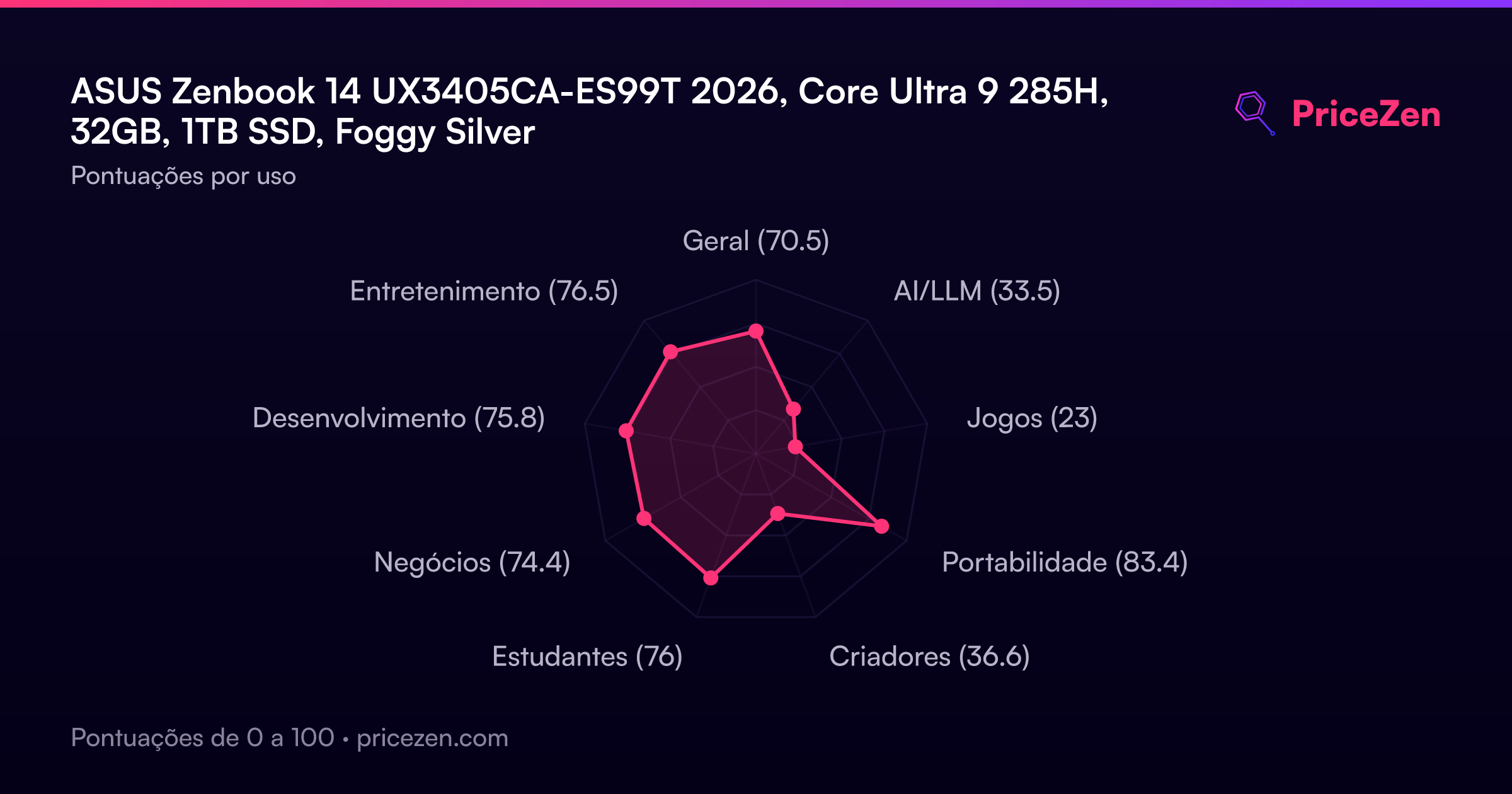
- Geral70.4
- AI/LLM33.5
- Jogos23
- Portabilidade83.4
- Criadores36.6
- Estudantes76
- Negócios74.4
- Desenvolvimento75.7
- Entretenimento76.5